How to connect Coinbase Exchange to Cursor
Add the Firecrawl MCP server to Cursor once and it can call the Coinbase Exchange API and every other provider in Firecrawl Alexandria, with no Coinbase Exchange integration code.
To connect Coinbase Exchange to Cursor, add the Firecrawl MCP server to Cursor, sign in on a Firecrawl team with Alexandria enabled, and ask for Coinbase Exchange data in plain language. The connection works in Cursor's agent and chat, and you set it up once.
Cursor uses Coinbase Exchange as an MCP tool through Firecrawl's hosted MCP server, so you don't install or host a separate MCP server for Coinbase Exchange.
Cursor is an AI code editor. Its agent uses MCP servers for outside tools, and the Firecrawl MCP server adds web search, scraping and every data provider in Firecrawl Alexandria.
How do I connect Coinbase Exchange to Cursor?
Install the Firecrawl MCP server
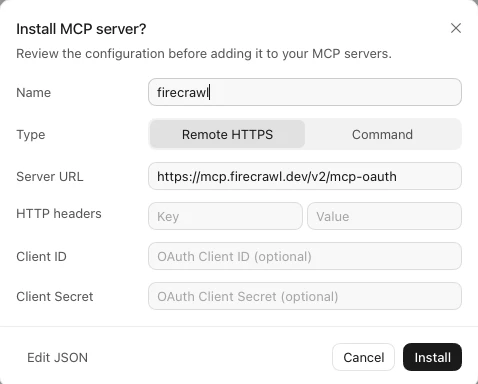
Open the install dialog in Cursor, check that the URL is Firecrawl's hosted server, then select Install.
Connect your Firecrawl account
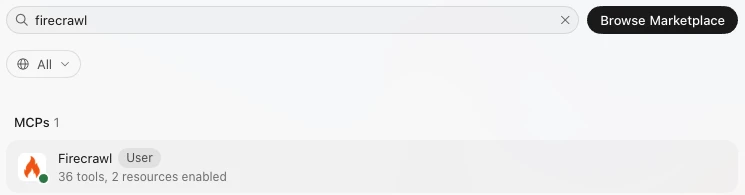
Use the server's sign-in option in Cursor's MCP settings. Firecrawl opens in your browser: sign in, choose a team with Alexandria enabled, and approve access. A green dot next to Firecrawl means it's connected.
Ask Cursor's agent for the data
In the agent chat, ask in plain language and mention Coinbase Exchange or Firecrawl Alexandria. The agent finds the Coinbase Exchange capability that fits and runs it. For example:
Use Firecrawl to show Coinbase Exchange’s BTC-USD last trade, best bid and ask, and 24-hour high, low and volume.
What can Cursor do with Coinbase Exchange?
Public market data from the Coinbase Exchange REST API (api.exchange.coinbase.com): trading pairs, tickers with 24h stats, aggregated order books, tick-level trades with cursor pagination, historical OHLCV candles from 1 minute to 1 day walked in 300-bucket windows, exchange-wide volume summary, currencies with networks, and wrapped-asset conversion rates. Anonymous endpoints only; no trading or account access.
Cursor can run any of Coinbase Exchange's 10 capabilities through Alexandria. Each call is billed in Firecrawl credits on your Firecrawl team.
- Get candles: Historical OHLCV candles for one trading pair (`GET /products/{product_id}/candles`) at 1m, 5m, 15m, 1h, 6h or 1d granularity, oldest first. The exchange serves at most 300 buckets per request, so a wider `start`..`end` range is walked in consecutive 300-bucket windows, up to `max_candles` (default 300, max 3000 = 10 upstream requests) per call; `next_start` continues where the call stopped. Buckets without trades are omitted by the exchange (thin markets return fewer rows than the window length; a `sparse_buckets` warning says so). Values are numbers as the exchange sends them. Costs 5 Firecrawl credits per call.
- Get currency: One currency's definition (`GET /currencies/{currency_id}`): name, status, minimum size and precision, type, convertible-to list, and every supported network with contract address, confirmations and withdrawal limits. Unknown ids are `not_found`. Costs 5 Firecrawl credits per call.
- Get order book: Aggregated order book for one trading pair (`GET /products/{product_id}/book?level=1|2`). Level 1 is the best bid and ask only; level 2 is the full aggregated book (thousands of price levels), truncated client-side to `depth` levels per side, best first. Level 3 (every individual order, ~6 MB) is not exposed. Costs 5 Firecrawl credits per call.
- Get product: One trading pair's definition (`GET /products/{product_id}`): base and quote currency, price and size increments, minimum order funds, status and trading flags. Unknown ids are `not_found`. Costs 5 Firecrawl credits per call.
- Get ticker: Market snapshot for one trading pair: last trade price, size, id and time, best bid and ask and 24h volume (`GET /products/{product_id}/ticker`) together with the 24h/30d statistics (`GET /products/{product_id}/stats`: open, high, low, last, volume). Prices and sizes are decimal strings in the pair's quote and base currency. Costs 5 Firecrawl credits per call.
- Get wrapped asset: Supply, staking yield and conversion rate of a Coinbase wrapped asset such as cbETH (`GET /wrapped-assets/{id}` and `GET /wrapped-assets/{id}/conversion-rate`). Only the assets the exchange wraps exist (currently CBETH); anything else is `not_found`. Costs 5 Firecrawl credits per call.
- List currencies: Currencies known to Coinbase Exchange (`GET /currencies`, ~500 crypto and fiat) with client-side filters on type, status and a free-text match on id or name, sorted by id and paged. Rows carry status, precision, default network and network count; `get_currency` has the networks. Costs 5 Firecrawl credits per call.
- List products: List Coinbase Exchange trading pairs (`GET /products`) with client-side filters on base/quote currency, status and a free-text match, sorted by id and paged with limit/offset. Each product carries its increments, minimum funds, status and trading flags. This is the discovery step for every `product_id`. Costs 5 Firecrawl credits per call.
- List trades: Recent trades for one trading pair (`GET /products/{product_id}/trades`), newest first, up to 1000 per page. Cursor pagination follows the exchange's `cb-after`/`cb-before` headers: pass `after` (a trade id) to get older trades, `before` to get newer ones. `next_after` is the cursor for the next older page. Costs 5 Firecrawl credits per call.
- List volume summary: 24-hour and 30-day traded volume for every Coinbase Exchange market (`GET /products/volume-summary`, ~3100 rows including RFQ-only and conversion markets), with client-side filters on market type, base/quote currency and a free-text match, sorted by id and paged. Costs 5 Firecrawl credits per call.
What should I ask Cursor?
Name Coinbase Exchange or Firecrawl Alexandria in the prompt so Cursor reaches for it. Each example opens in Cursor with the prompt filled in.
- Use Firecrawl to show Coinbase Exchange’s BTC-USD last trade, best bid and ask, and 24-hour high, low and volume.
- Use Firecrawl to show the top 10 aggregated bid and ask price levels for ETH-USD on Coinbase Exchange.
- Use Firecrawl to get BTC-USD daily OHLCV candles from September 1 through September 30, 2026, oldest first, capped at 31 candles.
- Use Firecrawl to list the first 20 online Coinbase Exchange trading pairs quoted in USD with their price increments and trading restrictions.
Troubleshooting
Why can't Cursor find Coinbase Exchange?
If Firecrawl's tools in Cursor stop at search, scrape and parse, the connection is keyless and doesn't include Alexandria. Finish the sign-in from Cursor's MCP settings, or add an API key from a team with Alexandria enabled.
Firecrawl shows a red dot in Cursor. What should I do?
Open Cursor's MCP settings, sign in to Firecrawl again, and restart the agent chat so it loads the tools.
Use Coinbase Exchange in other AI apps
The same Firecrawl account reaches Coinbase Exchange from other AI apps. Pick one for its setup steps:
- Coinbase Exchange in ChatGPT
- Coinbase Exchange in Claude
- Coinbase Exchange in Grok Bot
 Coinbase Exchange in Muse
Other data providers you can connect to Cursor
Frequently Asked Questions
What is Firecrawl?
Firecrawl is the web data API to search, scrape and interact with the web at scale. It turns websites into clean, LLM-ready data for AI agents and apps. The Firecrawl MCP server brings those tools into Cursor, along with every data provider in Firecrawl Alexandria.
What is Firecrawl Alexandria?
Firecrawl Alexandria is Firecrawl's library of 550+ data providers for AI agents, Coinbase Exchange among them. Each provider returns structured data through documented capabilities. Cursor finds the capability that fits your question and calls it through the Firecrawl MCP server, so you don't write any integration code. Alexandria needs a Firecrawl account signed in on a team with Alexandria enabled, or an API key from such a team; keyless connections don't include it.
Is there a Coinbase Exchange MCP server for Cursor?
Cursor reaches Coinbase Exchange through Firecrawl's hosted MCP server, which serves Coinbase Exchange and every other Alexandria provider as tools. Add the Firecrawl MCP server once and you don't install or host a separate MCP server for Coinbase Exchange.
What does connecting Coinbase Exchange to Cursor unlock?
Cursor can run all 10 of Coinbase Exchange's capabilities, including Get candles, Get currency and Get order book, from any chat, with structured results it can sort, compare and summarize. For example, ask: "Use Firecrawl to show Coinbase Exchange’s BTC-USD last trade, best bid and ask, and 24-hour high, low and volume." In the same conversation, Cursor can combine Coinbase Exchange with Firecrawl's web search and scraping and the other providers in Firecrawl Alexandria.
Do I need my own Coinbase Exchange account or API key to use it in Cursor?
No. Cursor calls Coinbase Exchange through Firecrawl Alexandria and each call is billed in Firecrawl credits, so you don't need a separate Coinbase Exchange account or API key.
How much does it cost to use Coinbase Exchange in Cursor?
Each Coinbase Exchange call costs 5 Firecrawl credits. The capability list on this page shows each price and its unit. The credits come from the Firecrawl team you connect to Cursor, and finding the right capability is free.
Can Cursor use other providers besides Coinbase Exchange?
Yes. The same Firecrawl MCP server reaches every provider in Firecrawl Alexandria, along with Firecrawl's web search and scraping, so you connect once.
Can I use Coinbase Exchange in other AI apps?
Yes. Connect Firecrawl to ChatGPT, Claude, Grok Bot, Muse signed in on a Firecrawl team with Alexandria enabled, or use the Firecrawl MCP server, CLI or API with an API key from that team, and the same Coinbase Exchange capabilities are available there. Keyless connections don't include Alexandria.