How to connect Where the ISS at? (wheretheiss.at) to Cursor
Add the Firecrawl MCP server to Cursor once and it can call the Where the ISS at? (wheretheiss.at) API and every other provider in Firecrawl Alexandria, with no Where the ISS at? (wheretheiss.at) integration code.
To connect Where the ISS at? (wheretheiss.at) to Cursor, add the Firecrawl MCP server to Cursor, sign in on a Firecrawl team with Alexandria enabled, and ask for Where the ISS at? (wheretheiss.at) data in plain language. The connection works in Cursor's agent and chat, and you set it up once.
Cursor uses Where the ISS at? (wheretheiss.at) as an MCP tool through Firecrawl's hosted MCP server, so you don't install or host a separate MCP server for Where the ISS at? (wheretheiss.at).
Cursor is an AI code editor. Its agent uses MCP servers for outside tools, and the Firecrawl MCP server adds web search, scraping and every data provider in Firecrawl Alexandria.
How do I connect Where the ISS at? (wheretheiss.at) to Cursor?
Install the Firecrawl MCP server
Open the install dialog in Cursor, check that the URL is Firecrawl's hosted server, then select Install.
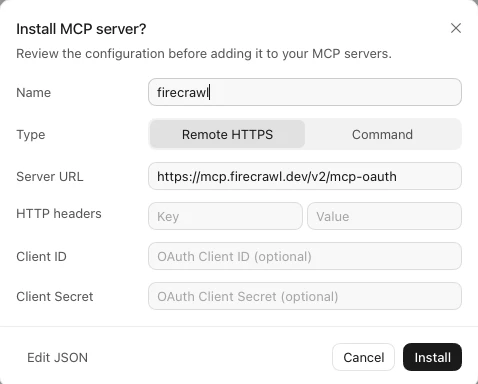
Connect your Firecrawl account
Use the server's sign-in option in Cursor's MCP settings. Firecrawl opens in your browser: sign in, choose a team with Alexandria enabled, and approve access. A green dot next to Firecrawl means it's connected.
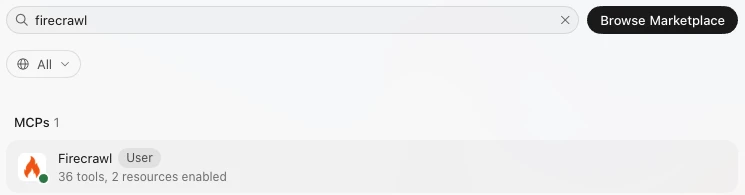
Ask Cursor's agent for the data
In the agent chat, ask in plain language and mention Where the ISS at? (wheretheiss.at) or Firecrawl Alexandria. The agent finds the Where the ISS at? (wheretheiss.at) capability that fits and runs it. For example:
Use Firecrawl to answer this: Where is the International Space Station right now and is it in daylight?
What can Cursor do with Where the ISS at? (wheretheiss.at)?
Live International Space Station tracking from the keyless wheretheiss.at REST API: where the ISS is now (latitude, longitude, altitude, velocity, sunlit or eclipsed, footprint), its positions at up to 10 past or future times, the current or historical TLE it is computed from, and the time zone and country below any point. One request per call to respect the API's limit of about one request per second.
Cursor can run any of Where the ISS at? (wheretheiss.at)'s 5 capabilities through Alexandria. Each call is billed in Firecrawl credits on your Firecrawl team.
- Coordinates: Time zone and country for a latitude and longitude: IANA time zone id (Etc/GMT+N over open ocean), current UTC offset in hours, ISO country code (null over ocean or unclaimed areas) and a Google Maps link. Source: GET api.wheretheiss.at/v1/coordinates/{lat},{lon}. Costs 5 Firecrawl credits per call.
- Current position: Where the ISS (or another supported satellite) is right now: latitude and longitude of the point below it, altitude, orbital velocity, whether it is sunlit (daylight) or in the Earth's shadow (eclipsed), the diameter of the ground footprint from which it is above the horizon, the subsolar point and the time of the fix. Computed by wheretheiss.at with SGP4 from the latest TLE. Source: GET api.wheretheiss.at/v1/satellites/{id}?units=. Costs 5 Firecrawl credits per call.
- List satellites: The satellites wheretheiss.at tracks, with NORAD catalog number and short name. Today the list is only the International Space Station (25544, iss). Source: GET api.wheretheiss.at/v1/satellites. Costs 5 Firecrawl credits per call.
- Positions at: ISS positions at up to 10 given times, past or future, each with latitude, longitude, altitude, velocity, daylight or eclipsed and footprint, in request order. Past times use the TLE in force then (history back to the 1998 launch); future times propagate the latest TLE, so accuracy falls off after a few days (a long_range_forecast warning flags times more than 3 days ahead; more than 30 days ahead is refused). Source: GET api.wheretheiss.at/v1/satellites/{id}/positions?timestamps=. Costs 5 Firecrawl credits per call.
- Tle: The two-line element set (TLE) wheretheiss.at uses for the ISS: the current one, or the one closest to a past time with at. Returns the header (ISS (ZARYA)), both TLE lines (checked to be 69 characters and to name the satellite), the TLE epoch, the requested time and the TLE's age in hours at that time (negative when the closest set is slightly later). Source: GET api.wheretheiss.at/v1/satellites/{id}/tles[?timestamp=]. Costs 5 Firecrawl credits per call.
What should I ask Cursor?
Name Where the ISS at? (wheretheiss.at) or Firecrawl Alexandria in the prompt so Cursor reaches for it. Each example opens in Cursor with the prompt filled in.
- Use Firecrawl to answer this: Where is the International Space Station right now and is it in daylight?
- Use Firecrawl to answer this: Which country is the ISS flying over at the moment?
- Use Firecrawl to give me the ISS ground track for the next 10 minutes.
- Use Firecrawl to answer this: What TLE was the ISS on during January 1, 2000?
Troubleshooting
Why can't Cursor find Where the ISS at? (wheretheiss.at)?
If Firecrawl's tools in Cursor stop at search, scrape and parse, the connection is keyless and doesn't include Alexandria. Finish the sign-in from Cursor's MCP settings, or add an API key from a team with Alexandria enabled.
Firecrawl shows a red dot in Cursor. What should I do?
Open Cursor's MCP settings, sign in to Firecrawl again, and restart the agent chat so it loads the tools.
Use Where the ISS at? (wheretheiss.at) in other AI apps
The same Firecrawl account reaches Where the ISS at? (wheretheiss.at) from other AI apps. Pick one for its setup steps:
- Where the ISS at? (wheretheiss.at) in ChatGPT
- Where the ISS at? (wheretheiss.at) in Claude
- Where the ISS at? (wheretheiss.at) in Grok Bot
 Where the ISS at? (wheretheiss.at) in Muse
Other data providers you can connect to Cursor
Frequently Asked Questions
What is Firecrawl?
Firecrawl is the web data API to search, scrape and interact with the web at scale. It turns websites into clean, LLM-ready data for AI agents and apps. The Firecrawl MCP server brings those tools into Cursor, along with every data provider in Firecrawl Alexandria.
What is Firecrawl Alexandria?
Firecrawl Alexandria is Firecrawl's library of 550+ data providers for AI agents, Where the ISS at? (wheretheiss.at) among them. Each provider returns structured data through documented capabilities. Cursor finds the capability that fits your question and calls it through the Firecrawl MCP server, so you don't write any integration code. Alexandria needs a Firecrawl account signed in on a team with Alexandria enabled, or an API key from such a team; keyless connections don't include it.
Is there a Where the ISS at? (wheretheiss.at) MCP server for Cursor?
Cursor reaches Where the ISS at? (wheretheiss.at) through Firecrawl's hosted MCP server, which serves Where the ISS at? (wheretheiss.at) and every other Alexandria provider as tools. Add the Firecrawl MCP server once and you don't install or host a separate MCP server for Where the ISS at? (wheretheiss.at).
What does connecting Where the ISS at? (wheretheiss.at) to Cursor unlock?
Cursor can run all 5 of Where the ISS at? (wheretheiss.at)'s capabilities, including Coordinates, Current position and List satellites, from any chat, with structured results it can sort, compare and summarize. For example, ask: "Use Firecrawl to answer this: Where is the International Space Station right now and is it in daylight?" In the same conversation, Cursor can combine Where the ISS at? (wheretheiss.at) with Firecrawl's web search and scraping and the other providers in Firecrawl Alexandria.
Do I need my own Where the ISS at? (wheretheiss.at) account or API key to use it in Cursor?
No. Cursor calls Where the ISS at? (wheretheiss.at) through Firecrawl Alexandria and each call is billed in Firecrawl credits, so you don't need a separate Where the ISS at? (wheretheiss.at) account or API key.
How much does it cost to use Where the ISS at? (wheretheiss.at) in Cursor?
Each Where the ISS at? (wheretheiss.at) call costs 5 Firecrawl credits. The capability list on this page shows each price and its unit. The credits come from the Firecrawl team you connect to Cursor, and finding the right capability is free.
Can Cursor use other providers besides Where the ISS at? (wheretheiss.at)?
Yes. The same Firecrawl MCP server reaches every provider in Firecrawl Alexandria, along with Firecrawl's web search and scraping, so you connect once.
Can I use Where the ISS at? (wheretheiss.at) in other AI apps?
Yes. Connect Firecrawl to ChatGPT, Claude, Grok Bot, Muse signed in on a Firecrawl team with Alexandria enabled, or use the Firecrawl MCP server, CLI or API with an API key from that team, and the same Where the ISS at? (wheretheiss.at) capabilities are available there. Keyless connections don't include Alexandria.