How to connect Alberta Utilities Commission to Cursor
Add the Firecrawl MCP server to Cursor once and it can call the Alberta Utilities Commission API and every other provider in Firecrawl Alexandria, with no Alberta Utilities Commission integration code.
To connect Alberta Utilities Commission to Cursor, add the Firecrawl MCP server to Cursor, sign in on a Firecrawl team with Alexandria enabled, and ask for Alberta Utilities Commission data in plain language. The connection works in Cursor's agent and chat, and you set it up once.
Cursor uses Alberta Utilities Commission as an MCP tool through Firecrawl's hosted MCP server, so you don't install or host a separate MCP server for Alberta Utilities Commission.
Cursor is an AI code editor. Its agent uses MCP servers for outside tools, and the Firecrawl MCP server adds web search, scraping and every data provider in Firecrawl Alexandria.
How do I connect Alberta Utilities Commission to Cursor?
Install the Firecrawl MCP server
Open the install dialog in Cursor, check that the URL is Firecrawl's hosted server, then select Install.
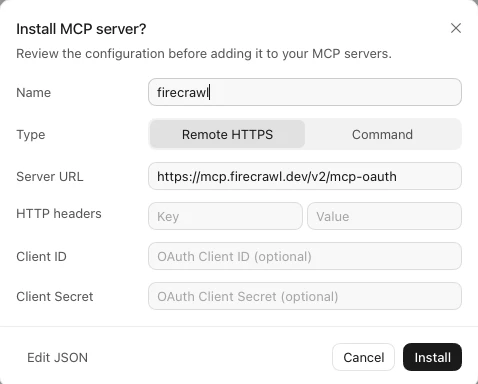
Connect your Firecrawl account
Use the server's sign-in option in Cursor's MCP settings. Firecrawl opens in your browser: sign in, choose a team with Alexandria enabled, and approve access. A green dot next to Firecrawl means it's connected.
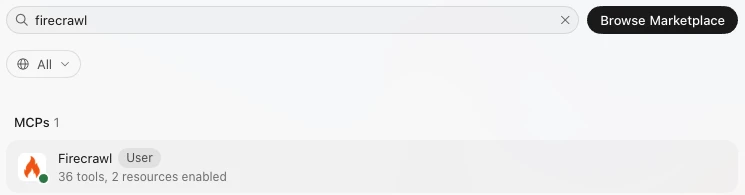
Ask Cursor's agent for the data
In the agent chat, ask in plain language and mention Alberta Utilities Commission or Firecrawl Alexandria. The agent finds the Alberta Utilities Commission capability that fits and runs it. For example:
Use Firecrawl to run Alberta Utilities Commission's Get document capability. Inspect the Alexandria inputs, ask for any missing required details, and return a small sample with sources.
What can Cursor do with Alberta Utilities Commission?
Alberta Utilities Commission (auc.ab.ca) public regulatory record: the decisions, recent updates, notices, facility approvals, gas pipeline licence and monthly rate approval tables with eFiling document ids, the public PDF of any decision or notice with its extracted text, proceedings currently under review, featured (high-profile) applications, the hearing and events calendar, and the site's full-text search over decision PDFs and pages. Proceedings' party lists and exhibit indexes sit behind the eFiling login and are not covered.
Cursor can run any of Alberta Utilities Commission's 7 capabilities through Alexandria. Each call is billed in Firecrawl credits on your Firecrawl team.
- Get document: Download one public AUC document (decision, approval, notice) from the eFiling API by its eFiling document id or download URL, and return its filename, the proceeding id and document number the filename carries, size, content type and the text extracted from the PDF (best effort: page content streams decoded in reading order; scanned or image-only PDFs yield no text). Costs 5 Firecrawl credits per call.
- Get featured application: One featured application page by WordPress id, slug or URL: title, dates, the proceeding id, application and decision numbers stated on the page, every document link (eFiling public downloads and media.auc.ab.ca files) and the page's text. Costs 5 Firecrawl credits per call.
- List current applications: All proceedings currently under review by the AUC (the 'current applications' table): application number, proceeding id, description, applicant and registration date, optionally filtered by proceeding id or applicant substring. Status, parties and exhibit lists are not public (eFiling login). Costs 5 Firecrawl credits per call.
- List documents: One page of an AUC regulatory documents table (decisions, recent updates, notices, facility approvals and licences, gas pipeline licences, monthly energy or gas charge approvals), newest or oldest first, with each row's document number, proceeding id, applicant, issue date and the eFiling document id that `get_document` downloads. Optional filters (proceeding id, document number, applicant, document type, division, year) are applied by this program while scanning the table in 1000-row pages, because the site's own table filters client side. Costs 5 Firecrawl credits per call.
- List events: The AUC hearing and events calendar between two dates: hearings (with the proceeding id and the virtual hearing link when stated), office closures and other events. Costs 5 Firecrawl credits per call.
- List featured applications: The AUC's featured application pages (high-profile facility proceedings such as data centre power plants, transmission lines, wind and solar projects): WordPress post id, slug, title, page URL and publication/modification dates, newest first. Costs 5 Firecrawl credits per call.
- Search: Full-text search over the AUC website and its indexed decision PDFs through the site's search provider (Expertrec): title, canonical URL, date, type and a highlighted snippet per hit. Hits on decision PDFs carry the eFiling document id for `get_document`; legacy efiling-webapi URLs in the index are rewritten to the current public download endpoint. Costs 5 Firecrawl credits per call.
What should I ask Cursor?
Name Alberta Utilities Commission or Firecrawl Alexandria in the prompt so Cursor reaches for it. Each example opens in Cursor with the prompt filled in.
- Use Firecrawl to run Alberta Utilities Commission's Get document capability. Inspect the Alexandria inputs, ask for any missing required details, and return a small sample with sources.
- Use Firecrawl to run Alberta Utilities Commission's Get featured application capability. Inspect the Alexandria inputs, ask for any missing required details, and return a small sample with sources.
- Use Firecrawl to run Alberta Utilities Commission's List current applications capability. Inspect the Alexandria inputs, ask for any missing required details, and return a small sample with sources.
- Use Firecrawl to run Alberta Utilities Commission's List documents capability. Inspect the Alexandria inputs, ask for any missing required details, and return a small sample with sources.
Troubleshooting
Why can't Cursor find Alberta Utilities Commission?
If Firecrawl's tools in Cursor stop at search, scrape and parse, the connection is keyless and doesn't include Alexandria. Finish the sign-in from Cursor's MCP settings, or add an API key from a team with Alexandria enabled.
Firecrawl shows a red dot in Cursor. What should I do?
Open Cursor's MCP settings, sign in to Firecrawl again, and restart the agent chat so it loads the tools.
Use Alberta Utilities Commission in other AI apps
The same Firecrawl account reaches Alberta Utilities Commission from other AI apps. Pick one for its setup steps:
- Alberta Utilities Commission in ChatGPT
- Alberta Utilities Commission in Claude
- Alberta Utilities Commission in Grok Bot
 Alberta Utilities Commission in Muse
Other data providers you can connect to Cursor
Frequently Asked Questions
What is Firecrawl?
Firecrawl is the web data API to search, scrape and interact with the web at scale. It turns websites into clean, LLM-ready data for AI agents and apps. The Firecrawl MCP server brings those tools into Cursor, along with every data provider in Firecrawl Alexandria.
What is Firecrawl Alexandria?
Firecrawl Alexandria is Firecrawl's library of 550+ data providers for AI agents, Alberta Utilities Commission among them. Each provider returns structured data through documented capabilities. Cursor finds the capability that fits your question and calls it through the Firecrawl MCP server, so you don't write any integration code. Alexandria needs a Firecrawl account signed in on a team with Alexandria enabled, or an API key from such a team; keyless connections don't include it.
Is there a Alberta Utilities Commission MCP server for Cursor?
Cursor reaches Alberta Utilities Commission through Firecrawl's hosted MCP server, which serves Alberta Utilities Commission and every other Alexandria provider as tools. Add the Firecrawl MCP server once and you don't install or host a separate MCP server for Alberta Utilities Commission.
What does connecting Alberta Utilities Commission to Cursor unlock?
Cursor can run all 7 of Alberta Utilities Commission's capabilities, including Get document, Get featured application and List current applications, from any chat, with structured results it can sort, compare and summarize. In the same conversation, Cursor can combine Alberta Utilities Commission with Firecrawl's web search and scraping and the other providers in Firecrawl Alexandria.
Do I need my own Alberta Utilities Commission account or API key to use it in Cursor?
No. Cursor calls Alberta Utilities Commission through Firecrawl Alexandria and each call is billed in Firecrawl credits, so you don't need a separate Alberta Utilities Commission account or API key.
How much does it cost to use Alberta Utilities Commission in Cursor?
Each Alberta Utilities Commission call costs 5 Firecrawl credits. The capability list on this page shows each price and its unit. The credits come from the Firecrawl team you connect to Cursor, and finding the right capability is free.
Can Cursor use other providers besides Alberta Utilities Commission?
Yes. The same Firecrawl MCP server reaches every provider in Firecrawl Alexandria, along with Firecrawl's web search and scraping, so you connect once.
Can I use Alberta Utilities Commission in other AI apps?
Yes. Connect Firecrawl to ChatGPT, Claude, Grok Bot, Muse signed in on a Firecrawl team with Alexandria enabled, or use the Firecrawl MCP server, CLI or API with an API key from that team, and the same Alberta Utilities Commission capabilities are available there. Keyless connections don't include Alexandria.