How to connect Arizona Registrar of Contractors license register (azroc.my.site.com) to Grok Bot
Add the Firecrawl plugin to Grok Bot once and it can call the Arizona Registrar of Contractors license register (azroc.my.site.com) API and every other provider in Firecrawl Alexandria, with no Arizona Registrar of Contractors license register (azroc.my.site.com) integration code.
To connect Arizona Registrar of Contractors license register (azroc.my.site.com) to Grok Bot, add the Firecrawl plugin to Grok Bot, sign in on a Firecrawl team with Alexandria enabled, and ask for Arizona Registrar of Contractors license register (azroc.my.site.com) data in plain language. The connection works in every Bot in your Grok Bot account, and you set it up once.
Grok Bot uses Arizona Registrar of Contractors license register (azroc.my.site.com) as an MCP tool through Firecrawl's hosted MCP server, so you don't install or host a separate MCP server for Arizona Registrar of Contractors license register (azroc.my.site.com).
Grok Bot is xAI's agent app. Plugins give your Bots outside tools, and the Firecrawl plugin adds web search, scraping and every data provider in Firecrawl Alexandria.
How do I connect Arizona Registrar of Contractors license register (azroc.my.site.com) to Grok Bot?
Add the Firecrawl plugin
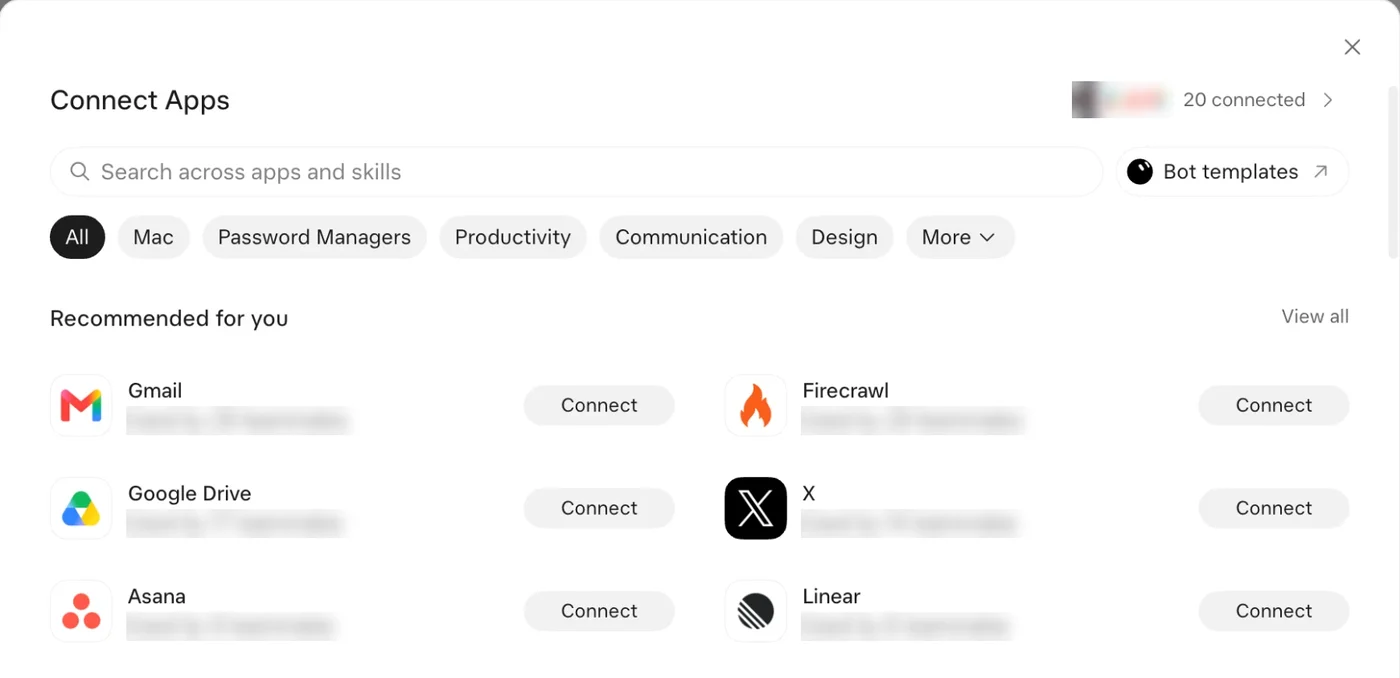
In Grok Bot, open Connect apps from the sidebar, find Firecrawl and select Connect. You can also open Firecrawl's plugin listing and select Add to Grok Bot, which opens the desktop app to finish the install.
Connect your Firecrawl account
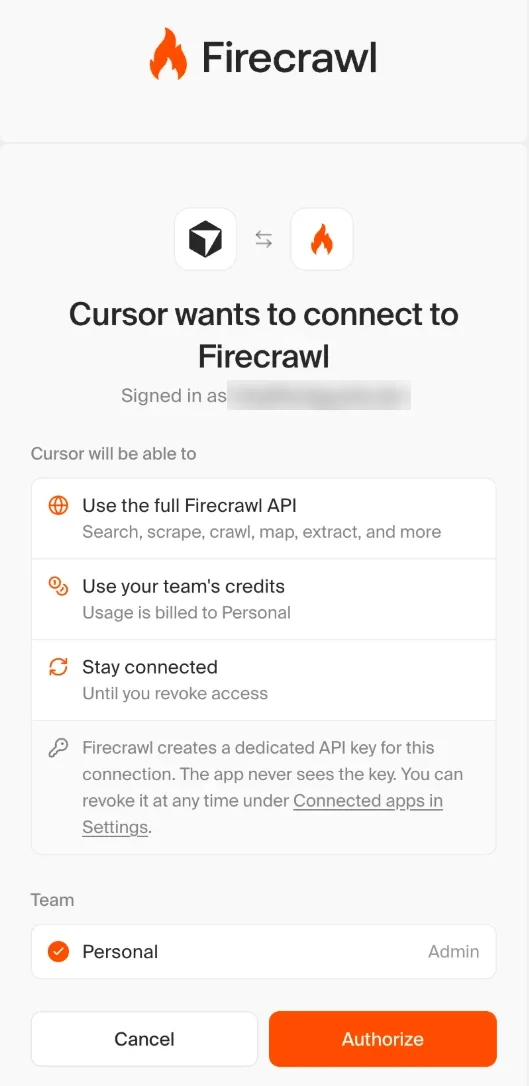
Grok Bot opens Firecrawl in your browser. Sign in, choose a team with Alexandria enabled, and select Authorize. The screen names Cursor, because the plugin is published on the Cursor Marketplace. No account yet? You can create one for free in the same flow.
Ask your Bot for the data
In a chat, ask in plain language and mention Arizona Registrar of Contractors license register (azroc.my.site.com) or Firecrawl Alexandria. To make sure the Bot uses Firecrawl, type @ and choose Firecrawl first. For example:
Use Firecrawl to find the first 20 Arizona ROC contractor records matching Sunstate Plumbing, showing license numbers, classifications and status.
What can Grok Bot do with Arizona Registrar of Contractors license register (azroc.my.site.com)?
Public contractor license register of the Arizona Registrar of Contractors (ROC), served by the AZRoc Salesforce Experience Cloud site at azroc.my.site.com/AZRoc/s/contractor-search. Search licensed contractors by business or person name, ROC license number, license classification and city; read a license record with its personnel, surety bonds and public complaint history; list the classification picklist and the official scope description of a license's classification. Anonymous guest access to the site's Aura Apex actions (class ARCP_ContractorSearch); no login, token or cookie is needed.
Grok Bot can run any of Arizona Registrar of Contractors license register (azroc.my.site.com)'s 4 capabilities through Alexandria. Each call is billed in Firecrawl credits on your Firecrawl team.
- Get classification description: The official scope description of a license's classification (Aura action ARCP_ContractorSearch.getLicenseDescriptionDetail, the detail page's 'License Classification Description' panel): for the license's classification, the license type (e.g. 'Specialty Commercial'), the classification (e.g. 'C-37 Plumbing') and the Registrar's description of the work it covers, as plain text (paragraph breaks preserved) and as the site's HTML. Keyed by the Salesforce `license_id` from search_contractors. An unknown license_id is not_found. Costs 5 Firecrawl credits per call.
- Get license: One ROC license record (Aura actions ARCP_ContractorSearch.getLicenseDetail + getAllPersonnelDetail + getAllBondDetail + getAllComplaintsDetail, sent as one batch; the site's contractor detail page). Keyed by the Salesforce `license_id` from search_contractors (a pasted detail URL `.../contractor-search?licenseId=...` is accepted). Returns the license (ROC number, status and status-change date, issue date, renewal-through date, classification description, entity type, QP exemption, business and DBA names, city/state/ZIP, phone), the personnel on file (name, title, other positions), the surety bonds (number, type, status, effective and cancellation dates, bond, allotted, available, payout and repayment amounts in USD, surety company) and the public complaint summary (open, resolved and disciplined counts) with each complaint's number, status, nature, type, allegations, outcome, closed date and jobsite city. Complainant identities are not returned. An unknown license_id makes the site answer an Apex System.QueryException; that is reported as not_found. Costs 5 Firecrawl credits per call.
- List classifications: The license classification picklist of the Arizona ROC contractor search (Aura action ARCP_ContractorSearch.getLicensePickListValues): every classification string the site accepts in search_contractors `classifications`, in the site's order (engineering 'A', general 'B', commercial 'C', dual 'CR'/'K', residential 'R' families, e.g. 'C-42 Roofing'). Costs 5 Firecrawl credits per call.
- Search contractors: Search the Arizona ROC contractor register (Aura action ARCP_ContractorSearch.getRecords, the site's 'Contractor Search'). `query` matches a business name, a person's name ('First Last'), or a ROC license number (6 digits, with or without the 'ROC ' prefix); `classifications` filters by license classification exactly as `list_classifications` spells them (e.g. 'C-42 Roofing'; the site matches the classification family loosely, a 'C-42 Roofing' filter also returns 'CR-42 Roofing' licenses); `city` filters by the licensee's Arizona city. At least one criterion is required. Results are grouped the way the site shows them: one row per business/account with its contacts (name and role) and every license it holds (license_id, ROC license number, status such as Active / Suspended / Revoked / Expired, classification, qualifying party or QP-exempt). The server returns the whole result set in one answer (a broad single-word query can be several hundred accounts and take a few seconds); this function pages through it client-side with `page_size` rows per page and an offset `cursor`, re-running the same search for each page. A search that matches nothing is a valid empty result (`accounts: []`). Costs 5 Firecrawl credits per call.
What should I ask Grok Bot?
Name Arizona Registrar of Contractors license register (azroc.my.site.com) or Firecrawl Alexandria in the prompt so Grok Bot reaches for it.
- Use Firecrawl to find the first 20 Arizona ROC contractor records matching Sunstate Plumbing, showing license numbers, classifications and status.
- Use Firecrawl to find Sunstate Plumbing in Arizona ROC and show its first license’s status, personnel, bonds and complaint counts.
- Use Firecrawl to list the first 20 C-42 Roofing contractor records in Flagstaff from Arizona ROC with their license statuses.
- Use Firecrawl to find one C-42 Roofing contractor in Flagstaff and show the official scope description of its ROC license classification.
Troubleshooting
Why doesn't my Bot use Arizona Registrar of Contractors license register (azroc.my.site.com)?
Attach Firecrawl to the chat with @ before you ask, and name Arizona Registrar of Contractors license register (azroc.my.site.com) or Firecrawl Alexandria in the prompt.
Add to Grok Bot doesn't open the app. What should I do?
Install the Grok Bot desktop app first, or open Connect apps in Grok Bot and search for Firecrawl.
Use Arizona Registrar of Contractors license register (azroc.my.site.com) in other AI apps
The same Firecrawl account reaches Arizona Registrar of Contractors license register (azroc.my.site.com) from other AI apps. Pick one for its setup steps:
- Arizona Registrar of Contractors license register (azroc.my.site.com) in ChatGPT
- Arizona Registrar of Contractors license register (azroc.my.site.com) in Claude
- Arizona Registrar of Contractors license register (azroc.my.site.com) in Cursor
 Arizona Registrar of Contractors license register (azroc.my.site.com) in Muse
Other data providers you can connect to Grok Bot
Frequently Asked Questions
What is Firecrawl?
Firecrawl is the web data API to search, scrape and interact with the web at scale. It turns websites into clean, LLM-ready data for AI agents and apps. The Firecrawl plugin brings those tools into Grok Bot, along with every data provider in Firecrawl Alexandria.
What is Firecrawl Alexandria?
Firecrawl Alexandria is Firecrawl's library of 550+ data providers for AI agents, Arizona Registrar of Contractors license register (azroc.my.site.com) among them. Each provider returns structured data through documented capabilities. Grok Bot finds the capability that fits your question and calls it through the Firecrawl plugin, so you don't write any integration code. Alexandria needs a Firecrawl account signed in on a team with Alexandria enabled, or an API key from such a team; keyless connections don't include it.
Is there a Arizona Registrar of Contractors license register (azroc.my.site.com) MCP server for Grok Bot?
Grok Bot reaches Arizona Registrar of Contractors license register (azroc.my.site.com) through Firecrawl's hosted MCP server, which serves Arizona Registrar of Contractors license register (azroc.my.site.com) and every other Alexandria provider as tools. Add the Firecrawl plugin once and you don't install or host a separate MCP server for Arizona Registrar of Contractors license register (azroc.my.site.com).
What does connecting Arizona Registrar of Contractors license register (azroc.my.site.com) to Grok Bot unlock?
Grok Bot can run all 4 of Arizona Registrar of Contractors license register (azroc.my.site.com)'s capabilities, including Get classification description, Get license and List classifications, from any chat, with structured results it can sort, compare and summarize. For example, ask: "Use Firecrawl to find the first 20 Arizona ROC contractor records matching Sunstate Plumbing, showing license numbers, classifications and status." In the same conversation, Grok Bot can combine Arizona Registrar of Contractors license register (azroc.my.site.com) with Firecrawl's web search and scraping and the other providers in Firecrawl Alexandria.
Do I need my own Arizona Registrar of Contractors license register (azroc.my.site.com) account or API key to use it in Grok Bot?
No. Grok Bot calls Arizona Registrar of Contractors license register (azroc.my.site.com) through Firecrawl Alexandria and each call is billed in Firecrawl credits, so you don't need a separate Arizona Registrar of Contractors license register (azroc.my.site.com) account or API key.
How much does it cost to use Arizona Registrar of Contractors license register (azroc.my.site.com) in Grok Bot?
Each Arizona Registrar of Contractors license register (azroc.my.site.com) call costs 5 Firecrawl credits. The capability list on this page shows each price and its unit. The credits come from the Firecrawl team you connect to Grok Bot, and finding the right capability is free.
Can Grok Bot use other providers besides Arizona Registrar of Contractors license register (azroc.my.site.com)?
Yes. The same Firecrawl plugin reaches every provider in Firecrawl Alexandria, along with Firecrawl's web search and scraping, so you connect once.
Can I use Arizona Registrar of Contractors license register (azroc.my.site.com) in other AI apps?
Yes. Connect Firecrawl to ChatGPT, Claude, Cursor, Muse signed in on a Firecrawl team with Alexandria enabled, or use the Firecrawl MCP server, CLI or API with an API key from that team, and the same Arizona Registrar of Contractors license register (azroc.my.site.com) capabilities are available there. Keyless connections don't include Alexandria.