How to connect Bank of Canada (Valet API and press feeds) to ChatGPT
Add the Firecrawl plugin to ChatGPT once and it can call the Bank of Canada (Valet API and press feeds) API and every other provider in Firecrawl Alexandria, with no Bank of Canada (Valet API and press feeds) integration code.
To connect Bank of Canada (Valet API and press feeds) to ChatGPT, add the Firecrawl plugin to ChatGPT, sign in on a Firecrawl team with Alexandria enabled, and ask for Bank of Canada (Valet API and press feeds) data in plain language. The connection works in ChatGPT and Codex, and you set it up once.
ChatGPT uses Bank of Canada (Valet API and press feeds) as an MCP tool through Firecrawl's hosted MCP server, so you don't install or host a separate MCP server for Bank of Canada (Valet API and press feeds).
ChatGPT is OpenAI's AI assistant. Plugins add tools from other services, and the Firecrawl plugin adds web search, scraping and every data provider in Firecrawl Alexandria.
How do I connect Bank of Canada (Valet API and press feeds) to ChatGPT?
Install the Firecrawl plugin
Open the Firecrawl listing in ChatGPT's plugin directory and select Install plugin. You can also open Plugins in ChatGPT or Codex and search for Firecrawl.
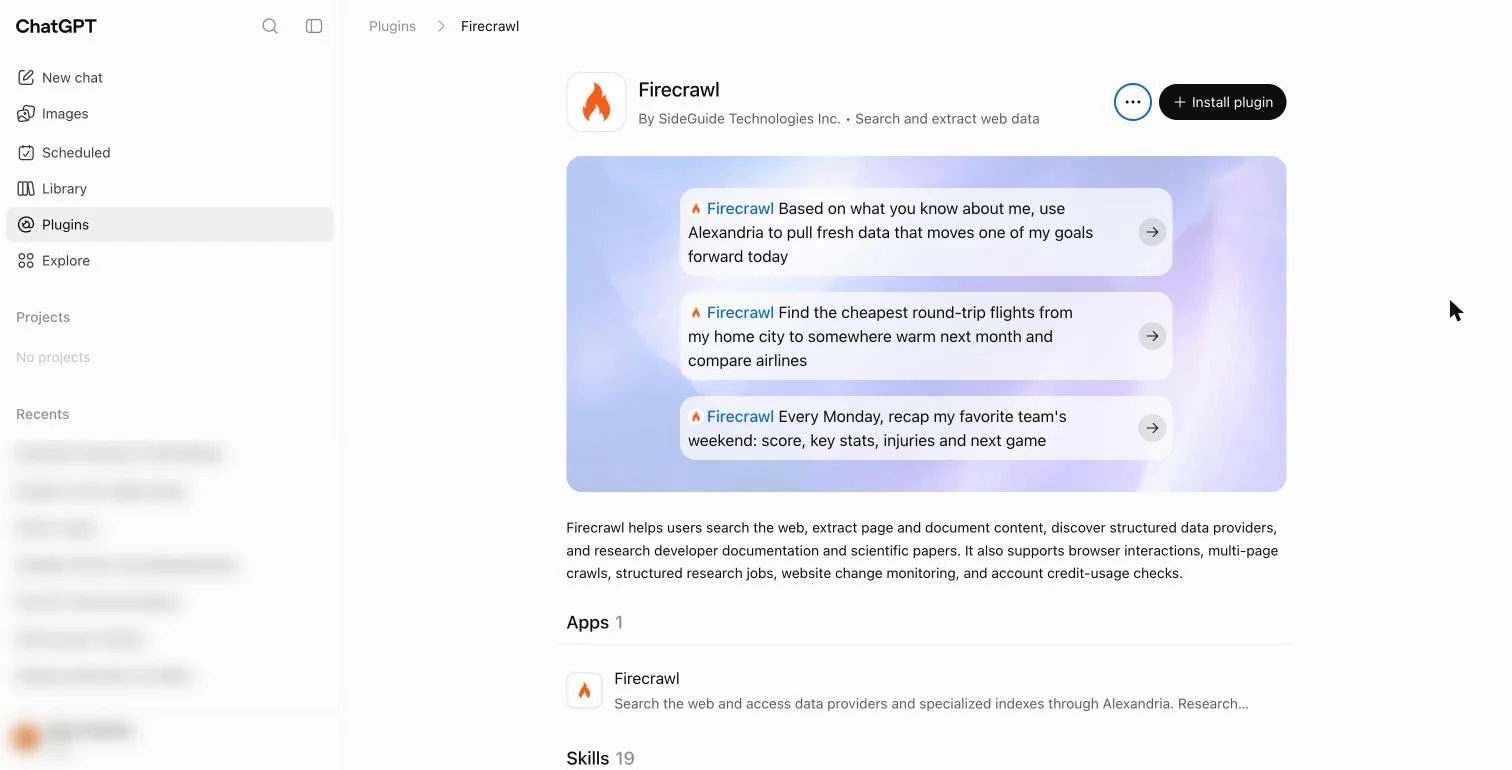
Connect your Firecrawl account
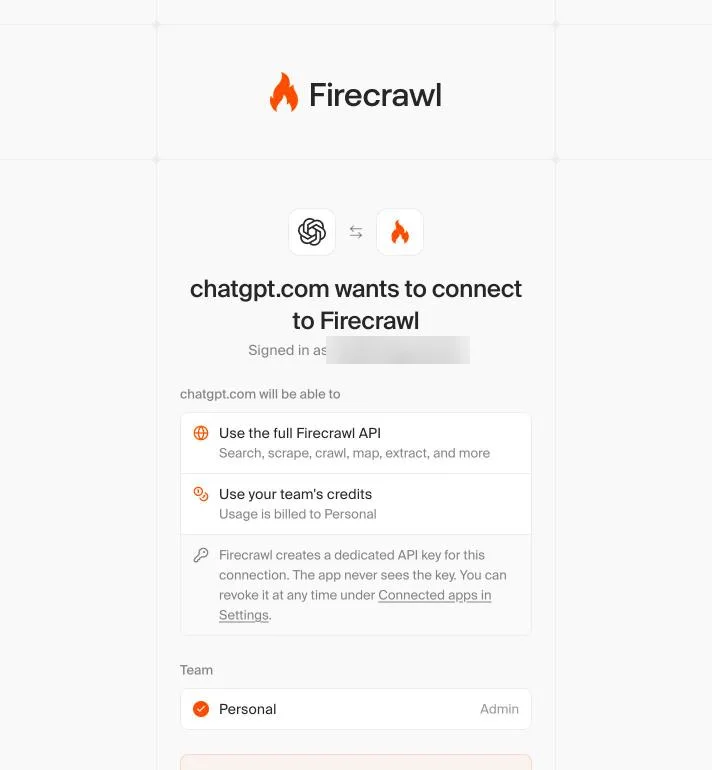
ChatGPT opens Firecrawl in your browser. Sign in, choose a team with Alexandria enabled, and approve access. No account yet? You can create one for free in the same flow.
Attach Firecrawl to a chat
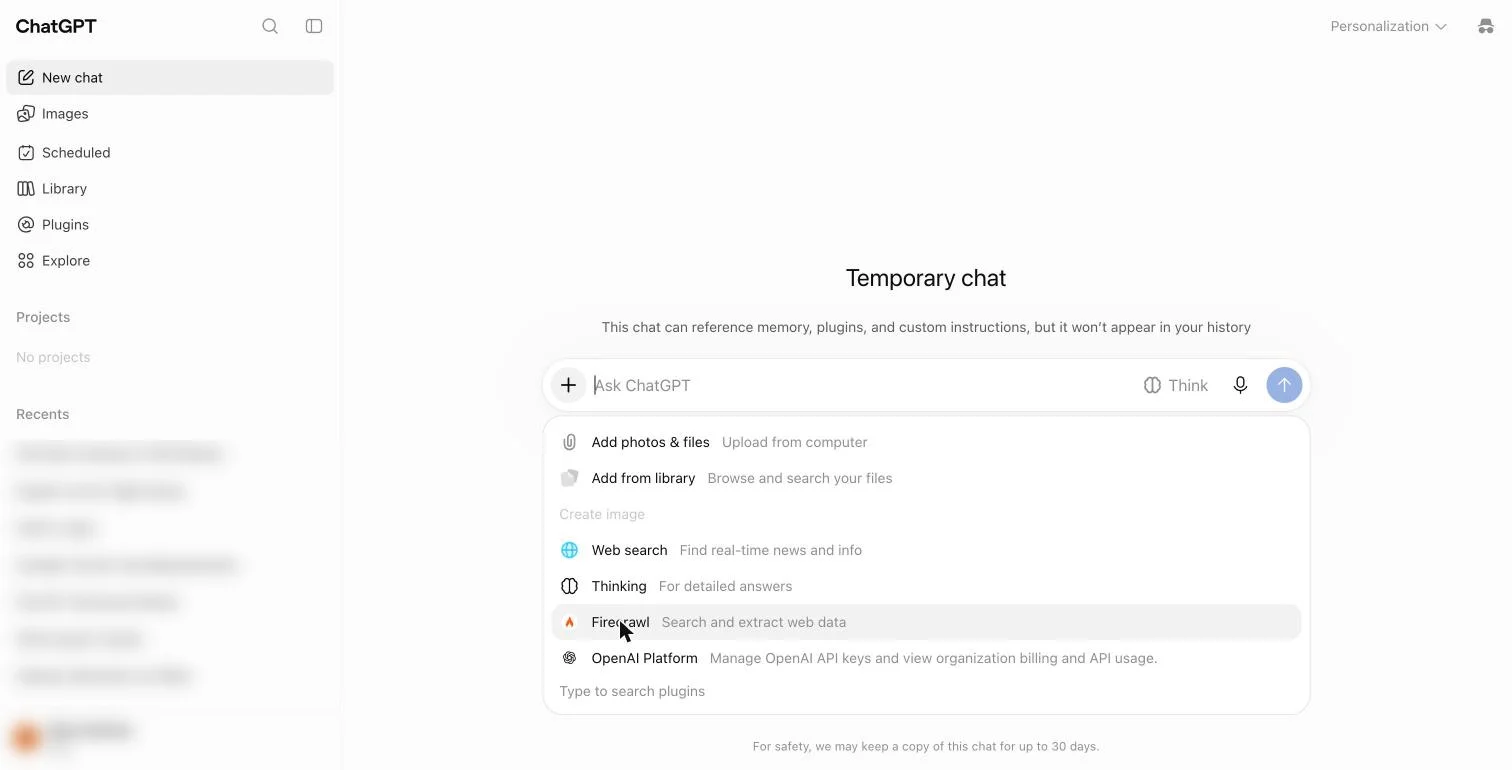
Start a new chat so it loads the plugin, open the + menu and choose Firecrawl. You can also ask ChatGPT to use Firecrawl by name.
Ask ChatGPT for the data
Ask in plain language and mention Bank of Canada (Valet API and press feeds) or Firecrawl Alexandria. ChatGPT finds the Bank of Canada (Valet API and press feeds) capability that fits and runs it. For example:
Use Firecrawl to run Bank of Canada (Valet API and press feeds)'s Bond yields capability. Inspect the Alexandria inputs, ask for any missing required details, and return a small sample with sources.
What can ChatGPT do with Bank of Canada (Valet API and press feeds)?
Official Bank of Canada data from the keyless Valet API and the Bank's RSS feeds: the policy interest rate in effect on any date with its change history, daily CAD exchange rates, Government of Canada benchmark bond yields, any of about 16,000 Valet series and 2,600 groups (CORRA, CPI and commodity price indexes, bank rates, auction results) with catalogue search and details, press releases, speeches and publications, and policy rate announcements with their decisions.
ChatGPT can run any of Bank of Canada (Valet API and press feeds)'s 8 capabilities through Alexandria. Each call is billed in Firecrawl credits on your Firecrawl team.
- Bond yields: Government of Canada benchmark bond yields from the Bank of Canada (Valet group bond_yields_benchmark): 2, 3, 5, 7 and 10-year, long-term and Real Return Bond yields in percent, for the latest business day, one date, a range or the latest N days. Costs 5 Firecrawl credits per call.
- Describe series: Details of one Bank of Canada Valet series (label, description, unit, frequency, date format) or one group (label, description, unit, page link and its member series). Costs 5 Firecrawl credits per call.
- Fx rates: Bank of Canada daily average exchange rates (Canadian dollars per unit of about 26 foreign currencies, published each business day by 16:30 ET): the latest day by default, one date, a date range or the latest N days, for chosen currencies or every published rate, each with the inverse rate. Costs 5 Firecrawl credits per call.
- News: Bank of Canada press releases, announcements, speeches, media advisories, market notices, upcoming events, Monetary Policy Reports, summaries of deliberations, Financial Stability Reports, Business Outlook Surveys and staff papers from the Bank's official RSS feeds, ten per page, newest first, with optional word filtering within the page. Costs 5 Firecrawl credits per call.
- Observations: Observations of any Bank of Canada Valet series (up to 20, e.g. V39079, FXUSDCAD, BD.CDN.10YR.DQ.YLD, CPI and commodity price indexes) or of one series group (e.g. CORRA, bond_yields_all, chartered_bank_interest, AUC_BOND_RESULTS auction results), for a date range, the latest N observations or the last N weeks, months or years, as one row per period and series with the raw value and its number. Costs 5 Firecrawl credits per call.
- Policy rate: The Bank of Canada policy interest rate (target for the overnight rate, Valet series V39079): the rate in effect today or on any date since 1992, the most recent change and every change in the history window (three years back by default), each with the previous rate and the move in basis points. A decision the series has not yet published (it takes effect the business day after the announcement and reaches the series about a day later) is read from the Bank's press releases and reported as announced_change. Costs 5 Firecrawl credits per call.
- Rate announcements: The Bank of Canada's scheduled policy interest rate announcements, newest first, found in its press release feed: date, title, link, summary, the decision (hold, cut or hike), the target overnight rate and the move in basis points. Scans up to 15 feed pages. Costs 5 Firecrawl credits per call.
- Search series: Search the Bank of Canada Valet catalogue (about 16,000 series and 2,600 groups) by words in the name, label and description, best matches first, with each result's details and observations URLs. Costs 5 Firecrawl credits per call.
What should I ask ChatGPT?
Name Bank of Canada (Valet API and press feeds) or Firecrawl Alexandria in the prompt so ChatGPT reaches for it. Each example opens in ChatGPT with the prompt filled in.
- Use Firecrawl to run Bank of Canada (Valet API and press feeds)'s Bond yields capability. Inspect the Alexandria inputs, ask for any missing required details, and return a small sample with sources.
- Use Firecrawl to run Bank of Canada (Valet API and press feeds)'s Describe series capability. Inspect the Alexandria inputs, ask for any missing required details, and return a small sample with sources.
- Use Firecrawl to run Bank of Canada (Valet API and press feeds)'s Fx rates capability. Inspect the Alexandria inputs, ask for any missing required details, and return a small sample with sources.
- Use Firecrawl to run Bank of Canada (Valet API and press feeds)'s News capability. Inspect the Alexandria inputs, ask for any missing required details, and return a small sample with sources.
Troubleshooting
Why doesn't ChatGPT use Bank of Canada (Valet API and press feeds)?
Start a new chat after installing so ChatGPT loads the plugin, then attach Firecrawl from the + menu and name Bank of Canada (Valet API and press feeds) or Firecrawl Alexandria in the prompt.
How do I switch the Firecrawl team ChatGPT uses?
Open the Firecrawl plugin page in ChatGPT, uninstall it from the menu next to Settings, then install it again and choose the other team on Firecrawl's consent screen.
Why does ChatGPT say Bank of Canada (Valet API and press feeds) isn't available?
Alexandria needs a Firecrawl team with Alexandria enabled. Reinstall the plugin and pick that team when you approve access.
Use Bank of Canada (Valet API and press feeds) in other AI apps
The same Firecrawl account reaches Bank of Canada (Valet API and press feeds) from other AI apps. Pick one for its setup steps:
- Bank of Canada (Valet API and press feeds) in Claude
- Bank of Canada (Valet API and press feeds) in Cursor
- Bank of Canada (Valet API and press feeds) in Grok Bot
 Bank of Canada (Valet API and press feeds) in Muse
Other data providers you can connect to ChatGPT
Frequently Asked Questions
What is Firecrawl?
Firecrawl is the web data API to search, scrape and interact with the web at scale. It turns websites into clean, LLM-ready data for AI agents and apps. The Firecrawl plugin brings those tools into ChatGPT, along with every data provider in Firecrawl Alexandria.
What is Firecrawl Alexandria?
Firecrawl Alexandria is Firecrawl's library of 550+ data providers for AI agents, Bank of Canada (Valet API and press feeds) among them. Each provider returns structured data through documented capabilities. ChatGPT finds the capability that fits your question and calls it through the Firecrawl plugin, so you don't write any integration code. Alexandria needs a Firecrawl account signed in on a team with Alexandria enabled, or an API key from such a team; keyless connections don't include it.
Is there a Bank of Canada (Valet API and press feeds) MCP server for ChatGPT?
ChatGPT reaches Bank of Canada (Valet API and press feeds) through Firecrawl's hosted MCP server, which serves Bank of Canada (Valet API and press feeds) and every other Alexandria provider as tools. Add the Firecrawl plugin once and you don't install or host a separate MCP server for Bank of Canada (Valet API and press feeds).
What does connecting Bank of Canada (Valet API and press feeds) to ChatGPT unlock?
ChatGPT can run all 8 of Bank of Canada (Valet API and press feeds)'s capabilities, including Bond yields, Describe series and Fx rates, from any chat, with structured results it can sort, compare and summarize. In the same conversation, ChatGPT can combine Bank of Canada (Valet API and press feeds) with Firecrawl's web search and scraping and the other providers in Firecrawl Alexandria.
Do I need my own Bank of Canada (Valet API and press feeds) account or API key to use it in ChatGPT?
No. ChatGPT calls Bank of Canada (Valet API and press feeds) through Firecrawl Alexandria and each call is billed in Firecrawl credits, so you don't need a separate Bank of Canada (Valet API and press feeds) account or API key.
How much does it cost to use Bank of Canada (Valet API and press feeds) in ChatGPT?
Each Bank of Canada (Valet API and press feeds) call costs 5 Firecrawl credits. The capability list on this page shows each price and its unit. The credits come from the Firecrawl team you connect to ChatGPT, and finding the right capability is free.
Can ChatGPT use other providers besides Bank of Canada (Valet API and press feeds)?
Yes. The same Firecrawl plugin reaches every provider in Firecrawl Alexandria, along with Firecrawl's web search and scraping, so you connect once.
Can I use Bank of Canada (Valet API and press feeds) in other AI apps?
Yes. Connect Firecrawl to Claude, Cursor, Grok Bot, Muse signed in on a Firecrawl team with Alexandria enabled, or use the Firecrawl MCP server, CLI or API with an API key from that team, and the same Bank of Canada (Valet API and press feeds) capabilities are available there. Keyless connections don't include Alexandria.