How to connect BLS labor statistics to Cursor
Add the Firecrawl MCP server to Cursor once and it can call the BLS labor statistics API and every other provider in Firecrawl Alexandria, with no BLS labor statistics integration code.
To connect BLS labor statistics to Cursor, add the Firecrawl MCP server to Cursor, sign in on a Firecrawl team with Alexandria enabled, and ask for BLS labor statistics data in plain language. The connection works in Cursor's agent and chat, and you set it up once.
Cursor uses BLS labor statistics as an MCP tool through Firecrawl's hosted MCP server, so you don't install or host a separate MCP server for BLS labor statistics.
Cursor is an AI code editor. Its agent uses MCP servers for outside tools, and the Firecrawl MCP server adds web search, scraping and every data provider in Firecrawl Alexandria.
How do I connect BLS labor statistics to Cursor?
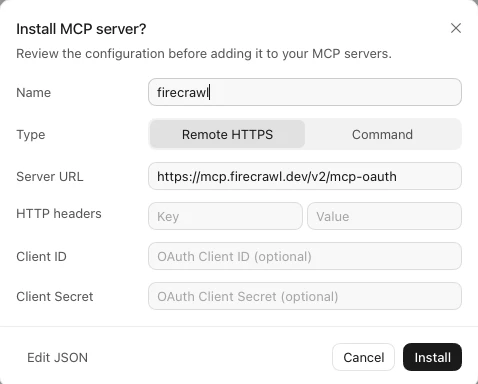
Install the Firecrawl MCP server
Open the install dialog in Cursor, check that the URL is Firecrawl's hosted server, then select Install.
Connect your Firecrawl account
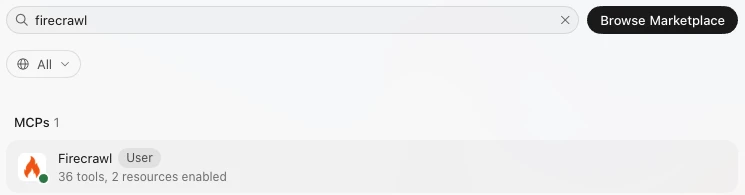
Use the server's sign-in option in Cursor's MCP settings. Firecrawl opens in your browser: sign in, choose a team with Alexandria enabled, and approve access. A green dot next to Firecrawl means it's connected.
Ask Cursor's agent for the data
In the agent chat, ask in plain language and mention BLS labor statistics or Firecrawl Alexandria. The agent finds the BLS labor statistics capability that fits and runs it. For example:
Use Firecrawl to get the US seasonally adjusted unemployment rate from BLS for 2024 through 2026, with monthly observation dates.
What can Cursor do with BLS labor statistics?
US Bureau of Labor Statistics time series: list surveys, discover series ids (curated Top Picks and full flat-file catalogs), read a series catalog page, and retrieve employment, wage, price and inflation observations from the keyless public API; plus QCEW Open Data CSV slices (county, state, MSA and national employment and wages by ownership, industry and establishment size) with a version check, paged listing and single-cell lookup.
Cursor can run any of BLS labor statistics's 10 capabilities through Alexandria. Each call is billed in Firecrawl credits on your Firecrawl team.
- Bls cpi: Consumer Price Index for All Urban Consumers (CPI-U) for one expenditure category (all_items, core, food, energy, gasoline, shelter, rent, apparel, medical_care, ...) and area (U.S. city average by default), over an optional year window of at most 10 years (the latest 3 years when omitted). Returns the index observations with the resolved BLS series id (CUUR/CUSR + area + item). Costs 5 Firecrawl credits per call.
- Bls series: Observations for 1-25 BLS series ids (LNS14000000 unemployment rate, CUUR0000SA0 CPI-U all items, CES0000000001 nonfarm payrolls, CES0500000003 private average hourly earnings, LAUCN060370000000003 Los Angeles County unemployment) from the public API: an optional year window of at most 10 years (the latest 3 years when omitted), or `latest` for the newest observation only. Values are numeric with the source string kept in raw_value; ids BLS does not know come back with exists=false, and a request where none exist is not_found. Costs 5 Firecrawl credits per call.
- Bls series detail: The data.bls.gov catalog page of one series: survey name, series title, seasonal adjustment and the survey-specific catalog labels (area, item, industry, ...), plus the year-by-period observation table for the requested window (the site's default of the latest 10 years, an explicit `start_year`/`end_year`, or `all_years`). Values keep the site's footnote markers in `raw_value`. Costs 5 Firecrawl credits per call.
- Bls series search: Find BLS series ids by keyword inside one survey's full flat-file catalog (download.bls.gov <survey>.series: every published series with its title, dimension codes, seasonal flag and first/last period). Every whitespace-separated word of `query` must appear (case-insensitive) in the series id, title or codes. Paged locally with `offset`; `total_matches` counts every match. Costs 5 Firecrawl credits per call.
- Bls surveys: List every BLS survey the public API serves (2-letter abbreviation and name, about 70 rows), or with `survey` the metadata of one survey: whether it allows net-change and percent-change calculations and publishes annual averages. The abbreviation is the first two letters of every series id and the key for bls_top_picks and bls_series_search. Costs 5 Firecrawl credits per call.
- Bls top picks: BLS Top Picks: the curated series list data.bls.gov shows for one survey (Consumer Price Index items, payroll employment industries, state and metro unemployment, ...). Returns human-readable names with the series ids behind them; state-level surveys (LA, SM) accept a 2-digit state FIPS code to narrow the list to one state. Paged locally with `offset`. Costs 5 Firecrawl credits per call.
- Bls unemployment rate: Unemployment rate (percent) for the nation, a state (2-digit FIPS) or a county (state + 3-digit county FIPS) from the Current Population Survey (LNS14000000 / LNU04000000) and Local Area Unemployment Statistics (LASST.., LAUST.., LAUCN..), over an optional year window of at most 10 years (the latest 3 years when omitted). Nation and state default to seasonally adjusted; counties are published not seasonally adjusted only. Costs 5 Firecrawl credits per call.
- Qcew get: One QCEW cell (records/get): fetches the area slice `/cew/data/api/{year}/{qtr}/area/{area_fips}.csv` and selects the row by own_code, industry_code and size_code (default 0; add agglvl_code if the tuple is ever ambiguous). Suppressed measures are null; titles are joined. Missing row or unknown area is `not_found`; an unpublished period is `not_found` with issue code `not_published`. Costs 5 Firecrawl credits per call.
- Qcew list: QCEW Open Data rows (records/list): one whole CSV slice per call, `/cew/data/api/{year}/{qtr}/{area|industry|size}/{code}.csv` (area slice: every ownership x industry x aggregation level for one area; industry slice: every area for one industry; size slice: Q1 only, private ownership by establishment size class), paged from memory with `limit` rows per page. The cursor pins the slice's ETag: a page whose slice was re-published since (BLS revises prior quarters) fails with `invalid_input` at `/cursor` and issue code `publication_changed` instead of mixing versions. Codes stay strings; `disclosure_code` N rows carry null employment and wage measures (never 0) while the establishment count stays. Titles from area_titles.csv and industry_titles.csv (fetched) and the ownership, aggregation-level and size code books (embedded) are joined unless `include_titles` is false. `titles` alone lists a code book instead (area 9,459 rows, industry 2,678). Costs 5 Firecrawl credits per call.
- Qcew status: QCEW Open Data version check (source/status): the newest published quarter and annual-average year from data.bls.gov/cew/apps/ref/year_qtr_info.csv, each with the ETag, Last-Modified and byte size of its national area slice (US000.csv) read with a one-byte ranged GET; `publication_id` is `<year>:<qtr>:<ETag>`. With `year` and `qtr` it checks that one period instead; an unpublished period (2026/2 until the 2026-12-02 release) is `not_found` with issue code `not_published`. Costs 5 Firecrawl credits per call.
What should I ask Cursor?
Name BLS labor statistics or Firecrawl Alexandria in the prompt so Cursor reaches for it. Each example opens in Cursor with the prompt filled in.
- Use Firecrawl to get the US seasonally adjusted unemployment rate from BLS for 2024 through 2026, with monthly observation dates.
- Use Firecrawl to get unadjusted US city-average CPI-U for all items and core inflation categories from BLS for 2024 through 2026.
- Use Firecrawl to show BLS’s latest published observations for unemployment series LNS14000000 and nonfarm payroll employment series CES0000000001.
- Use Firecrawl to show the title, survey, seasonal adjustment and footnotes for BLS unemployment series LNS14000000.
Troubleshooting
Why can't Cursor find BLS labor statistics?
If Firecrawl's tools in Cursor stop at search, scrape and parse, the connection is keyless and doesn't include Alexandria. Finish the sign-in from Cursor's MCP settings, or add an API key from a team with Alexandria enabled.
Firecrawl shows a red dot in Cursor. What should I do?
Open Cursor's MCP settings, sign in to Firecrawl again, and restart the agent chat so it loads the tools.
Use BLS labor statistics in other AI apps
The same Firecrawl account reaches BLS labor statistics from other AI apps. Pick one for its setup steps:
- BLS labor statistics in ChatGPT
- BLS labor statistics in Claude
- BLS labor statistics in Grok Bot
 BLS labor statistics in Muse
Other data providers you can connect to Cursor
Frequently Asked Questions
What is Firecrawl?
Firecrawl is the web data API to search, scrape and interact with the web at scale. It turns websites into clean, LLM-ready data for AI agents and apps. The Firecrawl MCP server brings those tools into Cursor, along with every data provider in Firecrawl Alexandria.
What is Firecrawl Alexandria?
Firecrawl Alexandria is Firecrawl's library of 550+ data providers for AI agents, BLS labor statistics among them. Each provider returns structured data through documented capabilities. Cursor finds the capability that fits your question and calls it through the Firecrawl MCP server, so you don't write any integration code. Alexandria needs a Firecrawl account signed in on a team with Alexandria enabled, or an API key from such a team; keyless connections don't include it.
Is there a BLS labor statistics MCP server for Cursor?
Cursor reaches BLS labor statistics through Firecrawl's hosted MCP server, which serves BLS labor statistics and every other Alexandria provider as tools. Add the Firecrawl MCP server once and you don't install or host a separate MCP server for BLS labor statistics.
What does connecting BLS labor statistics to Cursor unlock?
Cursor can run all 10 of BLS labor statistics's capabilities, including Bls cpi, Bls series and Bls series detail, from any chat, with structured results it can sort, compare and summarize. For example, ask: "Use Firecrawl to get the US seasonally adjusted unemployment rate from BLS for 2024 through 2026, with monthly observation dates." In the same conversation, Cursor can combine BLS labor statistics with Firecrawl's web search and scraping and the other providers in Firecrawl Alexandria.
Do I need my own BLS labor statistics account or API key to use it in Cursor?
No. Cursor calls BLS labor statistics through Firecrawl Alexandria and each call is billed in Firecrawl credits, so you don't need a separate BLS labor statistics account or API key.
How much does it cost to use BLS labor statistics in Cursor?
Each BLS labor statistics call costs 5 Firecrawl credits. The capability list on this page shows each price and its unit. The credits come from the Firecrawl team you connect to Cursor, and finding the right capability is free.
Can Cursor use other providers besides BLS labor statistics?
Yes. The same Firecrawl MCP server reaches every provider in Firecrawl Alexandria, along with Firecrawl's web search and scraping, so you connect once.
Can I use BLS labor statistics in other AI apps?
Yes. Connect Firecrawl to ChatGPT, Claude, Grok Bot, Muse signed in on a Firecrawl team with Alexandria enabled, or use the Firecrawl MCP server, CLI or API with an API key from that team, and the same BLS labor statistics capabilities are available there. Keyless connections don't include Alexandria.