How to connect Canadian Patents Database (CIPO) to Claude
Add the Firecrawl connector to Claude once and it can call the Canadian Patents Database (CIPO) API and every other provider in Firecrawl Alexandria, with no Canadian Patents Database (CIPO) integration code.
To connect Canadian Patents Database (CIPO) to Claude, add the Firecrawl connector to Claude, sign in on a Firecrawl team with Alexandria enabled, and ask for Canadian Patents Database (CIPO) data in plain language. The connection works in Claude on the web, Claude Desktop and Cowork, and you set it up once.
Claude uses Canadian Patents Database (CIPO) as an MCP tool through Firecrawl's hosted MCP server, so you don't install or host a separate MCP server for Canadian Patents Database (CIPO).
Claude is Anthropic's AI assistant. Connectors give it tools from other services, and the Firecrawl connector adds web search, scraping and every data provider in Firecrawl Alexandria.
How do I connect Canadian Patents Database (CIPO) to Claude?
Add the Firecrawl connector
Open the Firecrawl connector in Claude's connector directory and select Connect to Claude. In Claude Desktop you can also go to Customize, then Connectors, and search for Firecrawl.
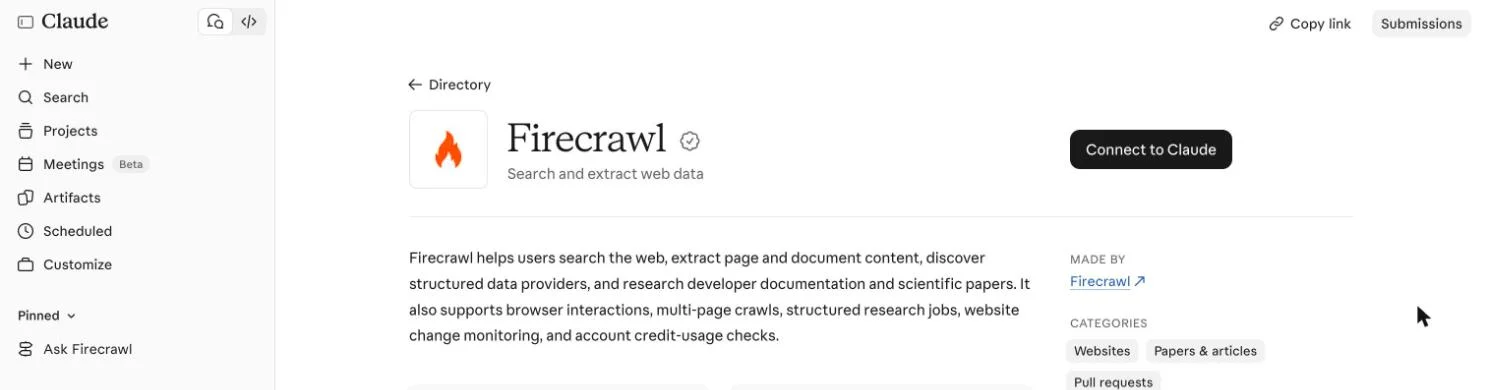
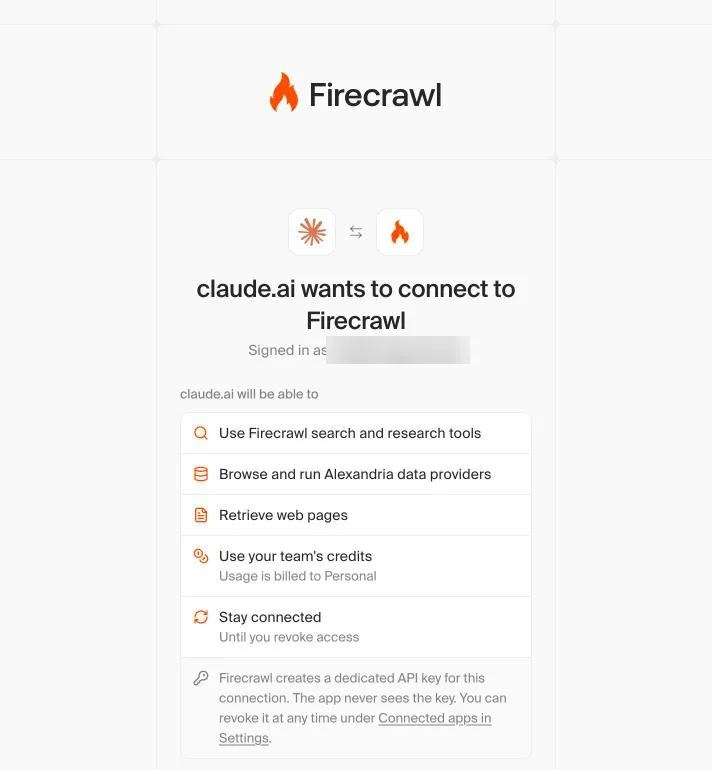
Connect your Firecrawl account
Claude opens Firecrawl in your browser. Sign in, choose a team with Alexandria enabled, and approve access. No account yet? You can create one for free in the same flow.
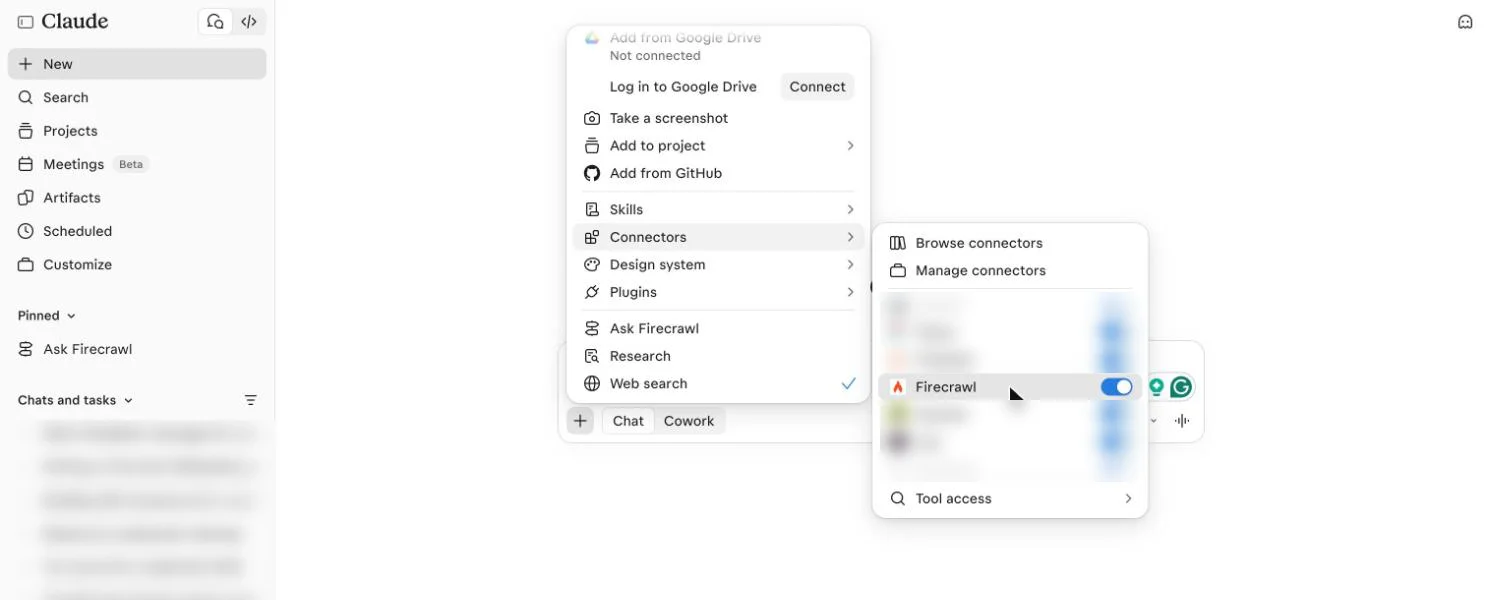
Turn on Firecrawl in a chat
In a new conversation, open the + menu, go to Connectors and switch on Firecrawl.
Ask Claude for the data
Ask in plain language and mention Canadian Patents Database (CIPO) or Firecrawl Alexandria. Claude finds the Canadian Patents Database (CIPO) capability that fits, checks its inputs and runs it. For example:
Use Firecrawl to find the first 25 Canadian patent records matching lithium battery electrode, with titles, patent numbers and summary links.
What can Claude do with Canadian Patents Database (CIPO)?
Canadian Intellectual Property Office patent database: keyword, fielded and date-range search over Canadian patents and applications, and the full bibliographic summary of one patent (titles, status, IPC, parties, dates, PCT and priority data, abstracts, claims and description text, event and fee history, owners on record, document list).
Claude can run any of Canadian Patents Database (CIPO)'s 2 capabilities through Alexandria. Each call is billed in Firecrawl credits on your Firecrawl team.
- Get patent: The full public record of one Canadian patent or application from its CPD summary page: kind (patent or application), English and French titles, status, IPC codes, inventors, owners, applicants and agents, filing/issue/publication/OPI/examination dates, licence and dedication flags, PCT and priority data, English and French abstracts, representative drawing URL, administrative event history, fee history, current and past owners on record, and the list of viewable documents. Claims and description text are included on request (`include_text`). PDF downloads are behind a reCAPTCHA and are not provided. Costs 5 Firecrawl credits per call.
- Search patents: Search the Canadian Patents Database. Free-text keyword search by default; set `field` to restrict the query to one bibliographic field (title, abstract, claims, inventor, applicant, current-owner, ipc, pct-number, ...), or give a raw CPD query expression such as `title:(solar panel) AND (issue-date:[2020-01-01 TO 2025-12-31])` with `search_type` advanced or boolean. Returns one page of ranked hits (patent number, title, relevance score, summary URL) with the total count and a `next_cursor` for the following page. The site displays at most 5,000 hits per query (`display_limit_exceeded`); narrow broad queries with a date range. Costs 5 Firecrawl credits per call.
What should I ask Claude?
Name Canadian Patents Database (CIPO) or Firecrawl Alexandria in the prompt so Claude reaches for it. Each example opens in Claude with the prompt filled in.
- Use Firecrawl to find the first 25 Canadian patent records matching lithium battery electrode, with titles, patent numbers and summary links.
- Use Firecrawl to search the Canadian Patents Database for Bombardier in the inventor field and show the first 25 matches.
- Use Firecrawl to find up to 25 Canadian patent records with solar in the title and issue dates from January 1, 2024 through December 31, 2025.
- Use Firecrawl to show Canadian patent 2553707’s English record, including status, inventors, owners, IPC codes, filing dates and full claims.
Troubleshooting
Why doesn't Claude use Canadian Patents Database (CIPO)?
The connector has to be on in each conversation. Open the + menu, go to Connectors and check that Firecrawl is switched on, then ask again and name Canadian Patents Database (CIPO) or Firecrawl Alexandria in the prompt.
Claude says it can't reach the Firecrawl server. What should I do?
Open Customize, then Connectors, disconnect Firecrawl and connect it again. On a Team or Enterprise plan, an owner has to allow the connector before members can add it.
Why does Claude say Canadian Patents Database (CIPO) isn't available?
Alexandria needs a Firecrawl team with Alexandria enabled. Reconnect Firecrawl and pick that team on the consent screen.
Use Canadian Patents Database (CIPO) in other AI apps
The same Firecrawl account reaches Canadian Patents Database (CIPO) from other AI apps. Pick one for its setup steps:
- Canadian Patents Database (CIPO) in ChatGPT
- Canadian Patents Database (CIPO) in Cursor
- Canadian Patents Database (CIPO) in Grok Bot
 Canadian Patents Database (CIPO) in Muse
Other data providers you can connect to Claude
Frequently Asked Questions
What is Firecrawl?
Firecrawl is the web data API to search, scrape and interact with the web at scale. It turns websites into clean, LLM-ready data for AI agents and apps. The Firecrawl connector brings those tools into Claude, along with every data provider in Firecrawl Alexandria.
What is Firecrawl Alexandria?
Firecrawl Alexandria is Firecrawl's library of 550+ data providers for AI agents, Canadian Patents Database (CIPO) among them. Each provider returns structured data through documented capabilities. Claude finds the capability that fits your question and calls it through the Firecrawl connector, so you don't write any integration code. Alexandria needs a Firecrawl account signed in on a team with Alexandria enabled, or an API key from such a team; keyless connections don't include it.
Is there a Canadian Patents Database (CIPO) MCP server for Claude?
Claude reaches Canadian Patents Database (CIPO) through Firecrawl's hosted MCP server, which serves Canadian Patents Database (CIPO) and every other Alexandria provider as tools. Add the Firecrawl connector once and you don't install or host a separate MCP server for Canadian Patents Database (CIPO).
What does connecting Canadian Patents Database (CIPO) to Claude unlock?
Claude can run Canadian Patents Database (CIPO)'s Get patent and Search patents, from any chat, with structured results it can sort, compare and summarize. For example, ask: "Use Firecrawl to find the first 25 Canadian patent records matching lithium battery electrode, with titles, patent numbers and summary links." In the same conversation, Claude can combine Canadian Patents Database (CIPO) with Firecrawl's web search and scraping and the other providers in Firecrawl Alexandria.
Do I need my own Canadian Patents Database (CIPO) account or API key to use it in Claude?
No. Claude calls Canadian Patents Database (CIPO) through Firecrawl Alexandria and each call is billed in Firecrawl credits, so you don't need a separate Canadian Patents Database (CIPO) account or API key.
How much does it cost to use Canadian Patents Database (CIPO) in Claude?
Each Canadian Patents Database (CIPO) call costs 5 Firecrawl credits. The capability list on this page shows each price and its unit. The credits come from the Firecrawl team you connect to Claude, and finding the right capability is free.
Can Claude use other providers besides Canadian Patents Database (CIPO)?
Yes. The same Firecrawl connector reaches every provider in Firecrawl Alexandria, along with Firecrawl's web search and scraping, so you connect once.
Can I use Canadian Patents Database (CIPO) in other AI apps?
Yes. Connect Firecrawl to ChatGPT, Cursor, Grok Bot, Muse signed in on a Firecrawl team with Alexandria enabled, or use the Firecrawl MCP server, CLI or API with an API key from that team, and the same Canadian Patents Database (CIPO) capabilities are available there. Keyless connections don't include Alexandria.