How to connect Campspot to Cursor
Add the Firecrawl MCP server to Cursor once and it can call the Campspot API and every other provider in Firecrawl Alexandria, with no Campspot integration code.
To connect Campspot to Cursor, add the Firecrawl MCP server to Cursor, sign in on a Firecrawl team with Alexandria enabled, and ask for Campspot data in plain language. The connection works in Cursor's agent and chat, and you set it up once.
Cursor uses Campspot as an MCP tool through Firecrawl's hosted MCP server, so you don't install or host a separate MCP server for Campspot.
Cursor is an AI code editor. Its agent uses MCP servers for outside tools, and the Firecrawl MCP server adds web search, scraping and every data provider in Firecrawl Alexandria.
How do I connect Campspot to Cursor?
Install the Firecrawl MCP server
Open the install dialog in Cursor, check that the URL is Firecrawl's hosted server, then select Install.
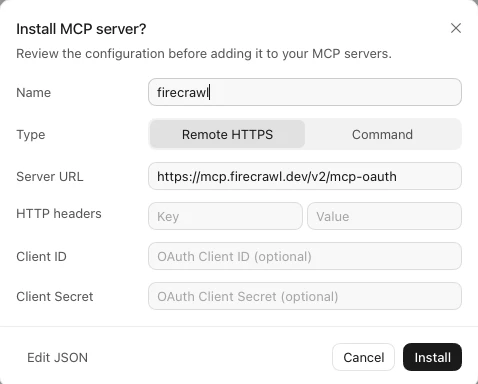
Connect your Firecrawl account
Use the server's sign-in option in Cursor's MCP settings. Firecrawl opens in your browser: sign in, choose a team with Alexandria enabled, and approve access. A green dot next to Firecrawl means it's connected.
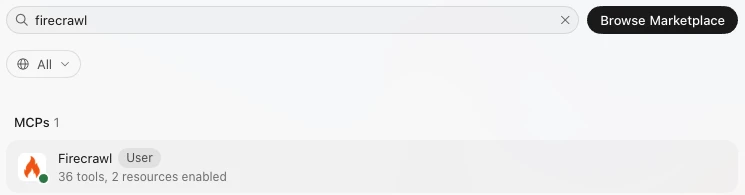
Ask Cursor's agent for the data
In the agent chat, ask in plain language and mention Campspot or Firecrawl Alexandria. The agent finds the Campspot capability that fits and runs it. For example:
Use Firecrawl to find the first 10 Campspot parks within 50 miles of Austin for two adults and one pet in an RV, June 11–13, 2027, ordered by distance.
What can Cursor do with Campspot?
Campspot campground marketplace (www.campspot.com): destination and park suggestions, dated park search by coordinates or place name with guest, pet, site-type, amenity and rating filters, park details and policies, per-park site-type availability and pricing for a date range, and the full park catalogue from the sitemap. Anonymous, read-only; nothing here books, holds or signs in.
Cursor can run any of Campspot's 5 capabilities through Alexandria. Each call is billed in Firecrawl credits on your Firecrawl team.
- Get park: One park's record from the booking API: identity and slugs, address and coordinates, time zone, currency, contact and website, description, Campspot rating, check-in/out times, site-type categories, park features, nearby activities, campsite amenities, RV types, policies (cancellation, refund, terms as HTML), closed date ranges, promotions and images. Costs 5 Firecrawl credits per call.
- Get park availability: Site types (campsite types) of one park with availability for a date range and party, average nightly price, total trip price, failure reasons for unavailable types, and the individual campsites with their availability, amenities and RV constraints. Without dates the site returns every type and campsite with no availability verdict and only a lowest baseline price. Works for every Campspot park, including booking-engine-only parks the marketplace does not list (the program then asks the way /book/{slug} does, by guest age category, and says so in a booking_engine_inventory warning). Costs 5 Firecrawl credits per call.
- List parks: The full Campspot park catalogue from the site's park sitemap (about 3,150 marketplace pages): aggregator slug, marketplace URL and the sitemap's last-modified date, in sitemap order, with offset pagination and an optional substring filter on the slug. Costs 5 Firecrawl credits per call.
- Search parks: Paginated park search around a point (latitude/longitude or a place name resolved through the site's autocomplete) with optional dates, guests, pets, site type (rv, tent, lodging), amenities, park features, minimum rating and RV constraints; sorted by distance or rating. Each result carries park_id, booking slug, coordinates, distance, availability for the requested dates, starting price, categories, features and rating. Filters other than dates/guests are soft on the site: non-matching parks are still returned with matches_filters false. Costs 5 Firecrawl credits per call.
- Suggest locations: Destination and park suggestions for a typed place or park name, from Campspot's search-box autocomplete. Places carry a location_metadata_id (resolved to coordinates when resolve_coordinates is true); parks carry their park_id, marketplace slug and coordinates directly. Costs 5 Firecrawl credits per call.
What should I ask Cursor?
Name Campspot or Firecrawl Alexandria in the prompt so Cursor reaches for it. Each example opens in Cursor with the prompt filled in.
- Use Firecrawl to find the first 10 Campspot parks within 50 miles of Austin for two adults and one pet in an RV, June 11–13, 2027, ordered by distance.
- Use Firecrawl to find up to five Campspot park and destination suggestions for Austin with resolved coordinates.
- Use Firecrawl to find the nearest Campspot park to Austin and show its pet policy, check-in times, cancellation policy and campsite amenities.
- Use Firecrawl to find the nearest Campspot park to Austin and show site-type availability and total trip prices for two adults and one pet, June 11–13, 2027.
Troubleshooting
Why can't Cursor find Campspot?
If Firecrawl's tools in Cursor stop at search, scrape and parse, the connection is keyless and doesn't include Alexandria. Finish the sign-in from Cursor's MCP settings, or add an API key from a team with Alexandria enabled.
Firecrawl shows a red dot in Cursor. What should I do?
Open Cursor's MCP settings, sign in to Firecrawl again, and restart the agent chat so it loads the tools.
Use Campspot in other AI apps
The same Firecrawl account reaches Campspot from other AI apps. Pick one for its setup steps:

Other data providers you can connect to Cursor
Frequently Asked Questions
What is Firecrawl?
Firecrawl is the web data API to search, scrape and interact with the web at scale. It turns websites into clean, LLM-ready data for AI agents and apps. The Firecrawl MCP server brings those tools into Cursor, along with every data provider in Firecrawl Alexandria.
What is Firecrawl Alexandria?
Firecrawl Alexandria is Firecrawl's library of 550+ data providers for AI agents, Campspot among them. Each provider returns structured data through documented capabilities. Cursor finds the capability that fits your question and calls it through the Firecrawl MCP server, so you don't write any integration code. Alexandria needs a Firecrawl account signed in on a team with Alexandria enabled, or an API key from such a team; keyless connections don't include it.
Is there a Campspot MCP server for Cursor?
Cursor reaches Campspot through Firecrawl's hosted MCP server, which serves Campspot and every other Alexandria provider as tools. Add the Firecrawl MCP server once and you don't install or host a separate MCP server for Campspot.
What does connecting Campspot to Cursor unlock?
Cursor can run all 5 of Campspot's capabilities, including Get park, Get park availability and List parks, from any chat, with structured results it can sort, compare and summarize. For example, ask: "Use Firecrawl to find the first 10 Campspot parks within 50 miles of Austin for two adults and one pet in an RV, June 11–13, 2027, ordered by distance." In the same conversation, Cursor can combine Campspot with Firecrawl's web search and scraping and the other providers in Firecrawl Alexandria.
Do I need my own Campspot account or API key to use it in Cursor?
No. Cursor calls Campspot through Firecrawl Alexandria and each call is billed in Firecrawl credits, so you don't need a separate Campspot account or API key.
How much does it cost to use Campspot in Cursor?
Each Campspot call costs 5 Firecrawl credits. The capability list on this page shows each price and its unit. The credits come from the Firecrawl team you connect to Cursor, and finding the right capability is free.
Can Cursor use other providers besides Campspot?
Yes. The same Firecrawl MCP server reaches every provider in Firecrawl Alexandria, along with Firecrawl's web search and scraping, so you connect once.
Can I use Campspot in other AI apps?
Yes. Connect Firecrawl to ChatGPT, Claude, Grok Bot, Muse signed in on a Firecrawl team with Alexandria enabled, or use the Firecrawl MCP server, CLI or API with an API key from that team, and the same Campspot capabilities are available there. Keyless connections don't include Alexandria.