How to connect US Census Bureau to Cursor
Add the Firecrawl MCP server to Cursor once and it can call the US Census Bureau API and every other provider in Firecrawl Alexandria, with no US Census Bureau integration code.
To connect US Census Bureau to Cursor, add the Firecrawl MCP server to Cursor, sign in on a Firecrawl team with Alexandria enabled, and ask for US Census Bureau data in plain language. The connection works in Cursor's agent and chat, and you set it up once.
Cursor uses US Census Bureau as an MCP tool through Firecrawl's hosted MCP server, so you don't install or host a separate MCP server for US Census Bureau.
Cursor is an AI code editor. Its agent uses MCP servers for outside tools, and the Firecrawl MCP server adds web search, scraping and every data provider in Firecrawl Alexandria.
How do I connect US Census Bureau to Cursor?
Install the Firecrawl MCP server
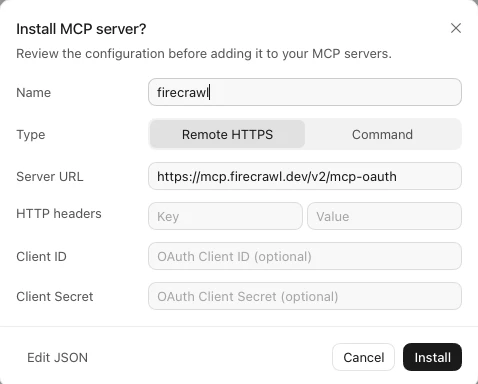
Open the install dialog in Cursor, check that the URL is Firecrawl's hosted server, then select Install.
Connect your Firecrawl account
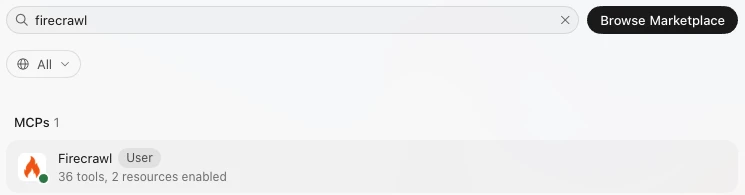
Use the server's sign-in option in Cursor's MCP settings. Firecrawl opens in your browser: sign in, choose a team with Alexandria enabled, and approve access. A green dot next to Firecrawl means it's connected.
Ask Cursor's agent for the data
In the agent chat, ask in plain language and mention US Census Bureau or Firecrawl Alexandria. The agent finds the US Census Bureau capability that fits and runs it. For example:
Use Firecrawl to show total population and margin of error for every California county in the 2023 ACS 5-year estimates.
What can Cursor do with US Census Bureau?
Discover Census datasets, variables and geography codes, then retrieve published estimates, margins of error and counts with source annotations; County Business Patterns establishments, employment and payroll by NAICS industry for the nation, states and counties; manufacturing shipments, value added, payroll and inventories (Annual Integrated Economic Survey and Economic Census); monthly manufacturers' shipments, new orders, unfilled orders and inventories (M3 factory orders and advance durable goods); monthly US imports and exports by HS commodity code, partner country and port (international trade API, keyed); and the Population Estimates Program and SAIPE poverty and income files from www2.census.gov.
Cursor can run any of US Census Bureau's 14 capabilities through Alexandria. Each call is billed in Firecrawl credits on your Firecrawl team.
- Cbp: County Business Patterns for one NAICS industry: establishments, March employment and annual and first-quarter payroll for the nation, a state, every state, a county or every county in a state, as labeled records with disclosure and noise flags resolved (withheld cells are null with the flag explained). Reads the CBP table (CBP<year>.CB<yy>00CBP) from the keyless data.census.gov backend; NAICS levels from 2-digit sectors to 6-digit industries. Costs 5 Firecrawl credits per call.
- Data: Retrieve estimates. Input: dataset path (acs/acs5, acs/acs1, acs/acs5/subject, acs/acs5/profile, dec/pl, dec/dhc, pep/population, cbp ...), vintage, 1-200 variable names or group(TABLE) tokens, and a geography as Data API for/in predicates (for: 'county:*', in: ['state:06']). Returns one row per geography with values as published, sentinels turned into null plus annotation, FIPS parts, variable metadata with units, and the equivalent api.census.gov URL. Unknown variables are rejected with invalid_input naming them. A variable list may be one name or a comma-separated string, and geography.for / geography.in may be a string or a list. A number is accepted where a code or year is a string. Unknown options are rejected by name. Costs 5 Firecrawl credits per call.
- Datasets: Search the Census Data API catalog. Input: free-text query over dataset path, title and description plus an optional vintage (year). Returns one record per dataset/vintage with its API endpoint, metadata links, publication date and supported geography levels. Costs 5 Firecrawl credits per call.
- Geographies: Geography resolver. Input: a place, county, state, tract or other geography name (e.g. 'Travis County, Texas'). Returns matching Census geographies with summary level, GEO_ID, FIPS parts and the exact `for`/`in` predicates to pass to `data`. Costs 5 Firecrawl credits per call.
- M3: Manufacturers' Shipments, Inventories and Orders (M3), the monthly factory orders and durable goods survey: value of shipments, new orders, unfilled orders and inventories (total and by stage) plus inventory/shipment and unfilled-orders/shipment ratios for total manufacturing, durable and nondurable goods, core capital goods and 80+ industry categories, US, millions of dollars, from 1992. Reads the full report (programCode M3) and the advance durable goods report (M3ADV, about a week earlier) from www.census.gov; report latest takes each series from whichever reaches the newer month. Costs 5 Firecrawl credits per call.
- Manufacturing: Manufacturing statistics for one NAICS industry (31-33 or any code under it): employees, production workers and hours, payroll and wages, value of shipments, value added, cost of materials, capital expenditures and end-of-year inventories, in thousands of dollars as published. source aies reads the Annual Integrated Economic Survey (AIES31BASIC01; reference years 2023+, US down to 6-digit NAICS, states down to 4-digit, with coefficients of variation); source economic_census reads the Economic Census (EC<yy>31BASIC; 2017 and 2022, US, states and counties, with establishment counts). Withheld cells are null with the flag explained. Costs 5 Firecrawl credits per call.
- Popest get: One PEP geography by its own codes, as its estimate-year records (same shape as popest_list). counties: state + county (county omitted or 000 = the state row). subcounty: the per-state file; select by place (default SUMLEV 162, or 157 together with county), cousub + county (SUMLEV 061), concit, or an explicit sumlev; nothing but state = the state row. More than one matching row is invalid_input asking for sumlev; none is not_found. state, county, place, cousub, concit and sumlev may be numbers (6 becomes 06, 40 becomes 040). Unknown options are rejected by name. Costs 5 Firecrawl credits per call.
- Popest list: List Vintage 2020-YYYY population estimates from one PEP file as one record per geography and estimate year: counties (SUMLEV 040 states and 050 counties; components of change, group quarters and per-1,000 rates) or subcounty (places, county subdivisions, consolidated cities; population only). The whole file is fetched per call (2.1 MB counties, 7.5 MB national subcounty, ~30 KB per state) and paged from memory; the cursor pins vintage, file, Last-Modified and size and a changed file fails with publication_changed. source_record_id = v<vintage>:<file>:<sumlev>:<geo_id>:<year>. Names are decoded from Latin-1. Costs 5 Firecrawl credits per call.
- Popest status: Cheap version check of the Population Estimates Program (PEP) file tree on www2.census.gov: newest 2020-YYYY vintage directory, then HEAD of counties/totals/co-est<YYYY>-alldata.csv and cities/totals/sub-est<YYYY>.csv (size, Last-Modified, publication_id = v<YYYY>:<file>:<Last-Modified>), plus the per-state sub-county files from the cities/totals listing. No publisher hash exists; popest_list reports the SHA-256 of the file it reads. Costs 5 Firecrawl credits per call.
- Saipe get: One SAIPE record by state and county FIPS for a year: reads est<yy>-<st>.txt (county omitted or 000 = the state row) or, for state 00 / US, the national row of est<yy>us.txt. Same record shape as saipe_list. Costs 5 Firecrawl credits per call.
See all 14 capabilities and their inputs on the US Census Bureau API page.
What should I ask Cursor?
Name US Census Bureau or Firecrawl Alexandria in the prompt so Cursor reaches for it. Each example opens in Cursor with the prompt filled in.
- Use Firecrawl to show total population and margin of error for every California county in the 2023 ACS 5-year estimates.
- Use Firecrawl to show median household income with margin of error for every census tract in San Francisco County in the 2023 ACS 5-year release.
- Use Firecrawl to find the FIPS codes for Travis County, Texas and retrieve its 2020 Census population.
- Use Firecrawl to find the 2023 ACS 5-year dataset and list the variables in its B19013 median household income table, including labels and units.
Troubleshooting
Why can't Cursor find US Census Bureau?
If Firecrawl's tools in Cursor stop at search, scrape and parse, the connection is keyless and doesn't include Alexandria. Finish the sign-in from Cursor's MCP settings, or add an API key from a team with Alexandria enabled.
Firecrawl shows a red dot in Cursor. What should I do?
Open Cursor's MCP settings, sign in to Firecrawl again, and restart the agent chat so it loads the tools.
Use US Census Bureau in other AI apps
The same Firecrawl account reaches US Census Bureau from other AI apps. Pick one for its setup steps:
- US Census Bureau in ChatGPT
- US Census Bureau in Claude
- US Census Bureau in Grok Bot
 US Census Bureau in Muse
Other data providers you can connect to Cursor
Frequently Asked Questions
What is Firecrawl?
Firecrawl is the web data API to search, scrape and interact with the web at scale. It turns websites into clean, LLM-ready data for AI agents and apps. The Firecrawl MCP server brings those tools into Cursor, along with every data provider in Firecrawl Alexandria.
What is Firecrawl Alexandria?
Firecrawl Alexandria is Firecrawl's library of 550+ data providers for AI agents, US Census Bureau among them. Each provider returns structured data through documented capabilities. Cursor finds the capability that fits your question and calls it through the Firecrawl MCP server, so you don't write any integration code. Alexandria needs a Firecrawl account signed in on a team with Alexandria enabled, or an API key from such a team; keyless connections don't include it.
Is there a US Census Bureau MCP server for Cursor?
Cursor reaches US Census Bureau through Firecrawl's hosted MCP server, which serves US Census Bureau and every other Alexandria provider as tools. Add the Firecrawl MCP server once and you don't install or host a separate MCP server for US Census Bureau.
What does connecting US Census Bureau to Cursor unlock?
Cursor can run all 14 of US Census Bureau's capabilities, including Cbp, Data and Datasets, from any chat, with structured results it can sort, compare and summarize. For example, ask: "Use Firecrawl to show total population and margin of error for every California county in the 2023 ACS 5-year estimates." In the same conversation, Cursor can combine US Census Bureau with Firecrawl's web search and scraping and the other providers in Firecrawl Alexandria.
Do I need my own US Census Bureau account or API key to use it in Cursor?
No. Cursor calls US Census Bureau through Firecrawl Alexandria and each call is billed in Firecrawl credits, so you don't need a separate US Census Bureau account or API key.
How much does it cost to use US Census Bureau in Cursor?
Each US Census Bureau call costs 5 Firecrawl credits. The capability list on this page shows each price and its unit. The credits come from the Firecrawl team you connect to Cursor, and finding the right capability is free.
Can Cursor use other providers besides US Census Bureau?
Yes. The same Firecrawl MCP server reaches every provider in Firecrawl Alexandria, along with Firecrawl's web search and scraping, so you connect once.
Can I use US Census Bureau in other AI apps?
Yes. Connect Firecrawl to ChatGPT, Claude, Grok Bot, Muse signed in on a Firecrawl team with Alexandria enabled, or use the Firecrawl MCP server, CLI or API with an API key from that team, and the same US Census Bureau capabilities are available there. Keyless connections don't include Alexandria.