How to connect Claude (claude.com) to Claude
Add the Firecrawl connector to Claude once and it can call the Claude (claude.com) API and every other provider in Firecrawl Alexandria, with no Claude (claude.com) integration code.
To connect Claude (claude.com) to Claude, add the Firecrawl connector to Claude, sign in on a Firecrawl team with Alexandria enabled, and ask for Claude (claude.com) data in plain language. The connection works in Claude on the web, Claude Desktop and Cowork, and you set it up once.
Claude uses Claude (claude.com) as an MCP tool through Firecrawl's hosted MCP server, so you don't install or host a separate MCP server for Claude (claude.com).
Claude is Anthropic's AI assistant. Connectors give it tools from other services, and the Firecrawl connector adds web search, scraping and every data provider in Firecrawl Alexandria.
How do I connect Claude (claude.com) to Claude?
Add the Firecrawl connector
Open the Firecrawl connector in Claude's connector directory and select Connect to Claude. In Claude Desktop you can also go to Customize, then Connectors, and search for Firecrawl.
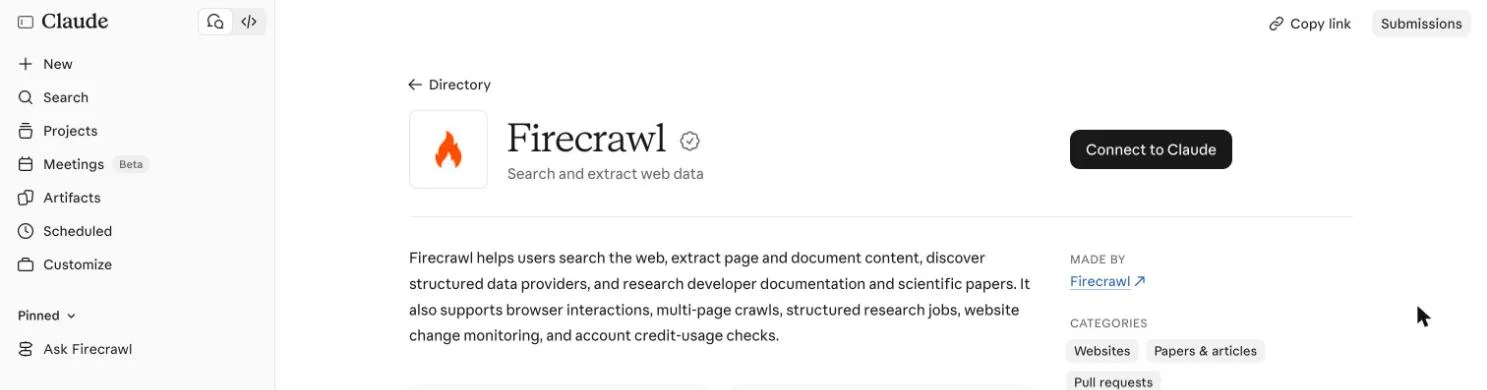
Connect your Firecrawl account
Claude opens Firecrawl in your browser. Sign in, choose a team with Alexandria enabled, and approve access. No account yet? You can create one for free in the same flow.
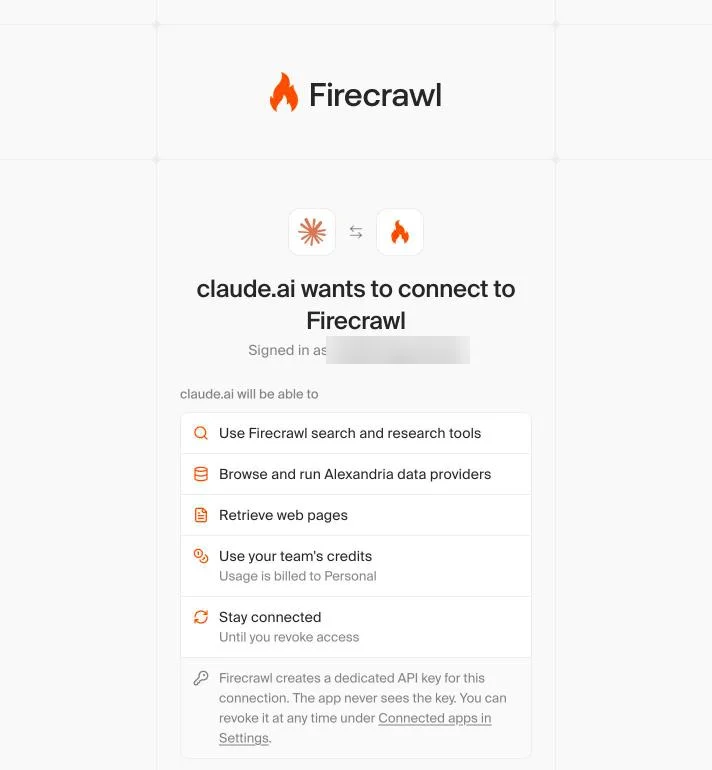
Turn on Firecrawl in a chat
In a new conversation, open the + menu, go to Connectors and switch on Firecrawl.
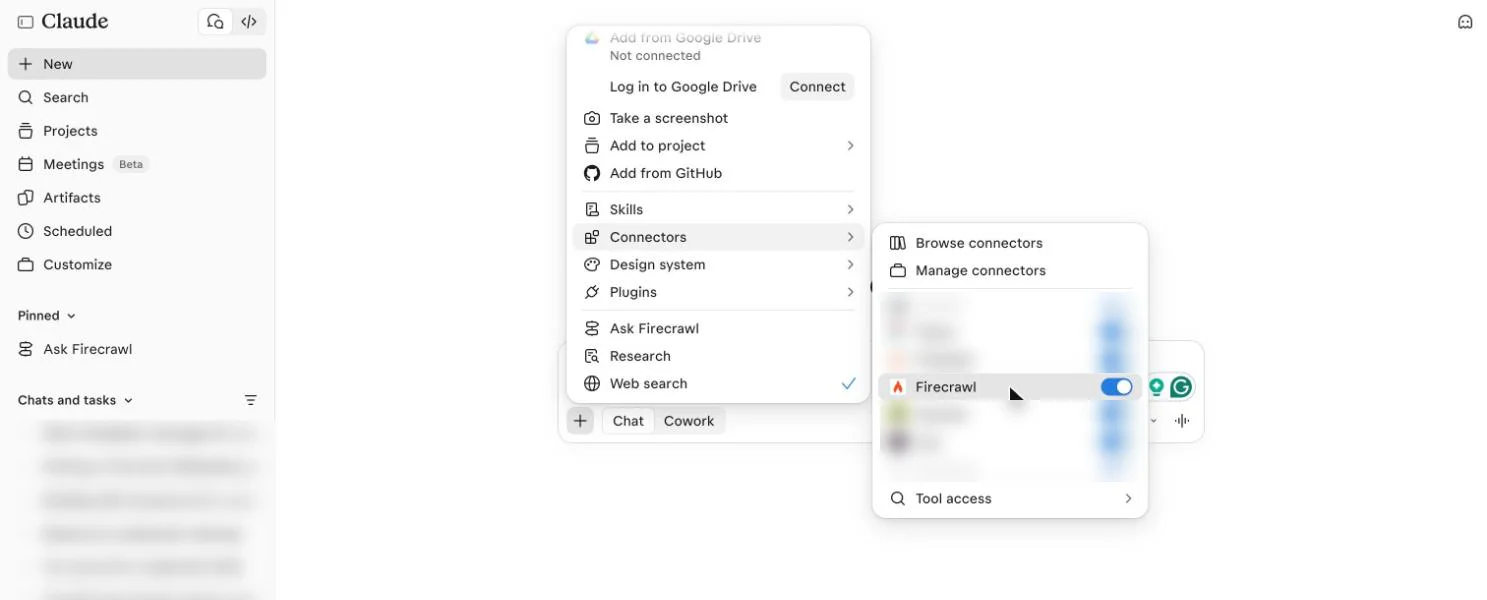
Ask Claude for the data
Ask in plain language and mention Claude (claude.com) or Firecrawl Alexandria. Claude finds the Claude (claude.com) capability that fits, checks its inputs and runs it. For example:
Use Firecrawl to run Claude (claude.com)'s Get page capability. Inspect the Alexandria inputs, ask for any missing required details, and return a small sample with sources.
What can Claude do with Claude (claude.com)?
Anthropic's Claude product site, claude.com: plan and API pricing as structured data, the resources library (articles, announcements, guides, webinars, videos) with dates, customer stories with industry, product and region, the connectors and plugins marketplace (publisher, categories, surfaces, MCP server URL), search over the claude.com help docs, and any claude.com page or help docs page as clean Markdown. Public pages and the JSON the site's own pages call; no login, key or claude.ai access.
Claude can run any of Claude (claude.com)'s 6 capabilities through Alexandria. Each call is billed in Firecrawl credits on your Firecrawl team.
- Get page: Any public claude.com page as clean Markdown: product, solution, feature and pricing pages, resources articles and guides, customer stories, marketplace connector and plugin pages, event and program pages (/code-with-claude, /programs/startups), localized copies (/de/..., /ja/...), and the claude.com help docs under /docs (read from their Markdown twins). Returns the title, meta description, publication date (articles), page facts (article category, product, date and reading time; customer industry, size, product and location; connector maker), an outline of headings (level, text, anchor) and the content. Pass `section` (heading text or anchor, case-insensitive) for one heading's subtree and `max_chars` to cap the content. Unknown pages, pages that redirect off claude.com (unknown paths redirect to claude.ai) and unknown sections are `not_found`. Costs 5 Firecrawl credits per call.
- Get pricing: Claude plans and prices from claude.com/pricing as structured data, per tab: Individual (Free, Pro, Max), Team and Enterprise (seat prices, annual and monthly), and API (current and legacy model prices per million tokens for input, output and prompt caching read and write, with long-prompt tiers, plus priced platform features such as Managed Agents, web search and code execution), with disclaimers and notes and the pricing FAQ. Set `include_comparison` for the full feature comparison tables, and `segment` for one tab. Prices are the US dollar prices the page server-renders. Costs 5 Firecrawl credits per call.
- List customers: Claude customer stories from claude.com/customers, newest first, read from the story list the page embeds (every story, not just the featured ones): customer name, headline, story URL, publication date, industries, company size, Claude products, partner and region. Filter by `q` (name, headline or slug), `industry`, `product`, `company_size`, `region` and `partner` (slug or name, case-insensitive); `facets` lists the accepted values. Window with `limit`/`offset` or the continuation. Costs 5 Firecrawl credits per call.
- List marketplace: Entries of the Claude connectors and plugins marketplace (claude.com/marketplace), read from the directory list the marketplace pages embed: every connector (about 1,000 remote MCP servers and desktop extensions) or every plugin (about 340). Each entry has its stable id, name, slug, claude.com URL, one-line description, publisher, categories, the Claude surfaces it works with, connector type, MCP server URL, verification, install or popularity numbers and the date added. Filter by `query` (name, slug, description or publisher), `category`, `works_with` and `connector_type`; `slug` returns one entry (`not_found` when absent). Sort like the site: `popular` (default), `trending`, `new` or `alphabetical`. `facets` counts every category and surface. Window with `limit`/`offset` or the continuation. Costs 5 Firecrawl credits per call.
- Search docs: Search the claude.com help docs (Claude.ai Documentation: connectors and the Connectors Directory, MCP tunnels, plugins, skills, Claude Tag, Claude Science, Cowork, Office agents, government and third-party deployments) through Anthropic's public Mintlify docs MCP server. Returns ranked hits in the vendor's order with title, URL, page path, section anchor and a Markdown snippet. The search is semantic, so unusual queries can return loosely related hits. Claude Code docs (code.claude.com) and Claude Platform API docs (platform.claude.com) are separate sources. Costs 5 Firecrawl credits per call.
- Search resources: Search and list the claude.com resources library (articles and announcements, guides, webinars, videos) newest first, through the same JSON search the site's resources pages call. Filter by full-text `query`, `type`, `category`, `product` and `use_case`; each row has the type, title, URL, date, excerpt, category, products and reading time (webinars add session time, time zone and recording flags). Pages hold 12 rows; pass `page` or follow the continuation. The site serves at most 20 pages (240 rows) per search, so a `result_cap` warning tells you to narrow the filter when `total` exceeds that. Costs 5 Firecrawl credits per call.
What should I ask Claude?
Name Claude (claude.com) or Firecrawl Alexandria in the prompt so Claude reaches for it. Each example opens in Claude with the prompt filled in.
- Use Firecrawl to run Claude (claude.com)'s Get page capability. Inspect the Alexandria inputs, ask for any missing required details, and return a small sample with sources.
- Use Firecrawl to run Claude (claude.com)'s Get pricing capability. Inspect the Alexandria inputs, ask for any missing required details, and return a small sample with sources.
- Use Firecrawl to run Claude (claude.com)'s List customers capability. Inspect the Alexandria inputs, ask for any missing required details, and return a small sample with sources.
- Use Firecrawl to run Claude (claude.com)'s List marketplace capability. Inspect the Alexandria inputs, ask for any missing required details, and return a small sample with sources.
Troubleshooting
Why doesn't Claude use Claude (claude.com)?
The connector has to be on in each conversation. Open the + menu, go to Connectors and check that Firecrawl is switched on, then ask again and name Claude (claude.com) or Firecrawl Alexandria in the prompt.
Claude says it can't reach the Firecrawl server. What should I do?
Open Customize, then Connectors, disconnect Firecrawl and connect it again. On a Team or Enterprise plan, an owner has to allow the connector before members can add it.
Why does Claude say Claude (claude.com) isn't available?
Alexandria needs a Firecrawl team with Alexandria enabled. Reconnect Firecrawl and pick that team on the consent screen.
Use Claude (claude.com) in other AI apps
The same Firecrawl account reaches Claude (claude.com) from other AI apps. Pick one for its setup steps:
- Claude (claude.com) in ChatGPT
- Claude (claude.com) in Cursor
- Claude (claude.com) in Grok Bot
 Claude (claude.com) in Muse
Other data providers you can connect to Claude
Frequently Asked Questions
What is Firecrawl?
Firecrawl is the web data API to search, scrape and interact with the web at scale. It turns websites into clean, LLM-ready data for AI agents and apps. The Firecrawl connector brings those tools into Claude, along with every data provider in Firecrawl Alexandria.
What is Firecrawl Alexandria?
Firecrawl Alexandria is Firecrawl's library of 550+ data providers for AI agents, Claude (claude.com) among them. Each provider returns structured data through documented capabilities. Claude finds the capability that fits your question and calls it through the Firecrawl connector, so you don't write any integration code. Alexandria needs a Firecrawl account signed in on a team with Alexandria enabled, or an API key from such a team; keyless connections don't include it.
Is there a Claude (claude.com) MCP server for Claude?
Claude reaches Claude (claude.com) through Firecrawl's hosted MCP server, which serves Claude (claude.com) and every other Alexandria provider as tools. Add the Firecrawl connector once and you don't install or host a separate MCP server for Claude (claude.com).
What does connecting Claude (claude.com) to Claude unlock?
Claude can run all 6 of Claude (claude.com)'s capabilities, including Get page, Get pricing and List customers, from any chat, with structured results it can sort, compare and summarize. In the same conversation, Claude can combine Claude (claude.com) with Firecrawl's web search and scraping and the other providers in Firecrawl Alexandria.
Do I need my own Claude (claude.com) account or API key to use it in Claude?
No. Claude calls Claude (claude.com) through Firecrawl Alexandria and each call is billed in Firecrawl credits, so you don't need a separate Claude (claude.com) account or API key.
How much does it cost to use Claude (claude.com) in Claude?
Each Claude (claude.com) call costs 5 Firecrawl credits. The capability list on this page shows each price and its unit. The credits come from the Firecrawl team you connect to Claude, and finding the right capability is free.
Can Claude use other providers besides Claude (claude.com)?
Yes. The same Firecrawl connector reaches every provider in Firecrawl Alexandria, along with Firecrawl's web search and scraping, so you connect once.
Can I use Claude (claude.com) in other AI apps?
Yes. Connect Firecrawl to ChatGPT, Cursor, Grok Bot, Muse signed in on a Firecrawl team with Alexandria enabled, or use the Firecrawl MCP server, CLI or API with an API key from that team, and the same Claude (claude.com) capabilities are available there. Keyless connections don't include Alexandria.