How to connect CME Group FedWatch and market data to Claude
Add the Firecrawl connector to Claude once and it can call the CME Group FedWatch and market data API and every other provider in Firecrawl Alexandria, with no CME Group FedWatch and market data integration code.
To connect CME Group FedWatch and market data to Claude, add the Firecrawl connector to Claude, sign in on a Firecrawl team with Alexandria enabled, and ask for CME Group FedWatch and market data data in plain language. The connection works in Claude on the web, Claude Desktop and Cowork, and you set it up once.
Claude uses CME Group FedWatch and market data as an MCP tool through Firecrawl's hosted MCP server, so you don't install or host a separate MCP server for CME Group FedWatch and market data.
Claude is Anthropic's AI assistant. Connectors give it tools from other services, and the Firecrawl connector adds web search, scraping and every data provider in Firecrawl Alexandria.
How do I connect CME Group FedWatch and market data to Claude?
Add the Firecrawl connector
Open the Firecrawl connector in Claude's connector directory and select Connect to Claude. In Claude Desktop you can also go to Customize, then Connectors, and search for Firecrawl.
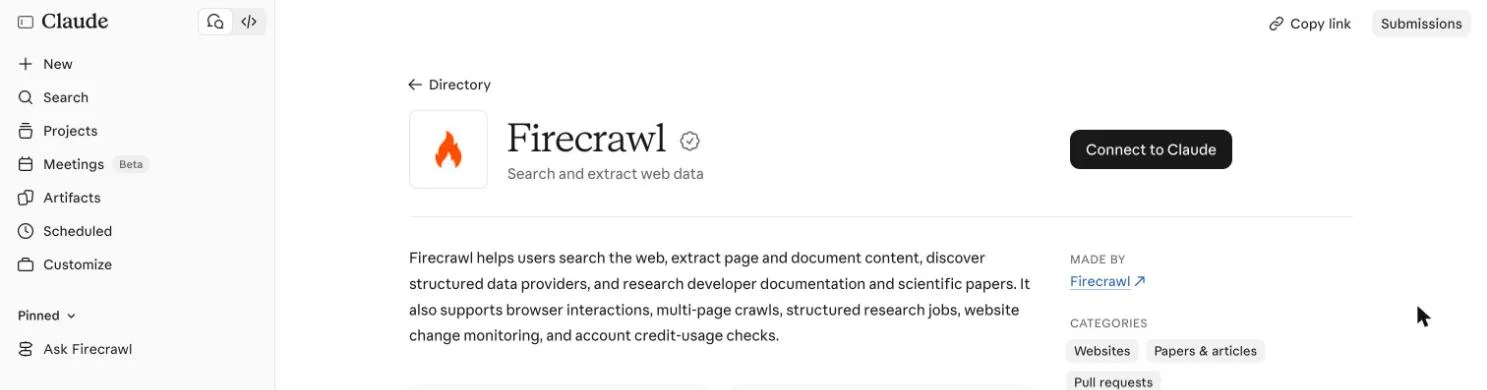
Connect your Firecrawl account
Claude opens Firecrawl in your browser. Sign in, choose a team with Alexandria enabled, and approve access. No account yet? You can create one for free in the same flow.
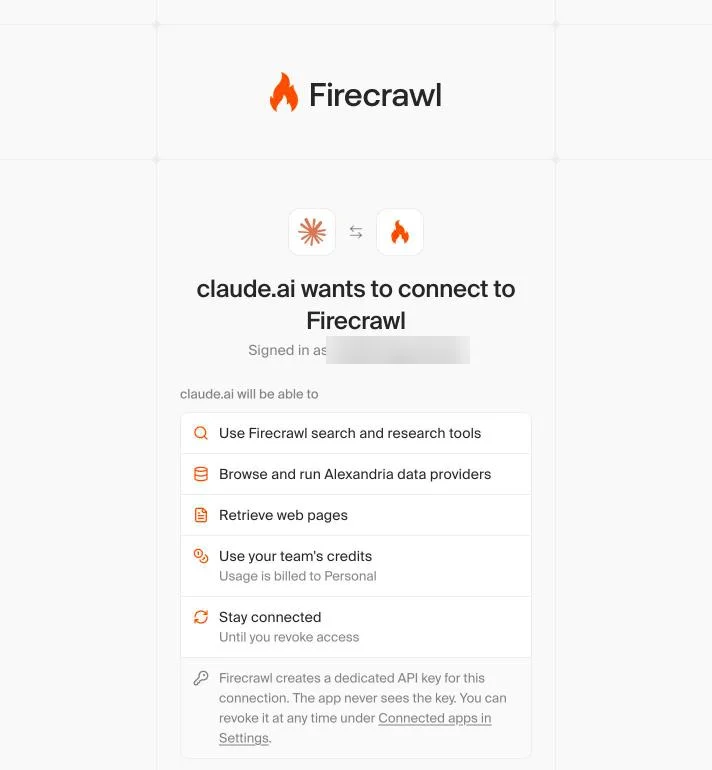
Turn on Firecrawl in a chat
In a new conversation, open the + menu, go to Connectors and switch on Firecrawl.
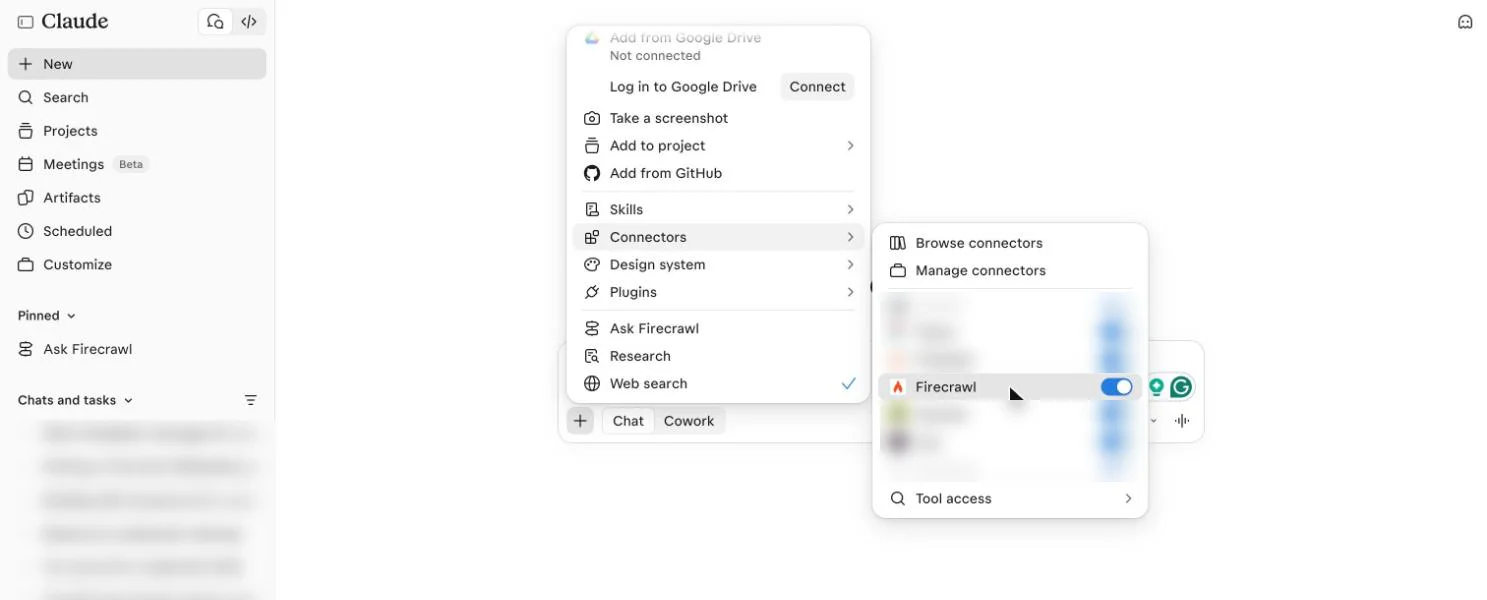
Ask Claude for the data
Ask in plain language and mention CME Group FedWatch and market data or Firecrawl Alexandria. Claude finds the CME Group FedWatch and market data capability that fits, checks its inputs and runs it. For example:
Use Firecrawl to show CME FedWatch’s probabilities of easing, no change and a hike for the next FOMC meeting, including the data-as-of date and comparisons with a week ago.
What can Claude do with CME Group FedWatch and market data?
CME FedWatch market-implied FOMC rate probabilities (the QuikStrike tool embedded on cmegroup.com: current view and per-meeting daily probability history), CME Group's public CmeWS market data JSON (delayed futures quotes, daily settlements, volume and open interest, contract specifications, product search, CME Term SOFR / SOFR average rates) and CME Globex trading hours: per-product per-date preopen/open/close events in U.S. Central for any past or future window (holiday schedules included), the upcoming holiday calendar, and a filterable product listing with hours.
Claude can run any of CME Group FedWatch and market data's 11 capabilities through Alexandria. Each call is billed in Firecrawl credits on your Firecrawl team.
- Contract specs: Contract specifications for one CME product from CmeWS: codes (Globex, clearing, ClearPort), contract unit, price quotation, minimum price fluctuation, listed contracts, settlement method and procedures, trading hours and termination of trading, as plain text. Costs 5 Firecrawl credits per call.
- Fedwatch meetings: CME FedWatch (QuikStrike) current view: the upcoming FOMC meeting tabs and, for the default (nearest) meeting, the 30 Day Fed Funds contract behind it, the ease / no change / hike probabilities and the target-rate probability table compared with one day, one week and one month earlier. The figures move intraday with the 30 Day Fed Funds futures; data_as_of is FedWatch's stamp as printed (12-hour clock, no AM/PM) and data_as_of_iso is the same instant as an unambiguous RFC 3339 Central timestamp. Mints a QuikStrike session (two requests: entry page with the cmegroup.com referer, then the view). Costs 5 Firecrawl credits per call.
- Fedwatch probability history: Daily history of CME FedWatch target-rate probabilities for one FOMC meeting, from the QuikStrike MeetingExport CSV: one row per trading day since the contract was modelled, each with the probability of every target range FedWatch modelled that day; latest is the most recent row in the returned window. Optionally restricted to a from/to date window. A date that is not an FOMC meeting FedWatch tracks is not_found. Costs 5 Firecrawl credits per call.
- Futures quotes: Delayed (10 minute) quotes for every listed contract month of one CME futures product from the CmeWS quotes v2 JSON: last, change, prior settle, open/high/low, volume and expiration data per contract. Prices are kept as the strings CME publishes. Costs 5 Firecrawl credits per call.
- Futures settlements: Daily futures settlements for one CME product on one trade date from CmeWS: settle, open/high/low/last, change, volume and open interest per contract month plus the total row, and the list of trade dates CME currently offers. Without trade_date the latest available date is used (one extra request). Costs 5 Firecrawl credits per call.
- Futures volume: Daily volume and open interest by contract month for one CME futures product on one trade date (CmeWS Volume Details, preliminary report): Globex, open outcry, ClearPort and block volume, deliveries, open interest at close and its change, with totals. Without trade_date the latest settlement date is used (one extra request). Costs 5 Firecrawl credits per call.
- Product search: Search CME's product slate (futures, all venues) by name or code and get numeric product ids with Globex/clearing codes, group, exchange, volume and open interest, ranked by CME's rank; paged with page / page_size. Costs 5 Firecrawl credits per call.
- Sofr rates: CME Term SOFR reference rates (1M, 3M, 6M, 1Y fixings), 30/90/180-day SOFR averages and the SOFR index for recent business days, plus the latest SOFR swap and SOFR-Fed Funds basis curves, from cmegroup.com's sofr-strip-rates service. Costs 5 Firecrawl credits per call.
- Trading hours by product: CME Globex trading-hours events (preopen, open, closed and any other session change CME schedules) for one or more products over a calendar-date window, past or future, from CME's trading-hours service. Each product carries one entry per calendar day in the window with the events CME schedules that day: the event type, the trading date the session belongs to (an evening open belongs to the next trading date), the wall-clock time in U.S. Central and an RFC 3339 timestamp with the Central offset. Weekends and regular days are answered too, so a normal trading day shows the regular 16:00 close and 17:00 open rather than a holiday schedule; for a holiday ask for the day before through the day after (trading_hours_holidays gives start_period / end_period). Costs 5 Firecrawl credits per call.
- Trading hours holidays: CME Globex holiday calendar from the trading-hours page: each upcoming holiday with its date and the start/end of the affected period (the window to pass to trading_hours_by_product), plus the exchange, asset-class/sub-group and Futures/Options filter vocabularies trading_hours_search accepts. Forward-looking only: CME lists upcoming holidays (about a year ahead), never past ones. Columbus Day and Veterans Day are not CME Globex holidays and do not appear. Costs 5 Firecrawl credits per call.
See all 11 capabilities and their inputs on the CME Group FedWatch and market data API page.
What should I ask Claude?
Name CME Group FedWatch and market data or Firecrawl Alexandria in the prompt so Claude reaches for it. Each example opens in Claude with the prompt filled in.
- Use Firecrawl to show CME FedWatch’s probabilities of easing, no change and a hike for the next FOMC meeting, including the data-as-of date and comparisons with a week ago.
- Use Firecrawl to find the next FOMC meeting CME FedWatch tracks and show its daily target-rate probability history for the last 30 days.
- Use Firecrawl to show the five nearest-expiring 30 Day Federal Funds futures contracts, CME product 305, with delayed last prices, prior settlements and volumes.
- Use Firecrawl to show the latest available settlements and open interest for 30 Day Federal Funds futures, CME product 305, including the trade date.
Troubleshooting
Why doesn't Claude use CME Group FedWatch and market data?
The connector has to be on in each conversation. Open the + menu, go to Connectors and check that Firecrawl is switched on, then ask again and name CME Group FedWatch and market data or Firecrawl Alexandria in the prompt.
Claude says it can't reach the Firecrawl server. What should I do?
Open Customize, then Connectors, disconnect Firecrawl and connect it again. On a Team or Enterprise plan, an owner has to allow the connector before members can add it.
Why does Claude say CME Group FedWatch and market data isn't available?
Alexandria needs a Firecrawl team with Alexandria enabled. Reconnect Firecrawl and pick that team on the consent screen.
Use CME Group FedWatch and market data in other AI apps
The same Firecrawl account reaches CME Group FedWatch and market data from other AI apps. Pick one for its setup steps:
- CME Group FedWatch and market data in ChatGPT
- CME Group FedWatch and market data in Cursor
- CME Group FedWatch and market data in Grok Bot
 CME Group FedWatch and market data in Muse
Other data providers you can connect to Claude
Frequently Asked Questions
What is Firecrawl?
Firecrawl is the web data API to search, scrape and interact with the web at scale. It turns websites into clean, LLM-ready data for AI agents and apps. The Firecrawl connector brings those tools into Claude, along with every data provider in Firecrawl Alexandria.
What is Firecrawl Alexandria?
Firecrawl Alexandria is Firecrawl's library of 550+ data providers for AI agents, CME Group FedWatch and market data among them. Each provider returns structured data through documented capabilities. Claude finds the capability that fits your question and calls it through the Firecrawl connector, so you don't write any integration code. Alexandria needs a Firecrawl account signed in on a team with Alexandria enabled, or an API key from such a team; keyless connections don't include it.
Is there a CME Group FedWatch and market data MCP server for Claude?
Claude reaches CME Group FedWatch and market data through Firecrawl's hosted MCP server, which serves CME Group FedWatch and market data and every other Alexandria provider as tools. Add the Firecrawl connector once and you don't install or host a separate MCP server for CME Group FedWatch and market data.
What does connecting CME Group FedWatch and market data to Claude unlock?
Claude can run all 11 of CME Group FedWatch and market data's capabilities, including Contract specs, Fedwatch meetings and Fedwatch probability history, from any chat, with structured results it can sort, compare and summarize. For example, ask: "Use Firecrawl to show CME FedWatch’s probabilities of easing, no change and a hike for the next FOMC meeting, including the data-as-of date and comparisons with a week ago." In the same conversation, Claude can combine CME Group FedWatch and market data with Firecrawl's web search and scraping and the other providers in Firecrawl Alexandria.
Do I need my own CME Group FedWatch and market data account or API key to use it in Claude?
No. Claude calls CME Group FedWatch and market data through Firecrawl Alexandria and each call is billed in Firecrawl credits, so you don't need a separate CME Group FedWatch and market data account or API key.
How much does it cost to use CME Group FedWatch and market data in Claude?
Each CME Group FedWatch and market data call costs 5 Firecrawl credits. The capability list on this page shows each price and its unit. The credits come from the Firecrawl team you connect to Claude, and finding the right capability is free.
Can Claude use other providers besides CME Group FedWatch and market data?
Yes. The same Firecrawl connector reaches every provider in Firecrawl Alexandria, along with Firecrawl's web search and scraping, so you connect once.
Can I use CME Group FedWatch and market data in other AI apps?
Yes. Connect Firecrawl to ChatGPT, Cursor, Grok Bot, Muse signed in on a Firecrawl team with Alexandria enabled, or use the Firecrawl MCP server, CLI or API with an API key from that team, and the same CME Group FedWatch and market data capabilities are available there. Keyless connections don't include Alexandria.