How to connect CMS data.cms.gov to Grok Bot
Add the Firecrawl plugin to Grok Bot once and it can call the CMS data.cms.gov API and every other provider in Firecrawl Alexandria, with no CMS data.cms.gov integration code.
To connect CMS data.cms.gov to Grok Bot, add the Firecrawl plugin to Grok Bot, sign in on a Firecrawl team with Alexandria enabled, and ask for CMS data.cms.gov data in plain language. The connection works in every Bot in your Grok Bot account, and you set it up once.
Grok Bot uses CMS data.cms.gov as an MCP tool through Firecrawl's hosted MCP server, so you don't install or host a separate MCP server for CMS data.cms.gov.
Grok Bot is xAI's agent app. Plugins give your Bots outside tools, and the Firecrawl plugin adds web search, scraping and every data provider in Firecrawl Alexandria.
How do I connect CMS data.cms.gov to Grok Bot?
Add the Firecrawl plugin
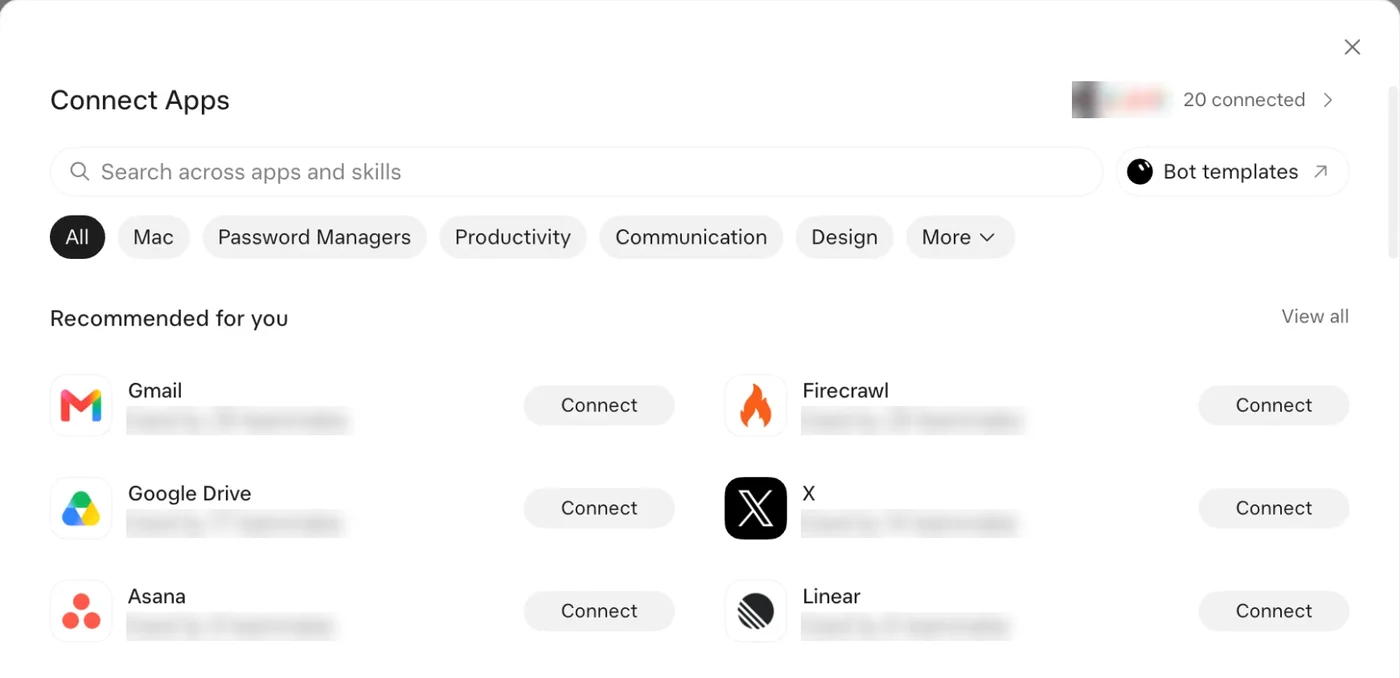
In Grok Bot, open Connect apps from the sidebar, find Firecrawl and select Connect. You can also open Firecrawl's plugin listing and select Add to Grok Bot, which opens the desktop app to finish the install.
Connect your Firecrawl account
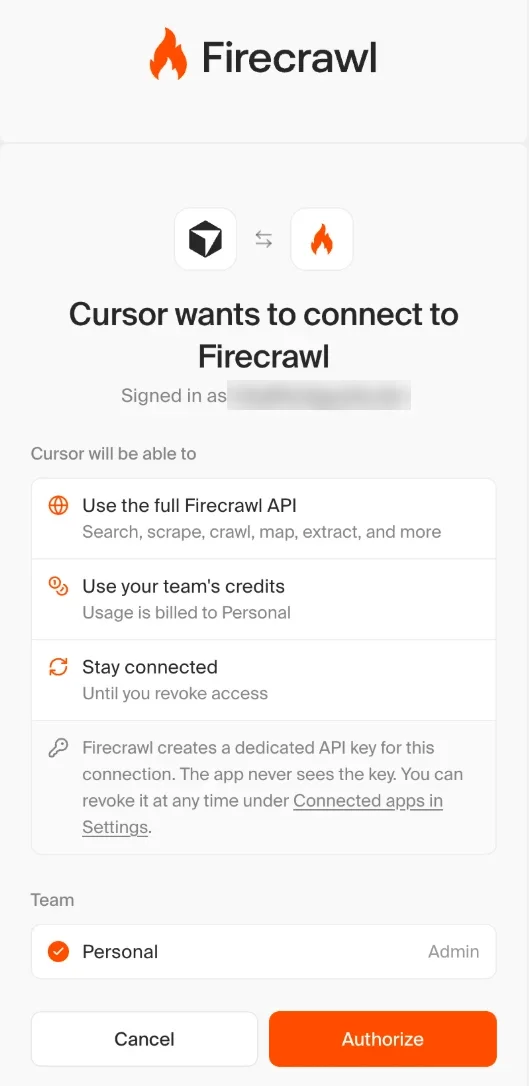
Grok Bot opens Firecrawl in your browser. Sign in, choose a team with Alexandria enabled, and select Authorize. The screen names Cursor, because the plugin is published on the Cursor Marketplace. No account yet? You can create one for free in the same flow.
Ask your Bot for the data
In a chat, ask in plain language and mention CMS data.cms.gov or Firecrawl Alexandria. To make sure the Bot uses Firecrawl, type @ and choose Firecrawl first. For example:
Use Firecrawl to show CMS procedure categories, reported volume and volume percentile for clinician NPI 1003000639, including the profile display indicator.
What can Grok Bot do with CMS data.cms.gov?
CMS data.cms.gov: Provider Data Catalog datasets (NPI-keyed clinician procedure volume; Care Compare search and detail for hospitals, nursing homes, home health agencies and dialysis facilities); what Medicare Part D, Medicare Part B and Medicaid spend on each drug, searched by brand or generic name or ranked by spending, claims, patients or unit-cost growth; and the Medicare and Medicaid Spending by Drug collectors (Part D, Part B and Medicaid annual and quarterly spending by drug and manufacturer, Part D prescribing by geography and drug): dataset catalogue, version status, full paged listing pinned to one release, and single-record lookup. CMS data is a U.S. Government work; spending answers carry CMS's attribution line.
Grok Bot can run any of CMS data.cms.gov's 15 capabilities through Alexandria. Each call is billed in Firecrawl credits on your Firecrawl team.
- Dialysis facilities: Search CMS Dialysis Facility Care Compare by state, city, ZIP, name or five-star rating. Each result carries the CCN, address, ESRD network, ownership, chain, star rating, station count, late shift and the dialysis modalities offered. Requires at least one of state, city, zip_code or name. Results are ordered by CCN and paginated with offset/next_offset; an explicit zero-match query returns an empty results array. Costs 5 Firecrawl credits per call.
- Dialysis facility: Return one CMS Dialysis Facility Care Compare facility by CCN: identity, chain and ownership, modalities, star rating with its period, and eleven standardized outcomes (survival, hospitalization, readmission, transfusion, transplant waitlisting, ED visits, modality switch, bloodstream infection, fistula) with categories, confidence limits and periods. Costs 5 Firecrawl credits per call.
- Home health agencies: Search CMS Home Health Care Compare agencies by state, city, ZIP, name or quality of patient care star rating. Each result carries the CCN, address, ownership, certification date and the half-star quality of patient care rating with CMS's footnote when unrated. Requires at least one of state, city, zip_code or name. Results are ordered by CCN and paginated with offset/next_offset; an explicit zero-match query returns an empty results array. Costs 5 Firecrawl credits per call.
- Home health agency: Return one CMS Home Health Care Compare agency by CCN: identity, ownership, services offered, quality of patient care star rating, twelve OASIS patient-care measures with numerators and denominators, three claims-based risk-standardized outcomes and Medicare spending per episode. Costs 5 Firecrawl credits per call.
- Hospital: Return one CMS Care Compare hospital by CCN: identity, type, ownership, emergency services, Birthing-Friendly designation, Overall Hospital Quality Star Rating with footnote, and the mortality, safety, readmission, patient experience and timely-and-effective-care measure-group counts behind it. Costs 5 Firecrawl credits per call.
- Hospitals: Search CMS Care Compare hospitals (Hospital General Information) by state, city, ZIP, name or overall star rating. Each result carries the CCN, address, hospital type, ownership, emergency services and the Overall Hospital Quality Star Rating. Requires at least one of state, city, zip_code or name. Results are ordered by CCN and paginated with offset/next_offset; an explicit zero-match query returns an empty results array. Costs 5 Firecrawl credits per call.
- Nursing home: Return one CMS Nursing Home Care Compare provider by CCN: identity, ownership and chain, all six star ratings with footnotes, payroll-based staffing hours and turnover, latest inspection results, fines and payment denials, coordinates and the CMS processing date. Costs 5 Firecrawl credits per call.
- Nursing homes: Search CMS Nursing Home Care Compare (Provider Information) by state, city, ZIP, name or overall star rating. Each result carries the CCN, address, ownership, certified beds, the overall, health inspection, quality measure and staffing star ratings, Special Focus Facility status and the abuse icon. Requires at least one of state, city, zip_code or name. Results are ordered by CCN and paginated with offset/next_offset; an explicit zero-match query returns an empty results array. Costs 5 Firecrawl credits per call.
- Utilization: Return public CMS procedure-volume rows by clinician NPI, including suppressed 1-10 counts as inclusive bounds, volume percentile where reported, and profile display indicator. Some public rows are marked N by CMS and should not appear on clinician profiles; filter displayed_on_profile for profile-facing use. The recent 12-month Medicare observation window has a three-month claims-processing lag; exact measurement dates are not supplied by this API. Costs 5 Firecrawl credits per call.
- Drug spending datasets: Catalogue of the six Medicare and Medicaid Spending by Drug datasets on data.cms.gov (Part D, Part B and Medicaid annual spending by drug; quarterly Part D and Part B; Part D Prescribers by Geography and Drug): stable dataset uuid, current version uuid and label, catalogue `modified` date, reporting periods, row and column counts, CSV URL, size and publisher SHA-1, attachments, and every published version with its row count. Read from the slug resolver, dataset-resources, data-viewer metadata and the Drupal JSON:API version list; four to five requests per dataset. Costs 5 Firecrawl credits per call.
See all 15 capabilities and their inputs on the CMS data.cms.gov API page.
What should I ask Grok Bot?
Name CMS data.cms.gov or Firecrawl Alexandria in the prompt so Grok Bot reaches for it.
- Use Firecrawl to show CMS procedure categories, reported volume and volume percentile for clinician NPI 1003000639, including the profile display indicator.
- Use Firecrawl to answer this: How much did Medicare Part D and Medicaid spend on Eliquis each year from 2020 to 2024, and how has its cost per dosage unit changed?
- Use Firecrawl to answer this: Which ten drugs cost Medicare Part D the most in 2024, and which manufacturers make them?
- Use Firecrawl to answer this: Among drugs with over $1 billion in 2024 Part D spending, which cost the most per beneficiary, and what does Medicaid spend on the top one?
Troubleshooting
Why doesn't my Bot use CMS data.cms.gov?
Attach Firecrawl to the chat with @ before you ask, and name CMS data.cms.gov or Firecrawl Alexandria in the prompt.
Add to Grok Bot doesn't open the app. What should I do?
Install the Grok Bot desktop app first, or open Connect apps in Grok Bot and search for Firecrawl.
Use CMS data.cms.gov in other AI apps
The same Firecrawl account reaches CMS data.cms.gov from other AI apps. Pick one for its setup steps:
- CMS data.cms.gov in ChatGPT
- CMS data.cms.gov in Claude
- CMS data.cms.gov in Cursor
 CMS data.cms.gov in Muse
Other data providers you can connect to Grok Bot
Frequently Asked Questions
What is Firecrawl?
Firecrawl is the web data API to search, scrape and interact with the web at scale. It turns websites into clean, LLM-ready data for AI agents and apps. The Firecrawl plugin brings those tools into Grok Bot, along with every data provider in Firecrawl Alexandria.
What is Firecrawl Alexandria?
Firecrawl Alexandria is Firecrawl's library of 550+ data providers for AI agents, CMS data.cms.gov among them. Each provider returns structured data through documented capabilities. Grok Bot finds the capability that fits your question and calls it through the Firecrawl plugin, so you don't write any integration code. Alexandria needs a Firecrawl account signed in on a team with Alexandria enabled, or an API key from such a team; keyless connections don't include it.
Is there a CMS data.cms.gov MCP server for Grok Bot?
Grok Bot reaches CMS data.cms.gov through Firecrawl's hosted MCP server, which serves CMS data.cms.gov and every other Alexandria provider as tools. Add the Firecrawl plugin once and you don't install or host a separate MCP server for CMS data.cms.gov.
What does connecting CMS data.cms.gov to Grok Bot unlock?
Grok Bot can run all 15 of CMS data.cms.gov's capabilities, including Dialysis facilities, Dialysis facility and Home health agencies, from any chat, with structured results it can sort, compare and summarize. For example, ask: "Use Firecrawl to show CMS procedure categories, reported volume and volume percentile for clinician NPI 1003000639, including the profile display indicator." In the same conversation, Grok Bot can combine CMS data.cms.gov with Firecrawl's web search and scraping and the other providers in Firecrawl Alexandria.
Do I need my own CMS data.cms.gov account or API key to use it in Grok Bot?
No. Grok Bot calls CMS data.cms.gov through Firecrawl Alexandria and each call is billed in Firecrawl credits, so you don't need a separate CMS data.cms.gov account or API key.
How much does it cost to use CMS data.cms.gov in Grok Bot?
Each CMS data.cms.gov call costs 5 Firecrawl credits. The capability list on this page shows each price and its unit. The credits come from the Firecrawl team you connect to Grok Bot, and finding the right capability is free.
Can Grok Bot use other providers besides CMS data.cms.gov?
Yes. The same Firecrawl plugin reaches every provider in Firecrawl Alexandria, along with Firecrawl's web search and scraping, so you connect once.
Can I use CMS data.cms.gov in other AI apps?
Yes. Connect Firecrawl to ChatGPT, Claude, Cursor, Muse signed in on a Firecrawl team with Alexandria enabled, or use the Firecrawl MCP server, CLI or API with an API key from that team, and the same CMS data.cms.gov capabilities are available there. Keyless connections don't include Alexandria.