How to connect IMF Data to Cursor
Add the Firecrawl MCP server to Cursor once and it can call the IMF Data API and every other provider in Firecrawl Alexandria, with no IMF Data integration code.
To connect IMF Data to Cursor, add the Firecrawl MCP server to Cursor, sign in on a Firecrawl team with Alexandria enabled, and ask for IMF Data data in plain language. The connection works in Cursor's agent and chat, and you set it up once.
Cursor uses IMF Data as an MCP tool through Firecrawl's hosted MCP server, so you don't install or host a separate MCP server for IMF Data.
Cursor is an AI code editor. Its agent uses MCP servers for outside tools, and the Firecrawl MCP server adds web search, scraping and every data provider in Firecrawl Alexandria.
How do I connect IMF Data to Cursor?
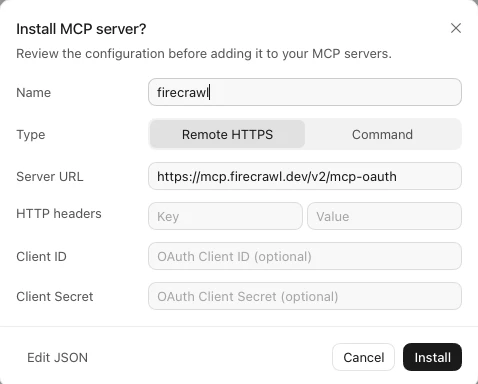
Install the Firecrawl MCP server
Open the install dialog in Cursor, check that the URL is Firecrawl's hosted server, then select Install.
Connect your Firecrawl account
Use the server's sign-in option in Cursor's MCP settings. Firecrawl opens in your browser: sign in, choose a team with Alexandria enabled, and approve access. A green dot next to Firecrawl means it's connected.
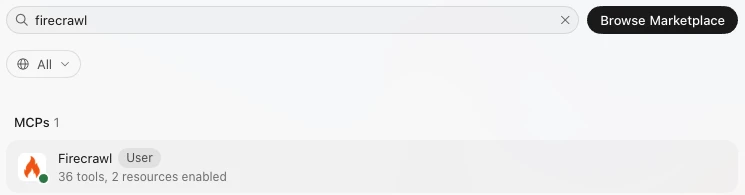
Ask Cursor's agent for the data
In the agent chat, ask in plain language and mention IMF Data or Firecrawl Alexandria. The agent finds the IMF Data capability that fits and runs it. For example:
Use Firecrawl to compare the IMF April 2026 WEO forecasts for real GDP growth in the United States and Germany for 2025 through 2027, keeping the estimate flags.
What can Cursor do with IMF Data?
IMF SDMX dataflows, structures, observations and World Economic Outlook editions.
Cursor can run any of IMF Data's 4 capabilities through Alexandria. Each call is billed in Firecrawl credits on your Firecrawl team.
- Data: Retrieve observations from any IMF dataflow (BOP current account, ER exchange rates, IL reserves, IMTS bilateral trade, CPI, GFS, FM, WEO) by dimension key. Codes are validated against the dataflow's availability; unknown codes fail with invalid_input listing valid ones. Observations carry source codes, unit, scale, status and dataset vintage; a valid key with no observations returns complete=true and no records. Costs 5 Firecrawl credits per call.
- Dataflows: List IMF Data portal dataflows (WEO, BOP, ER, IMTS, CPI, GFS_*, FM and 200+ more, including frozen vintages) filtered by a free-text query over id, agency and name. Returns dataflow records with stable AGENCY:ID identifiers for structure and data. Costs 5 Firecrawl credits per call.
- Structure: Describe one dataflow: its dimensions in SDMX key order, the concept/codelist each one uses, the codes that currently carry data, attribute ids, series count and time coverage. Use before data to learn valid REF_AREA/INDICATOR/FREQ codes. Costs 5 Firecrawl credits per call.
- Weo: World Economic Outlook observations for one edition (`latest` is the current unversioned WEO; a month such as 2026-10, 2026-04, 2025-10, `April 2025` or `October 2026` selects that vintage), given WEO subject codes (NGDP_RPCH, PCPIPCH, LUR, GGXWDG_NGDP, BCA_NGDPD, or the same code with spaces or hyphens) and ISO3 economy or WEO group codes. Every row carries the edition, publication date and is_estimate (year after LATEST_ACTUAL_ANNUAL_DATA), so two editions can be compared for revisions. Costs 5 Firecrawl credits per call.
What should I ask Cursor?
Name IMF Data or Firecrawl Alexandria in the prompt so Cursor reaches for it. Each example opens in Cursor with the prompt filled in.
- Use Firecrawl to compare the IMF April 2026 WEO forecasts for real GDP growth in the United States and Germany for 2025 through 2027, keeping the estimate flags.
- Use Firecrawl to answer this: How did the IMF forecast for US real GDP growth in 2026 change between the October 2025 and April 2026 WEO editions?
- Use Firecrawl to find the IMF monthly consumer price inflation series for the United States and return observations for 2023 through 2025 with units and status flags.
- Use Firecrawl to find IMF bilateral goods-trade data for US trade with Canada in 2024, and return quarterly observations with units and dataset vintage.
Troubleshooting
Why can't Cursor find IMF Data?
If Firecrawl's tools in Cursor stop at search, scrape and parse, the connection is keyless and doesn't include Alexandria. Finish the sign-in from Cursor's MCP settings, or add an API key from a team with Alexandria enabled.
Firecrawl shows a red dot in Cursor. What should I do?
Open Cursor's MCP settings, sign in to Firecrawl again, and restart the agent chat so it loads the tools.
Use IMF Data in other AI apps
The same Firecrawl account reaches IMF Data from other AI apps. Pick one for its setup steps:

Other data providers you can connect to Cursor
Frequently Asked Questions
What is Firecrawl?
Firecrawl is the web data API to search, scrape and interact with the web at scale. It turns websites into clean, LLM-ready data for AI agents and apps. The Firecrawl MCP server brings those tools into Cursor, along with every data provider in Firecrawl Alexandria.
What is Firecrawl Alexandria?
Firecrawl Alexandria is Firecrawl's library of 550+ data providers for AI agents, IMF Data among them. Each provider returns structured data through documented capabilities. Cursor finds the capability that fits your question and calls it through the Firecrawl MCP server, so you don't write any integration code. Alexandria needs a Firecrawl account signed in on a team with Alexandria enabled, or an API key from such a team; keyless connections don't include it.
Is there a IMF Data MCP server for Cursor?
Cursor reaches IMF Data through Firecrawl's hosted MCP server, which serves IMF Data and every other Alexandria provider as tools. Add the Firecrawl MCP server once and you don't install or host a separate MCP server for IMF Data.
What does connecting IMF Data to Cursor unlock?
Cursor can run all 4 of IMF Data's capabilities, including Data, Dataflows and Structure, from any chat, with structured results it can sort, compare and summarize. For example, ask: "Use Firecrawl to compare the IMF April 2026 WEO forecasts for real GDP growth in the United States and Germany for 2025 through 2027, keeping the estimate flags." In the same conversation, Cursor can combine IMF Data with Firecrawl's web search and scraping and the other providers in Firecrawl Alexandria.
Do I need my own IMF Data account or API key to use it in Cursor?
No. Cursor calls IMF Data through Firecrawl Alexandria and each call is billed in Firecrawl credits, so you don't need a separate IMF Data account or API key.
How much does it cost to use IMF Data in Cursor?
Each IMF Data call costs 5 Firecrawl credits. The capability list on this page shows each price and its unit. The credits come from the Firecrawl team you connect to Cursor, and finding the right capability is free.
Can Cursor use other providers besides IMF Data?
Yes. The same Firecrawl MCP server reaches every provider in Firecrawl Alexandria, along with Firecrawl's web search and scraping, so you connect once.
Can I use IMF Data in other AI apps?
Yes. Connect Firecrawl to ChatGPT, Claude, Grok Bot, Muse signed in on a Firecrawl team with Alexandria enabled, or use the Firecrawl MCP server, CLI or API with an API key from that team, and the same IMF Data capabilities are available there. Keyless connections don't include Alexandria.