How to connect DataSF open data portal to Cursor
Add the Firecrawl MCP server to Cursor once and it can call the DataSF open data portal API and every other provider in Firecrawl Alexandria, with no DataSF open data portal integration code.
To connect DataSF open data portal to Cursor, add the Firecrawl MCP server to Cursor, sign in on a Firecrawl team with Alexandria enabled, and ask for DataSF open data portal data in plain language. The connection works in Cursor's agent and chat, and you set it up once.
Cursor uses DataSF open data portal as an MCP tool through Firecrawl's hosted MCP server, so you don't install or host a separate MCP server for DataSF open data portal.
Cursor is an AI code editor. Its agent uses MCP servers for outside tools, and the Firecrawl MCP server adds web search, scraping and every data provider in Firecrawl Alexandria.
How do I connect DataSF open data portal to Cursor?
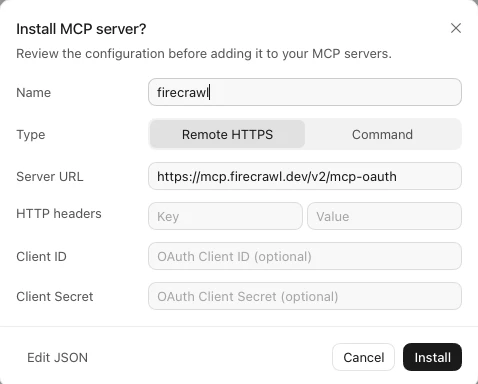
Install the Firecrawl MCP server
Open the install dialog in Cursor, check that the URL is Firecrawl's hosted server, then select Install.
Connect your Firecrawl account
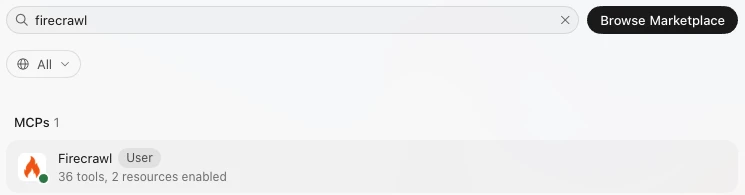
Use the server's sign-in option in Cursor's MCP settings. Firecrawl opens in your browser: sign in, choose a team with Alexandria enabled, and approve access. A green dot next to Firecrawl means it's connected.
Ask Cursor's agent for the data
In the agent chat, ask in plain language and mention DataSF open data portal or Firecrawl Alexandria. The agent finds the DataSF open data portal capability that fits and runs it. For example:
Use Firecrawl to find up to five tabular DataSF datasets about zoning and show their IDs, descriptions and published column names.
What can Cursor do with DataSF open data portal?
San Francisco's open data portal (data.sf.gov, a Socrata site): typed Department of Building Inspection building permits (search by address, parcel, contractor, type, status and dates, poll for new and changed permits, read one permit with its contractors, architects and engineers, rank contractors by permits and valuation), plus search the dataset catalog, read a dataset's metadata and columns, query and count rows of any dataset with SoQL ($select/$where/$order/$group/$q and bare field filters, including spatial functions), and list the portal's category and tag facets.
Cursor can run any of DataSF open data portal's 8 capabilities through Alexandria. Each call is billed in Firecrawl credits on your Firecrawl team.
- Dataset: Metadata and the column list of one DataSF asset from /api/views/<4x4>.json: name, description, category, tags, attribution, license, provenance, creation/update timestamps, publishing department and frequency, custom metadata fields, and every column with its SoQL field_name (which can differ from the display name and may be truncated to 10 characters on legacy imports), datatype (text, number, calendar_date, point, multipolygon ...), description and cached value statistics (counts and top values). Also returns the landing source_url and the SODA api_url. Unknown ids are not_found. Costs 5 Firecrawl credits per call.
- Datasets: Search the DataSF catalog through the Socrata Discovery API (search_context=data.sf.gov): free-text query, asset type, category, tags and sort order, or look up one asset by its 4x4 id. Each result carries the 4x4 dataset id, name, type (dataset, map, filter, href, chart, story ...), description, category, tags, timestamps, column field names and datatypes, download and view counts, the landing link, permalink and, for tabular datasets, the SODA api_url to pass to `rows`. Paged by `limit` and an opaque `cursor`. An unknown `dataset_id` is not_found; a query with no match is a successful empty result. Costs 5 Firecrawl credits per call.
- Facets: The DataSF portal's category or tag facets with asset counts, from the Discovery API domain_categories / domain_tags endpoints scoped to data.sf.gov. Use the values as `category` / `tags` inputs to `datasets`. Costs 5 Firecrawl credits per call.
- Row count: Number of rows of a DataSF dataset matching optional `where`, `q` and `filters`, from `$select=count(*)` on the SODA endpoint. Returns the integer count and the exact request URL. An unknown dataset id is not_found; a SoQL error is invalid_input. Costs 5 Firecrawl credits per call.
- Rows: Query rows of any DataSF dataset through the SODA 2.1 endpoint https://data.sf.gov/resource/<4x4>.json with SoQL: `select` (columns, aggregates such as count(*)), `where` (SoQL predicates incl. like, between, intersects(the_geom,'POINT(lon lat)'), within_circle(point, lat, lon, meters), within_box), `order`, `group`, `q` (full text) and `filters` (bare field=value equality parameters), paged with `limit` (1-50000, default 100) and `cursor` (row offset). Without `order` (and without `group`) the program orders by the row id `:id` so pages are stable. Rows come back exactly as published: numbers and dates are strings, geometry is GeoJSON; `columns` lists the returned field names and Socrata types from the X-SODA2-Fields/Types headers. An unknown dataset id is not_found; a SoQL error (unknown column, bad syntax) is invalid_input carrying the portal's message; an empty page is a successful result with count 0. Costs 5 Firecrawl credits per call.
- Contractor activity: Rank the contractors on San Francisco building permits issued in a date window by permit count, then total DBI cost estimate, in one grouped SODA request joining Building Permits (i98e-djp9) with Building Permits Contacts (3pee-9qhc). Contractors are grouped by CSLB licence number, each with the firm name, permits, total valuation, first and last issue date in the window and a source_url listing those permits. Owner-builders (licence OWN or OWNER) and contacts without a licence are left out. Optional permit type or use words and ZIP. A window without contractors is a successful result with count 0. Costs 5 Firecrawl credits per call.
- Get permit: One San Francisco building permit by DBI permit number, with the shared permit fields, every contact DBI lists (contractors with CSLB licence numbers, architects, engineers, agents) and raw: the permit's primary-address row with every Building Permits column exactly as published (block, lot, unit, stories, occupancy and construction types, estimated and revised cost, existing and proposed use and units, priority programs, supervisor district, neighborhood, site permit, ADU and reroof flags). Unknown numbers are not_found. Costs 5 Firecrawl credits per call.
- Search permits: Search San Francisco building permits from the Department of Building Inspection (DataSF dataset i98e-djp9, about 1.15 million permits, loaded daily) by street address, ZIP, Assessor block/lot, contractor or other contact name or licence number, permit type or building use, status, issue, filing and last-updated dates and minimum valuation. Newest issued first by default, or newest filed, most recently changed or largest valuation. Each record has the shared permit fields (number, type, use, description, status, filed, issued and completed dates, address, ZIP, coordinates, block/lot parcel_id, DBI cost estimate, net housing units) with every contact DBI lists (contractors with their CSLB licence numbers, architects, engineers, agents) from Building Permits Contacts (3pee-9qhc), a source_url and the PDDL licence. An empty page is a valid result. Costs 5 Firecrawl credits per call.
What should I ask Cursor?
Name DataSF open data portal or Firecrawl Alexandria in the prompt so Cursor reaches for it. Each example opens in Cursor with the prompt filled in.
- Use Firecrawl to find up to five tabular DataSF datasets about zoning and show their IDs, descriptions and published column names.
- Use Firecrawl to show the published description, update time and SoQL column names for DataSF zoning dataset 3i4a-hu95.
- Use Firecrawl to count rows in DataSF zoning dataset 3i4a-hu95 whose zoning_sim value starts with RH-1.
- Use Firecrawl to group rows in DataSF zoning dataset 3i4a-hu95 by zoning_sim and show the ten most frequent zoning values with row counts.
Troubleshooting
Why can't Cursor find DataSF open data portal?
If Firecrawl's tools in Cursor stop at search, scrape and parse, the connection is keyless and doesn't include Alexandria. Finish the sign-in from Cursor's MCP settings, or add an API key from a team with Alexandria enabled.
Firecrawl shows a red dot in Cursor. What should I do?
Open Cursor's MCP settings, sign in to Firecrawl again, and restart the agent chat so it loads the tools.
Use DataSF open data portal in other AI apps
The same Firecrawl account reaches DataSF open data portal from other AI apps. Pick one for its setup steps:
- DataSF open data portal in ChatGPT
- DataSF open data portal in Claude
- DataSF open data portal in Grok Bot
 DataSF open data portal in Muse
Other data providers you can connect to Cursor
Frequently Asked Questions
What is Firecrawl?
Firecrawl is the web data API to search, scrape and interact with the web at scale. It turns websites into clean, LLM-ready data for AI agents and apps. The Firecrawl MCP server brings those tools into Cursor, along with every data provider in Firecrawl Alexandria.
What is Firecrawl Alexandria?
Firecrawl Alexandria is Firecrawl's library of 550+ data providers for AI agents, DataSF open data portal among them. Each provider returns structured data through documented capabilities. Cursor finds the capability that fits your question and calls it through the Firecrawl MCP server, so you don't write any integration code. Alexandria needs a Firecrawl account signed in on a team with Alexandria enabled, or an API key from such a team; keyless connections don't include it.
Is there a DataSF open data portal MCP server for Cursor?
Cursor reaches DataSF open data portal through Firecrawl's hosted MCP server, which serves DataSF open data portal and every other Alexandria provider as tools. Add the Firecrawl MCP server once and you don't install or host a separate MCP server for DataSF open data portal.
What does connecting DataSF open data portal to Cursor unlock?
Cursor can run all 8 of DataSF open data portal's capabilities, including Dataset, Datasets and Facets, from any chat, with structured results it can sort, compare and summarize. For example, ask: "Use Firecrawl to find up to five tabular DataSF datasets about zoning and show their IDs, descriptions and published column names." In the same conversation, Cursor can combine DataSF open data portal with Firecrawl's web search and scraping and the other providers in Firecrawl Alexandria.
Do I need my own DataSF open data portal account or API key to use it in Cursor?
No. Cursor calls DataSF open data portal through Firecrawl Alexandria and each call is billed in Firecrawl credits, so you don't need a separate DataSF open data portal account or API key.
How much does it cost to use DataSF open data portal in Cursor?
Each DataSF open data portal call costs 5 Firecrawl credits. The capability list on this page shows each price and its unit. The credits come from the Firecrawl team you connect to Cursor, and finding the right capability is free.
Can Cursor use other providers besides DataSF open data portal?
Yes. The same Firecrawl MCP server reaches every provider in Firecrawl Alexandria, along with Firecrawl's web search and scraping, so you connect once.
Can I use DataSF open data portal in other AI apps?
Yes. Connect Firecrawl to ChatGPT, Claude, Grok Bot, Muse signed in on a Firecrawl team with Alexandria enabled, or use the Firecrawl MCP server, CLI or API with an API key from that team, and the same DataSF open data portal capabilities are available there. Keyless connections don't include Alexandria.