How to connect Consolidated Screening List (trade.gov) to ChatGPT
Add the Firecrawl plugin to ChatGPT once and it can call the Consolidated Screening List (trade.gov) API and every other provider in Firecrawl Alexandria, with no Consolidated Screening List (trade.gov) integration code.
To connect Consolidated Screening List (trade.gov) to ChatGPT, add the Firecrawl plugin to ChatGPT, sign in on a Firecrawl team with Alexandria enabled, and ask for Consolidated Screening List (trade.gov) data in plain language. The connection works in ChatGPT and Codex, and you set it up once.
ChatGPT uses Consolidated Screening List (trade.gov) as an MCP tool through Firecrawl's hosted MCP server, so you don't install or host a separate MCP server for Consolidated Screening List (trade.gov).
ChatGPT is OpenAI's AI assistant. Plugins add tools from other services, and the Firecrawl plugin adds web search, scraping and every data provider in Firecrawl Alexandria.
How do I connect Consolidated Screening List (trade.gov) to ChatGPT?
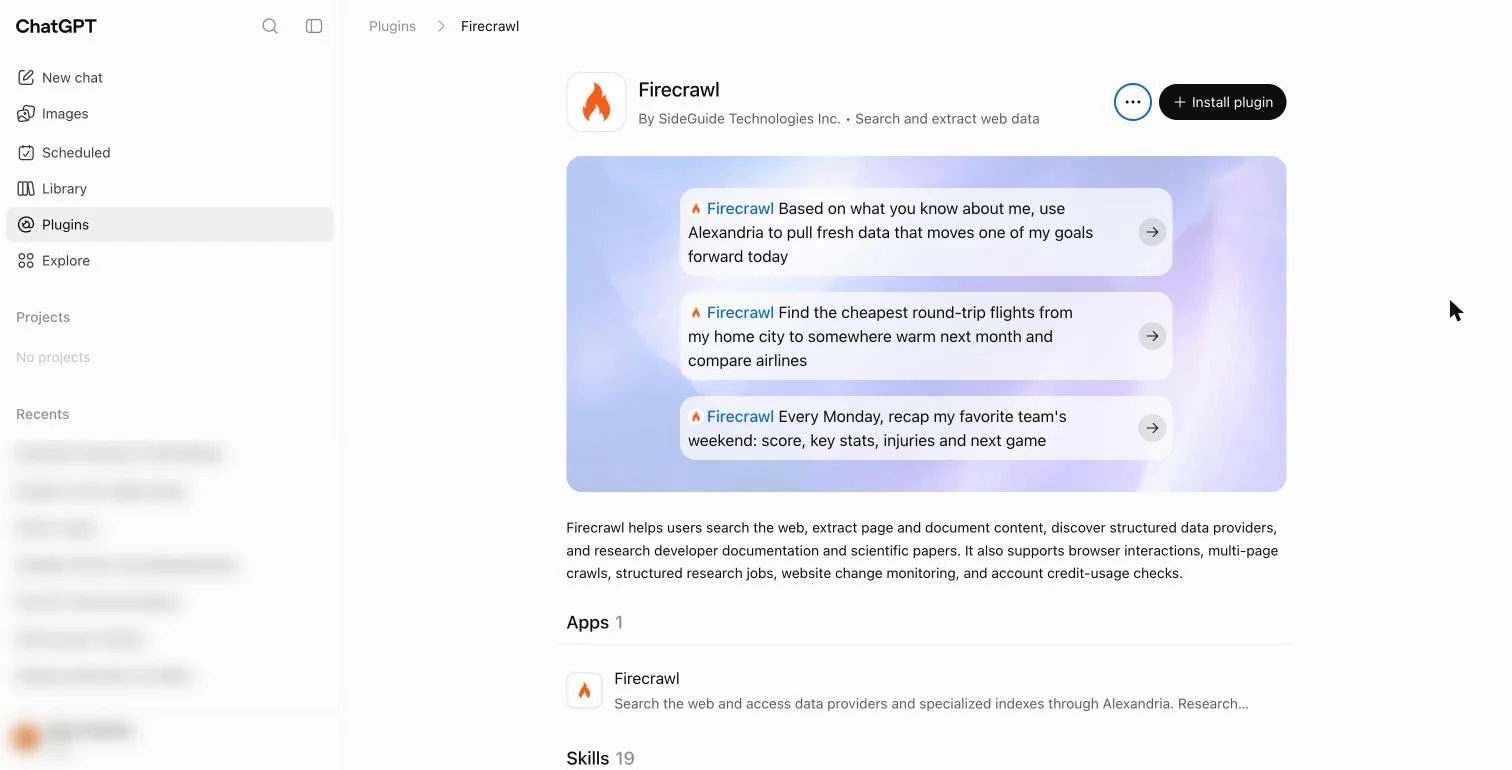
Install the Firecrawl plugin
Open the Firecrawl listing in ChatGPT's plugin directory and select Install plugin. You can also open Plugins in ChatGPT or Codex and search for Firecrawl.
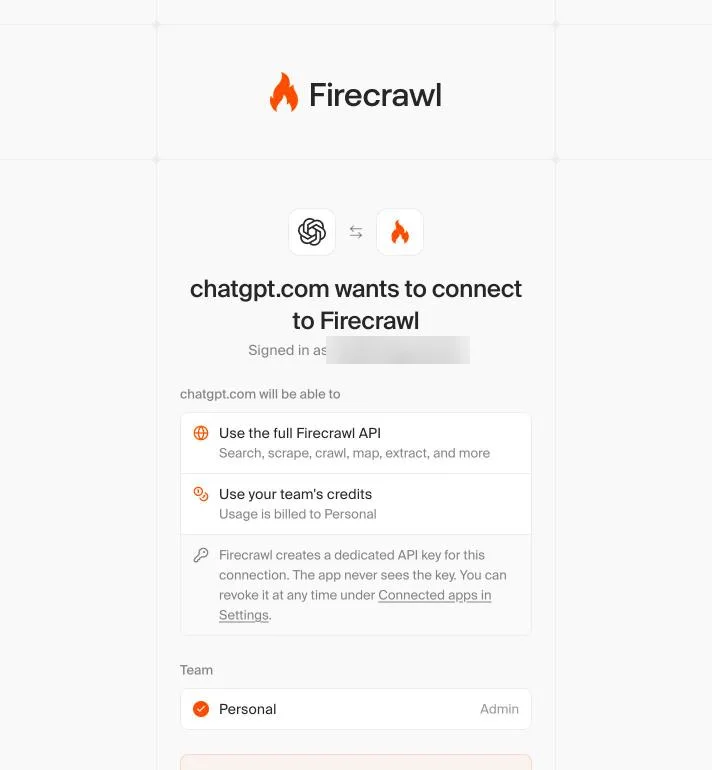
Connect your Firecrawl account
ChatGPT opens Firecrawl in your browser. Sign in, choose a team with Alexandria enabled, and approve access. No account yet? You can create one for free in the same flow.
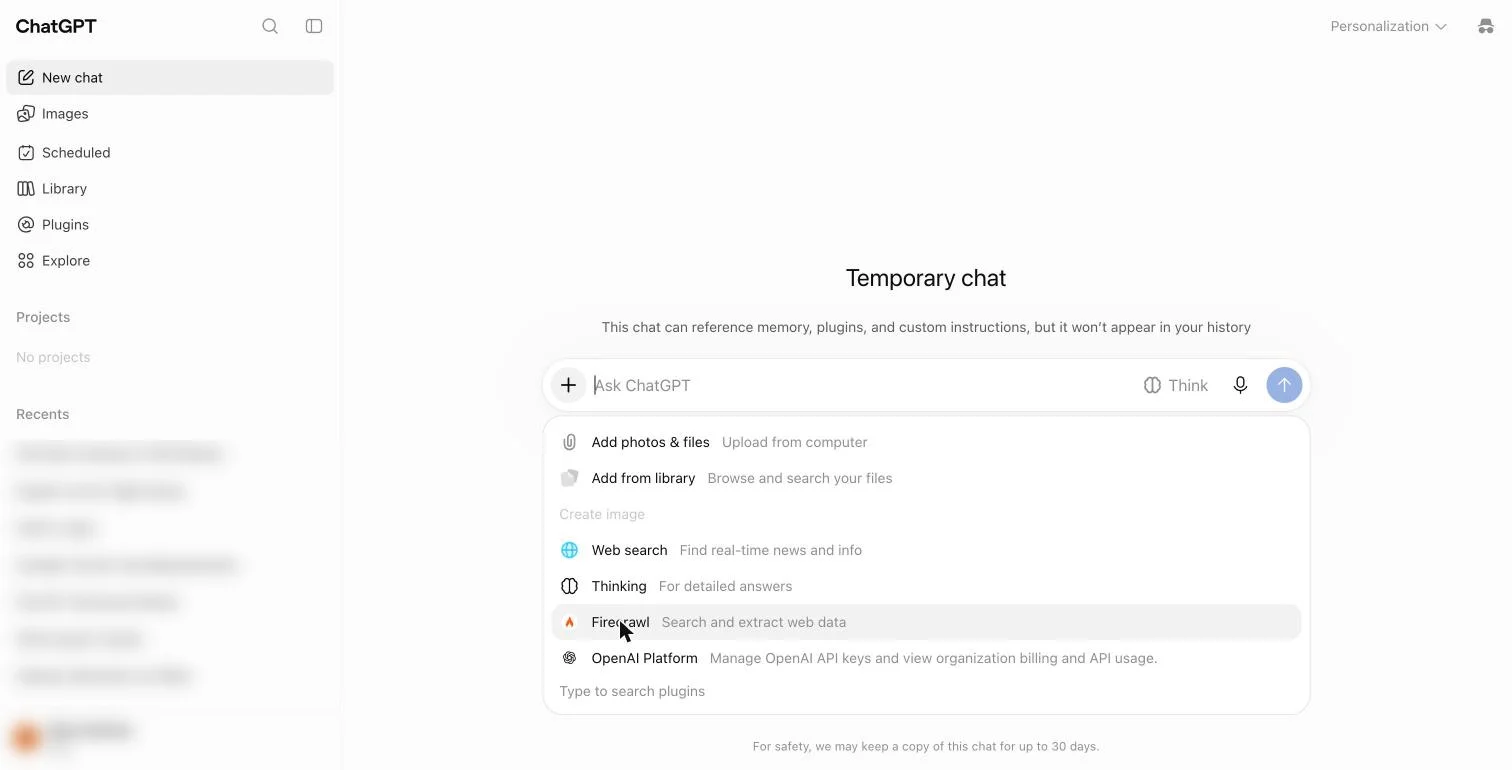
Attach Firecrawl to a chat
Start a new chat so it loads the plugin, open the + menu and choose Firecrawl. You can also ask ChatGPT to use Firecrawl by name.
Ask ChatGPT for the data
Ask in plain language and mention Consolidated Screening List (trade.gov) or Firecrawl Alexandria. ChatGPT finds the Consolidated Screening List (trade.gov) capability that fits and runs it. For example:
Use Firecrawl to run Consolidated Screening List (trade.gov)'s Records get capability. Inspect the Alexandria inputs, ask for any missing required details, and return a small sample with sources.
What can ChatGPT do with Consolidated Screening List (trade.gov)?
The U.S. Consolidated Screening List published by the International Trade Administration at data.trade.gov: one hourly-rebuilt file that merges the Commerce (BIS Entity List, Denied Persons, Unverified, Military End User), State (ITAR Debarred, Nonproliferation Sanctions) and Treasury (SDN, SSI, FSE, CAPTA, CMIC, NS-MBS, PLC) lists. A collector for the batch's downstream normaliser: a cheap version check of the current file, the full list paginated with a cursor pinned to one publication, and one record by source and id. Anonymous, read-only, public domain (US Government work). No deltas: the publisher offers none, so there is no records/changes function and the downstream diffs snapshots. A match or an absence is not a compliance determination.
ChatGPT can run any of Consolidated Screening List (trade.gov)'s 3 capabilities through Alexandria. Each call is billed in Firecrawl credits on your Firecrawl team.
- Records get: One record by the source's own identity (the batch's `records/get`): the source abbreviation plus the file's `id`. The download has no per-record endpoint, so the function reads the current file in Range segments until the `SOURCE:id` key matches (up to the whole 34 MB, 20-80 s for a late source such as UVL) and fails with not_found when the key is not in the current publication. Non-Treasury ids are content hashes that change when the agency edits the record, so a not_found for an id taken from an older snapshot usually means the row changed, not that the party was removed. Costs 5 Firecrawl credits per call.
- Records list: The full current list (the batch's `records/list`), paginated with a cursor pinned to one publication. Every page re-reads the file's trailer, recomputes the publication id and compares it with the one in the cursor; when the source moved on the call fails with invalid_input whose issue code is `publication_changed` (message prefixed `publication_changed:`), never mixing publications. Pages are read as Range segments of the 34 MB consolidated.json from the pinned byte offset; on resume the last record of the previous page is re-read and its `SOURCE:id` checked against the cursor, so a re-ordered file is also reported as publication_changed. Filters: `sources` (list abbreviations; ISN is accepted for ACN), `exclude_treasury` (drops SDN, SSI, FSE, CAP, CMIC, MBS, PLC, which `sanctionssearch-ofac-treas-gov` already covers), `entity_types`, `programs` (exact program strings). A page reads until `limit` records matched or the file ended (the whole 34 MB file scans in under 10 s), so a filtered page shorter than `limit` normally means the list is exhausted; `next_cursor` is null exactly when it is. Records are grouped by source in the file (ACN first, SDN the bulk, UVL last on 2026-10-17) but no order is promised. Costs 5 Firecrawl credits per call.
- Source status: Version check of the current consolidated.json (the batch's `source/status`; named with an underscore because function names must be identifiers). One Range request for the file's trailer returns the publication id (SHA-256 over the sorted `source=source_last_updated` lines of `sources_used` plus the record total: it moves only when an agency publishes or the count changes, unlike the ETag, Last-Modified and `search_performed_at`, which change at every hourly rebuild), the build time, the per-source import state, the record count, the JSON/CSV/TSV file URLs and the JSON size. The publisher posts no hash; with `content_hash: true` the function walks the whole file in Range segments (about 34 MB, 30-90 s) and returns the SHA-256 of the sorted per-record canonical SHA-256 digests, an order-independent hash of the records themselves. Costs 5 Firecrawl credits per call.
What should I ask ChatGPT?
Name Consolidated Screening List (trade.gov) or Firecrawl Alexandria in the prompt so ChatGPT reaches for it. Each example opens in ChatGPT with the prompt filled in.
- Use Firecrawl to run Consolidated Screening List (trade.gov)'s Records get capability. Inspect the Alexandria inputs, ask for any missing required details, and return a small sample with sources.
- Use Firecrawl to run Consolidated Screening List (trade.gov)'s Records list capability. Inspect the Alexandria inputs, ask for any missing required details, and return a small sample with sources.
- Use Firecrawl to run Consolidated Screening List (trade.gov)'s Source status capability. Inspect the Alexandria inputs, ask for any missing required details, and return a small sample with sources.
- Use Firecrawl to find the right Consolidated Screening List (trade.gov) capabilities for my research question
Troubleshooting
Why doesn't ChatGPT use Consolidated Screening List (trade.gov)?
Start a new chat after installing so ChatGPT loads the plugin, then attach Firecrawl from the + menu and name Consolidated Screening List (trade.gov) or Firecrawl Alexandria in the prompt.
How do I switch the Firecrawl team ChatGPT uses?
Open the Firecrawl plugin page in ChatGPT, uninstall it from the menu next to Settings, then install it again and choose the other team on Firecrawl's consent screen.
Why does ChatGPT say Consolidated Screening List (trade.gov) isn't available?
Alexandria needs a Firecrawl team with Alexandria enabled. Reinstall the plugin and pick that team when you approve access.
Use Consolidated Screening List (trade.gov) in other AI apps
The same Firecrawl account reaches Consolidated Screening List (trade.gov) from other AI apps. Pick one for its setup steps:
- Consolidated Screening List (trade.gov) in Claude
- Consolidated Screening List (trade.gov) in Cursor
- Consolidated Screening List (trade.gov) in Grok Bot
 Consolidated Screening List (trade.gov) in Muse
Other data providers you can connect to ChatGPT
Frequently Asked Questions
What is Firecrawl?
Firecrawl is the web data API to search, scrape and interact with the web at scale. It turns websites into clean, LLM-ready data for AI agents and apps. The Firecrawl plugin brings those tools into ChatGPT, along with every data provider in Firecrawl Alexandria.
What is Firecrawl Alexandria?
Firecrawl Alexandria is Firecrawl's library of 550+ data providers for AI agents, Consolidated Screening List (trade.gov) among them. Each provider returns structured data through documented capabilities. ChatGPT finds the capability that fits your question and calls it through the Firecrawl plugin, so you don't write any integration code. Alexandria needs a Firecrawl account signed in on a team with Alexandria enabled, or an API key from such a team; keyless connections don't include it.
Is there a Consolidated Screening List (trade.gov) MCP server for ChatGPT?
ChatGPT reaches Consolidated Screening List (trade.gov) through Firecrawl's hosted MCP server, which serves Consolidated Screening List (trade.gov) and every other Alexandria provider as tools. Add the Firecrawl plugin once and you don't install or host a separate MCP server for Consolidated Screening List (trade.gov).
What does connecting Consolidated Screening List (trade.gov) to ChatGPT unlock?
ChatGPT can run Consolidated Screening List (trade.gov)'s Records get, Records list and Source status, from any chat, with structured results it can sort, compare and summarize. In the same conversation, ChatGPT can combine Consolidated Screening List (trade.gov) with Firecrawl's web search and scraping and the other providers in Firecrawl Alexandria.
Do I need my own Consolidated Screening List (trade.gov) account or API key to use it in ChatGPT?
No. ChatGPT calls Consolidated Screening List (trade.gov) through Firecrawl Alexandria and each call is billed in Firecrawl credits, so you don't need a separate Consolidated Screening List (trade.gov) account or API key.
How much does it cost to use Consolidated Screening List (trade.gov) in ChatGPT?
Each Consolidated Screening List (trade.gov) call costs 5 Firecrawl credits. The capability list on this page shows each price and its unit. The credits come from the Firecrawl team you connect to ChatGPT, and finding the right capability is free.
Can ChatGPT use other providers besides Consolidated Screening List (trade.gov)?
Yes. The same Firecrawl plugin reaches every provider in Firecrawl Alexandria, along with Firecrawl's web search and scraping, so you connect once.
Can I use Consolidated Screening List (trade.gov) in other AI apps?
Yes. Connect Firecrawl to Claude, Cursor, Grok Bot, Muse signed in on a Firecrawl team with Alexandria enabled, or use the Firecrawl MCP server, CLI or API with an API key from that team, and the same Consolidated Screening List (trade.gov) capabilities are available there. Keyless connections don't include Alexandria.