How to connect Element 84 Earth Search (Sentinel-2 L2A) to Cursor
Add the Firecrawl MCP server to Cursor once and it can call the Element 84 Earth Search (Sentinel-2 L2A) API and every other provider in Firecrawl Alexandria, with no Element 84 Earth Search (Sentinel-2 L2A) integration code.
To connect Element 84 Earth Search (Sentinel-2 L2A) to Cursor, add the Firecrawl MCP server to Cursor, sign in on a Firecrawl team with Alexandria enabled, and ask for Element 84 Earth Search (Sentinel-2 L2A) data in plain language. The connection works in Cursor's agent and chat, and you set it up once.
Cursor uses Element 84 Earth Search (Sentinel-2 L2A) as an MCP tool through Firecrawl's hosted MCP server, so you don't install or host a separate MCP server for Element 84 Earth Search (Sentinel-2 L2A).
Cursor is an AI code editor. Its agent uses MCP servers for outside tools, and the Firecrawl MCP server adds web search, scraping and every data provider in Firecrawl Alexandria.
How do I connect Element 84 Earth Search (Sentinel-2 L2A) to Cursor?
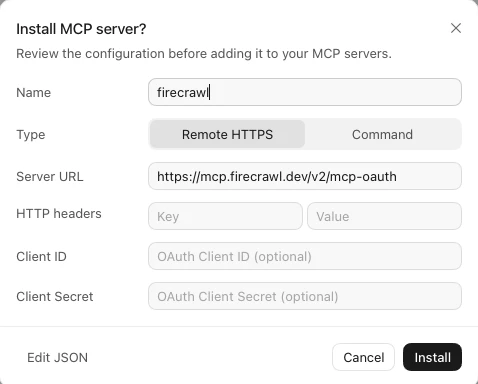
Install the Firecrawl MCP server
Open the install dialog in Cursor, check that the URL is Firecrawl's hosted server, then select Install.
Connect your Firecrawl account
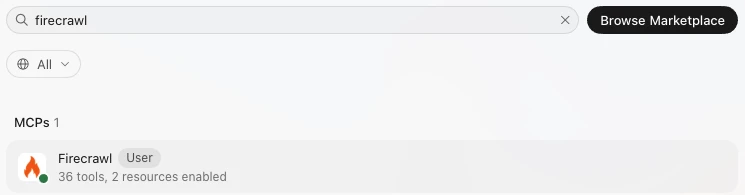
Use the server's sign-in option in Cursor's MCP settings. Firecrawl opens in your browser: sign in, choose a team with Alexandria enabled, and approve access. A green dot next to Firecrawl means it's connected.
Ask Cursor's agent for the data
In the agent chat, ask in plain language and mention Element 84 Earth Search (Sentinel-2 L2A) or Firecrawl Alexandria. The agent finds the Element 84 Earth Search (Sentinel-2 L2A) capability that fits and runs it. For example:
Use Firecrawl to find up to five Sentinel-2 scenes covering the point at longitude -86.8, latitude 36.1 during September 2026 with tile cloud cover below 20%.
What can Cursor do with Element 84 Earth Search (Sentinel-2 L2A)?
Sentinel-2 L2A scenes over a geometry from Element 84's Earth Search STAC API, with per-field vegetation indices (NDVI, EVI, NDMI) and true-colour/NDVI clips read straight from the Cloud Optimized GeoTIFFs on AWS Open Data by HTTP range request.
Cursor can run any of Element 84 Earth Search (Sentinel-2 L2A)'s 5 capabilities through Alexandria. Each call is billed in Firecrawl credits on your Firecrawl team.
- Render clip: A true-colour (TCI) or NDVI PNG of the geometry's bounding box from one scene at native 10 m, scaled by whole-number factors (nearest-neighbour up, box-average down) so its longest side fits max_px, pixels outside the geometry dimmed. Returned as base64 (programs have no artifact storage). Costs 5 Firecrawl credits per call.
- Scene availability: How many Sentinel-2 scenes cover a geometry's bounding box in a window, by month, cloud-cover bucket, MGRS tile and platform (GET /v1/aggregate). Cheap pre-check before reading pixels. Costs 5 Firecrawl credits per call.
- Scene detail: One Sentinel-2 scene with every asset: COG hrefs on the S3 buckets, projection, shape, transform, data type, nodata, scale and offset (GET /v1/collections/{collection}/items/{id}). Costs 5 Firecrawl credits per call.
- Search scenes: Sentinel-2 L2A scenes intersecting a geometry in a date window, newest first, with tile-level cloud cover and other scene percentages (POST /v1/search with intersects, datetime, query, sortby, fields). Costs 5 Firecrawl credits per call.
- Vegetation indices: NDVI, EVI and NDMI statistics (mean, median, p10, p90, min, max, std) over a geometry per scene, computed from the Sentinel-2 COGs by HTTP range request: SCL read first for the field's cloud share, cloudy scenes skipped, reflectance = scale * DN + offset from the item's raster:bands, pixels counted when their centre falls inside the geometry, plus a zone grid of weak areas. Costs 5 Firecrawl credits per call.
What should I ask Cursor?
Name Element 84 Earth Search (Sentinel-2 L2A) or Firecrawl Alexandria in the prompt so Cursor reaches for it. Each example opens in Cursor with the prompt filled in.
- Use Firecrawl to find up to five Sentinel-2 scenes covering the point at longitude -86.8, latitude 36.1 during September 2026 with tile cloud cover below 20%.
- Use Firecrawl to show September 2026 Sentinel-2 scene availability for the point at longitude -86.8, latitude 36.1, grouped by month, cloud-cover bucket and satellite.
- Use Firecrawl to show all assets, resolutions and raster scaling metadata for Sentinel-2 scene S2B_T16SDE_20260903T163711_L2A.
- Use Firecrawl to calculate NDVI and NDMI for up to two September 2026 scenes over the polygon [(-86.81,36.10),(-86.80,36.10),(-86.80,36.11),(-86.81,36.11),(-86.81,36.10)], skipping scenes with more than 20% field cloud share.
Troubleshooting
Why can't Cursor find Element 84 Earth Search (Sentinel-2 L2A)?
If Firecrawl's tools in Cursor stop at search, scrape and parse, the connection is keyless and doesn't include Alexandria. Finish the sign-in from Cursor's MCP settings, or add an API key from a team with Alexandria enabled.
Firecrawl shows a red dot in Cursor. What should I do?
Open Cursor's MCP settings, sign in to Firecrawl again, and restart the agent chat so it loads the tools.
Use Element 84 Earth Search (Sentinel-2 L2A) in other AI apps
The same Firecrawl account reaches Element 84 Earth Search (Sentinel-2 L2A) from other AI apps. Pick one for its setup steps:
- Element 84 Earth Search (Sentinel-2 L2A) in ChatGPT
- Element 84 Earth Search (Sentinel-2 L2A) in Claude
- Element 84 Earth Search (Sentinel-2 L2A) in Grok Bot
 Element 84 Earth Search (Sentinel-2 L2A) in Muse
Other data providers you can connect to Cursor
Frequently Asked Questions
What is Firecrawl?
Firecrawl is the web data API to search, scrape and interact with the web at scale. It turns websites into clean, LLM-ready data for AI agents and apps. The Firecrawl MCP server brings those tools into Cursor, along with every data provider in Firecrawl Alexandria.
What is Firecrawl Alexandria?
Firecrawl Alexandria is Firecrawl's library of 550+ data providers for AI agents, Element 84 Earth Search (Sentinel-2 L2A) among them. Each provider returns structured data through documented capabilities. Cursor finds the capability that fits your question and calls it through the Firecrawl MCP server, so you don't write any integration code. Alexandria needs a Firecrawl account signed in on a team with Alexandria enabled, or an API key from such a team; keyless connections don't include it.
Is there a Element 84 Earth Search (Sentinel-2 L2A) MCP server for Cursor?
Cursor reaches Element 84 Earth Search (Sentinel-2 L2A) through Firecrawl's hosted MCP server, which serves Element 84 Earth Search (Sentinel-2 L2A) and every other Alexandria provider as tools. Add the Firecrawl MCP server once and you don't install or host a separate MCP server for Element 84 Earth Search (Sentinel-2 L2A).
What does connecting Element 84 Earth Search (Sentinel-2 L2A) to Cursor unlock?
Cursor can run all 5 of Element 84 Earth Search (Sentinel-2 L2A)'s capabilities, including Render clip, Scene availability and Scene detail, from any chat, with structured results it can sort, compare and summarize. For example, ask: "Use Firecrawl to find up to five Sentinel-2 scenes covering the point at longitude -86.8, latitude 36.1 during September 2026 with tile cloud cover below 20%." In the same conversation, Cursor can combine Element 84 Earth Search (Sentinel-2 L2A) with Firecrawl's web search and scraping and the other providers in Firecrawl Alexandria.
Do I need my own Element 84 Earth Search (Sentinel-2 L2A) account or API key to use it in Cursor?
No. Cursor calls Element 84 Earth Search (Sentinel-2 L2A) through Firecrawl Alexandria and each call is billed in Firecrawl credits, so you don't need a separate Element 84 Earth Search (Sentinel-2 L2A) account or API key.
How much does it cost to use Element 84 Earth Search (Sentinel-2 L2A) in Cursor?
Each Element 84 Earth Search (Sentinel-2 L2A) call costs 5 Firecrawl credits. The capability list on this page shows each price and its unit. The credits come from the Firecrawl team you connect to Cursor, and finding the right capability is free.
Can Cursor use other providers besides Element 84 Earth Search (Sentinel-2 L2A)?
Yes. The same Firecrawl MCP server reaches every provider in Firecrawl Alexandria, along with Firecrawl's web search and scraping, so you connect once.
Can I use Element 84 Earth Search (Sentinel-2 L2A) in other AI apps?
Yes. Connect Firecrawl to ChatGPT, Claude, Grok Bot, Muse signed in on a Firecrawl team with Alexandria enabled, or use the Firecrawl MCP server, CLI or API with an API key from that team, and the same Element 84 Earth Search (Sentinel-2 L2A) capabilities are available there. Keyless connections don't include Alexandria.