How to connect European Central Bank (ECB Data Portal) to Cursor
Add the Firecrawl MCP server to Cursor once and it can call the European Central Bank (ECB Data Portal) API and every other provider in Firecrawl Alexandria, with no European Central Bank (ECB Data Portal) integration code.
To connect European Central Bank (ECB Data Portal) to Cursor, add the Firecrawl MCP server to Cursor, sign in on a Firecrawl team with Alexandria enabled, and ask for European Central Bank (ECB Data Portal) data in plain language. The connection works in Cursor's agent and chat, and you set it up once.
Cursor uses European Central Bank (ECB Data Portal) as an MCP tool through Firecrawl's hosted MCP server, so you don't install or host a separate MCP server for European Central Bank (ECB Data Portal).
Cursor is an AI code editor. Its agent uses MCP servers for outside tools, and the Firecrawl MCP server adds web search, scraping and every data provider in Firecrawl Alexandria.
How do I connect European Central Bank (ECB Data Portal) to Cursor?
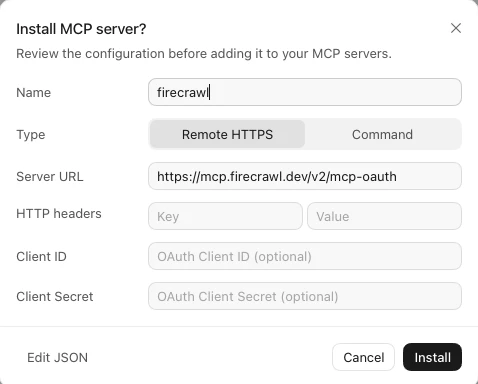
Install the Firecrawl MCP server
Open the install dialog in Cursor, check that the URL is Firecrawl's hosted server, then select Install.
Connect your Firecrawl account
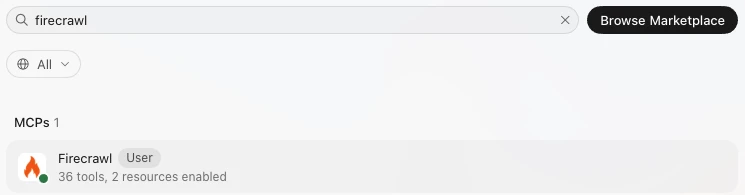
Use the server's sign-in option in Cursor's MCP settings. Firecrawl opens in your browser: sign in, choose a team with Alexandria enabled, and approve access. A green dot next to Firecrawl means it's connected.
Ask Cursor's agent for the data
In the agent chat, ask in plain language and mention European Central Bank (ECB Data Portal) or Firecrawl Alexandria. The agent finds the European Central Bank (ECB Data Portal) capability that fits and runs it. For example:
Use Firecrawl to run European Central Bank (ECB Data Portal)'s Fx rates capability. Inspect the Alexandria inputs, ask for any missing required details, and return a small sample with sources.
What can Cursor do with European Central Bank (ECB Data Portal)?
Official European Central Bank statistics from the ECB Data Portal's keyless SDMX API: euro foreign exchange reference rates (latest, one day or a range, with derived cross rates between two non-euro currencies), any ECB time series by dataflow and key (euro short-term rate €STR, key policy rates, HICP inflation, M3 and other monetary aggregates, bank interest rates, yield curves, balance of payments) with decoded titles, units and frequency, and dataflow search with dimension codes for building series keys.
Cursor can run any of European Central Bank (ECB Data Portal)'s 3 capabilities through Alexandria. Each call is billed in Firecrawl credits on your Firecrawl team.
- Fx rates: Euro foreign exchange reference rates from the ECB (EXR dataflow, series D.{CUR}.EUR.SP00.A): units of each currency per 1 EUR for the latest business day (default), one date or a date range, each row with its actual observation date. Optionally derives a cross rate between two non-euro currencies (base/quote) from the EUR legs on the same date, flagged derived:true with its formula. ECB rates are published around 16:00 CET on TARGET business days, so 'latest' is often the previous business day. Costs 5 Firecrawl credits per call.
- Search dataflows: List or keyword-search the ECB Data Portal's dataflows (about 100: EXR, EST, FM, ICP, BSI, MIR, YC, BOP, ...) by id, name and description; or, with `flow`, describe one dataflow's dimensions in key order with the codes that currently carry data (optionally narrowed by a partial key and a code text filter) so a series key can be built for `series`. Costs 5 Firecrawl credits per call.
- Series: Fetch any ECB Data Portal time series by dataflow and SDMX key (wildcards and '+' alternatives allowed): per series the full key, title, unit, unit multiplier, frequency, decimals, decoded dimensions and attributes, and observations normalised to {date, value, status} with null values preserved. Filter by start/end period or take the last N observations. Costs 5 Firecrawl credits per call.
What should I ask Cursor?
Name European Central Bank (ECB Data Portal) or Firecrawl Alexandria in the prompt so Cursor reaches for it. Each example opens in Cursor with the prompt filled in.
- Use Firecrawl to run European Central Bank (ECB Data Portal)'s Fx rates capability. Inspect the Alexandria inputs, ask for any missing required details, and return a small sample with sources.
- Use Firecrawl to run European Central Bank (ECB Data Portal)'s Search dataflows capability. Inspect the Alexandria inputs, ask for any missing required details, and return a small sample with sources.
- Use Firecrawl to run European Central Bank (ECB Data Portal)'s Series capability. Inspect the Alexandria inputs, ask for any missing required details, and return a small sample with sources.
- Use Firecrawl to find the right European Central Bank (ECB Data Portal) capabilities for my research question
Troubleshooting
Why can't Cursor find European Central Bank (ECB Data Portal)?
If Firecrawl's tools in Cursor stop at search, scrape and parse, the connection is keyless and doesn't include Alexandria. Finish the sign-in from Cursor's MCP settings, or add an API key from a team with Alexandria enabled.
Firecrawl shows a red dot in Cursor. What should I do?
Open Cursor's MCP settings, sign in to Firecrawl again, and restart the agent chat so it loads the tools.
Use European Central Bank (ECB Data Portal) in other AI apps
The same Firecrawl account reaches European Central Bank (ECB Data Portal) from other AI apps. Pick one for its setup steps:
- European Central Bank (ECB Data Portal) in ChatGPT
- European Central Bank (ECB Data Portal) in Claude
- European Central Bank (ECB Data Portal) in Grok Bot
 European Central Bank (ECB Data Portal) in Muse
Other data providers you can connect to Cursor
Frequently Asked Questions
What is Firecrawl?
Firecrawl is the web data API to search, scrape and interact with the web at scale. It turns websites into clean, LLM-ready data for AI agents and apps. The Firecrawl MCP server brings those tools into Cursor, along with every data provider in Firecrawl Alexandria.
What is Firecrawl Alexandria?
Firecrawl Alexandria is Firecrawl's library of 550+ data providers for AI agents, European Central Bank (ECB Data Portal) among them. Each provider returns structured data through documented capabilities. Cursor finds the capability that fits your question and calls it through the Firecrawl MCP server, so you don't write any integration code. Alexandria needs a Firecrawl account signed in on a team with Alexandria enabled, or an API key from such a team; keyless connections don't include it.
Is there a European Central Bank (ECB Data Portal) MCP server for Cursor?
Cursor reaches European Central Bank (ECB Data Portal) through Firecrawl's hosted MCP server, which serves European Central Bank (ECB Data Portal) and every other Alexandria provider as tools. Add the Firecrawl MCP server once and you don't install or host a separate MCP server for European Central Bank (ECB Data Portal).
What does connecting European Central Bank (ECB Data Portal) to Cursor unlock?
Cursor can run European Central Bank (ECB Data Portal)'s Fx rates, Search dataflows and Series, from any chat, with structured results it can sort, compare and summarize. In the same conversation, Cursor can combine European Central Bank (ECB Data Portal) with Firecrawl's web search and scraping and the other providers in Firecrawl Alexandria.
Do I need my own European Central Bank (ECB Data Portal) account or API key to use it in Cursor?
No. Cursor calls European Central Bank (ECB Data Portal) through Firecrawl Alexandria and each call is billed in Firecrawl credits, so you don't need a separate European Central Bank (ECB Data Portal) account or API key.
How much does it cost to use European Central Bank (ECB Data Portal) in Cursor?
Each European Central Bank (ECB Data Portal) call costs 5 Firecrawl credits. The capability list on this page shows each price and its unit. The credits come from the Firecrawl team you connect to Cursor, and finding the right capability is free.
Can Cursor use other providers besides European Central Bank (ECB Data Portal)?
Yes. The same Firecrawl MCP server reaches every provider in Firecrawl Alexandria, along with Firecrawl's web search and scraping, so you connect once.
Can I use European Central Bank (ECB Data Portal) in other AI apps?
Yes. Connect Firecrawl to ChatGPT, Claude, Grok Bot, Muse signed in on a Firecrawl team with Alexandria enabled, or use the Firecrawl MCP server, CLI or API with an API key from that team, and the same European Central Bank (ECB Data Portal) capabilities are available there. Keyless connections don't include Alexandria.