How to connect US Senate financial disclosures (eFD) to Grok Bot
Add the Firecrawl plugin to Grok Bot once and it can call the US Senate financial disclosures (eFD) API and every other provider in Firecrawl Alexandria, with no US Senate financial disclosures (eFD) integration code.
To connect US Senate financial disclosures (eFD) to Grok Bot, add the Firecrawl plugin to Grok Bot, sign in on a Firecrawl team with Alexandria enabled, and ask for US Senate financial disclosures (eFD) data in plain language. The connection works in every Bot in your Grok Bot account, and you set it up once.
Grok Bot uses US Senate financial disclosures (eFD) as an MCP tool through Firecrawl's hosted MCP server, so you don't install or host a separate MCP server for US Senate financial disclosures (eFD).
Grok Bot is xAI's agent app. Plugins give your Bots outside tools, and the Firecrawl plugin adds web search, scraping and every data provider in Firecrawl Alexandria.
How do I connect US Senate financial disclosures (eFD) to Grok Bot?
Add the Firecrawl plugin
In Grok Bot, open Connect apps from the sidebar, find Firecrawl and select Connect. You can also open Firecrawl's plugin listing and select Add to Grok Bot, which opens the desktop app to finish the install.
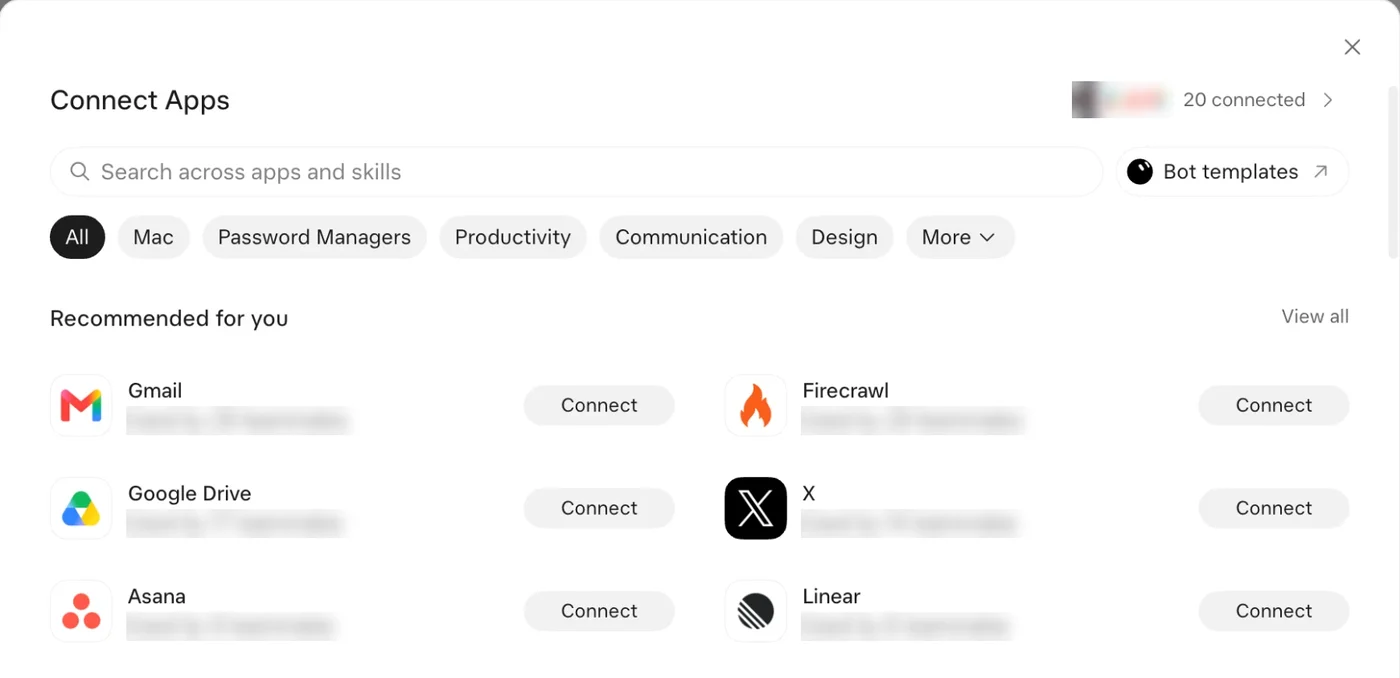
Connect your Firecrawl account
Grok Bot opens Firecrawl in your browser. Sign in, choose a team with Alexandria enabled, and select Authorize. The screen names Cursor, because the plugin is published on the Cursor Marketplace. No account yet? You can create one for free in the same flow.
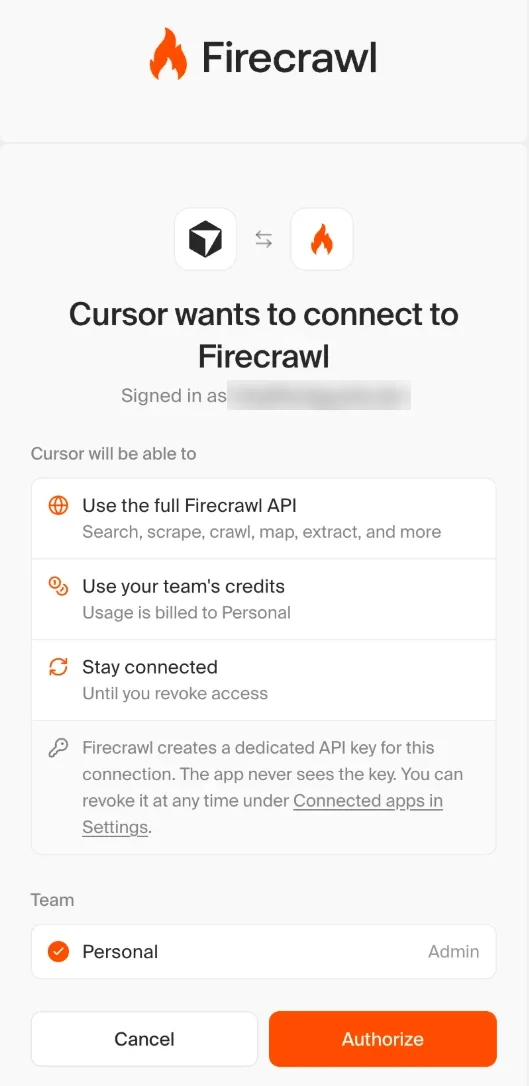
Ask your Bot for the data
In a chat, ask in plain language and mention US Senate financial disclosures (eFD) or Firecrawl Alexandria. To make sure the Bot uses Firecrawl, type @ and choose Firecrawl first. For example:
Use Firecrawl to help with this: After I acknowledge the Senate’s statutory use prohibitions, find up to 10 annual financial disclosure filings by Elizabeth Warren received during 2026, with report titles, dates and links.
What can Grok Bot do with US Senate financial disclosures (eFD)?
United States Senate electronic Financial Disclosure search (efdsearch.senate.gov): search public financial disclosure filings of Senators, former Senators and Senate candidates by name, filer type, report type, state and date received, then read one filing: an electronic periodic transaction report (transactions table), an electronic annual report (Parts 1-10 with their tables), a scanned paper filing (page image URLs on efd-media-public.senate.gov) or a due-date extension notice. Every call requires the caller to acknowledge the statutory prohibitions on obtaining and using these reports (5 U.S.C. app. 105(c)); the program performs the site's acknowledgement step only after the caller has done so and repeats the statutory notice in every output. Public, anonymous, read-only.
Grok Bot can run any of US Senate financial disclosures (eFD)'s 2 capabilities through Alexandria. Each call is billed in Firecrawl credits on your Firecrawl team.
- Get report: Read one Senate eFD filing by report_kind and report_id (from search_reports), or by its pasted efdsearch.senate.gov/search/view/ URL. Four detail families: ptr (GET /search/view/ptr/{id}/): title, filer name, filed-at text and date, the certification statements, and the transactions table (number, date, owner, ticker or null, asset name, asset type, transaction type, amount range text with parsed min/max dollars, comment or null); annual (GET /search/view/annual/{id}/, also Candidate reports and amendments): title, filer, filed-at, certifications and every Part section (number, title, yes/no question and answer, the table's column headers and rows as text cells, notes); paper (GET /search/view/paper/{id}/, scanned filings incl. all blind-trust and other-document reports): page_count and pages[] with the page image URL on efd-media-public.senate.gov (anonymous GIFs, not fetched); extension_notice (GET /search/view/extension-notice/regular/{id}/): filer name, notice text and the new due date. Filed-at timestamps carry no timezone on the page and are kept as text plus the calendar date. Sections not applicable to the family are omitted. An unknown report_id is answered by the site with a redirect to the search form and reported as not_found. LEGAL NOTICE (5 U.S.C. app. 105(c)): it is unlawful to obtain or use a report for any unlawful purpose; for any commercial purpose other than by news and communications media for dissemination to the general public; for determining or establishing the credit rating of any individual; or for use, directly or indirectly, in the solicitation of money for any political, charitable or other purpose. The caller must set acknowledge_use_prohibitions to true; otherwise the function fails with invalid_input and contacts nothing. Costs 5 Firecrawl credits per call.
- Search reports: Search the Senate eFD filing index (POST /search/report/data/, the DataTables endpoint behind the Find Reports form). Filters: last_name and first_name (prefix match), filer_types (senator, candidate, former_senator), report_types (annual, ptr, extension, blind_trust, other), senator_state and candidate_state (two-letter codes), submitted_from / submitted_to (date received, YYYY-MM-DD; the site indexes filings from 2012-01-01), filter_text (the table's free-text filter across all columns), sort_by and sort_dir. Offset pagination with page_size (1-100) and continuation (the next start offset). Each row carries the filer's first and last name, the filer label as shown (for example 'Warren, Elizabeth (Senator)'), the report title, the report kind derived from the detail link (ptr, annual, paper, extension_notice), the report_id (UUID) and URL for get_report, and the date received (MM/DD/YYYY as given plus ISO). records_total is the count for the structured filters, records_filtered additionally applies filter_text. A search with no matches is a valid empty result. LEGAL NOTICE (5 U.S.C. app. 105(c)): it is unlawful to obtain or use a report for any unlawful purpose; for any commercial purpose other than by news and communications media for dissemination to the general public; for determining or establishing the credit rating of any individual; or for use, directly or indirectly, in the solicitation of money for any political, charitable or other purpose. The caller must set acknowledge_use_prohibitions to true; otherwise the function fails with invalid_input and contacts nothing. Costs 5 Firecrawl credits per call.
What should I ask Grok Bot?
Name US Senate financial disclosures (eFD) or Firecrawl Alexandria in the prompt so Grok Bot reaches for it.
- Use Firecrawl to help with this: After I acknowledge the Senate’s statutory use prohibitions, find up to 10 annual financial disclosure filings by Elizabeth Warren received during 2026, with report titles, dates and links.
- Use Firecrawl to help with this: After I acknowledge the Senate’s statutory use prohibitions, find up to 10 periodic transaction reports received in September 2026 from senators representing Massachusetts.
- Use Firecrawl to help with this: After I acknowledge the Senate’s statutory use prohibitions, read Elizabeth Warren’s 2025 annual disclosure at https://efdsearch.senate.gov/search/view/annual/5ba78cce-ea42-4909-93e4-d6c2585ffb26/ and summarise its section tables.
- Use Firecrawl to help with this: After I acknowledge the Senate’s statutory use prohibitions, read https://efdsearch.senate.gov/search/view/ptr/6bf3b6f7-9e1b-499a-bd5a-990292ce2e72/ and list the reported transactions with dates, assets, transaction types and amount ranges.
Troubleshooting
Why doesn't my Bot use US Senate financial disclosures (eFD)?
Attach Firecrawl to the chat with @ before you ask, and name US Senate financial disclosures (eFD) or Firecrawl Alexandria in the prompt.
Add to Grok Bot doesn't open the app. What should I do?
Install the Grok Bot desktop app first, or open Connect apps in Grok Bot and search for Firecrawl.
Use US Senate financial disclosures (eFD) in other AI apps
The same Firecrawl account reaches US Senate financial disclosures (eFD) from other AI apps. Pick one for its setup steps:
- US Senate financial disclosures (eFD) in ChatGPT
- US Senate financial disclosures (eFD) in Claude
- US Senate financial disclosures (eFD) in Cursor
 US Senate financial disclosures (eFD) in Muse
Other data providers you can connect to Grok Bot
Frequently Asked Questions
What is Firecrawl?
Firecrawl is the web data API to search, scrape and interact with the web at scale. It turns websites into clean, LLM-ready data for AI agents and apps. The Firecrawl plugin brings those tools into Grok Bot, along with every data provider in Firecrawl Alexandria.
What is Firecrawl Alexandria?
Firecrawl Alexandria is Firecrawl's library of 550+ data providers for AI agents, US Senate financial disclosures (eFD) among them. Each provider returns structured data through documented capabilities. Grok Bot finds the capability that fits your question and calls it through the Firecrawl plugin, so you don't write any integration code. Alexandria needs a Firecrawl account signed in on a team with Alexandria enabled, or an API key from such a team; keyless connections don't include it.
Is there a US Senate financial disclosures (eFD) MCP server for Grok Bot?
Grok Bot reaches US Senate financial disclosures (eFD) through Firecrawl's hosted MCP server, which serves US Senate financial disclosures (eFD) and every other Alexandria provider as tools. Add the Firecrawl plugin once and you don't install or host a separate MCP server for US Senate financial disclosures (eFD).
What does connecting US Senate financial disclosures (eFD) to Grok Bot unlock?
Grok Bot can run US Senate financial disclosures (eFD)'s Get report and Search reports, from any chat, with structured results it can sort, compare and summarize. For example, ask: "Use Firecrawl to help with this: After I acknowledge the Senate’s statutory use prohibitions, find up to 10 annual financial disclosure filings by Elizabeth Warren received during 2026, with report titles, dates and links." In the same conversation, Grok Bot can combine US Senate financial disclosures (eFD) with Firecrawl's web search and scraping and the other providers in Firecrawl Alexandria.
Do I need my own US Senate financial disclosures (eFD) account or API key to use it in Grok Bot?
No. Grok Bot calls US Senate financial disclosures (eFD) through Firecrawl Alexandria and each call is billed in Firecrawl credits, so you don't need a separate US Senate financial disclosures (eFD) account or API key.
How much does it cost to use US Senate financial disclosures (eFD) in Grok Bot?
Each US Senate financial disclosures (eFD) call costs 5 Firecrawl credits. The capability list on this page shows each price and its unit. The credits come from the Firecrawl team you connect to Grok Bot, and finding the right capability is free.
Can Grok Bot use other providers besides US Senate financial disclosures (eFD)?
Yes. The same Firecrawl plugin reaches every provider in Firecrawl Alexandria, along with Firecrawl's web search and scraping, so you connect once.
Can I use US Senate financial disclosures (eFD) in other AI apps?
Yes. Connect Firecrawl to ChatGPT, Claude, Cursor, Muse signed in on a Firecrawl team with Alexandria enabled, or use the Firecrawl MCP server, CLI or API with an API key from that team, and the same US Senate financial disclosures (eFD) capabilities are available there. Keyless connections don't include Alexandria.