How to connect FAA public records to Grok Bot
Add the Firecrawl plugin to Grok Bot once and it can call the FAA public records API and every other provider in Firecrawl Alexandria, with no FAA public records integration code.
To connect FAA public records to Grok Bot, add the Firecrawl plugin to Grok Bot, sign in on a Firecrawl team with Alexandria enabled, and ask for FAA public records data in plain language. The connection works in every Bot in your Grok Bot account, and you set it up once.
Grok Bot uses FAA public records as an MCP tool through Firecrawl's hosted MCP server, so you don't install or host a separate MCP server for FAA public records.
Grok Bot is xAI's agent app. Plugins give your Bots outside tools, and the Firecrawl plugin adds web search, scraping and every data provider in Firecrawl Alexandria.
How do I connect FAA public records to Grok Bot?
Add the Firecrawl plugin
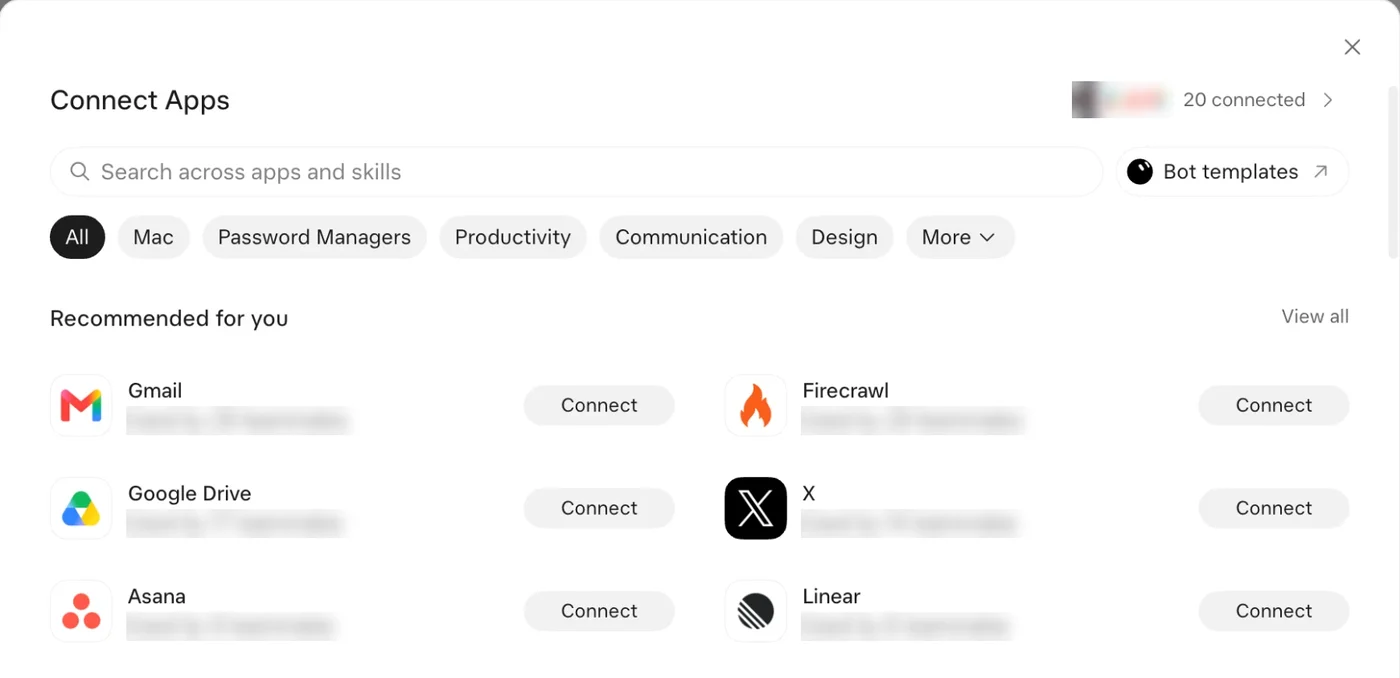
In Grok Bot, open Connect apps from the sidebar, find Firecrawl and select Connect. You can also open Firecrawl's plugin listing and select Add to Grok Bot, which opens the desktop app to finish the install.
Connect your Firecrawl account
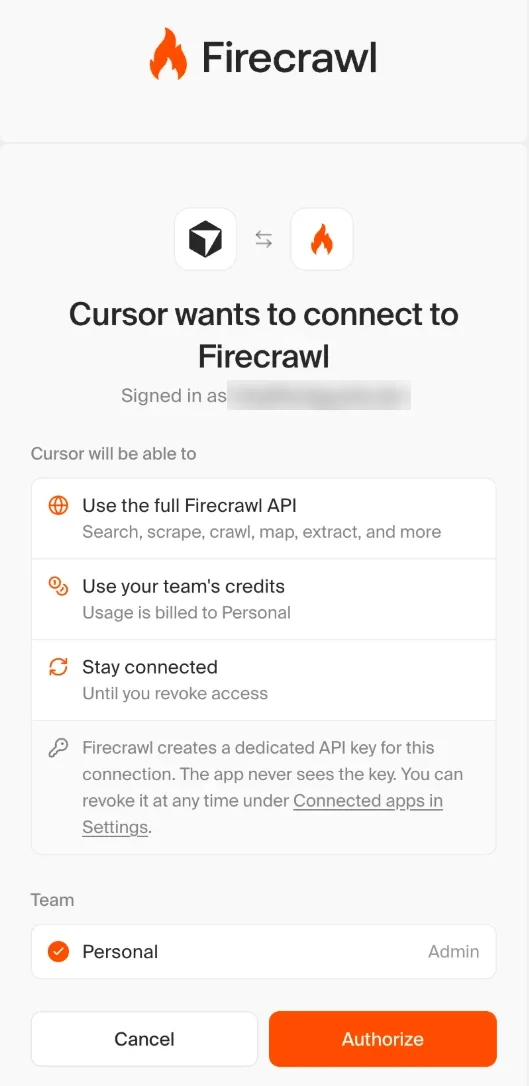
Grok Bot opens Firecrawl in your browser. Sign in, choose a team with Alexandria enabled, and select Authorize. The screen names Cursor, because the plugin is published on the Cursor Marketplace. No account yet? You can create one for free in the same flow.
Ask your Bot for the data
In a chat, ask in plain language and mention FAA public records or Firecrawl Alexandria. To make sure the Bot uses Firecrawl, type @ and choose Firecrawl first. For example:
Use Firecrawl to look up N637JB in the FAA aircraft registry and report its registration status, make, model and registered owner.
What can Grok Bot do with FAA public records?
FAA public records from faa.gov: the aircraft registry (N-number detail, owner, serial and dealer searches, recorded documents), airworthiness directives and other regulatory documents from the Dynamic Regulatory System (DRS), live NAS airport delay and closure status, and active temporary flight restrictions (TFRs) from tfr.faa.gov, including space operations, security, hazard and VIP airspace closures with their altitudes, times and boundaries.
Grok Bot can run any of FAA public records's 11 capabilities through Alexandria. Each call is billed in Firecrawl credits on your Firecrawl team.
- Aircraft: FAA registry record for one N-number: registration status, aircraft description (serial, make, model, year, Mode S code), registered owner, airworthiness certificate data, temporary certificates and reservation data. Deregistered numbers return the status only. Costs 5 Firecrawl credits per call.
- Aircraft documents: FAA registry document index for one N-number: conveyance and lien documents recorded against the aircraft (collateral type, document type, party and receipt date). One page of up to 50 rows. Costs 5 Firecrawl credits per call.
- Aircraft search: Search the FAA registry by registered owner name or aircraft serial number. One result page of up to 50 aircraft (N-number, serial, make, model, owner name and address) with the registry's total and page count; each row links to the `aircraft` record. Costs 5 Firecrawl credits per call.
- Airport delays: Current FAA NAS status airport events: ground stops, ground delay programs, arrival and departure delays, closures, free-form NOTAM notices and runway configuration, for every airport with an active event or for one airport. Costs 5 Firecrawl credits per call.
- Airworthiness directive: One DRS document by its document key: AD number, docket, subject, make, model, product type, status, citation, effective date, supersession links, the full metadata map, the file list and the content URL of the PDF or HTML. Costs 5 Firecrawl credits per call.
- Airworthiness directive search: Full-text search of the FAA Dynamic Regulatory System (DRS): airworthiness directives, advisory circulars, special airworthiness information bulletins, regulations and other FAA documents. One page of results with document number, title, type, status, published and effective dates and the DRS document key for `airworthiness_directive`. Costs 5 Firecrawl credits per call.
- Dealer search: Search FAA aircraft dealer certificates by dealer name: certificate number, dealer name, address, ownership type, certificate issue and expiration dates. One page of up to 50 certificates. Costs 5 Firecrawl credits per call.
- Make model lookup: Resolve a manufacturer (and optional model) to the FAA registry's Mfr/Mdl codes: each code's manufacturer, model, aircraft type, engine type, category, certification basis, engines, seats, weight class, and the number of aircraft currently assigned per US state or country. Costs 5 Firecrawl credits per call.
- N number availability: List the unassigned, unreserved N-numbers in a numeric range with an optional 1-2 letter suffix (e.g. 600JB-699JB), straight from the FAA registry's N-Number Availability search. One page of up to 50 numbers. Costs 5 Firecrawl credits per call.
- Tfr detail: One FAA temporary flight restriction by NOTAM number from tfr.faa.gov: type and CFR authority (e.g. 91.143 space operations, 99.7 security), location, controlling facility, effective start and end (UTC), purpose, the full NOTAM text, and each area's floor and ceiling, activation windows, and boundary as a polygon and, when the area is a circle, its center and radius. Costs 5 Firecrawl credits per call.
See all 11 capabilities and their inputs on the FAA public records API page.
What should I ask Grok Bot?
Name FAA public records or Firecrawl Alexandria in the prompt so Grok Bot reaches for it.
- Use Firecrawl to look up N637JB in the FAA aircraft registry and report its registration status, make, model and registered owner.
- Use Firecrawl to show the first page of FAA aircraft registrations whose owner name starts with JETBLUE, including tail numbers and models.
- Use Firecrawl to show current FAA ground stops, delays and closures at Newark airport, EWR.
- Use Firecrawl to find up to three current FAA regulatory documents matching SR22, then read the first result and show its effective date and document link.
Troubleshooting
Why doesn't my Bot use FAA public records?
Attach Firecrawl to the chat with @ before you ask, and name FAA public records or Firecrawl Alexandria in the prompt.
Add to Grok Bot doesn't open the app. What should I do?
Install the Grok Bot desktop app first, or open Connect apps in Grok Bot and search for Firecrawl.
Use FAA public records in other AI apps
The same Firecrawl account reaches FAA public records from other AI apps. Pick one for its setup steps:
- FAA public records in ChatGPT
- FAA public records in Claude
- FAA public records in Cursor
 FAA public records in Muse
Other data providers you can connect to Grok Bot
Frequently Asked Questions
What is Firecrawl?
Firecrawl is the web data API to search, scrape and interact with the web at scale. It turns websites into clean, LLM-ready data for AI agents and apps. The Firecrawl plugin brings those tools into Grok Bot, along with every data provider in Firecrawl Alexandria.
What is Firecrawl Alexandria?
Firecrawl Alexandria is Firecrawl's library of 550+ data providers for AI agents, FAA public records among them. Each provider returns structured data through documented capabilities. Grok Bot finds the capability that fits your question and calls it through the Firecrawl plugin, so you don't write any integration code. Alexandria needs a Firecrawl account signed in on a team with Alexandria enabled, or an API key from such a team; keyless connections don't include it.
Is there a FAA public records MCP server for Grok Bot?
Grok Bot reaches FAA public records through Firecrawl's hosted MCP server, which serves FAA public records and every other Alexandria provider as tools. Add the Firecrawl plugin once and you don't install or host a separate MCP server for FAA public records.
What does connecting FAA public records to Grok Bot unlock?
Grok Bot can run all 11 of FAA public records's capabilities, including Aircraft, Aircraft documents and Aircraft search, from any chat, with structured results it can sort, compare and summarize. For example, ask: "Use Firecrawl to look up N637JB in the FAA aircraft registry and report its registration status, make, model and registered owner." In the same conversation, Grok Bot can combine FAA public records with Firecrawl's web search and scraping and the other providers in Firecrawl Alexandria.
Do I need my own FAA public records account or API key to use it in Grok Bot?
No. Grok Bot calls FAA public records through Firecrawl Alexandria and each call is billed in Firecrawl credits, so you don't need a separate FAA public records account or API key.
How much does it cost to use FAA public records in Grok Bot?
Each FAA public records call costs 5 Firecrawl credits. The capability list on this page shows each price and its unit. The credits come from the Firecrawl team you connect to Grok Bot, and finding the right capability is free.
Can Grok Bot use other providers besides FAA public records?
Yes. The same Firecrawl plugin reaches every provider in Firecrawl Alexandria, along with Firecrawl's web search and scraping, so you connect once.
Can I use FAA public records in other AI apps?
Yes. Connect Firecrawl to ChatGPT, Claude, Cursor, Muse signed in on a Firecrawl team with Alexandria enabled, or use the Firecrawl MCP server, CLI or API with an API key from that team, and the same FAA public records capabilities are available there. Keyless connections don't include Alexandria.