How to connect FDA to Grok Bot
Add the Firecrawl plugin to Grok Bot once and it can call the FDA API and every other provider in Firecrawl Alexandria, with no FDA integration code.
To connect FDA to Grok Bot, add the Firecrawl plugin to Grok Bot, sign in on a Firecrawl team with Alexandria enabled, and ask for FDA data in plain language. The connection works in every Bot in your Grok Bot account, and you set it up once.
Grok Bot uses FDA as an MCP tool through Firecrawl's hosted MCP server, so you don't install or host a separate MCP server for FDA.
Grok Bot is xAI's agent app. Plugins give your Bots outside tools, and the Firecrawl plugin adds web search, scraping and every data provider in Firecrawl Alexandria.
How do I connect FDA to Grok Bot?
Add the Firecrawl plugin
In Grok Bot, open Connect apps from the sidebar, find Firecrawl and select Connect. You can also open Firecrawl's plugin listing and select Add to Grok Bot, which opens the desktop app to finish the install.
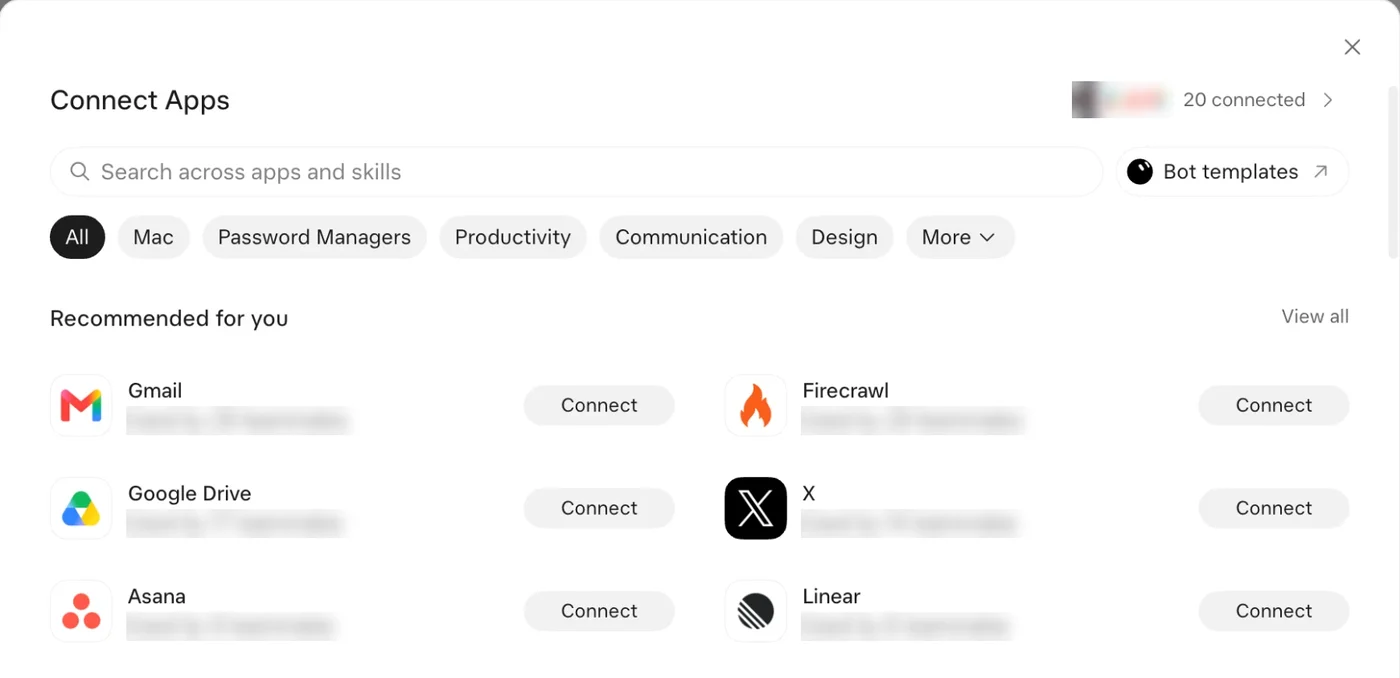
Connect your Firecrawl account
Grok Bot opens Firecrawl in your browser. Sign in, choose a team with Alexandria enabled, and select Authorize. The screen names Cursor, because the plugin is published on the Cursor Marketplace. No account yet? You can create one for free in the same flow.
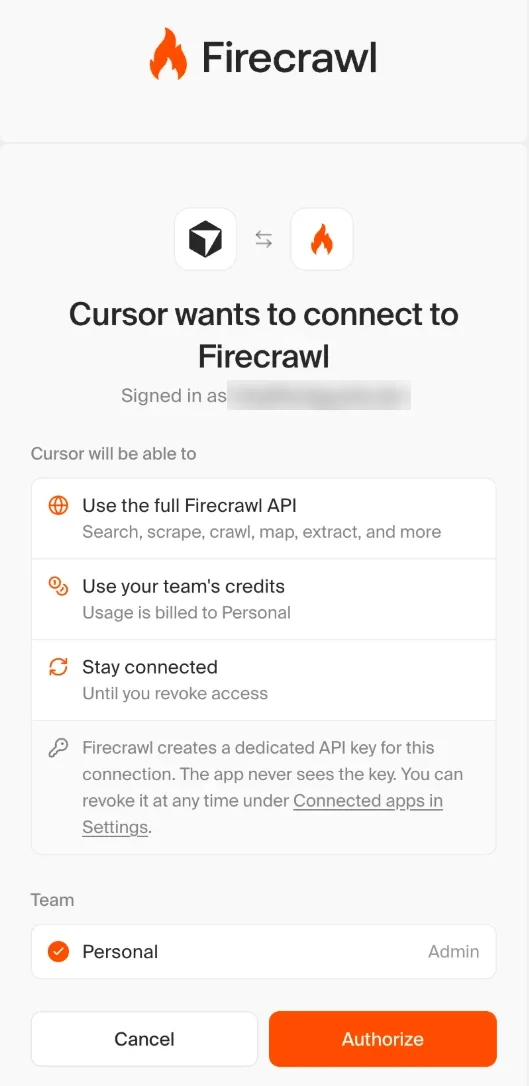
Ask your Bot for the data
In a chat, ask in plain language and mention FDA or Firecrawl Alexandria. To make sure the Bot uses Firecrawl, type @ and choose Firecrawl first. For example:
Use Firecrawl to answer this: Which interchangeable biosimilars reference Eylea, and when did each become interchangeable?
What can Grok Bot do with FDA?
US FDA drug, food and device enforcement recalls, Drugs@FDA applications and approval documents (letters, labels, reviews), complete response letters, orphan drug designations and approvals with exclusivity dates, Orange Book products with therapeutic equivalence codes, patents and exclusivities, the Purple Book of licensed biologics with reference product exclusivity and biosimilar and interchangeable status, the Paragraph IV patent certifications list, novel drug and first generic approvals, approved cell and gene therapies, structured labeling, device 510(k) decisions, PMA approvals and supplements, device classifications, GUDID device identifiers, MAUDE device and FAERS drug adverse-event reports, the UNII substance registry, the NDC directory, drug shortages, and warning letters, via openFDA, fda.gov, accessdata.fda.gov and the Purple Book.
Grok Bot can run any of FDA's 27 capabilities through Alexandria. Each call is billed in Firecrawl credits on your Firecrawl team.
- Complete response letter: Read one FDA complete response letter in full from openFDA: the fields complete_response_letters returns plus the letter's OCR text and a list of the application's other published CRLs. Without letter_date it returns the application's most recent letter. Costs 5 Firecrawl credits per call.
- Complete response letters: Search FDA complete response letters (CRLs), the letters FDA sends when it will not approve an NDA or BLA as submitted, as published in openFDA. Filter by letter date range, words in the letter, company, application number and whether the application was later approved; newest first. Each letter has its date, type, company, application numbers, review office and signatory, the letter's own section headings, a short excerpt and the PDF link. FDA publishes CRLs in batches, so last_updated is the dataset date and a letter a sponsor has announced may not be published yet. Costs 5 Firecrawl credits per call.
- Device clearances: Search device 510(k) submission decision records and resolve a k_number. Preserve decision_code and decision_date; do not equate every returned submission with clearance or PMA approval. Costs 5 Firecrawl credits per call.
- Device recalls: Search medical device enforcement recall records and resolve a recall_number. Preserve recall reason, status and classification; this is not the separate device recall classification dataset. Costs 5 Firecrawl credits per call.
- Drug application documents: Drugs@FDA documents for one NDA, ANDA or BLA: approval and action letters, labels, reviews, summary reviews, medication guides and other documents with type, date and URL, newest first, each with its submission (type, number, status, status date, class). Read from openFDA's Drugs@FDA dataset, whose documents match the Drugs@FDA application page. A document's presence is not proof that the product is currently approved or marketed. Costs 5 Firecrawl credits per call.
- Drug applications: Search Drugs@FDA applications and submission histories, or resolve an application_number. Inspect submission statuses: a returned record alone is not proof of current approval or availability. Costs 5 Firecrawl credits per call.
- Drug events: FAERS drug adverse event reports: patient reactions, suspect and concomitant drugs, seriousness and reporter qualification. Search e.g. patient.drug.medicinalproduct:aspirin, patient.reaction.reactionmeddrapt:nausea or receivedate:[20250101 TO 20251231], or resolve a safetyreportid using record_id. A report is not evidence that the drug caused the reaction; FAERS lags the calendar by months. Costs 5 Firecrawl credits per call.
- Drug labels: Search structured drug labeling and resolve a source label id. Includes source warnings and indications where available. Label presence does not itself establish FDA approval. Costs 5 Firecrawl credits per call.
- Drug ndc: NDC Directory product listings: product NDC, brand and generic names, labeler, dosage form, route, active ingredients, marketing category and packages. Search e.g. brand_name:Lipitor, generic_name:atorvastatin or labeler_name:Pfizer, or resolve a product_ndc using record_id. A listing is not proof of FDA approval. Costs 5 Firecrawl credits per call.
- Drug recalls: Search drug enforcement recall records, including classification, reason and recall status. Search product_description, recalling_firm or report_date, or resolve a recall_number using record_id. Costs 5 Firecrawl credits per call.
See all 27 capabilities and their inputs on the FDA API page.
What should I ask Grok Bot?
Name FDA or Firecrawl Alexandria in the prompt so Grok Bot reaches for it.
- Use Firecrawl to answer this: Which interchangeable biosimilars reference Eylea, and when did each become interchangeable?
- Use Firecrawl to answer this: Which semaglutide products face Paragraph IV patent challenges, when was each first challenged, and when do the challenged patents expire?
- Use Firecrawl to answer this: How many MAUDE adverse event reports did FDA receive for the Dexcom G7 in 2026, broken down by event type?
- Use Firecrawl to answer this: What device carries UDI (01)00386270003935(17)251031(10)1824129005, and which other product codes fall under its classification regulation?
Troubleshooting
Why doesn't my Bot use FDA?
Attach Firecrawl to the chat with @ before you ask, and name FDA or Firecrawl Alexandria in the prompt.
Add to Grok Bot doesn't open the app. What should I do?
Install the Grok Bot desktop app first, or open Connect apps in Grok Bot and search for Firecrawl.
Use FDA in other AI apps
The same Firecrawl account reaches FDA from other AI apps. Pick one for its setup steps:

Other data providers you can connect to Grok Bot
Frequently Asked Questions
What is Firecrawl?
Firecrawl is the web data API to search, scrape and interact with the web at scale. It turns websites into clean, LLM-ready data for AI agents and apps. The Firecrawl plugin brings those tools into Grok Bot, along with every data provider in Firecrawl Alexandria.
What is Firecrawl Alexandria?
Firecrawl Alexandria is Firecrawl's library of 550+ data providers for AI agents, FDA among them. Each provider returns structured data through documented capabilities. Grok Bot finds the capability that fits your question and calls it through the Firecrawl plugin, so you don't write any integration code. Alexandria needs a Firecrawl account signed in on a team with Alexandria enabled, or an API key from such a team; keyless connections don't include it.
Is there a FDA MCP server for Grok Bot?
Grok Bot reaches FDA through Firecrawl's hosted MCP server, which serves FDA and every other Alexandria provider as tools. Add the Firecrawl plugin once and you don't install or host a separate MCP server for FDA.
What does connecting FDA to Grok Bot unlock?
Grok Bot can run all 27 of FDA's capabilities, including Complete response letter, Complete response letters and Device clearances, from any chat, with structured results it can sort, compare and summarize. For example, ask: "Use Firecrawl to answer this: Which interchangeable biosimilars reference Eylea, and when did each become interchangeable?" In the same conversation, Grok Bot can combine FDA with Firecrawl's web search and scraping and the other providers in Firecrawl Alexandria.
Do I need my own FDA account or API key to use it in Grok Bot?
No. Grok Bot calls FDA through Firecrawl Alexandria and each call is billed in Firecrawl credits, so you don't need a separate FDA account or API key.
How much does it cost to use FDA in Grok Bot?
Each FDA call costs 5 Firecrawl credits. The capability list on this page shows each price and its unit. The credits come from the Firecrawl team you connect to Grok Bot, and finding the right capability is free.
Can Grok Bot use other providers besides FDA?
Yes. The same Firecrawl plugin reaches every provider in Firecrawl Alexandria, along with Firecrawl's web search and scraping, so you connect once.
Can I use FDA in other AI apps?
Yes. Connect Firecrawl to ChatGPT, Claude, Cursor, Muse signed in on a Firecrawl team with Alexandria enabled, or use the Firecrawl MCP server, CLI or API with an API key from that team, and the same FDA capabilities are available there. Keyless connections don't include Alexandria.