
How to connect Trends to Grok Bot
Add the Firecrawl plugin to Grok Bot once and it can call the Trends API and every other provider in Firecrawl Alexandria, with no Trends integration code.
To connect Trends to Grok Bot, add the Firecrawl plugin to Grok Bot, sign in on a Firecrawl team with Alexandria enabled, and ask for Trends data in plain language. The connection works in every Bot in your Grok Bot account, and you set it up once.
Grok Bot uses Trends as an MCP tool through Firecrawl's hosted MCP server, so you don't install or host a separate MCP server for Trends.
Grok Bot is xAI's agent app. Plugins give your Bots outside tools, and the Firecrawl plugin adds web search, scraping and every data provider in Firecrawl Alexandria.
How do I connect Trends to Grok Bot?
Add the Firecrawl plugin
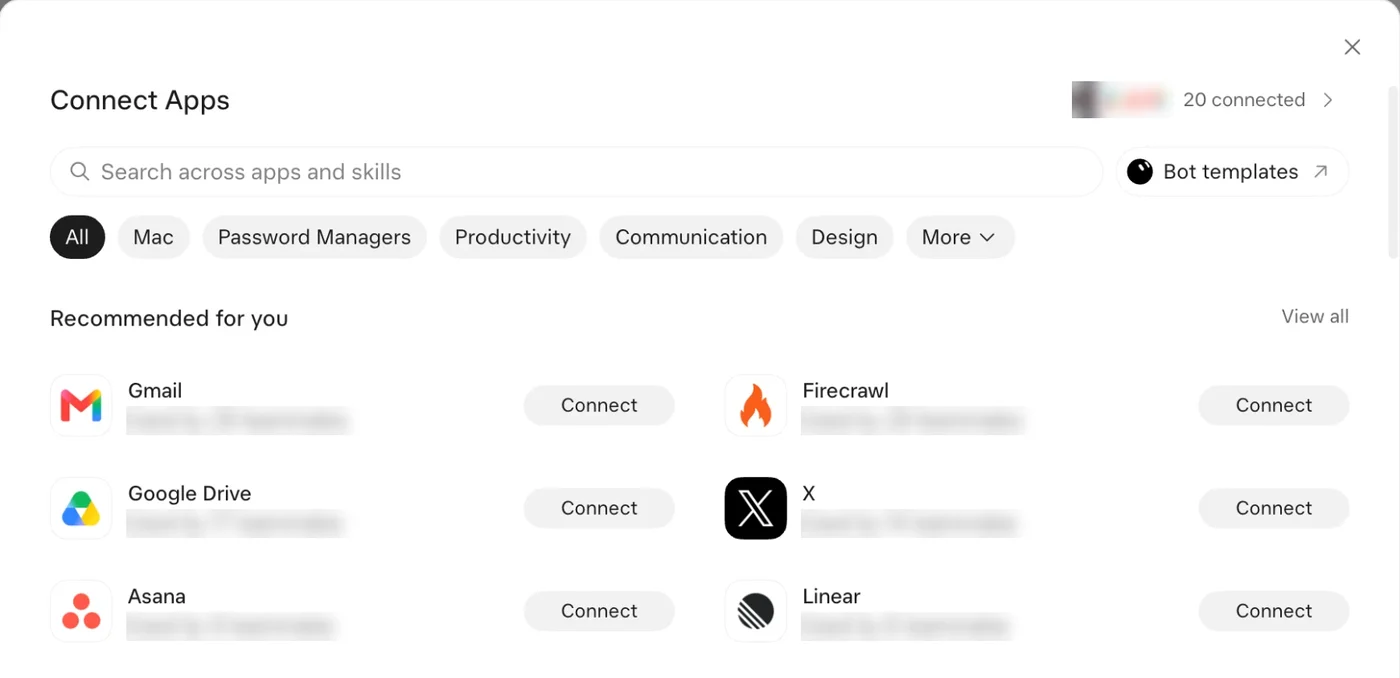
In Grok Bot, open Connect apps from the sidebar, find Firecrawl and select Connect. You can also open Firecrawl's plugin listing and select Add to Grok Bot, which opens the desktop app to finish the install.
Connect your Firecrawl account
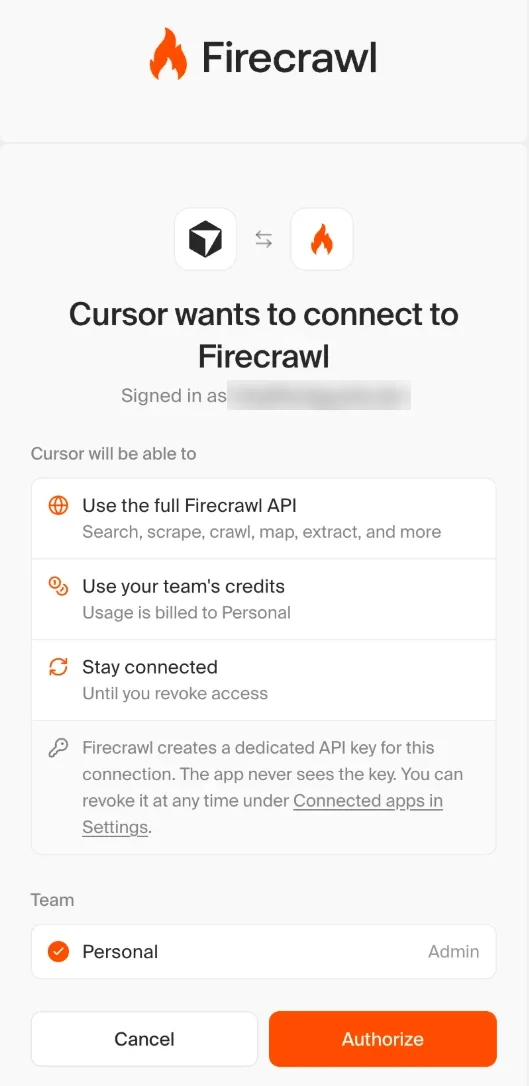
Grok Bot opens Firecrawl in your browser. Sign in, choose a team with Alexandria enabled, and select Authorize. The screen names Cursor, because the plugin is published on the Cursor Marketplace. No account yet? You can create one for free in the same flow.
Ask your Bot for the data
In a chat, ask in plain language and mention Trends or Firecrawl Alexandria. To make sure the Bot uses Firecrawl, type @ and choose Firecrawl first. For example:
Use Firecrawl to answer this: How has search interest in pizza versus tacos changed in the US over the past year?
What can Grok Bot do with Trends?
Search interest over time and by region, related and rising queries, keyword suggestions and what is trending now.
Grok Bot can run any of Trends's 5 capabilities through Alexandria. Each call is billed in Firecrawl credits on your Firecrawl team.
- Interest by region: Search interest by location for 1-5 terms or topics (Trends Explore 'Interest by subregion'). With one keyword values are 0-100 relative to the top location (share of that location's searches, so a small place can outrank a large one); with several, each keyword's percentage share of the location's searches. Values are relative, not absolute search counts. Resolutions offers by geo: worldwide: country (default), metro, city; US: region (default), metro (Nielsen DMA), city; another country: region (default), city (metro is a US breakdown and lists no locations in e.g. DE or LT, so requesting it there is invalid_input); a US state: metro (default), city; a US metro or a non-US region: city only. An unsupported combination is invalid_input at /resolution. Locations without data for any keyword are omitted, as on 's page. When the requested (or default) breakdown has no location with data, the next coarser one is tried: city, then metro, then region in the US; city, then region in other countries; city or metro, then country worldwide; city, then metro in a US state. `resolution` is the breakdown returned, `requested_resolution` the one asked for, and a warning such as city_resolution_unavailable_fallback_metro says so. If no breakdown has data, `regions` is empty with data_status insufficient_volume and an insufficient_search_volume warning: has too little search volume, which is not zero demand. City breakdowns list 's own sample of about 200 places, and for many terms outside the largest markets none of them has data. Costs 5 Firecrawl credits per call.
- Interest over time: Search interest over time for 1-5 terms or topics (Trends Explore 'Interest over time'). Each point has a UTC time, 's label and a 0-100 value per keyword, relative to the highest point across all keywords in the range; values are relative, not absolute search counts (does not publish absolute volume). Bucket size (resolution) follows the range: MINUTE/EIGHT_MINUTE for hours, HOUR for 1-7 days, DAY up to ~9 months, WEEK up to 5 years, MONTH beyond. `partial` marks the incomplete latest bucket. aligns buckets to whole days, weeks (Sunday start) or months, so with a custom date range the first or last bucket can cover days outside it; `extends_beyond_range` marks those buckets (values are 's, not clipped). Averages are given only when comparing several keywords. Low-volume queries (niche terms, small countries, short ranges) are not errors: when has too little data, points are empty or carry value 0 with has_data false; `data_status` is insufficient_volume when no keyword has any data, and `warnings` names each keyword without data (insufficient_search_volume) or with gaps (partial_search_volume). Such zeros mean too little data, not zero demand. Costs 5 Firecrawl credits per call.
- Related queries: Related searches for one term or topic (Trends Explore 'Related queries'): top queries ranked by relative popularity (0-100, not absolute search counts) and rising queries ranked by growth versus the previous period (percent, or Breakout above 5000%). Each has a Trends Explore link. Lists are 's, unfiltered and in 's order: they come from other searches by the same searchers, not from semantic similarity, and rising lists can be led by unrelated queries exactly as on 's Explore page; check relevance before relying on them. For low-volume terms returns empty lists: each empty list gets an insufficient_search_volume warning scoped to /top or /rising, and data_status is insufficient_volume when both are empty. That means too little search volume, not zero demand. Costs 5 Firecrawl credits per call.
- Suggestions: Trends topic suggestions for a partial term: Knowledge Graph topics with id, title and type (e.g. /m/0663v Pizza, Dish). Pass an id as a keyword to the other functions to measure the topic (all its names and languages) instead of the literal search term. Costs 0 Firecrawl credits per call.
- Trending now: Trends 'Trending now': searches surging in a country over the past 4, 24 or 48 hours or 7 days, in 's order. Each trend has approximate search volume, percent increase, UTC start (and end once it is no longer active), 's category names, the related searches grouped into it, and an Explore link. Costs 5 Firecrawl credits per call.
What should I ask Grok Bot?
Name Trends or Firecrawl Alexandria in the prompt so Grok Bot reaches for it.
- Use Firecrawl to answer this: How has search interest in pizza versus tacos changed in the US over the past year?
- Use Firecrawl to answer this: Which US states search most for pickleball?
- Use Firecrawl to answer this: What are the rising searches related to Firecrawl?
- Use Firecrawl to answer this: What is trending on in the UK right now?
Troubleshooting
Why doesn't my Bot use Trends?
Attach Firecrawl to the chat with @ before you ask, and name Trends or Firecrawl Alexandria in the prompt.
Add to Grok Bot doesn't open the app. What should I do?
Install the Grok Bot desktop app first, or open Connect apps in Grok Bot and search for Firecrawl.
Use Trends in other AI apps
The same Firecrawl account reaches Trends from other AI apps. Pick one for its setup steps:

Other data providers you can connect to Grok Bot
Frequently Asked Questions
What is Firecrawl?
Firecrawl is the web data API to search, scrape and interact with the web at scale. It turns websites into clean, LLM-ready data for AI agents and apps. The Firecrawl plugin brings those tools into Grok Bot, along with every data provider in Firecrawl Alexandria.
What is Firecrawl Alexandria?
Firecrawl Alexandria is Firecrawl's library of 550+ data providers for AI agents, Trends among them. Each provider returns structured data through documented capabilities. Grok Bot finds the capability that fits your question and calls it through the Firecrawl plugin, so you don't write any integration code. Alexandria needs a Firecrawl account signed in on a team with Alexandria enabled, or an API key from such a team; keyless connections don't include it.
Is there a Trends MCP server for Grok Bot?
Grok Bot reaches Trends through Firecrawl's hosted MCP server, which serves Trends and every other Alexandria provider as tools. Add the Firecrawl plugin once and you don't install or host a separate MCP server for Trends.
What does connecting Trends to Grok Bot unlock?
Grok Bot can run all 5 of Trends's capabilities, including Interest by region, Interest over time and Related queries, from any chat, with structured results it can sort, compare and summarize. For example, ask: "Use Firecrawl to answer this: How has search interest in pizza versus tacos changed in the US over the past year?" In the same conversation, Grok Bot can combine Trends with Firecrawl's web search and scraping and the other providers in Firecrawl Alexandria.
Do I need my own Trends account or API key to use it in Grok Bot?
No. Grok Bot calls Trends through Firecrawl Alexandria and each call is billed in Firecrawl credits, so you don't need a separate Trends account or API key.
How much does it cost to use Trends in Grok Bot?
Trends calls cost from 0 to 5 Firecrawl credits, depending on the capability. The capability list on this page shows each price and its unit. The credits come from the Firecrawl team you connect to Grok Bot, and finding the right capability is free.
Can Grok Bot use other providers besides Trends?
Yes. The same Firecrawl plugin reaches every provider in Firecrawl Alexandria, along with Firecrawl's web search and scraping, so you connect once.
Can I use Trends in other AI apps?
Yes. Connect Firecrawl to ChatGPT, Claude, Cursor, Muse signed in on a Firecrawl team with Alexandria enabled, or use the Firecrawl MCP server, CLI or API with an API key from that team, and the same Trends capabilities are available there. Keyless connections don't include Alexandria.