How to connect FullEnrich to Grok Bot
Add the Firecrawl plugin to Grok Bot once and it can call the FullEnrich API and every other provider in Firecrawl Alexandria, with no FullEnrich integration code.
To connect FullEnrich to Grok Bot, add the Firecrawl plugin to Grok Bot, sign in on a Firecrawl team with Alexandria enabled, and ask for FullEnrich data in plain language. The connection works in every Bot in your Grok Bot account, and you set it up once.
Grok Bot uses FullEnrich as an MCP tool through Firecrawl's hosted MCP server, so you don't install or host a separate MCP server for FullEnrich.
Grok Bot is xAI's agent app. Plugins give your Bots outside tools, and the Firecrawl plugin adds web search, scraping and every data provider in Firecrawl Alexandria.
How do I connect FullEnrich to Grok Bot?
Add the Firecrawl plugin
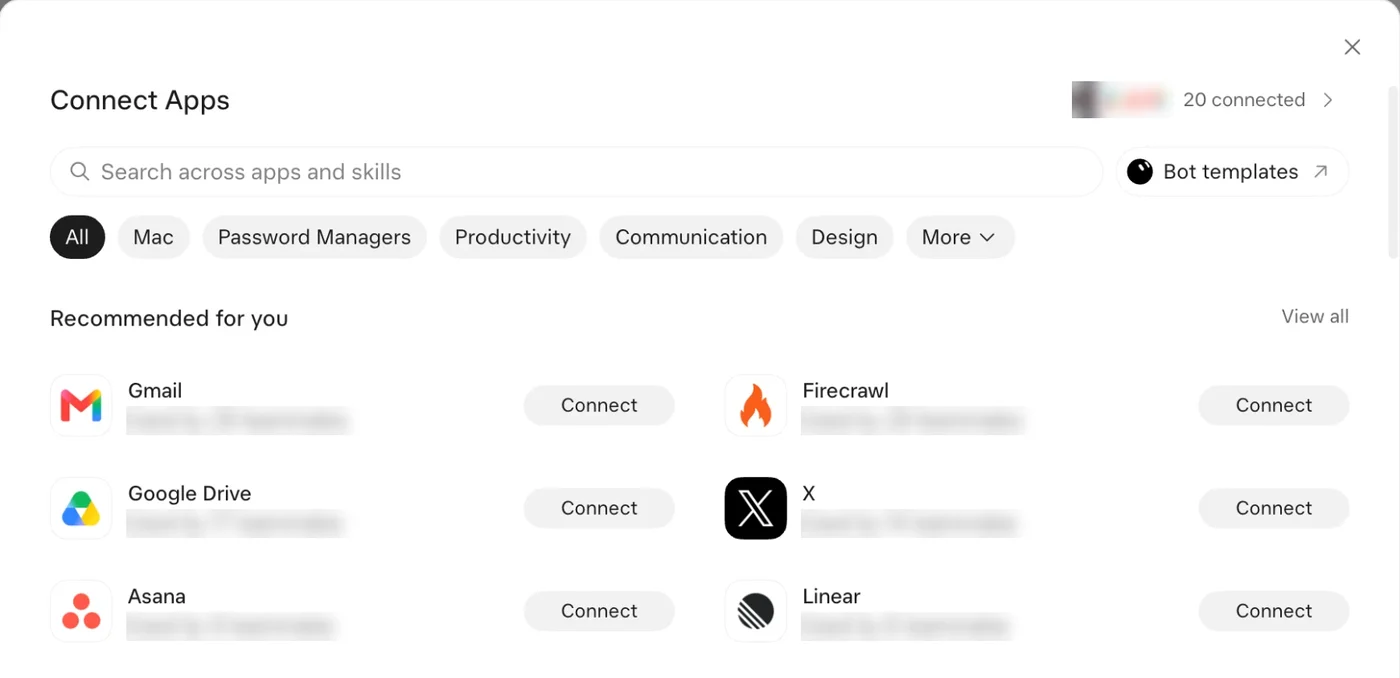
In Grok Bot, open Connect apps from the sidebar, find Firecrawl and select Connect. You can also open Firecrawl's plugin listing and select Add to Grok Bot, which opens the desktop app to finish the install.
Connect your Firecrawl account
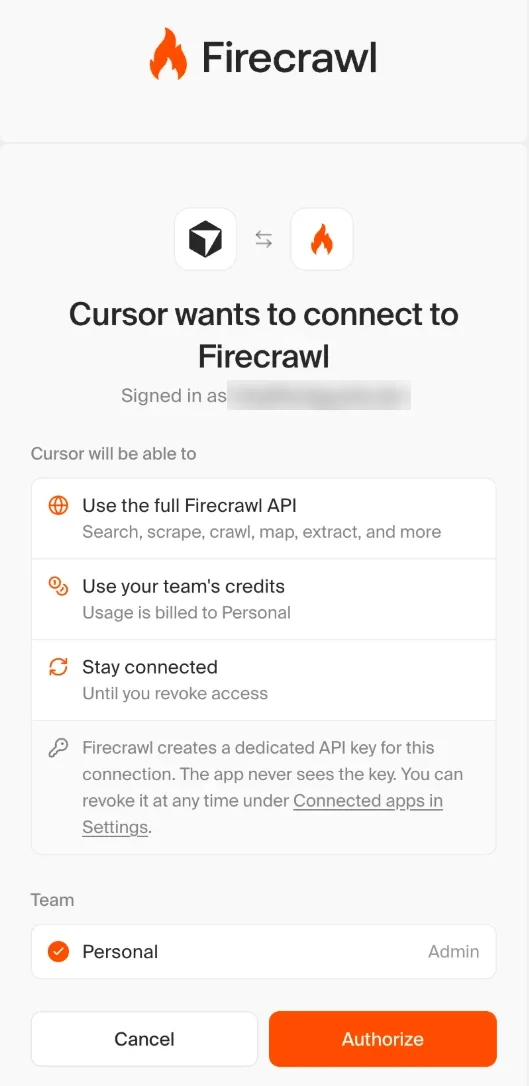
Grok Bot opens Firecrawl in your browser. Sign in, choose a team with Alexandria enabled, and select Authorize. The screen names Cursor, because the plugin is published on the Cursor Marketplace. No account yet? You can create one for free in the same flow.
Ask your Bot for the data
In a chat, ask in plain language and mention FullEnrich or Firecrawl Alexandria. To make sure the Bot uses Firecrawl, type @ and choose Firecrawl first. For example:
Use Firecrawl to find up to 10 engineering leaders at software companies in Toronto, with their current titles and employers.
What can Grok Bot do with FullEnrich?
People and company search, profile lookups, firmographics, and verified contact data.
Grok Bot can run any of FullEnrich's 10 capabilities through Alexandria. Each call is billed in Firecrawl credits on your Firecrawl team.
- Person match: At most one matching profile in the people array. An empty array costs no credits. Costs 1 Firecrawl credit per record.
- People search: People in the people array. Search also returns metadata.total, metadata.offset, and metadata.search_after. An empty array costs no credits. Email and phone enrichment is a separate operation. Costs 1 Firecrawl credit per record.
- Person lookup: The best matching person in the people array, or an empty array when no match is found. No-match costs no credits. Costs 10 Firecrawl credits per record.
- Company match: At most one matching company in the companies array. An empty array costs no credits. Costs 1 Firecrawl credit per record.
- Company search: Company records in the companies array. Search also returns metadata.total, metadata.offset, and metadata.search_after. An empty array costs no credits. Costs 5 Firecrawl credits per record.
- Company lookup: The best matching company in the companies array, or an empty array when no match is found. No-match costs no credits. Costs 10 Firecrawl credits per record.
- Work email: One record in results when a deliverable, high-probability, or catch-all work email was found, an empty array when not. An empty array costs nothing. contact_info carries most_probable_work_email and the work_emails candidates; profile is present when linkedin_url was given. Costs 30 Firecrawl credits per record.
- Mobile number: One record in results when a mobile number was found, an empty array when not. An empty array costs nothing. contact_info carries most_probable_phone and the phones candidates; profile is present when linkedin_url was given. Costs 300 Firecrawl credits per record.
- Personal email: One record in results when a valid personal email was found, an empty array when not. An empty array costs nothing. contact_info carries most_probable_personal_email and the personal_emails candidates; profile is present when linkedin_url was given. Costs 100 Firecrawl credits per record.
- Reverse email lookup: One record in results when the person behind the email was found, an empty array when not. An empty array costs nothing. profile carries the person and their employer. Costs 30 Firecrawl credits per record.
What should I ask Grok Bot?
Name FullEnrich or Firecrawl Alexandria in the prompt so Grok Bot reaches for it.
- Use Firecrawl to find up to 10 engineering leaders at software companies in Toronto, with their current titles and employers.
- Use Firecrawl to look up stripe.com and return the company's industry, headquarters, founding year and employee count.
- Use Firecrawl to find up to 10 software companies headquartered in Toronto with 50 to 500 employees, including their domains and employee counts.
- Use Firecrawl to find up to 10 people currently at Stripe with Python skills and show their professional profiles and current roles.
Troubleshooting
Why doesn't my Bot use FullEnrich?
Attach Firecrawl to the chat with @ before you ask, and name FullEnrich or Firecrawl Alexandria in the prompt.
Add to Grok Bot doesn't open the app. What should I do?
Install the Grok Bot desktop app first, or open Connect apps in Grok Bot and search for Firecrawl.
Use FullEnrich in other AI apps
The same Firecrawl account reaches FullEnrich from other AI apps. Pick one for its setup steps:

Other data providers you can connect to Grok Bot
Frequently Asked Questions
What is Firecrawl?
Firecrawl is the web data API to search, scrape and interact with the web at scale. It turns websites into clean, LLM-ready data for AI agents and apps. The Firecrawl plugin brings those tools into Grok Bot, along with every data provider in Firecrawl Alexandria.
What is Firecrawl Alexandria?
Firecrawl Alexandria is Firecrawl's library of 550+ data providers for AI agents, FullEnrich among them. Each provider returns structured data through documented capabilities. Grok Bot finds the capability that fits your question and calls it through the Firecrawl plugin, so you don't write any integration code. Alexandria needs a Firecrawl account signed in on a team with Alexandria enabled, or an API key from such a team; keyless connections don't include it.
Is there a FullEnrich MCP server for Grok Bot?
Grok Bot reaches FullEnrich through Firecrawl's hosted MCP server, which serves FullEnrich and every other Alexandria provider as tools. Add the Firecrawl plugin once and you don't install or host a separate MCP server for FullEnrich.
What does connecting FullEnrich to Grok Bot unlock?
Grok Bot can run all 10 of FullEnrich's capabilities, including Person match, People search and Person lookup, from any chat, with structured results it can sort, compare and summarize. For example, ask: "Use Firecrawl to find up to 10 engineering leaders at software companies in Toronto, with their current titles and employers." In the same conversation, Grok Bot can combine FullEnrich with Firecrawl's web search and scraping and the other providers in Firecrawl Alexandria.
Do I need my own FullEnrich account or API key to use it in Grok Bot?
No. Grok Bot calls FullEnrich through Firecrawl Alexandria and each call is billed in Firecrawl credits, so you don't need a separate FullEnrich account or API key.
How much does it cost to use FullEnrich in Grok Bot?
FullEnrich calls cost from 1 to 300 Firecrawl credits per billed unit, depending on the capability and how much data it returns. The capability list on this page shows each price and its unit. The credits come from the Firecrawl team you connect to Grok Bot, and finding the right capability is free.
Can Grok Bot use other providers besides FullEnrich?
Yes. The same Firecrawl plugin reaches every provider in Firecrawl Alexandria, along with Firecrawl's web search and scraping, so you connect once.
Can I use FullEnrich in other AI apps?
Yes. Connect Firecrawl to ChatGPT, Claude, Cursor, Muse signed in on a Firecrawl team with Alexandria enabled, or use the Firecrawl MCP server, CLI or API with an API key from that team, and the same FullEnrich capabilities are available there. Keyless connections don't include Alexandria.