How to connect GDACS global multi-hazard alerts to Cursor
Add the Firecrawl MCP server to Cursor once and it can call the GDACS global multi-hazard alerts API and every other provider in Firecrawl Alexandria, with no GDACS global multi-hazard alerts integration code.
To connect GDACS global multi-hazard alerts to Cursor, add the Firecrawl MCP server to Cursor, sign in on a Firecrawl team with Alexandria enabled, and ask for GDACS global multi-hazard alerts data in plain language. The connection works in Cursor's agent and chat, and you set it up once.
Cursor uses GDACS global multi-hazard alerts as an MCP tool through Firecrawl's hosted MCP server, so you don't install or host a separate MCP server for GDACS global multi-hazard alerts.
Cursor is an AI code editor. Its agent uses MCP servers for outside tools, and the Firecrawl MCP server adds web search, scraping and every data provider in Firecrawl Alexandria.
How do I connect GDACS global multi-hazard alerts to Cursor?
Install the Firecrawl MCP server
Open the install dialog in Cursor, check that the URL is Firecrawl's hosted server, then select Install.
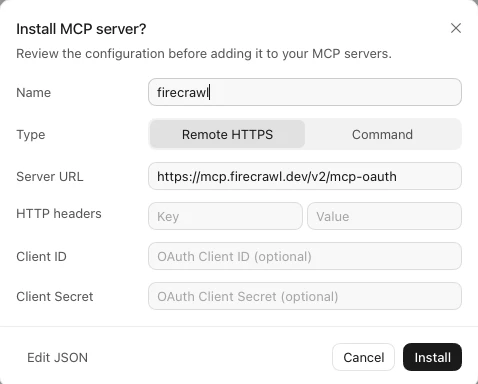
Connect your Firecrawl account
Use the server's sign-in option in Cursor's MCP settings. Firecrawl opens in your browser: sign in, choose a team with Alexandria enabled, and approve access. A green dot next to Firecrawl means it's connected.
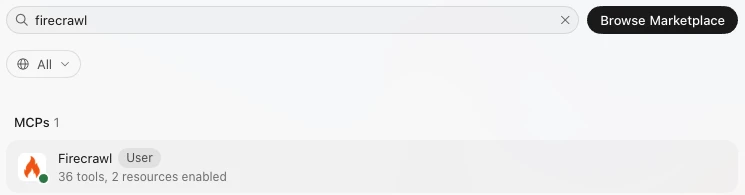
Ask Cursor's agent for the data
In the agent chat, ask in plain language and mention GDACS global multi-hazard alerts or Firecrawl Alexandria. The agent finds the GDACS global multi-hazard alerts capability that fits and runs it. For example:
Use Firecrawl to list every GDACS event (EQ, TC, FL, VO, DR, WF) overlapping 2026-10-10 to 2026-10-17, page by page.
What can Cursor do with GDACS global multi-hazard alerts?
Global Disaster Alert and Coordination System (UN OCHA, UNOSAT, EC JRC and ECHO) event alerts for earthquakes, tropical cyclones, floods, volcanoes, droughts and wildfires: full list by date window, modified-since changes, one event with episodes and footprint geometry, and filtered search, from the public gdacsapi JSON API. As-is data; GDACS's terms say automatic alerts are not for decisions without confirmation and copyright follows the EC legal notice. robots.txt asks for a low request rate, so every call is serial.
Cursor can run any of GDACS global multi-hazard alerts's 5 capabilities through Alexandria. Each call is billed in Firecrawl credits on your Firecrawl team.
- Records changes: Events modified since a UTC timestamp, from GDACS's own modified-since filter events/geteventlist/latest?datemodified=<since> with alertlevel=green;orange;red, 100 rows per page. The API answers its 404 problem document past the last page (and for a quiet window on page 1); that is an explicit empty page here, not not_found. Rows whose datemodified is before since are dropped with a warning. Each page is a slow query upstream (3-20 s when GDACS is idle, minutes while its database is busy): every request is bounded by the call's wall-clock budget and a page that does not come back in time is a retryable upstream_unavailable with retry_after; retry the same since and cursor. Costs 5 Firecrawl credits per call.
- Records get: One GDACS event by its own identifier (eventtype + eventid) from events/geteventdata, or one episode of it from events/getepisodedata when episodeid is given: the full record plus the episode index (ids and detail URLs), impact resources (timeline, buffers, shakemap exports), image and document links. include_geometry adds the footprints from polygons/getgeometry for that episode (centroid, Poly_Green/Orange/Red wind buffers, track lines, Poly_Cones, earthquake intensity contours, flood extents); polygon_types narrows them (e.g. Green,Orange,Red for the ~24 KB wind buffers instead of ~400 KB). Unknown event or episode -> not_found. Costs 5 Firecrawl credits per call.
- Records list: One page (100 rows) of the full GDACS event list for one segment: hazard types x calendar date window, from events/geteventlist/SEARCH with alertlevel=green;orange;red always sent (the API default silently hides Green). Rows are episodes ordered by todate descending; every record carries source_record_id gdacs:<eventtype>:<eventid>:<episodeid>, source_url, publication_id and retrieved_at. publication_id = segment + the newest datemodified on page 1. A window that ended more than 30 days ago is closed: later pages re-fetch page 1 and return invalid_input with issue code publication_changed when the pin moved. A window ending within 30 days of today is live (live: true, coverage partial): rows may shift between pages, so dedupe on source_record_id and reconcile with records_changes. Default segment: the current calendar month to today. Events overlapping the window (long droughts, cyclones) are included even when they started earlier. Costs 5 Firecrawl credits per call.
- Search: Per-query search over events/geteventlist/SEARCH with GDACS's own filters: hazard types, alert levels, date window (default the last 7 days), English country name as GDACS writes it (e.g. Guam, Philippines) and minimum severity in the hazard's unit (magnitude for EQ, km/h for TC). One page of 100 rows ordered by todate descending; next_page when the page was full. Costs 5 Firecrawl credits per call.
- Source status: Cheap version check for the GDACS event catalogue. Reads page 1 of the modified-since feed (events/geteventlist/latest, last hour, then last day) for the newest datemodified, and events/geteventlist/statistic for the year (year-to-date for the current year): total events, totals per alert level and per hazard type, plus a SHA-256 over the sorted unique eventtype:eventid keys of statistic.details[] as the content hash (GDACS publishes no hash). publication_id is gdacs:<newest datemodified>. Costs 5 Firecrawl credits per call.
What should I ask Cursor?
Name GDACS global multi-hazard alerts or Firecrawl Alexandria in the prompt so Cursor reaches for it. Each example opens in Cursor with the prompt filled in.
- Use Firecrawl to list every GDACS event (EQ, TC, FL, VO, DR, WF) overlapping 2026-10-10 to 2026-10-17, page by page.
- Use Firecrawl to answer this: Which GDACS events were modified since 2026-10-18T03:00 UTC?
- Use Firecrawl to get tropical cyclone 1001338 with its episodes, then its wind-buffer, cone and track footprints.
- Use Firecrawl to help with this: Red or Orange alerts affecting Guam this week.
Troubleshooting
Why can't Cursor find GDACS global multi-hazard alerts?
If Firecrawl's tools in Cursor stop at search, scrape and parse, the connection is keyless and doesn't include Alexandria. Finish the sign-in from Cursor's MCP settings, or add an API key from a team with Alexandria enabled.
Firecrawl shows a red dot in Cursor. What should I do?
Open Cursor's MCP settings, sign in to Firecrawl again, and restart the agent chat so it loads the tools.
Use GDACS global multi-hazard alerts in other AI apps
The same Firecrawl account reaches GDACS global multi-hazard alerts from other AI apps. Pick one for its setup steps:
- GDACS global multi-hazard alerts in ChatGPT
- GDACS global multi-hazard alerts in Claude
- GDACS global multi-hazard alerts in Grok Bot
 GDACS global multi-hazard alerts in Muse
Other data providers you can connect to Cursor
Frequently Asked Questions
What is Firecrawl?
Firecrawl is the web data API to search, scrape and interact with the web at scale. It turns websites into clean, LLM-ready data for AI agents and apps. The Firecrawl MCP server brings those tools into Cursor, along with every data provider in Firecrawl Alexandria.
What is Firecrawl Alexandria?
Firecrawl Alexandria is Firecrawl's library of 550+ data providers for AI agents, GDACS global multi-hazard alerts among them. Each provider returns structured data through documented capabilities. Cursor finds the capability that fits your question and calls it through the Firecrawl MCP server, so you don't write any integration code. Alexandria needs a Firecrawl account signed in on a team with Alexandria enabled, or an API key from such a team; keyless connections don't include it.
Is there a GDACS global multi-hazard alerts MCP server for Cursor?
Cursor reaches GDACS global multi-hazard alerts through Firecrawl's hosted MCP server, which serves GDACS global multi-hazard alerts and every other Alexandria provider as tools. Add the Firecrawl MCP server once and you don't install or host a separate MCP server for GDACS global multi-hazard alerts.
What does connecting GDACS global multi-hazard alerts to Cursor unlock?
Cursor can run all 5 of GDACS global multi-hazard alerts's capabilities, including Records changes, Records get and Records list, from any chat, with structured results it can sort, compare and summarize. For example, ask: "Use Firecrawl to list every GDACS event (EQ, TC, FL, VO, DR, WF) overlapping 2026-10-10 to 2026-10-17, page by page." In the same conversation, Cursor can combine GDACS global multi-hazard alerts with Firecrawl's web search and scraping and the other providers in Firecrawl Alexandria.
Do I need my own GDACS global multi-hazard alerts account or API key to use it in Cursor?
No. Cursor calls GDACS global multi-hazard alerts through Firecrawl Alexandria and each call is billed in Firecrawl credits, so you don't need a separate GDACS global multi-hazard alerts account or API key.
How much does it cost to use GDACS global multi-hazard alerts in Cursor?
Each GDACS global multi-hazard alerts call costs 5 Firecrawl credits. The capability list on this page shows each price and its unit. The credits come from the Firecrawl team you connect to Cursor, and finding the right capability is free.
Can Cursor use other providers besides GDACS global multi-hazard alerts?
Yes. The same Firecrawl MCP server reaches every provider in Firecrawl Alexandria, along with Firecrawl's web search and scraping, so you connect once.
Can I use GDACS global multi-hazard alerts in other AI apps?
Yes. Connect Firecrawl to ChatGPT, Claude, Grok Bot, Muse signed in on a Firecrawl team with Alexandria enabled, or use the Firecrawl MCP server, CLI or API with an API key from that team, and the same GDACS global multi-hazard alerts capabilities are available there. Keyless connections don't include Alexandria.