How to connect US Census Bureau Geocoder to Cursor
Add the Firecrawl MCP server to Cursor once and it can call the US Census Bureau Geocoder API and every other provider in Firecrawl Alexandria, with no US Census Bureau Geocoder integration code.
To connect US Census Bureau Geocoder to Cursor, add the Firecrawl MCP server to Cursor, sign in on a Firecrawl team with Alexandria enabled, and ask for US Census Bureau Geocoder data in plain language. The connection works in Cursor's agent and chat, and you set it up once.
Cursor uses US Census Bureau Geocoder as an MCP tool through Firecrawl's hosted MCP server, so you don't install or host a separate MCP server for US Census Bureau Geocoder.
Cursor is an AI code editor. Its agent uses MCP servers for outside tools, and the Firecrawl MCP server adds web search, scraping and every data provider in Firecrawl Alexandria.
How do I connect US Census Bureau Geocoder to Cursor?
Install the Firecrawl MCP server
Open the install dialog in Cursor, check that the URL is Firecrawl's hosted server, then select Install.
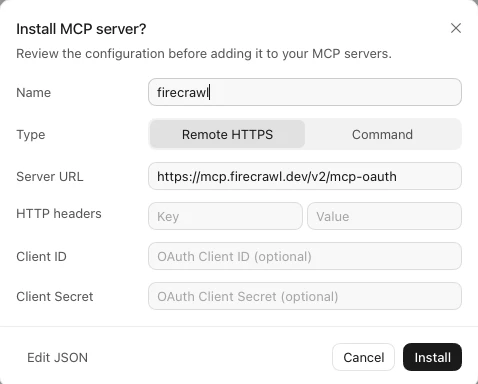
Connect your Firecrawl account
Use the server's sign-in option in Cursor's MCP settings. Firecrawl opens in your browser: sign in, choose a team with Alexandria enabled, and approve access. A green dot next to Firecrawl means it's connected.
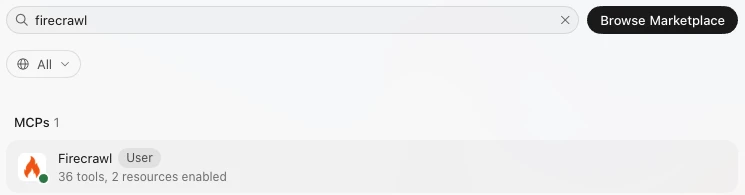
Ask Cursor's agent for the data
In the agent chat, ask in plain language and mention US Census Bureau Geocoder or Firecrawl Alexandria. The agent finds the US Census Bureau Geocoder capability that fits and runs it. For example:
Use Firecrawl to answer this: Is 1600 Pennsylvania Ave NW, Washington, DC 20500 a real US address, and what are its coordinates?
What can Cursor do with US Census Bureau Geocoder?
The US Census Bureau Geocoder at geocoding.geo.census.gov: matches US addresses against the Census Bureau's MAF/TIGER address ranges and returns the standardized matched address, interpolated coordinates and the census geography that contains it (state, county, tract and block codes, places, county subdivisions, urban and statistical areas, congressional and state legislative districts), for one address, a batch of up to 1,000, or a latitude and longitude. This is not USPS address validation: a match means the house number falls inside a TIGER address range, not that USPS delivers mail there, and the geocoder drops apartment and suite numbers and returns no ZIP+4. Uses the Census Bureau Geocoder but is not endorsed or certified by the Census Bureau.
Cursor can run any of US Census Bureau Geocoder's 3 capabilities through Alexandria. Each call is billed in Firecrawl credits on your Firecrawl team.
- Batch geocode: Match up to 1,000 US addresses in one call through the geocoder's batch service. Each row comes back in input order as match, no_match or tie, with whether the match was exact, the standardized address, interpolated coordinates, the TIGER line and side, and with geographies (the default) its state, county, tract and block codes and block GEOID, plus counts of matched, unmatched and tied rows. Costs 5 Firecrawl credits per call.
- Geocode: Match one US address against the Census Bureau's TIGER address ranges, given as one line (address) or as street with city and state and/or zip. Each match carries the standardized address with its house number, street, postal city, state and 5-digit ZIP, interpolated latitude and longitude, the parsed street components, the TIGER address range and side it fell in, and, with geographies (the default), the state, county, tract and block codes plus every census layer containing the point. No match returns an empty list with a no_match warning; several matches come with an ambiguous warning. Costs 5 Firecrawl credits per call.
- Geographies at: Every census geography that contains a latitude and longitude: the state, county, tract and block codes, plus each layer (places, county subdivisions, urban and statistical areas, congressional and state legislative districts) with its GEOID, name, MAF/TIGER feature class, land and water area and internal point. A point outside the United States, Puerto Rico and the Island Areas returns no geographies with an outside_coverage warning. Costs 5 Firecrawl credits per call.
What should I ask Cursor?
Name US Census Bureau Geocoder or Firecrawl Alexandria in the prompt so Cursor reaches for it. Each example opens in Cursor with the prompt filled in.
- Use Firecrawl to answer this: Is 1600 Pennsylvania Ave NW, Washington, DC 20500 a real US address, and what are its coordinates?
- Use Firecrawl to answer this: Which census tract, county and congressional district is 350 Fifth Avenue, New York in?
- Use Firecrawl to help with this: Standardize and geocode this list of customer addresses and flag the ones that don't match.
- Use Firecrawl to answer this: Which county, census tract and state legislative districts contain 37.7749, -122.4194?
Troubleshooting
Why can't Cursor find US Census Bureau Geocoder?
If Firecrawl's tools in Cursor stop at search, scrape and parse, the connection is keyless and doesn't include Alexandria. Finish the sign-in from Cursor's MCP settings, or add an API key from a team with Alexandria enabled.
Firecrawl shows a red dot in Cursor. What should I do?
Open Cursor's MCP settings, sign in to Firecrawl again, and restart the agent chat so it loads the tools.
Use US Census Bureau Geocoder in other AI apps
The same Firecrawl account reaches US Census Bureau Geocoder from other AI apps. Pick one for its setup steps:
- US Census Bureau Geocoder in ChatGPT
- US Census Bureau Geocoder in Claude
- US Census Bureau Geocoder in Grok Bot
 US Census Bureau Geocoder in Muse
Other data providers you can connect to Cursor
Frequently Asked Questions
What is Firecrawl?
Firecrawl is the web data API to search, scrape and interact with the web at scale. It turns websites into clean, LLM-ready data for AI agents and apps. The Firecrawl MCP server brings those tools into Cursor, along with every data provider in Firecrawl Alexandria.
What is Firecrawl Alexandria?
Firecrawl Alexandria is Firecrawl's library of 550+ data providers for AI agents, US Census Bureau Geocoder among them. Each provider returns structured data through documented capabilities. Cursor finds the capability that fits your question and calls it through the Firecrawl MCP server, so you don't write any integration code. Alexandria needs a Firecrawl account signed in on a team with Alexandria enabled, or an API key from such a team; keyless connections don't include it.
Is there a US Census Bureau Geocoder MCP server for Cursor?
Cursor reaches US Census Bureau Geocoder through Firecrawl's hosted MCP server, which serves US Census Bureau Geocoder and every other Alexandria provider as tools. Add the Firecrawl MCP server once and you don't install or host a separate MCP server for US Census Bureau Geocoder.
What does connecting US Census Bureau Geocoder to Cursor unlock?
Cursor can run US Census Bureau Geocoder's Batch geocode, Geocode and Geographies at, from any chat, with structured results it can sort, compare and summarize. For example, ask: "Use Firecrawl to answer this: Is 1600 Pennsylvania Ave NW, Washington, DC 20500 a real US address, and what are its coordinates?" In the same conversation, Cursor can combine US Census Bureau Geocoder with Firecrawl's web search and scraping and the other providers in Firecrawl Alexandria.
Do I need my own US Census Bureau Geocoder account or API key to use it in Cursor?
No. Cursor calls US Census Bureau Geocoder through Firecrawl Alexandria and each call is billed in Firecrawl credits, so you don't need a separate US Census Bureau Geocoder account or API key.
How much does it cost to use US Census Bureau Geocoder in Cursor?
Each US Census Bureau Geocoder call costs 5 Firecrawl credits. The capability list on this page shows each price and its unit. The credits come from the Firecrawl team you connect to Cursor, and finding the right capability is free.
Can Cursor use other providers besides US Census Bureau Geocoder?
Yes. The same Firecrawl MCP server reaches every provider in Firecrawl Alexandria, along with Firecrawl's web search and scraping, so you connect once.
Can I use US Census Bureau Geocoder in other AI apps?
Yes. Connect Firecrawl to ChatGPT, Claude, Grok Bot, Muse signed in on a Firecrawl team with Alexandria enabled, or use the Firecrawl MCP server, CLI or API with an API key from that team, and the same US Census Bureau Geocoder capabilities are available there. Keyless connections don't include Alexandria.