How to connect GLEIF to Grok Bot
Add the Firecrawl plugin to Grok Bot once and it can call the GLEIF API and every other provider in Firecrawl Alexandria, with no GLEIF integration code.
To connect GLEIF to Grok Bot, add the Firecrawl plugin to Grok Bot, sign in on a Firecrawl team with Alexandria enabled, and ask for GLEIF data in plain language. The connection works in every Bot in your Grok Bot account, and you set it up once.
Grok Bot uses GLEIF as an MCP tool through Firecrawl's hosted MCP server, so you don't install or host a separate MCP server for GLEIF.
Grok Bot is xAI's agent app. Plugins give your Bots outside tools, and the Firecrawl plugin adds web search, scraping and every data provider in Firecrawl Alexandria.
How do I connect GLEIF to Grok Bot?
Add the Firecrawl plugin
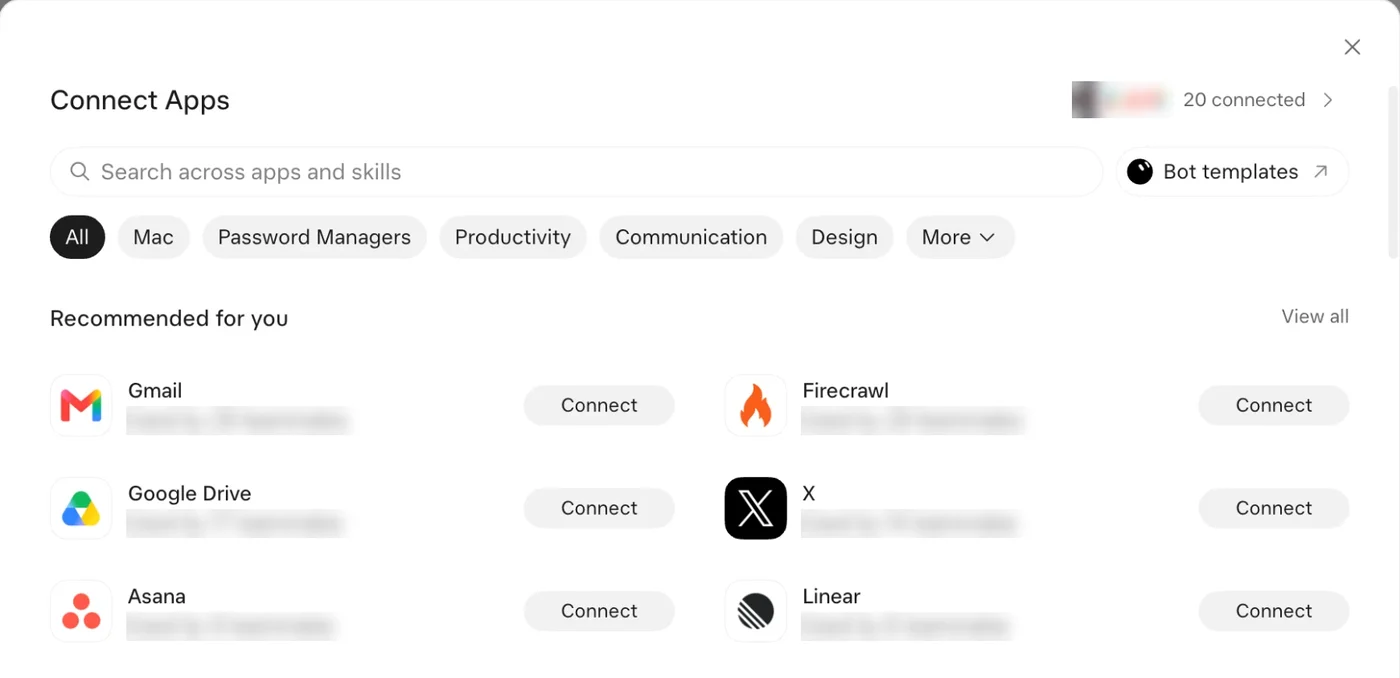
In Grok Bot, open Connect apps from the sidebar, find Firecrawl and select Connect. You can also open Firecrawl's plugin listing and select Add to Grok Bot, which opens the desktop app to finish the install.
Connect your Firecrawl account
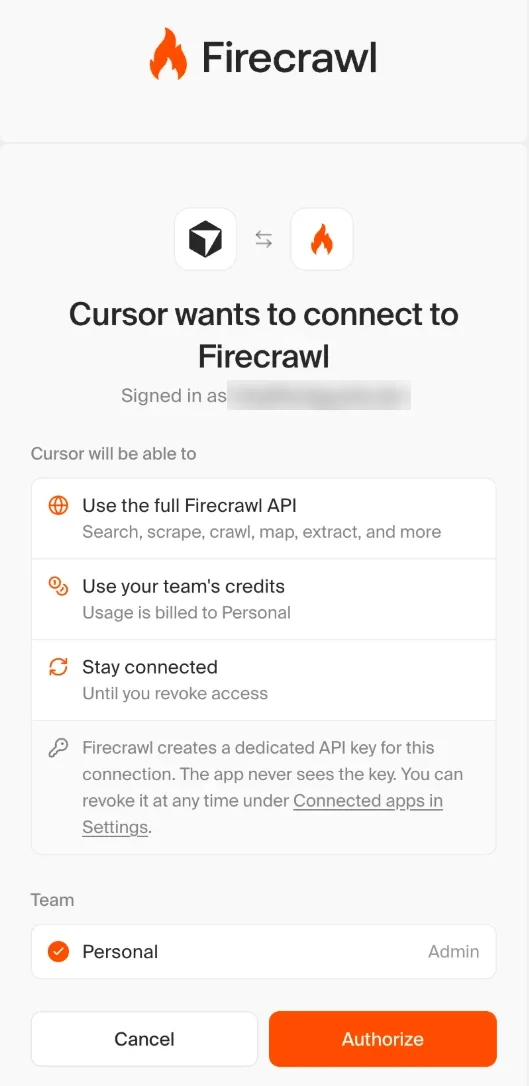
Grok Bot opens Firecrawl in your browser. Sign in, choose a team with Alexandria enabled, and select Authorize. The screen names Cursor, because the plugin is published on the Cursor Marketplace. No account yet? You can create one for free in the same flow.
Ask your Bot for the data
In a chat, ask in plain language and mention GLEIF or Firecrawl Alexandria. To make sure the Bot uses Firecrawl, type @ and choose Firecrawl first. For example:
Use Firecrawl to find up to 10 GLEIF legal entities named Apple with legal addresses in the United States, and show their LEIs and legal names.
What can Grok Bot do with GLEIF?
Global LEI search by name or national business-register number, identity and reported direct/ultimate accounting-consolidation parents and children, plus the GLEIF Golden Copy collection contract: publication status, Level 1/Level 2/reporting-exception delta files, the paginated Level 2 (rr) full copy pinned to one publication, and one LEI mapped onto CDF field names.
Grok Bot can run any of GLEIF's 11 capabilities through Alexandria. Each call is billed in Firecrawl credits on your Firecrawl team.
- By registration: Find GLEIF LEI records by a company's national business-register number as GLEIF records it (entity.registeredAs), such as a Dutch KvK number, an Italian codice fiscale, a French SIREN or a UK Companies House number. Optional legal-address country and GLEIF Registration Authority code narrow a number that repeats across registers. Returns the same records as search: legal name, legal and headquarters address, entity and registration status, registration authority id, LEI and relationship links. A number no LEI record carries fails as not_found. Costs 5 Firecrawl credits per call.
- Direct children: Page through reported direct accounting-consolidated children for an LEI. This excludes unreported ownership relationships. Costs 5 Firecrawl credits per call.
- Direct parent: Retrieve the reported direct accounting-consolidating parent, or its reporting-exception record and reason. This is not a complete beneficial-ownership graph. Costs 5 Firecrawl credits per call.
- Entity: Resolve an exact 20-character LEI to source identity, registration, mapped identifiers and relationship links. Unknown LEIs fail as upstream not-found, not an empty success. Costs 5 Firecrawl credits per call.
- Records changes: Rows of one Golden Copy delta file (IntraDay, LastDay, LastWeek or LastMonth) for lei2, rr or repex, streamed from the CSV zip by byte range and paginated with an opaque cursor pinned to one publication and file. Each record carries source_record_id, source_url, publication_id, retrieved_at, deleted_at (rr/repex DeletedAt) and every non-empty CDF column under fields. Files above the 32 MiB fetch cap (lei2 LastMonth) fail with exceeds_fetch_cap: download the URL from source_status. Costs 5 Firecrawl credits per call.
- Records get: One LEI from api.gleif.org mapped onto Golden Copy CDF field names (LEI, Entity.LegalName, Entity.LegalJurisdiction, Entity.LegalForm.EntityLegalFormCode, Entity.EntityStatus, Registration.RegistrationStatus, Entity.LegalAddress, Entity.HeadquartersAddress, RegistrationAuthority, SuccessorEntity, LegalEntityEvents) plus its Level 2 parent side: the direct and ultimate parent relationship records (StartNode = this LEI) or the reporting exception that replaces them. publication_id is api.gleif.org's goldenCopy.publishDate, which can lag the files by one publication. Unknown LEIs fail not_found. Costs 5 Firecrawl credits per call.
- Records list: The full current Level 2 (rr, 'who owns whom') relationship list from the Golden Copy rr CSV zip, paginated with a cursor pinned to one publication. Every page re-reads publishes/rr/latest and fails with publication_changed when the source moved on (unless publication_id was pinned explicitly: old publications stay downloadable). Each page streams the zip from byte 0 up to the requested rows, so later pages cost more. lei2 (482 MB) and repex (59 MB) full copies are hand-offs from source_status. Costs 5 Firecrawl credits per call.
- Search: Search global registered entities by name: current legal name, previous legal and other names, and ASCII-transliterated names, with optional legal-address country. Commas in the name are folded into spaces (GLEIF reads them as OR separators). Page through matching LEIs; name matches are candidates, not guaranteed identity equivalence. Costs 5 Firecrawl credits per call.
- Source status: Cheap version check of the GLEIF Golden Copy: the latest publication (publication_id, published_at), and for lei2 (Level 1), rr (Level 2) and repex (reporting exceptions) the full and delta (IntraDay, LastDay, LastWeek, LastMonth) zip URLs, sizes and record counts. The publisher posts no checksum (content_hash is null). lei2 and repex full copies are hand-offs (URL, size, record count) because they exceed the fetch cap; rr is served by records_list. Costs 5 Firecrawl credits per call.
- Ultimate children: Page through reported ultimate accounting-consolidated children for an LEI. This excludes unreported ownership relationships. Costs 5 Firecrawl credits per call.
See all 11 capabilities and their inputs on the GLEIF API page.
What should I ask Grok Bot?
Name GLEIF or Firecrawl Alexandria in the prompt so Grok Bot reaches for it.
- Use Firecrawl to find up to 10 GLEIF legal entities named Apple with legal addresses in the United States, and show their LEIs and legal names.
- Use Firecrawl to look up Apple Inc.'s LEI HWUPKR0MPOU8FGXBT394 and show its legal name, address and LEI registration status.
- Use Firecrawl to show the reported direct and ultimate accounting-consolidating parents of LEI 2549008YU9EOMHFUA249, including any reporting exceptions.
- Use Firecrawl to list up to 10 reported direct accounting-consolidated children of Apple Inc., LEI HWUPKR0MPOU8FGXBT394.
Troubleshooting
Why doesn't my Bot use GLEIF?
Attach Firecrawl to the chat with @ before you ask, and name GLEIF or Firecrawl Alexandria in the prompt.
Add to Grok Bot doesn't open the app. What should I do?
Install the Grok Bot desktop app first, or open Connect apps in Grok Bot and search for Firecrawl.
Use GLEIF in other AI apps
The same Firecrawl account reaches GLEIF from other AI apps. Pick one for its setup steps:

Other data providers you can connect to Grok Bot
Frequently Asked Questions
What is Firecrawl?
Firecrawl is the web data API to search, scrape and interact with the web at scale. It turns websites into clean, LLM-ready data for AI agents and apps. The Firecrawl plugin brings those tools into Grok Bot, along with every data provider in Firecrawl Alexandria.
What is Firecrawl Alexandria?
Firecrawl Alexandria is Firecrawl's library of 550+ data providers for AI agents, GLEIF among them. Each provider returns structured data through documented capabilities. Grok Bot finds the capability that fits your question and calls it through the Firecrawl plugin, so you don't write any integration code. Alexandria needs a Firecrawl account signed in on a team with Alexandria enabled, or an API key from such a team; keyless connections don't include it.
Is there a GLEIF MCP server for Grok Bot?
Grok Bot reaches GLEIF through Firecrawl's hosted MCP server, which serves GLEIF and every other Alexandria provider as tools. Add the Firecrawl plugin once and you don't install or host a separate MCP server for GLEIF.
What does connecting GLEIF to Grok Bot unlock?
Grok Bot can run all 11 of GLEIF's capabilities, including By registration, Direct children and Direct parent, from any chat, with structured results it can sort, compare and summarize. For example, ask: "Use Firecrawl to find up to 10 GLEIF legal entities named Apple with legal addresses in the United States, and show their LEIs and legal names." In the same conversation, Grok Bot can combine GLEIF with Firecrawl's web search and scraping and the other providers in Firecrawl Alexandria.
Do I need my own GLEIF account or API key to use it in Grok Bot?
No. Grok Bot calls GLEIF through Firecrawl Alexandria and each call is billed in Firecrawl credits, so you don't need a separate GLEIF account or API key.
How much does it cost to use GLEIF in Grok Bot?
Each GLEIF call costs 5 Firecrawl credits. The capability list on this page shows each price and its unit. The credits come from the Firecrawl team you connect to Grok Bot, and finding the right capability is free.
Can Grok Bot use other providers besides GLEIF?
Yes. The same Firecrawl plugin reaches every provider in Firecrawl Alexandria, along with Firecrawl's web search and scraping, so you connect once.
Can I use GLEIF in other AI apps?
Yes. Connect Firecrawl to ChatGPT, Claude, Cursor, Muse signed in on a Firecrawl team with Alexandria enabled, or use the Firecrawl MCP server, CLI or API with an API key from that team, and the same GLEIF capabilities are available there. Keyless connections don't include Alexandria.