How to connect GO Tracker (GO Transit) to Cursor
Add the Firecrawl MCP server to Cursor once and it can call the GO Tracker (GO Transit) API and every other provider in Firecrawl Alexandria, with no GO Tracker (GO Transit) integration code.
To connect GO Tracker (GO Transit) to Cursor, add the Firecrawl MCP server to Cursor, sign in on a Firecrawl team with Alexandria enabled, and ask for GO Tracker (GO Transit) data in plain language. The connection works in Cursor's agent and chat, and you set it up once.
Cursor uses GO Tracker (GO Transit) as an MCP tool through Firecrawl's hosted MCP server, so you don't install or host a separate MCP server for GO Tracker (GO Transit).
Cursor is an AI code editor. Its agent uses MCP servers for outside tools, and the Firecrawl MCP server adds web search, scraping and every data provider in Firecrawl Alexandria.
How do I connect GO Tracker (GO Transit) to Cursor?
Install the Firecrawl MCP server
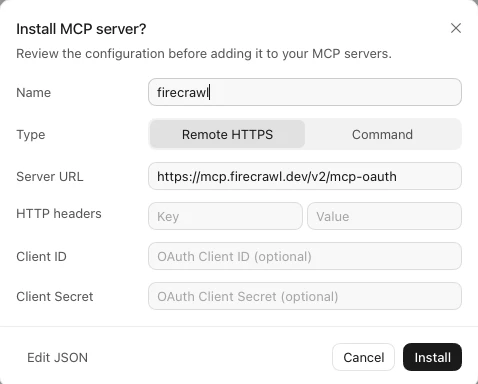
Open the install dialog in Cursor, check that the URL is Firecrawl's hosted server, then select Install.
Connect your Firecrawl account
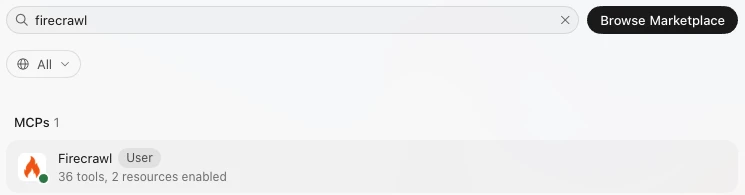
Use the server's sign-in option in Cursor's MCP settings. Firecrawl opens in your browser: sign in, choose a team with Alexandria enabled, and approve access. A green dot next to Firecrawl means it's connected.
Ask Cursor's agent for the data
In the agent chat, ask in plain language and mention GO Tracker (GO Transit) or Firecrawl Alexandria. The agent finds the GO Tracker (GO Transit) capability that fits and runs it. For example:
Use Firecrawl to answer this: When is the next GO train from Oakville to Union, and is it late?
What can Cursor do with GO Tracker (GO Transit)?
GO Transit live rail data from GO Tracker (gotracker.ca), Metrolinx's public train tracker for the Toronto region: live train positions and delays, station departure signs with expected times and tracks, Union Station's departure board with platforms, today's stop-by-stop trip times, station service messages, and the seven rail lines with their stations.
Cursor can run any of GO Tracker (GO Transit)'s 6 capabilities through Alexandria. Each call is billed in Firecrawl credits on your Firecrawl team.
- Lines: GO Transit rail lines from GO Tracker with their stations in line order (code, name, coordinates, location id, whether buses serve it) and the trip numbers and names the tracker lists for each line. Costs 5 Firecrawl credits per call.
- Station alerts: Service messages GO Tracker shows on a GO train station's signs: planned construction, service adjustments, station improvements and safety notices, in English and French. Costs 5 Firecrawl credits per call.
- Station departures: Live departure sign for a GO train station from GO Tracker: the next trains in each direction (about the next 2 hours) with scheduled and expected times, delay in minutes, track, destination, express flag, coach count, status and remaining stops, plus the station's service messages. Costs 5 Firecrawl credits per call.
- Train positions: Live positions of GO trains in service from GO Tracker: latitude and longitude, moving or stopped at a station, on-time status and delay in seconds, origin and destination with scheduled times, express flag and equipment number, optionally for one line. Costs 5 Firecrawl credits per call.
- Trip detail: Today's stop-by-stop record for one GO train trip from GO Tracker: scheduled arrival and departure at every stop, actual times and delay as the train reports them, scheduled and actual track, cancelled or non-stopping stops, and the engine number. Costs 5 Firecrawl credits per call.
- Union departures: Union Station's live GO train departure board from GO Tracker: upcoming trains with line, scheduled time, platform once posted, boarding status (Proceed or Wait), express flag, coach count and stops, optionally for one line. Costs 5 Firecrawl credits per call.
What should I ask Cursor?
Name GO Tracker (GO Transit) or Firecrawl Alexandria in the prompt so Cursor reaches for it. Each example opens in Cursor with the prompt filled in.
- Use Firecrawl to answer this: When is the next GO train from Oakville to Union, and is it late?
- Use Firecrawl to answer this: Which platform does the next Lakeshore East train leave from at Union Station?
- Use Firecrawl to answer this: Where are the Kitchener line GO trains right now?
- Use Firecrawl to answer this: How delayed is GO train 1620 at each stop today?
Troubleshooting
Why can't Cursor find GO Tracker (GO Transit)?
If Firecrawl's tools in Cursor stop at search, scrape and parse, the connection is keyless and doesn't include Alexandria. Finish the sign-in from Cursor's MCP settings, or add an API key from a team with Alexandria enabled.
Firecrawl shows a red dot in Cursor. What should I do?
Open Cursor's MCP settings, sign in to Firecrawl again, and restart the agent chat so it loads the tools.
Use GO Tracker (GO Transit) in other AI apps
The same Firecrawl account reaches GO Tracker (GO Transit) from other AI apps. Pick one for its setup steps:
- GO Tracker (GO Transit) in ChatGPT
- GO Tracker (GO Transit) in Claude
- GO Tracker (GO Transit) in Grok Bot
 GO Tracker (GO Transit) in Muse
Other data providers you can connect to Cursor
Frequently Asked Questions
What is Firecrawl?
Firecrawl is the web data API to search, scrape and interact with the web at scale. It turns websites into clean, LLM-ready data for AI agents and apps. The Firecrawl MCP server brings those tools into Cursor, along with every data provider in Firecrawl Alexandria.
What is Firecrawl Alexandria?
Firecrawl Alexandria is Firecrawl's library of 550+ data providers for AI agents, GO Tracker (GO Transit) among them. Each provider returns structured data through documented capabilities. Cursor finds the capability that fits your question and calls it through the Firecrawl MCP server, so you don't write any integration code. Alexandria needs a Firecrawl account signed in on a team with Alexandria enabled, or an API key from such a team; keyless connections don't include it.
Is there a GO Tracker (GO Transit) MCP server for Cursor?
Cursor reaches GO Tracker (GO Transit) through Firecrawl's hosted MCP server, which serves GO Tracker (GO Transit) and every other Alexandria provider as tools. Add the Firecrawl MCP server once and you don't install or host a separate MCP server for GO Tracker (GO Transit).
What does connecting GO Tracker (GO Transit) to Cursor unlock?
Cursor can run all 6 of GO Tracker (GO Transit)'s capabilities, including Lines, Station alerts and Station departures, from any chat, with structured results it can sort, compare and summarize. For example, ask: "Use Firecrawl to answer this: When is the next GO train from Oakville to Union, and is it late?" In the same conversation, Cursor can combine GO Tracker (GO Transit) with Firecrawl's web search and scraping and the other providers in Firecrawl Alexandria.
Do I need my own GO Tracker (GO Transit) account or API key to use it in Cursor?
No. Cursor calls GO Tracker (GO Transit) through Firecrawl Alexandria and each call is billed in Firecrawl credits, so you don't need a separate GO Tracker (GO Transit) account or API key.
How much does it cost to use GO Tracker (GO Transit) in Cursor?
Each GO Tracker (GO Transit) call costs 5 Firecrawl credits. The capability list on this page shows each price and its unit. The credits come from the Firecrawl team you connect to Cursor, and finding the right capability is free.
Can Cursor use other providers besides GO Tracker (GO Transit)?
Yes. The same Firecrawl MCP server reaches every provider in Firecrawl Alexandria, along with Firecrawl's web search and scraping, so you connect once.
Can I use GO Tracker (GO Transit) in other AI apps?
Yes. Connect Firecrawl to ChatGPT, Claude, Grok Bot, Muse signed in on a Firecrawl team with Alexandria enabled, or use the Firecrawl MCP server, CLI or API with an API key from that team, and the same GO Tracker (GO Transit) capabilities are available there. Keyless connections don't include Alexandria.