How to connect GOV.UK to Grok Bot
Add the Firecrawl plugin to Grok Bot once and it can call the GOV.UK API and every other provider in Firecrawl Alexandria, with no GOV.UK integration code.
To connect GOV.UK to Grok Bot, add the Firecrawl plugin to Grok Bot, sign in on a Firecrawl team with Alexandria enabled, and ask for GOV.UK data in plain language. The connection works in every Bot in your Grok Bot account, and you set it up once.
Grok Bot uses GOV.UK as an MCP tool through Firecrawl's hosted MCP server, so you don't install or host a separate MCP server for GOV.UK.
Grok Bot is xAI's agent app. Plugins give your Bots outside tools, and the Firecrawl plugin adds web search, scraping and every data provider in Firecrawl Alexandria.
How do I connect GOV.UK to Grok Bot?
Add the Firecrawl plugin
In Grok Bot, open Connect apps from the sidebar, find Firecrawl and select Connect. You can also open Firecrawl's plugin listing and select Add to Grok Bot, which opens the desktop app to finish the install.
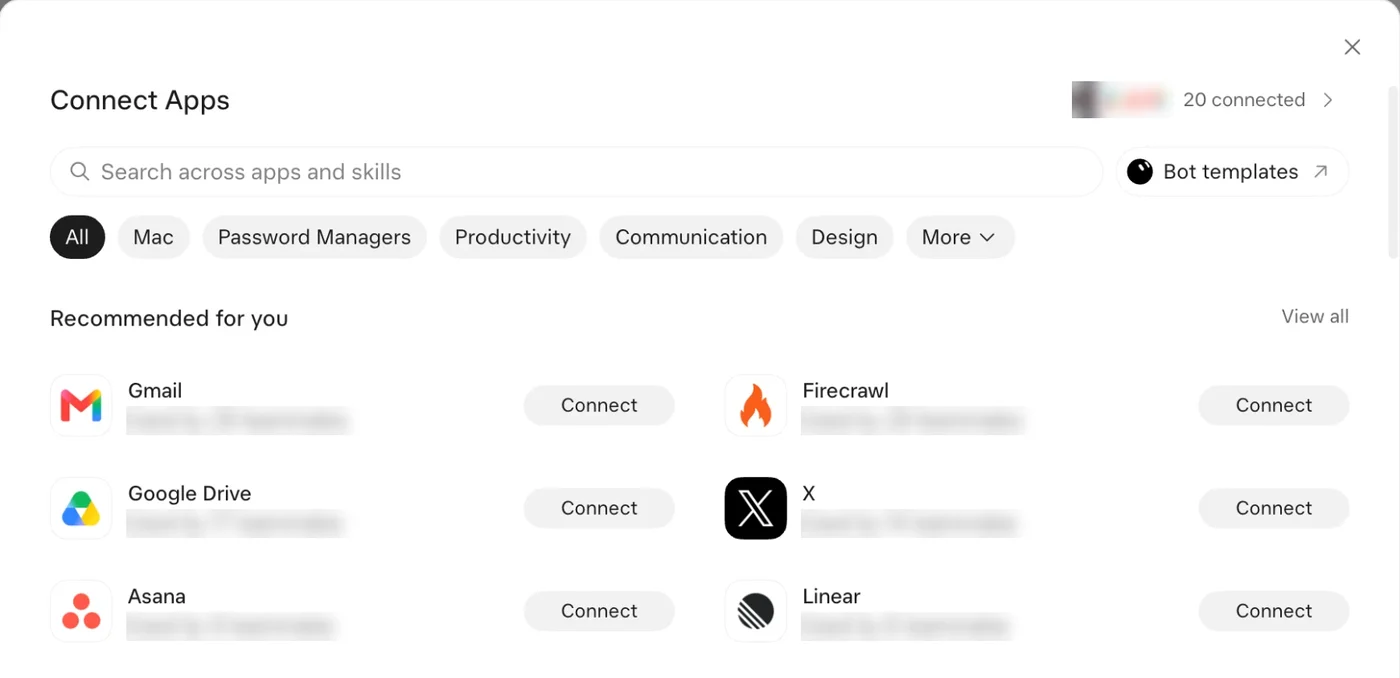
Connect your Firecrawl account
Grok Bot opens Firecrawl in your browser. Sign in, choose a team with Alexandria enabled, and select Authorize. The screen names Cursor, because the plugin is published on the Cursor Marketplace. No account yet? You can create one for free in the same flow.
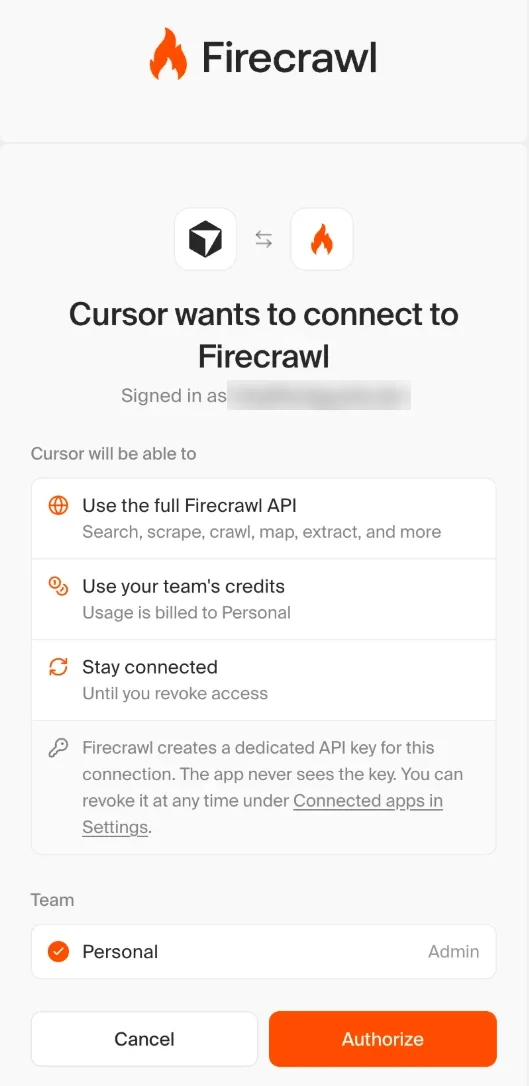
Ask your Bot for the data
In a chat, ask in plain language and mention GOV.UK or Firecrawl Alexandria. To make sure the Bot uses Firecrawl, type @ and choose Firecrawl first. For example:
Use Firecrawl to run GOV.UK's Get manual capability. Inspect the Alexandria inputs, ask for any missing required details, and return a small sample with sources.
What can Grok Bot do with GOV.UK?
GOV.UK (www.gov.uk), the UK government's website: site-wide search with document type, supergroup, organisation, person, location, topic and date filters (or a pasted GOV.UK finder URL), any page as Markdown with its dates, change notes, organisations, guide parts, attachments, collection documents, manual sections and travel advice status, HMRC internal manuals and other manuals with their sections and update notes, the OPSS product safety alerts, reports and recalls, and the list of government organisations. From the public GOV.UK Search, Content and Organisations APIs; content under the Open Government Licence v3.0.
Grok Bot can run any of GOV.UK's 5 capabilities through Alexandria. Each call is billed in Firecrawl credits on your Firecrawl team.
- Get manual: One GOV.UK manual from the Content API (GET /api/content/{manual}): HMRC internal manuals (/hmrc-internal-manuals/<slug>, e.g. inheritance-tax-manual, capital-gains-manual) and other manuals (/guidance/<slug>, e.g. tax-agents-handbook, immigration-rules). Returns title, summary, dates, organisations, body (for guidance manuals), the section groups with every child section (section id, title, path) and the manual's update notes (the /updates page: section, change note, date), newest first, paged through next_cursor. Accepts the manual, any of its section paths or its /updates URL. Costs 5 Firecrawl credits per call.
- Get page: One www.gov.uk page from the GOV.UK Content API (GET /api/content/{path}): title, description, document type, schema, first published and last updated dates, the latest change note and change history, withdrawal notice, organisations, the full body as clean Markdown (tables, lists, links, collapsed details sections and transcripts included, since the API serves the complete HTML), its links, attachments (title, URL, content type, size, pages; consultation documents and final outcome PDFs marked), consultation dates, specialist metadata, product information rows for product safety notices, a collection's groups and documents, a manual section's breadcrumbs and child sections, and foreign travel advice alert status and latest update. Multi-part guides and travel advice list their parts and return one. Redirected paths are followed; removed and unknown pages are not_found. Costs 5 Firecrawl credits per call.
- List organisations: Every organisation on GOV.UK (ministerial departments, agencies, public bodies, courts, including closed ones) from the GOV.UK Organisations API (GET /api/organisations?page=N), 20 per page: slug, title, acronym, format, status (live, closed, exempt, ...), closed status, URL, content id, updated date and the slugs of parent, child and superseding organisations. Page through with next_cursor. Costs 5 Firecrawl credits per call.
- List product safety alerts: Product safety alerts, reports and recalls from the Office for Product Safety and Standards (OPSS) on GOV.UK, newest first: the GOV.UK Search API filtered to document type product_safety_alert_report_recall (the finder at www.gov.uk/product-safety-alerts-reports-recalls). Each notice: title, reference (the PSD notification number such as 2609-0213, or PSA9, from the title), path, url, description, alert type (product-recall, product-safety-report, product-safety-alert), risk level (serious, high, medium, low, not-provided), product category, corrective measures, the alert date and the publication timestamp. Filter by words, alert type, risk level, category and alert date range. get_page on a path returns the full notice with its product information table (brand, model, barcodes, batch numbers), hazard, corrective action and the product image PDF. Costs 5 Firecrawl credits per call.
- Search: Full-text search over www.gov.uk with the official GOV.UK Search API (GET /api/search.json): guidance, consultations and their outcomes, publications, news, speeches, statistics, product safety notices and every other GOV.UK format. Filters: document type (content_store_document_type), content purpose supergroup (the finder groupings), organisation, person, world location, topical event and topic taxon slugs, and a public timestamp range. Accepts a pasted GOV.UK finder URL (search/all, news-and-communications, guidance-and-regulation, policy-papers-and-consultations, research-and-statistics, transparency-and-freedom-of-information-releases, services, .atom feeds too) and maps its query to the same filters. Order by relevance (needs q), newest, oldest or most viewed. Each result: title, path, url, description, document type, public timestamp and organisations. Offset pagination through next_cursor replaces finder paging and scrolling. For monitoring, order newest with a from date lists everything changed since then. Costs 5 Firecrawl credits per call.
What should I ask Grok Bot?
Name GOV.UK or Firecrawl Alexandria in the prompt so Grok Bot reaches for it.
- Use Firecrawl to run GOV.UK's Get manual capability. Inspect the Alexandria inputs, ask for any missing required details, and return a small sample with sources.
- Use Firecrawl to run GOV.UK's Get page capability. Inspect the Alexandria inputs, ask for any missing required details, and return a small sample with sources.
- Use Firecrawl to run GOV.UK's List organisations capability. Inspect the Alexandria inputs, ask for any missing required details, and return a small sample with sources.
- Use Firecrawl to run GOV.UK's List product safety alerts capability. Inspect the Alexandria inputs, ask for any missing required details, and return a small sample with sources.
Troubleshooting
Why doesn't my Bot use GOV.UK?
Attach Firecrawl to the chat with @ before you ask, and name GOV.UK or Firecrawl Alexandria in the prompt.
Add to Grok Bot doesn't open the app. What should I do?
Install the Grok Bot desktop app first, or open Connect apps in Grok Bot and search for Firecrawl.
Use GOV.UK in other AI apps
The same Firecrawl account reaches GOV.UK from other AI apps. Pick one for its setup steps:

Other data providers you can connect to Grok Bot
Frequently Asked Questions
What is Firecrawl?
Firecrawl is the web data API to search, scrape and interact with the web at scale. It turns websites into clean, LLM-ready data for AI agents and apps. The Firecrawl plugin brings those tools into Grok Bot, along with every data provider in Firecrawl Alexandria.
What is Firecrawl Alexandria?
Firecrawl Alexandria is Firecrawl's library of 550+ data providers for AI agents, GOV.UK among them. Each provider returns structured data through documented capabilities. Grok Bot finds the capability that fits your question and calls it through the Firecrawl plugin, so you don't write any integration code. Alexandria needs a Firecrawl account signed in on a team with Alexandria enabled, or an API key from such a team; keyless connections don't include it.
Is there a GOV.UK MCP server for Grok Bot?
Grok Bot reaches GOV.UK through Firecrawl's hosted MCP server, which serves GOV.UK and every other Alexandria provider as tools. Add the Firecrawl plugin once and you don't install or host a separate MCP server for GOV.UK.
What does connecting GOV.UK to Grok Bot unlock?
Grok Bot can run all 5 of GOV.UK's capabilities, including Get manual, Get page and List organisations, from any chat, with structured results it can sort, compare and summarize. In the same conversation, Grok Bot can combine GOV.UK with Firecrawl's web search and scraping and the other providers in Firecrawl Alexandria.
Do I need my own GOV.UK account or API key to use it in Grok Bot?
No. Grok Bot calls GOV.UK through Firecrawl Alexandria and each call is billed in Firecrawl credits, so you don't need a separate GOV.UK account or API key.
How much does it cost to use GOV.UK in Grok Bot?
Each GOV.UK call costs 5 Firecrawl credits. The capability list on this page shows each price and its unit. The credits come from the Firecrawl team you connect to Grok Bot, and finding the right capability is free.
Can Grok Bot use other providers besides GOV.UK?
Yes. The same Firecrawl plugin reaches every provider in Firecrawl Alexandria, along with Firecrawl's web search and scraping, so you connect once.
Can I use GOV.UK in other AI apps?
Yes. Connect Firecrawl to ChatGPT, Claude, Cursor, Muse signed in on a Firecrawl team with Alexandria enabled, or use the Firecrawl MCP server, CLI or API with an API key from that team, and the same GOV.UK capabilities are available there. Keyless connections don't include Alexandria.