How to connect NIH Guide for Grants and Contracts to Grok Bot
Add the Firecrawl plugin to Grok Bot once and it can call the NIH Guide for Grants and Contracts API and every other provider in Firecrawl Alexandria, with no NIH Guide for Grants and Contracts integration code.
To connect NIH Guide for Grants and Contracts to Grok Bot, add the Firecrawl plugin to Grok Bot, sign in on a Firecrawl team with Alexandria enabled, and ask for NIH Guide for Grants and Contracts data in plain language. The connection works in every Bot in your Grok Bot account, and you set it up once.
Grok Bot uses NIH Guide for Grants and Contracts as an MCP tool through Firecrawl's hosted MCP server, so you don't install or host a separate MCP server for NIH Guide for Grants and Contracts.
Grok Bot is xAI's agent app. Plugins give your Bots outside tools, and the Firecrawl plugin adds web search, scraping and every data provider in Firecrawl Alexandria.
How do I connect NIH Guide for Grants and Contracts to Grok Bot?
Add the Firecrawl plugin
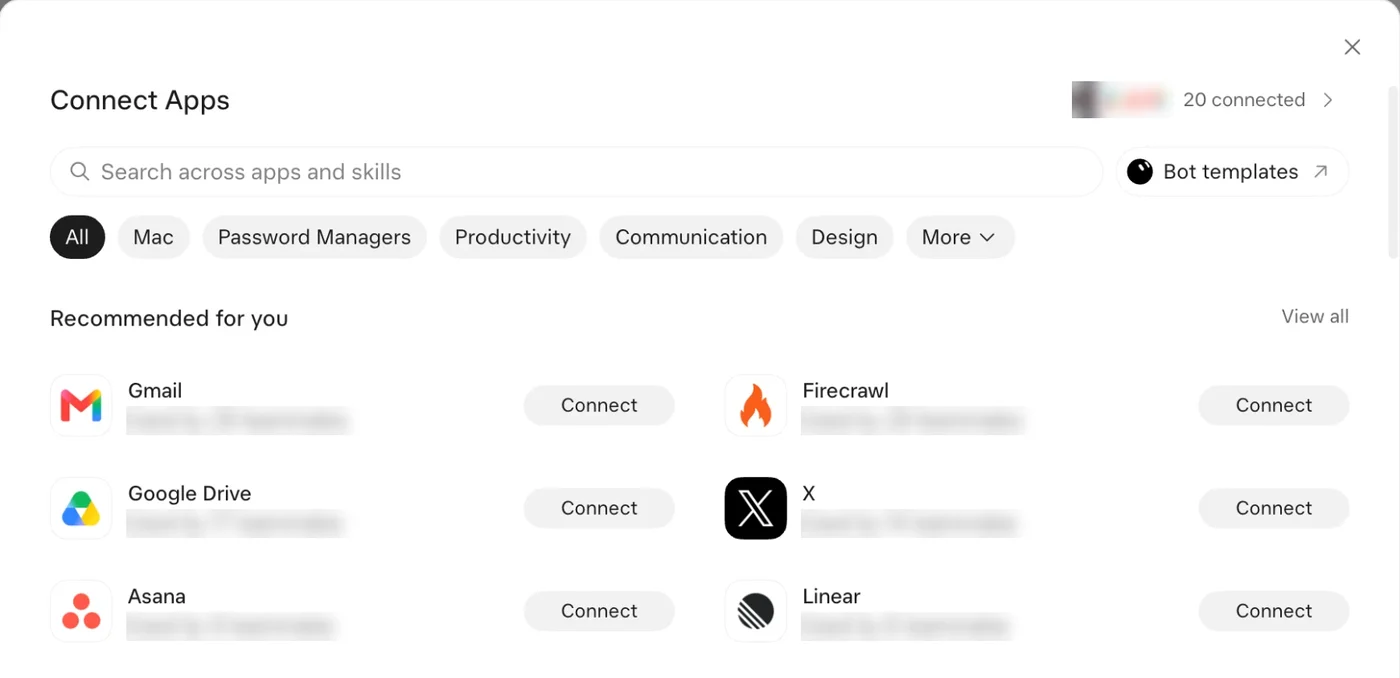
In Grok Bot, open Connect apps from the sidebar, find Firecrawl and select Connect. You can also open Firecrawl's plugin listing and select Add to Grok Bot, which opens the desktop app to finish the install.
Connect your Firecrawl account
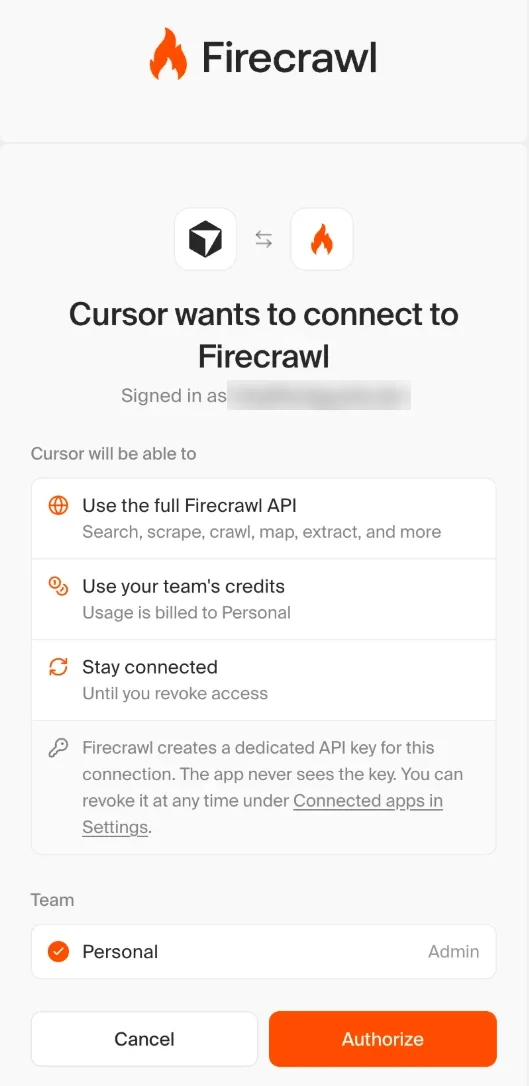
Grok Bot opens Firecrawl in your browser. Sign in, choose a team with Alexandria enabled, and select Authorize. The screen names Cursor, because the plugin is published on the Cursor Marketplace. No account yet? You can create one for free in the same flow.
Ask your Bot for the data
In a chat, ask in plain language and mention NIH Guide for Grants and Contracts or Firecrawl Alexandria. To make sure the Bot uses Firecrawl, type @ and choose Firecrawl first. For example:
Use Firecrawl to run NIH Guide for Grants and Contracts' Records changes capability. Inspect the Alexandria inputs, ask for any missing required details, and return a small sample with sources.
What can Grok Bot do with NIH Guide for Grants and Contracts?
NIH Guide for Grants and Contracts: active and expired notices of funding opportunity (RFA, PA, PAR, PAS), notices of special interest and Guide notices from the Guide search index (the keyless AWS API Gateway JSON behind grants.nih.gov/funding/nih-guide-for-grants-and-contracts), with the grants.nih.gov document HTML parsed for assistance listing numbers, eligibility, number of applications, letter-of-intent and application due dates. A collector: source_status, records_list (cursor pinned to one publication), records_get, records_changes (publisher-dated notices) and search.
Grok Bot can run any of NIH Guide for Grants and Contracts's 5 capabilities through Alexandria. Each call is billed in Firecrawl credits on your Firecrawl team.
- Records changes: The publisher's own delta: Guide documents released in a date window (`daterange` on the index release date), default segment `notices` (Notices of Change to a NOFO, Notices of Intent to Publish, policy notices, RFIs). `referenced_docnums` on each record names the NOFO a change notice amends (from its title and related documents). Optional `notice_subject` filter. Pages of up to 1000 in rowid order; the cursor pins the window total and fails with `publication_changed` when it moves. When the gateway is unavailable and the segment is `notices`, the official RSS feed is filtered to the window and returned as a partial result. Costs 5 Firecrawl credits per call.
- Records get: One Guide document by its number (`docnum`, e.g. PAR-27-053): the index record plus the grants.nih.gov HTML parsed into assistance listing numbers, eligible organizations, number of applications (with the derived `limited_submission`), letter of intent due date, application due dates and expiration date (NOFO pages) or release/effective dates, related announcements, issuer and purpose (notice pages). `document_status` says what happened: `parsed`; `grants_gov_only` when the index has no HTML filename (the NOFO lives only on Grants.gov: use `grants_gov_id` with the grants-gov program); `missing` when grants.nih.gov answered 404 for the listed file; `unrecognized_layout` when the page has none of the Guide labels (legacy documents). Costs 5 Firecrawl credits per call.
- Records list: The full current list of one index segment (default `active`: the active NOFOs), sorted by rowid ascending, up to 1000 records per page. The cursor pins the segment, the offset, the total and the highest rowid; every page re-reads total and max rowid and fails with `publication_changed` (failure code invalid_input, issue code `publication_changed` at /cursor) when the segment moved, instead of mixing publications. Segments: active, activenosis, expired, expirednosis, notices (notices: about 17 pages). When the gateway is unavailable and the segment is `notices`, the official RSS feed (`/grants/guide/newsfeed/fundingopps.xml`, the latest notices only) is returned as a partial page instead. Costs 5 Firecrawl credits per call.
- Search: Keyword and facet search over the Guide index: free text (`query`, quoted phrases supported; relevance order), issuing IC (`primary_ic`), parent organization (`parent_ic`), activity code, document type (RFA, PA, PAR, PAS, NOSIS), clinical-trial allowance and notice subject, within one segment (default `active`). Without `query` the newest documents come first. Costs 5 Firecrawl credits per call.
- Source status: Cheap version check of the Guide index: per segment (active, activenosis, expired, expirednosis, notices) the record count, the highest rowid and the latest document, plus the newest release date overall. `version` is the SHA-256 of the canonical segment tuples; for segments that fit one page (at most 1000 records) `content_hash` is the SHA-256 of the sorted (rowid, docnum, reldate, expdate) tuples of every record. The index is an API, not a file, so there is no size. Costs 5 Firecrawl credits per call.
What should I ask Grok Bot?
Name NIH Guide for Grants and Contracts or Firecrawl Alexandria in the prompt so Grok Bot reaches for it.
- Use Firecrawl to run NIH Guide for Grants and Contracts' Records changes capability. Inspect the Alexandria inputs, ask for any missing required details, and return a small sample with sources.
- Use Firecrawl to run NIH Guide for Grants and Contracts' Records get capability. Inspect the Alexandria inputs, ask for any missing required details, and return a small sample with sources.
- Use Firecrawl to run NIH Guide for Grants and Contracts' Records list capability. Inspect the Alexandria inputs, ask for any missing required details, and return a small sample with sources.
- Use Firecrawl to run NIH Guide for Grants and Contracts' Search capability. Inspect the Alexandria inputs, ask for any missing required details, and return a small sample with sources.
Troubleshooting
Why doesn't my Bot use NIH Guide for Grants and Contracts?
Attach Firecrawl to the chat with @ before you ask, and name NIH Guide for Grants and Contracts or Firecrawl Alexandria in the prompt.
Add to Grok Bot doesn't open the app. What should I do?
Install the Grok Bot desktop app first, or open Connect apps in Grok Bot and search for Firecrawl.
Use NIH Guide for Grants and Contracts in other AI apps
The same Firecrawl account reaches NIH Guide for Grants and Contracts from other AI apps. Pick one for its setup steps:
- NIH Guide for Grants and Contracts in ChatGPT
- NIH Guide for Grants and Contracts in Claude
- NIH Guide for Grants and Contracts in Cursor
 NIH Guide for Grants and Contracts in Muse
Other data providers you can connect to Grok Bot
Frequently Asked Questions
What is Firecrawl?
Firecrawl is the web data API to search, scrape and interact with the web at scale. It turns websites into clean, LLM-ready data for AI agents and apps. The Firecrawl plugin brings those tools into Grok Bot, along with every data provider in Firecrawl Alexandria.
What is Firecrawl Alexandria?
Firecrawl Alexandria is Firecrawl's library of 550+ data providers for AI agents, NIH Guide for Grants and Contracts among them. Each provider returns structured data through documented capabilities. Grok Bot finds the capability that fits your question and calls it through the Firecrawl plugin, so you don't write any integration code. Alexandria needs a Firecrawl account signed in on a team with Alexandria enabled, or an API key from such a team; keyless connections don't include it.
Is there a NIH Guide for Grants and Contracts MCP server for Grok Bot?
Grok Bot reaches NIH Guide for Grants and Contracts through Firecrawl's hosted MCP server, which serves NIH Guide for Grants and Contracts and every other Alexandria provider as tools. Add the Firecrawl plugin once and you don't install or host a separate MCP server for NIH Guide for Grants and Contracts.
What does connecting NIH Guide for Grants and Contracts to Grok Bot unlock?
Grok Bot can run all 5 of NIH Guide for Grants and Contracts's capabilities, including Records changes, Records get and Records list, from any chat, with structured results it can sort, compare and summarize. In the same conversation, Grok Bot can combine NIH Guide for Grants and Contracts with Firecrawl's web search and scraping and the other providers in Firecrawl Alexandria.
Do I need my own NIH Guide for Grants and Contracts account or API key to use it in Grok Bot?
No. Grok Bot calls NIH Guide for Grants and Contracts through Firecrawl Alexandria and each call is billed in Firecrawl credits, so you don't need a separate NIH Guide for Grants and Contracts account or API key.
How much does it cost to use NIH Guide for Grants and Contracts in Grok Bot?
Each NIH Guide for Grants and Contracts call costs 5 Firecrawl credits. The capability list on this page shows each price and its unit. The credits come from the Firecrawl team you connect to Grok Bot, and finding the right capability is free.
Can Grok Bot use other providers besides NIH Guide for Grants and Contracts?
Yes. The same Firecrawl plugin reaches every provider in Firecrawl Alexandria, along with Firecrawl's web search and scraping, so you connect once.
Can I use NIH Guide for Grants and Contracts in other AI apps?
Yes. Connect Firecrawl to ChatGPT, Claude, Cursor, Muse signed in on a Firecrawl team with Alexandria enabled, or use the Firecrawl MCP server, CLI or API with an API key from that team, and the same NIH Guide for Grants and Contracts capabilities are available there. Keyless connections don't include Alexandria.