How to connect California Legislative Information (leginfo.legislature.ca.gov) to Cursor
Add the Firecrawl MCP server to Cursor once and it can call the California Legislative Information (leginfo.legislature.ca.gov) API and every other provider in Firecrawl Alexandria, with no California Legislative Information (leginfo.legislature.ca.gov) integration code.
To connect California Legislative Information (leginfo.legislature.ca.gov) to Cursor, add the Firecrawl MCP server to Cursor, sign in on a Firecrawl team with Alexandria enabled, and ask for California Legislative Information (leginfo.legislature.ca.gov) data in plain language. The connection works in Cursor's agent and chat, and you set it up once.
Cursor uses California Legislative Information (leginfo.legislature.ca.gov) as an MCP tool through Firecrawl's hosted MCP server, so you don't install or host a separate MCP server for California Legislative Information (leginfo.legislature.ca.gov).
Cursor is an AI code editor. Its agent uses MCP servers for outside tools, and the Firecrawl MCP server adds web search, scraping and every data provider in Firecrawl Alexandria.
How do I connect California Legislative Information (leginfo.legislature.ca.gov) to Cursor?
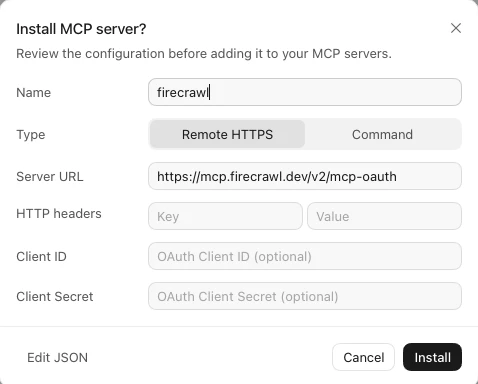
Install the Firecrawl MCP server
Open the install dialog in Cursor, check that the URL is Firecrawl's hosted server, then select Install.
Connect your Firecrawl account
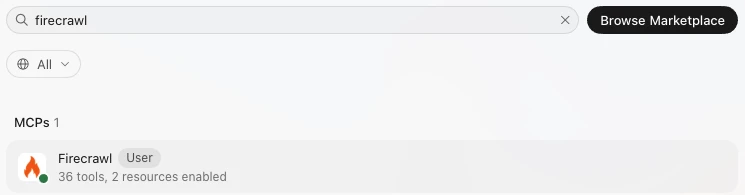
Use the server's sign-in option in Cursor's MCP settings. Firecrawl opens in your browser: sign in, choose a team with Alexandria enabled, and approve access. A green dot next to Firecrawl means it's connected.
Ask Cursor's agent for the data
In the agent chat, ask in plain language and mention California Legislative Information (leginfo.legislature.ca.gov) or Firecrawl Alexandria. The agent finds the California Legislative Information (leginfo.legislature.ca.gov) capability that fits and runs it. For example:
Use Firecrawl to read California Code of Civil Procedure section 2031.310 and include its heading path and legislative history note.
What can Cursor do with California Legislative Information (leginfo.legislature.ca.gov)?
California Legislative Information, the Legislature's official site for state law and bills: current text of any California code section or article, full code tables of contents, keyword search over bill text by session, and per bill the current text with digest and versions, status, complete history and roll-call votes. Server-rendered HTML; no API key.
Cursor can run any of California Legislative Information (leginfo.legislature.ca.gov)'s 8 capabilities through Alexandria. Each call is billed in Firecrawl credits on your Firecrawl team.
- Bill: One bill's current text page (billNavClient.xhtml): measure, session, title line, legislative counsel's digest and the enacting text as plain text, the digest keys (vote, appropriation, fiscal committee, local program), the chapter number when chaptered, the list of versions with dates and stages, the publication timestamp, the PDF link and the links to the status, history, votes and analysis tabs. Only the current version's text is addressable by URL; the site keeps earlier versions behind a session-bound form. Costs 5 Firecrawl credits per call.
- Bill history: One bill's complete history (billHistoryClient.xhtml): every dated action, newest first, as the site prints it. Costs 5 Firecrawl credits per call.
- Bill search: Keyword search over the bill text of one legislative session (billSearchClient.xhtml): the total, the page position and, per result, the bill_id, measure (e.g. 'AB-1930'), author slug, the site's snippet with the matched words, and the bill text URL. Page 1 is a stateless GET; later pages replay the site's 'Go To Page' JSF form in the same session. 10 results per page. Costs 5 Firecrawl credits per call.
- Bill status: One bill's status page (billStatusClient.xhtml): measure, lead authors, principal coauthors, coauthors, topic, 31st day in print, title, house location, the last dated milestone the site prints (e.g. 'Chaptered Date', 'Last Amended Date') with its date, the 'Type of Measure' flags and the last five history actions. Costs 5 Firecrawl credits per call.
- Bill votes: One bill's roll-call votes (billVotesClient.xhtml): per vote the date, result, location (floor or committee), ayes/noes/NVR counts, the motion, and the member names voting aye, no and not voting. Costs 5 Firecrawl credits per call.
- Code article: Every section of one article (or of a chapter/division that has no articles) of a California code, from codes_displayText.xhtml: the heading path and, per section, the number, plain text and history note. The hierarchy parameters are exactly the ones code_toc and code_section return (trailing dots kept, '' for levels that do not apply). Costs 5 Firecrawl credits per call.
- Code section: One section of a California code by code abbreviation and section number (codes_displaySection.xhtml): the heading path (division/part/title/chapter/article with the site's enactment notes), the section text as plain text, the history note, the hierarchy parameters and node tree path for code_article, and the page URL. Costs 5 Firecrawl credits per call.
- Code toc: The full table of contents of one California code in one call (codedisplayexpand.xhtml, the site's 'Expand all'): every division/part/title/chapter/article node with its heading, section range, depth, whether it is a leaf whose text code_article returns, and the hierarchy parameters to pass on. For the Constitution (CONS) the nodes are its articles and the hierarchy carries the article numeral (e.g. 'XIII A'). Costs 5 Firecrawl credits per call.
What should I ask Cursor?
Name California Legislative Information (leginfo.legislature.ca.gov) or Firecrawl Alexandria in the prompt so Cursor reaches for it. Each example opens in Cursor with the prompt filled in.
- Use Firecrawl to read California Code of Civil Procedure section 2031.310 and include its heading path and legislative history note.
- Use Firecrawl to show the California Evidence Code table of contents with section ranges.
- Use Firecrawl to find the first 10 California bills mentioning civil discovery in the 2025–2026 session, with bill numbers and matching text snippets.
- Use Firecrawl to show the current text, status and roll-call vote counts for California AB 2793 in the 2025–2026 session (bill ID 202520260AB2793).
Troubleshooting
Why can't Cursor find California Legislative Information (leginfo.legislature.ca.gov)?
If Firecrawl's tools in Cursor stop at search, scrape and parse, the connection is keyless and doesn't include Alexandria. Finish the sign-in from Cursor's MCP settings, or add an API key from a team with Alexandria enabled.
Firecrawl shows a red dot in Cursor. What should I do?
Open Cursor's MCP settings, sign in to Firecrawl again, and restart the agent chat so it loads the tools.
Use California Legislative Information (leginfo.legislature.ca.gov) in other AI apps
The same Firecrawl account reaches California Legislative Information (leginfo.legislature.ca.gov) from other AI apps. Pick one for its setup steps:
- California Legislative Information (leginfo.legislature.ca.gov) in ChatGPT
- California Legislative Information (leginfo.legislature.ca.gov) in Claude
- California Legislative Information (leginfo.legislature.ca.gov) in Grok Bot
 California Legislative Information (leginfo.legislature.ca.gov) in Muse
Other data providers you can connect to Cursor
Frequently Asked Questions
What is Firecrawl?
Firecrawl is the web data API to search, scrape and interact with the web at scale. It turns websites into clean, LLM-ready data for AI agents and apps. The Firecrawl MCP server brings those tools into Cursor, along with every data provider in Firecrawl Alexandria.
What is Firecrawl Alexandria?
Firecrawl Alexandria is Firecrawl's library of 550+ data providers for AI agents, California Legislative Information (leginfo.legislature.ca.gov) among them. Each provider returns structured data through documented capabilities. Cursor finds the capability that fits your question and calls it through the Firecrawl MCP server, so you don't write any integration code. Alexandria needs a Firecrawl account signed in on a team with Alexandria enabled, or an API key from such a team; keyless connections don't include it.
Is there a California Legislative Information (leginfo.legislature.ca.gov) MCP server for Cursor?
Cursor reaches California Legislative Information (leginfo.legislature.ca.gov) through Firecrawl's hosted MCP server, which serves California Legislative Information (leginfo.legislature.ca.gov) and every other Alexandria provider as tools. Add the Firecrawl MCP server once and you don't install or host a separate MCP server for California Legislative Information (leginfo.legislature.ca.gov).
What does connecting California Legislative Information (leginfo.legislature.ca.gov) to Cursor unlock?
Cursor can run all 8 of California Legislative Information (leginfo.legislature.ca.gov)'s capabilities, including Bill, Bill history and Bill search, from any chat, with structured results it can sort, compare and summarize. For example, ask: "Use Firecrawl to read California Code of Civil Procedure section 2031.310 and include its heading path and legislative history note." In the same conversation, Cursor can combine California Legislative Information (leginfo.legislature.ca.gov) with Firecrawl's web search and scraping and the other providers in Firecrawl Alexandria.
Do I need my own California Legislative Information (leginfo.legislature.ca.gov) account or API key to use it in Cursor?
No. Cursor calls California Legislative Information (leginfo.legislature.ca.gov) through Firecrawl Alexandria and each call is billed in Firecrawl credits, so you don't need a separate California Legislative Information (leginfo.legislature.ca.gov) account or API key.
How much does it cost to use California Legislative Information (leginfo.legislature.ca.gov) in Cursor?
Each California Legislative Information (leginfo.legislature.ca.gov) call costs 5 Firecrawl credits. The capability list on this page shows each price and its unit. The credits come from the Firecrawl team you connect to Cursor, and finding the right capability is free.
Can Cursor use other providers besides California Legislative Information (leginfo.legislature.ca.gov)?
Yes. The same Firecrawl MCP server reaches every provider in Firecrawl Alexandria, along with Firecrawl's web search and scraping, so you connect once.
Can I use California Legislative Information (leginfo.legislature.ca.gov) in other AI apps?
Yes. Connect Firecrawl to ChatGPT, Claude, Grok Bot, Muse signed in on a Firecrawl team with Alexandria enabled, or use the Firecrawl MCP server, CLI or API with an API key from that team, and the same California Legislative Information (leginfo.legislature.ca.gov) capabilities are available there. Keyless connections don't include Alexandria.