How to connect Florida DBPR licensing registry (myfloridalicense.com) to Grok Bot
Add the Firecrawl plugin to Grok Bot once and it can call the Florida DBPR licensing registry (myfloridalicense.com) API and every other provider in Firecrawl Alexandria, with no Florida DBPR licensing registry (myfloridalicense.com) integration code.
To connect Florida DBPR licensing registry (myfloridalicense.com) to Grok Bot, add the Firecrawl plugin to Grok Bot, sign in on a Firecrawl team with Alexandria enabled, and ask for Florida DBPR licensing registry (myfloridalicense.com) data in plain language. The connection works in every Bot in your Grok Bot account, and you set it up once.
Grok Bot uses Florida DBPR licensing registry (myfloridalicense.com) as an MCP tool through Firecrawl's hosted MCP server, so you don't install or host a separate MCP server for Florida DBPR licensing registry (myfloridalicense.com).
Grok Bot is xAI's agent app. Plugins give your Bots outside tools, and the Firecrawl plugin adds web search, scraping and every data provider in Firecrawl Alexandria.
How do I connect Florida DBPR licensing registry (myfloridalicense.com) to Grok Bot?
Add the Firecrawl plugin
In Grok Bot, open Connect apps from the sidebar, find Firecrawl and select Connect. You can also open Firecrawl's plugin listing and select Add to Grok Bot, which opens the desktop app to finish the install.
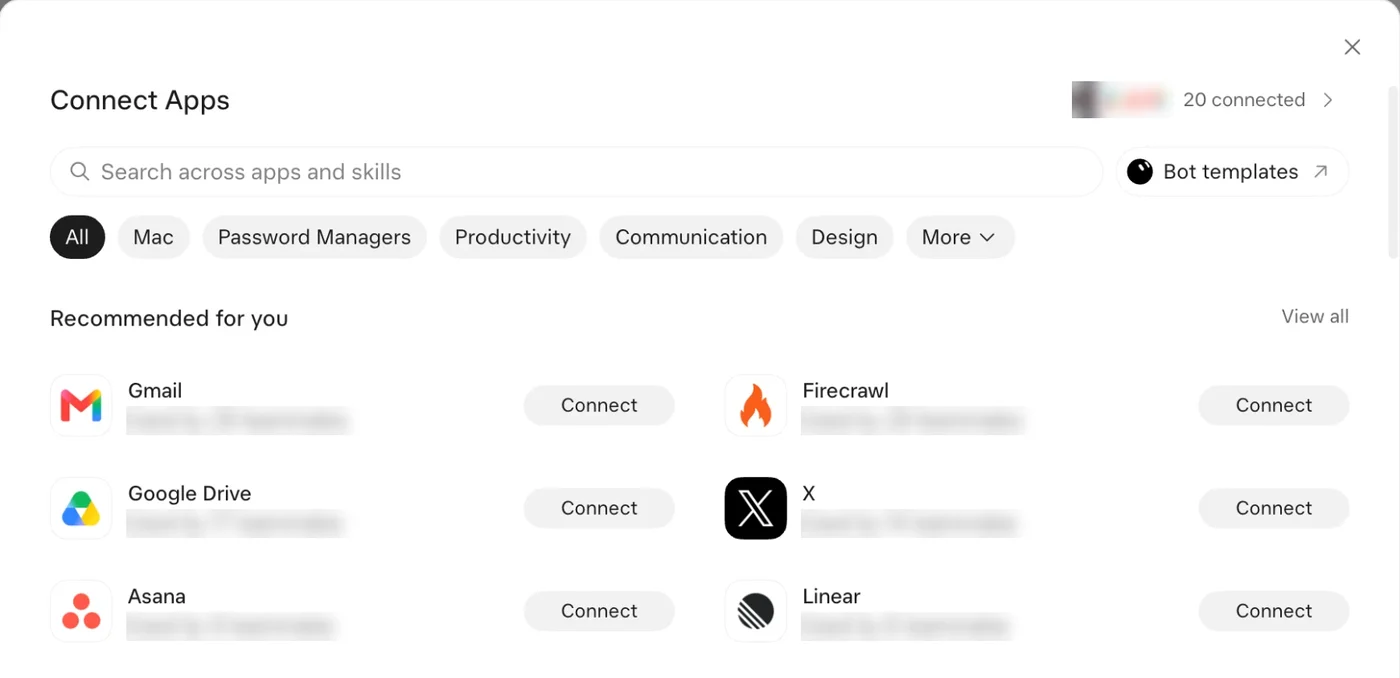
Connect your Firecrawl account
Grok Bot opens Firecrawl in your browser. Sign in, choose a team with Alexandria enabled, and select Authorize. The screen names Cursor, because the plugin is published on the Cursor Marketplace. No account yet? You can create one for free in the same flow.
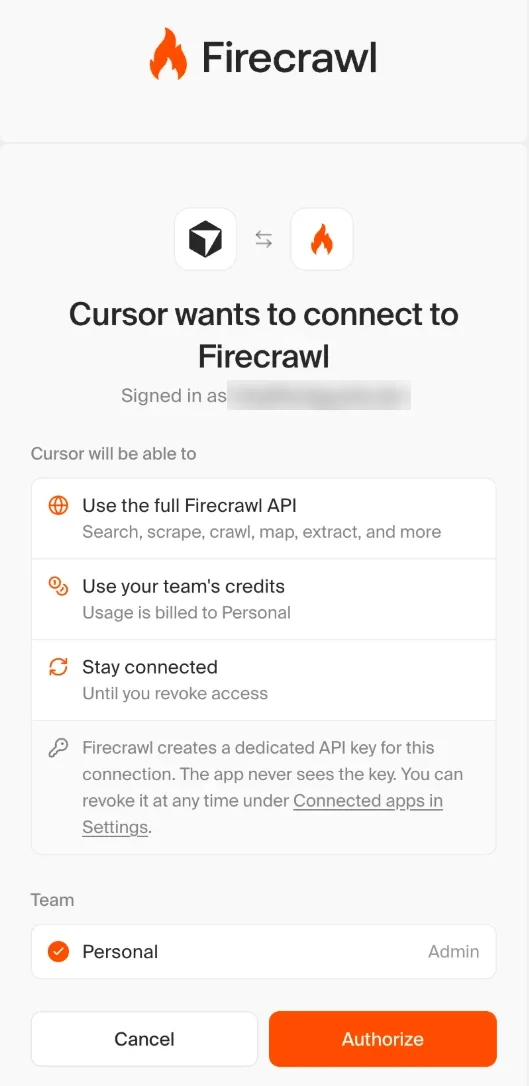
Ask your Bot for the data
In a chat, ask in plain language and mention Florida DBPR licensing registry (myfloridalicense.com) or Firecrawl Alexandria. To make sure the Bot uses Firecrawl, type @ and choose Firecrawl first. For example:
Use Firecrawl to look up Florida DBPR license CFC056678 and show its current status, license type, licensure date and expiry date.
What can Grok Bot do with Florida DBPR licensing registry (myfloridalicense.com)?
Florida Department of Business and Professional Regulation public license verification at myfloridalicense.com (the ASP.NET MVC `portalsearches/VerifyLicensee` application that the legacy wl11.asp search now redirects to): search professional and business licensees by name or license number with board, license type, county, city and state filters and historic-license inclusion; the licensee detail page with status, rank, licensure and expiry dates, special qualifications and alternate names; the related-license table (qualifying agents, businesses) and the public complaint list. Server-rendered HTML, anonymous, stateless (no cookies or tokens required).
Grok Bot can run any of Florida DBPR licensing registry (myfloridalicense.com)'s 4 capabilities through Alexandria. Each call is billed in Firecrawl credits on your Firecrawl team.
- Get license complaints: The public complaint list for a licensee (POST /portalsearches/VerifyLicensee/ViewComplaint): number, class, incident date, status, disposition, disposition date and the discipline date / description column, as the site's Complaint Details table shows them. Keyed by the 32-hex detail_id: the detail page is fetched first to resolve the numeric internal_id and to confirm the licensee exists (an unknown detail_id is not_found). An empty table is the common case and a valid result (`complaints: []`). The site itself notes the list may not include every public complaint and excludes confidential ones. Costs 5 Firecrawl credits per call.
- Get license detail: The licensee detail page (GET /portalsearches/VerifyLicensee/LicenseDetail?ID=<detail_id>, also where the legacy LicenseDetail.asp?id= links redirect): name with its name type, DBA name, main address and county, license type, rank, license number, status (primary and secondary), licensure and expiry dates, special qualifications with their effective dates, alternate names, and the site's numeric internal_id used by the related-license and complaint forms. An unknown or no-longer-published detail_id makes the site answer HTTP 500 'An error occurred while processing your request'; that is reported as not_found. Costs 5 Firecrawl credits per call.
- Get license relations: Related license information for a licensee (POST /portalsearches/VerifyLicensee/LicenseRelation): the licensee header (name, license number, rank, primary and secondary status, original license and expiration dates) and the table of related licenses (qualifying agents, the businesses they qualify, financially responsible officers) with license number, status, related party, relationship type, relation effective date, rank and expiration date. Keyed by the 32-hex detail_id: the detail page is fetched first to resolve the site's numeric internal_id and to confirm the licensee exists (an unknown detail_id is not_found). A licensee without related licenses is a valid empty result (`relations: []`, `licensee: null`, the site's 'There are no related licenses found' message). The site's own filter form (license type category, names, dates) and its pagination beyond the first 10 rows are not exposed; a longer table is reported as partial. Costs 5 Firecrawl credits per call.
- Search licenses: Search the Florida DBPR licensee registry (POST /portalsearches/VerifyLicensee/Results). Two modes: by license number (`license_number`, SearchType=SearchByLicenseNumber) or by name (`last_name` / `first_name` / `middle_name` for individuals, `org_name` for businesses and establishments; SearchType=SearchByName). Name searches accept the site's optional filters: `board` (2-3 digit DBPR board code, e.g. 06 Construction Industry, 25 Real Estate), `license_type` (4-digit code within the board), `county` (Florida county code, e.g. 39 Hillsborough, 47 Leon, 23 Dade), `city` and `state`, and `include_historic` for licenses no longer current. Returns the results table as displayed: one row per licensee name (a licensee with a DBA appears once as `Primary` and once as `DBA`, both with the same detail_id), with license type, license number and rank, status and expiry, the address block and the 32-hex detail_id that `get_license_detail`, `get_license_relations` and `get_license_complaints` take. `per_page` rows per page (default 10); the continuation cursor is `<page>:<total_records>` because the site needs the total echoed back to page. A search with no match is a valid empty result (the site's 'There were no records found' message with 'Search Results - 0 Records'), not an error. `data_as_of` is the site's nightly refresh stamp. Costs 5 Firecrawl credits per call.
What should I ask Grok Bot?
Name Florida DBPR licensing registry (myfloridalicense.com) or Firecrawl Alexandria in the prompt so Grok Bot reaches for it.
- Use Firecrawl to look up Florida DBPR license CFC056678 and show its current status, license type, licensure date and expiry date.
- Use Firecrawl to search Florida DBPR for businesses with AARDVARK in their name and show the first 10 license results and statuses.
- Use Firecrawl to look up the related licenses and qualifying-agent relationships for Florida DBPR license CFC056678.
- Use Firecrawl to show the public complaint records listed for Florida DBPR license CFC056678, including disposition dates when available.
Troubleshooting
Why doesn't my Bot use Florida DBPR licensing registry (myfloridalicense.com)?
Attach Firecrawl to the chat with @ before you ask, and name Florida DBPR licensing registry (myfloridalicense.com) or Firecrawl Alexandria in the prompt.
Add to Grok Bot doesn't open the app. What should I do?
Install the Grok Bot desktop app first, or open Connect apps in Grok Bot and search for Firecrawl.
Use Florida DBPR licensing registry (myfloridalicense.com) in other AI apps
The same Firecrawl account reaches Florida DBPR licensing registry (myfloridalicense.com) from other AI apps. Pick one for its setup steps:
- Florida DBPR licensing registry (myfloridalicense.com) in ChatGPT
- Florida DBPR licensing registry (myfloridalicense.com) in Claude
- Florida DBPR licensing registry (myfloridalicense.com) in Cursor
 Florida DBPR licensing registry (myfloridalicense.com) in Muse
Other data providers you can connect to Grok Bot
Frequently Asked Questions
What is Firecrawl?
Firecrawl is the web data API to search, scrape and interact with the web at scale. It turns websites into clean, LLM-ready data for AI agents and apps. The Firecrawl plugin brings those tools into Grok Bot, along with every data provider in Firecrawl Alexandria.
What is Firecrawl Alexandria?
Firecrawl Alexandria is Firecrawl's library of 550+ data providers for AI agents, Florida DBPR licensing registry (myfloridalicense.com) among them. Each provider returns structured data through documented capabilities. Grok Bot finds the capability that fits your question and calls it through the Firecrawl plugin, so you don't write any integration code. Alexandria needs a Firecrawl account signed in on a team with Alexandria enabled, or an API key from such a team; keyless connections don't include it.
Is there a Florida DBPR licensing registry (myfloridalicense.com) MCP server for Grok Bot?
Grok Bot reaches Florida DBPR licensing registry (myfloridalicense.com) through Firecrawl's hosted MCP server, which serves Florida DBPR licensing registry (myfloridalicense.com) and every other Alexandria provider as tools. Add the Firecrawl plugin once and you don't install or host a separate MCP server for Florida DBPR licensing registry (myfloridalicense.com).
What does connecting Florida DBPR licensing registry (myfloridalicense.com) to Grok Bot unlock?
Grok Bot can run all 4 of Florida DBPR licensing registry (myfloridalicense.com)'s capabilities, including Get license complaints, Get license detail and Get license relations, from any chat, with structured results it can sort, compare and summarize. For example, ask: "Use Firecrawl to look up Florida DBPR license CFC056678 and show its current status, license type, licensure date and expiry date." In the same conversation, Grok Bot can combine Florida DBPR licensing registry (myfloridalicense.com) with Firecrawl's web search and scraping and the other providers in Firecrawl Alexandria.
Do I need my own Florida DBPR licensing registry (myfloridalicense.com) account or API key to use it in Grok Bot?
No. Grok Bot calls Florida DBPR licensing registry (myfloridalicense.com) through Firecrawl Alexandria and each call is billed in Firecrawl credits, so you don't need a separate Florida DBPR licensing registry (myfloridalicense.com) account or API key.
How much does it cost to use Florida DBPR licensing registry (myfloridalicense.com) in Grok Bot?
Each Florida DBPR licensing registry (myfloridalicense.com) call costs 5 Firecrawl credits. The capability list on this page shows each price and its unit. The credits come from the Firecrawl team you connect to Grok Bot, and finding the right capability is free.
Can Grok Bot use other providers besides Florida DBPR licensing registry (myfloridalicense.com)?
Yes. The same Firecrawl plugin reaches every provider in Firecrawl Alexandria, along with Firecrawl's web search and scraping, so you connect once.
Can I use Florida DBPR licensing registry (myfloridalicense.com) in other AI apps?
Yes. Connect Firecrawl to ChatGPT, Claude, Cursor, Muse signed in on a Firecrawl team with Alexandria enabled, or use the Firecrawl MCP server, CLI or API with an API key from that team, and the same Florida DBPR licensing registry (myfloridalicense.com) capabilities are available there. Keyless connections don't include Alexandria.