How to connect Nasdaq.com news feeds and articles to Grok Bot
Add the Firecrawl plugin to Grok Bot once and it can call the Nasdaq.com news feeds and articles API and every other provider in Firecrawl Alexandria, with no Nasdaq.com news feeds and articles integration code.
To connect Nasdaq.com news feeds and articles to Grok Bot, add the Firecrawl plugin to Grok Bot, sign in on a Firecrawl team with Alexandria enabled, and ask for Nasdaq.com news feeds and articles data in plain language. The connection works in every Bot in your Grok Bot account, and you set it up once.
Grok Bot uses Nasdaq.com news feeds and articles as an MCP tool through Firecrawl's hosted MCP server, so you don't install or host a separate MCP server for Nasdaq.com news feeds and articles.
Grok Bot is xAI's agent app. Plugins give your Bots outside tools, and the Firecrawl plugin adds web search, scraping and every data provider in Firecrawl Alexandria.
How do I connect Nasdaq.com news feeds and articles to Grok Bot?
Add the Firecrawl plugin
In Grok Bot, open Connect apps from the sidebar, find Firecrawl and select Connect. You can also open Firecrawl's plugin listing and select Add to Grok Bot, which opens the desktop app to finish the install.
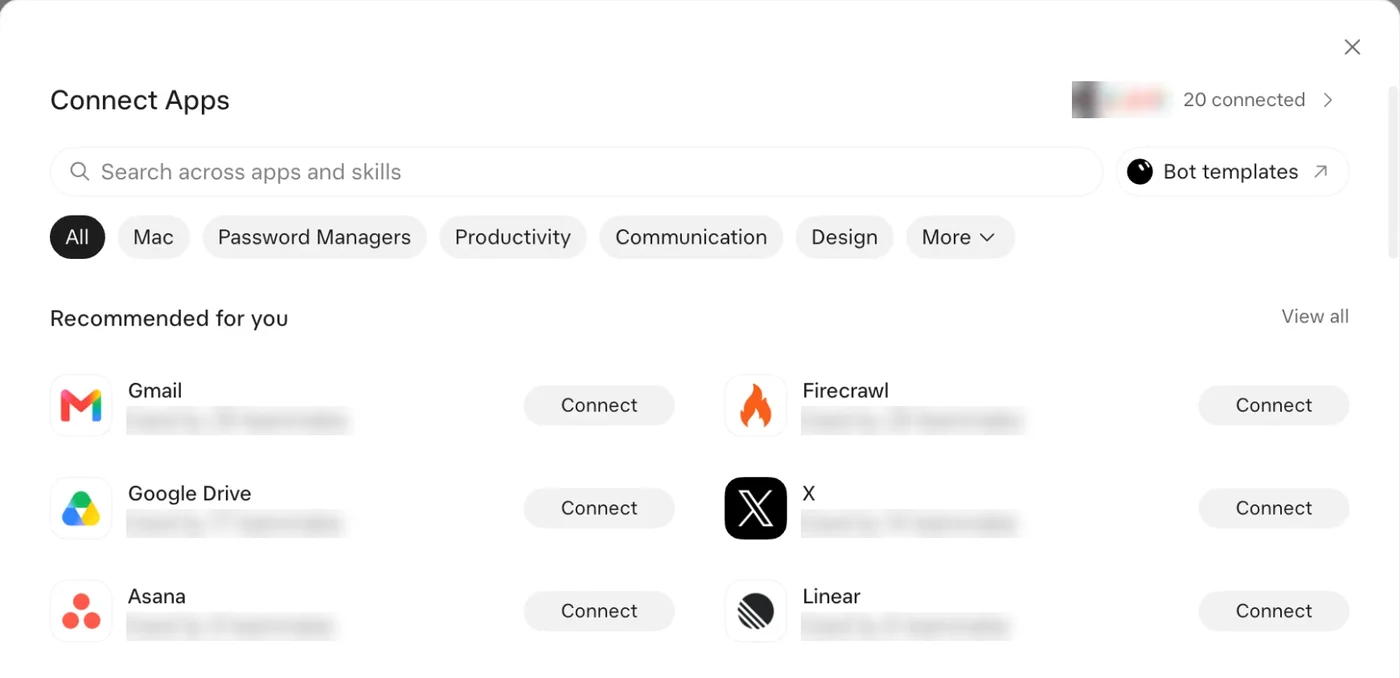
Connect your Firecrawl account
Grok Bot opens Firecrawl in your browser. Sign in, choose a team with Alexandria enabled, and select Authorize. The screen names Cursor, because the plugin is published on the Cursor Marketplace. No account yet? You can create one for free in the same flow.
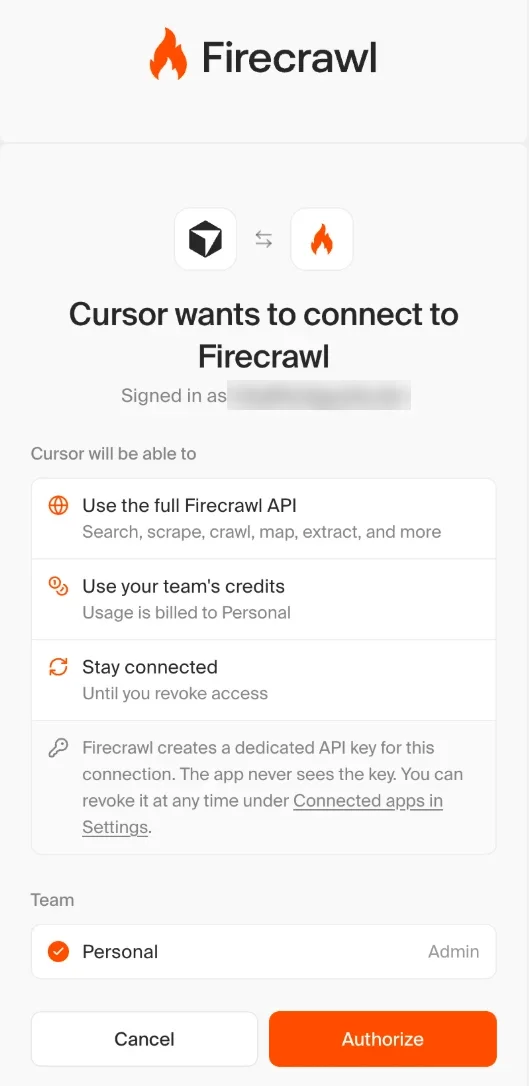
Ask your Bot for the data
In a chat, ask in plain language and mention Nasdaq.com news feeds and articles or Firecrawl Alexandria. To make sure the Bot uses Firecrawl, type @ and choose Firecrawl first. For example:
Use Firecrawl to show the 10 newest Nasdaq news stories tagged AAPL, including publisher and whether Apple is the primary ticker.
What can Grok Bot do with Nasdaq.com news feeds and articles?
Nasdaq.com's public news surfaces: ticker news, press releases, market-wide and topic feeds (JSON), the RSS feeds that carry publish times, and the full text and exact publish instant of a Nasdaq article or press release page.
Grok Bot can run any of Nasdaq.com news feeds and articles's 6 capabilities through Alexandria. Each call is billed in Firecrawl credits on your Firecrawl team.
- Article: One Nasdaq.com story page (`/articles/{slug}` or `/press-release/{slug}`): title, publisher and author from the page's JSON-LD, the exact publish instant as RFC 3339 UTC (JSON-LD datePublished on articles; the `Published` stamp with its EDT/EST zone on press releases), the topic and quote symbols from Nasdaq's CMS meta tags, and the body paragraphs from the Mercury text block. Only nasdaq.com URLs are accepted; third-party publisher pages are out of scope. A slug Nasdaq does not know is `not_found`. Costs 5 Firecrawl credits per call.
- Feed: Nasdaq's RSS feed (`/feed/rssoutbound`) for one ticker, one topic category, or the whole site: the 15 newest articles, each with its exact publish instant (`published_at`, RFC 3339 UTC from pubDate, cross-checked against the guid epoch), publisher, topic, tagged tickers and teaser. This is the only Nasdaq list surface that carries a time of day. It lists articles only, never press releases. An unknown ticker or category is `not_found` (Nasdaq would silently answer the site-wide feed; that fallback is detected). Costs 5 Firecrawl credits per call.
- Latest headlines: Nasdaq.com's market-wide latest-news feed (`latestnews`), newest first across every syndicated publisher, up to 500 rows deep. Rows carry Nasdaq's calendar day and `ago` label plus `published_at` (RFC 3339 UTC) for the stories the default RSS feed lists (its 15 newest). Costs 5 Firecrawl credits per call.
- Press releases: Press releases Nasdaq lists for one ticker (its `press_release` feed: Business Wire, PR Newswire, GlobeNewswire, Accesswire distributions), newest first; `total_records` is the real count here. Rows carry Nasdaq's calendar day and `ago` label; the feed has no time of day and the ticker RSS feed lists no releases, so `published_at` is null on every row: pass the `url` to `article`, which reads the release page's `Published` stamp. A ticker with no releases returns zero rows; an unknown ticker is `not_found`. Costs 5 Firecrawl credits per call.
- Ticker news: News stories Nasdaq lists for one ticker (its articlebysymbol feed): syndicated articles from Zacks, The Motley Fool, Barchart, RTTNews, Reuters and others, newest first, up to 500 rows deep. By default only stories about the ticker are returned (relevant_only): Nasdaq files many stories under another company or tags the ticker in market wraps and most-active lists, and those are skipped. A story is about the ticker when Nasdaq's primary_symbol is the ticker; when Nasdaq names no primary symbol, when the ticker is its only tag or the headline names the ticker or the company. from/to keep stories published on those US-Eastern days (inclusive, matched on published_date), so "why is X moving today" is from = to = today. While filtering, the function reads up to the whole 500-row window ahead until limit stories pass; filtered_out counts the rows skipped, and offset/next_offset count feed rows, filtered or not. Each row carries Nasdaq's calendar day (published_date), its server-relative ago label, published_at (RFC 3339 UTC) when the story is among the ticker RSS feed's 15 newest, and about_ticker. Company press releases are not in this feed: include_press_releases: true merges the ticker's newest releases that pass the same filters into the first page (as kind: press_release), and press_releases pages through all of them. An unknown ticker is not_found (Nasdaq itself would answer market-wide news; that fallback is detected and rejected). Costs 5 Firecrawl credits per call.
- Topic news: News stories under one Nasdaq topic (its `article?q=field_primary_topic:{id}` feed), newest first, up to 500 rows deep. Topic ids come from `primary_topic_id` on any feed row: 4006 Markets, 4301 Stocks, 4001 Technology, 4056 Investing. Rows carry `published_at` (RFC 3339 UTC) for the stories the topic's RSS feed lists (its 15 newest). An id Nasdaq has no rows for is `not_found`. Costs 5 Firecrawl credits per call.
What should I ask Grok Bot?
Name Nasdaq.com news feeds and articles or Firecrawl Alexandria in the prompt so Grok Bot reaches for it.
- Use Firecrawl to show the 10 newest Nasdaq news stories tagged AAPL, including publisher and whether Apple is the primary ticker.
- Use Firecrawl to find Apple’s five newest press releases on Nasdaq and read the newest release to get its exact publication time and full text.
- Use Firecrawl to show Nasdaq’s 15 newest market-wide RSS articles with their exact UTC publication times.
- Use Firecrawl to show the 10 newest Nasdaq Markets-topic news stories with publisher names and article links.
Troubleshooting
Why doesn't my Bot use Nasdaq.com news feeds and articles?
Attach Firecrawl to the chat with @ before you ask, and name Nasdaq.com news feeds and articles or Firecrawl Alexandria in the prompt.
Add to Grok Bot doesn't open the app. What should I do?
Install the Grok Bot desktop app first, or open Connect apps in Grok Bot and search for Firecrawl.
Use Nasdaq.com news feeds and articles in other AI apps
The same Firecrawl account reaches Nasdaq.com news feeds and articles from other AI apps. Pick one for its setup steps:
- Nasdaq.com news feeds and articles in ChatGPT
- Nasdaq.com news feeds and articles in Claude
- Nasdaq.com news feeds and articles in Cursor
 Nasdaq.com news feeds and articles in Muse
Other data providers you can connect to Grok Bot
Frequently Asked Questions
What is Firecrawl?
Firecrawl is the web data API to search, scrape and interact with the web at scale. It turns websites into clean, LLM-ready data for AI agents and apps. The Firecrawl plugin brings those tools into Grok Bot, along with every data provider in Firecrawl Alexandria.
What is Firecrawl Alexandria?
Firecrawl Alexandria is Firecrawl's library of 550+ data providers for AI agents, Nasdaq.com news feeds and articles among them. Each provider returns structured data through documented capabilities. Grok Bot finds the capability that fits your question and calls it through the Firecrawl plugin, so you don't write any integration code. Alexandria needs a Firecrawl account signed in on a team with Alexandria enabled, or an API key from such a team; keyless connections don't include it.
Is there a Nasdaq.com news feeds and articles MCP server for Grok Bot?
Grok Bot reaches Nasdaq.com news feeds and articles through Firecrawl's hosted MCP server, which serves Nasdaq.com news feeds and articles and every other Alexandria provider as tools. Add the Firecrawl plugin once and you don't install or host a separate MCP server for Nasdaq.com news feeds and articles.
What does connecting Nasdaq.com news feeds and articles to Grok Bot unlock?
Grok Bot can run all 6 of Nasdaq.com news feeds and articles's capabilities, including Article, Feed and Latest headlines, from any chat, with structured results it can sort, compare and summarize. For example, ask: "Use Firecrawl to show the 10 newest Nasdaq news stories tagged AAPL, including publisher and whether Apple is the primary ticker." In the same conversation, Grok Bot can combine Nasdaq.com news feeds and articles with Firecrawl's web search and scraping and the other providers in Firecrawl Alexandria.
Do I need my own Nasdaq.com news feeds and articles account or API key to use it in Grok Bot?
No. Grok Bot calls Nasdaq.com news feeds and articles through Firecrawl Alexandria and each call is billed in Firecrawl credits, so you don't need a separate Nasdaq.com news feeds and articles account or API key.
How much does it cost to use Nasdaq.com news feeds and articles in Grok Bot?
Each Nasdaq.com news feeds and articles call costs 5 Firecrawl credits. The capability list on this page shows each price and its unit. The credits come from the Firecrawl team you connect to Grok Bot, and finding the right capability is free.
Can Grok Bot use other providers besides Nasdaq.com news feeds and articles?
Yes. The same Firecrawl plugin reaches every provider in Firecrawl Alexandria, along with Firecrawl's web search and scraping, so you connect once.
Can I use Nasdaq.com news feeds and articles in other AI apps?
Yes. Connect Firecrawl to ChatGPT, Claude, Cursor, Muse signed in on a Firecrawl team with Alexandria enabled, or use the Firecrawl MCP server, CLI or API with an API key from that team, and the same Nasdaq.com news feeds and articles capabilities are available there. Keyless connections don't include Alexandria.