How to connect NOAA NCEI Storm Events Database bulk CSVs to Cursor
Add the Firecrawl MCP server to Cursor once and it can call the NOAA NCEI Storm Events Database bulk CSVs API and every other provider in Firecrawl Alexandria, with no NOAA NCEI Storm Events Database bulk CSVs integration code.
To connect NOAA NCEI Storm Events Database bulk CSVs to Cursor, add the Firecrawl MCP server to Cursor, sign in on a Firecrawl team with Alexandria enabled, and ask for NOAA NCEI Storm Events Database bulk CSVs data in plain language. The connection works in Cursor's agent and chat, and you set it up once.
Cursor uses NOAA NCEI Storm Events Database bulk CSVs as an MCP tool through Firecrawl's hosted MCP server, so you don't install or host a separate MCP server for NOAA NCEI Storm Events Database bulk CSVs.
Cursor is an AI code editor. Its agent uses MCP servers for outside tools, and the Firecrawl MCP server adds web search, scraping and every data provider in Firecrawl Alexandria.
How do I connect NOAA NCEI Storm Events Database bulk CSVs to Cursor?
Install the Firecrawl MCP server
Open the install dialog in Cursor, check that the URL is Firecrawl's hosted server, then select Install.
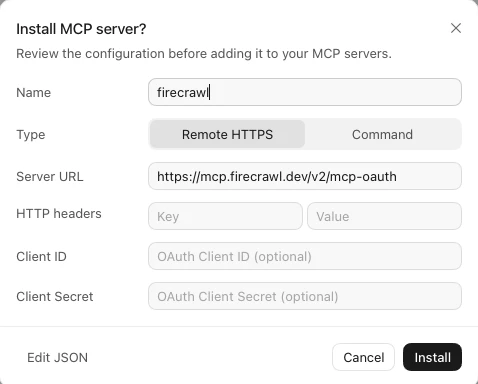
Connect your Firecrawl account
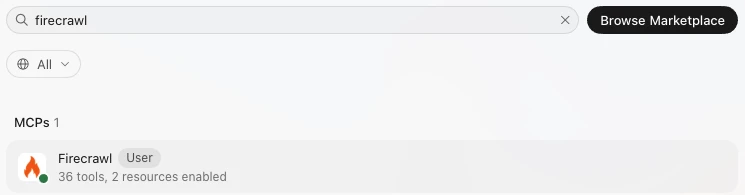
Use the server's sign-in option in Cursor's MCP settings. Firecrawl opens in your browser: sign in, choose a team with Alexandria enabled, and approve access. A green dot next to Firecrawl means it's connected.
Ask Cursor's agent for the data
In the agent chat, ask in plain language and mention NOAA NCEI Storm Events Database bulk CSVs or Firecrawl Alexandria. The agent finds the NOAA NCEI Storm Events Database bulk CSVs capability that fits and runs it. For example:
Use Firecrawl to answer this: Which Storm Events bulk files has NCEI reissued since March 2026, and what are their current c dates and ETags?
What can Cursor do with NOAA NCEI Storm Events Database bulk CSVs?
NOAA NCEI Storm Events Database (1950 to present) bulk CSV files: per-year details, locations and fatalities gzips. Directory status with file versions, paged rows of one (type, year) file pinned to its ETag, and one event joined with its locations and fatalities.
Cursor can run any of NOAA NCEI Storm Events Database bulk CSVs's 3 capabilities through Alexandria. Each call is billed in Firecrawl credits on your Firecrawl team.
- Records get: One event by EVENT_ID and data year: its details row from the year's details file (ep-3) joined with every row of the year's locations and fatalities files for that EVENT_ID. Three gzip reads; not_found when the year's details file has no such EVENT_ID. Costs 5 Firecrawl credits per call.
- Records list: One page of rows from one bulk file (ep-3), segment key (type, year). Each page re-fetches the gzip, stream-decompresses it through an RFC 4180 parser (narratives hold commas, quotes and newlines), skips to the row offset, returns up to 2000 typed rows and stops. The cursor pins file name and ETag; if NCEI reissued the file in between (new c date, missing old name or different ETag) the call fails with upstream_error `publication_changed: ...` instead of mixing versions. Every row carries source_record_id, source_url, publication_id and retrieved_at; DAMAGE_* are kept verbatim with a parsed USD value beside them. Costs 5 Firecrawl credits per call.
- Source status: Cheap version check of the bulk directory (ep-1 autoindex): every StormEvents_<type>-ftp_v1.0_d<YYYY>_c<YYYYMMDD>.csv.gz with its c date, size and listing time; optionally narrowed to one type and/or year. When exactly one file is selected its HTTP ETag and Last-Modified are read with one Range request. Files above the 32 MiB fetch cap are flagged hand_off with the URL and size. Costs 5 Firecrawl credits per call.
What should I ask Cursor?
Name NOAA NCEI Storm Events Database bulk CSVs or Firecrawl Alexandria in the prompt so Cursor reaches for it. Each example opens in Cursor with the prompt filled in.
- Use Firecrawl to answer this: Which Storm Events bulk files has NCEI reissued since March 2026, and what are their current c dates and ETags?
- Use Firecrawl to list every 2026 storm event row from the NCEI details file, page by page.
- Use Firecrawl to get storm event 1318063 from 2026 with its locations and fatalities.
- Use Firecrawl to run NOAA NCEI Storm Events Database bulk CSVs' Records get capability. Inspect the Alexandria inputs, ask for any missing required details, and return a small sample with sources.
Troubleshooting
Why can't Cursor find NOAA NCEI Storm Events Database bulk CSVs?
If Firecrawl's tools in Cursor stop at search, scrape and parse, the connection is keyless and doesn't include Alexandria. Finish the sign-in from Cursor's MCP settings, or add an API key from a team with Alexandria enabled.
Firecrawl shows a red dot in Cursor. What should I do?
Open Cursor's MCP settings, sign in to Firecrawl again, and restart the agent chat so it loads the tools.
Use NOAA NCEI Storm Events Database bulk CSVs in other AI apps
The same Firecrawl account reaches NOAA NCEI Storm Events Database bulk CSVs from other AI apps. Pick one for its setup steps:
- NOAA NCEI Storm Events Database bulk CSVs in ChatGPT
- NOAA NCEI Storm Events Database bulk CSVs in Claude
- NOAA NCEI Storm Events Database bulk CSVs in Grok Bot
 NOAA NCEI Storm Events Database bulk CSVs in Muse
Other data providers you can connect to Cursor
Frequently Asked Questions
What is Firecrawl?
Firecrawl is the web data API to search, scrape and interact with the web at scale. It turns websites into clean, LLM-ready data for AI agents and apps. The Firecrawl MCP server brings those tools into Cursor, along with every data provider in Firecrawl Alexandria.
What is Firecrawl Alexandria?
Firecrawl Alexandria is Firecrawl's library of 550+ data providers for AI agents, NOAA NCEI Storm Events Database bulk CSVs among them. Each provider returns structured data through documented capabilities. Cursor finds the capability that fits your question and calls it through the Firecrawl MCP server, so you don't write any integration code. Alexandria needs a Firecrawl account signed in on a team with Alexandria enabled, or an API key from such a team; keyless connections don't include it.
Is there a NOAA NCEI Storm Events Database bulk CSVs MCP server for Cursor?
Cursor reaches NOAA NCEI Storm Events Database bulk CSVs through Firecrawl's hosted MCP server, which serves NOAA NCEI Storm Events Database bulk CSVs and every other Alexandria provider as tools. Add the Firecrawl MCP server once and you don't install or host a separate MCP server for NOAA NCEI Storm Events Database bulk CSVs.
What does connecting NOAA NCEI Storm Events Database bulk CSVs to Cursor unlock?
Cursor can run NOAA NCEI Storm Events Database bulk CSVs's Records get, Records list and Source status, from any chat, with structured results it can sort, compare and summarize. For example, ask: "Use Firecrawl to answer this: Which Storm Events bulk files has NCEI reissued since March 2026, and what are their current c dates and ETags?" In the same conversation, Cursor can combine NOAA NCEI Storm Events Database bulk CSVs with Firecrawl's web search and scraping and the other providers in Firecrawl Alexandria.
Do I need my own NOAA NCEI Storm Events Database bulk CSVs account or API key to use it in Cursor?
No. Cursor calls NOAA NCEI Storm Events Database bulk CSVs through Firecrawl Alexandria and each call is billed in Firecrawl credits, so you don't need a separate NOAA NCEI Storm Events Database bulk CSVs account or API key.
How much does it cost to use NOAA NCEI Storm Events Database bulk CSVs in Cursor?
Each NOAA NCEI Storm Events Database bulk CSVs call costs 5 Firecrawl credits. The capability list on this page shows each price and its unit. The credits come from the Firecrawl team you connect to Cursor, and finding the right capability is free.
Can Cursor use other providers besides NOAA NCEI Storm Events Database bulk CSVs?
Yes. The same Firecrawl MCP server reaches every provider in Firecrawl Alexandria, along with Firecrawl's web search and scraping, so you connect once.
Can I use NOAA NCEI Storm Events Database bulk CSVs in other AI apps?
Yes. Connect Firecrawl to ChatGPT, Claude, Grok Bot, Muse signed in on a Firecrawl team with Alexandria enabled, or use the Firecrawl MCP server, CLI or API with an API key from that team, and the same NOAA NCEI Storm Events Database bulk CSVs capabilities are available there. Keyless connections don't include Alexandria.