How to connect Notion Docs, Help Center, Pricing, Blog and Templates to Claude
Add the Firecrawl connector to Claude once and it can call the Notion Docs, Help Center, Pricing, Blog and Templates API and every other provider in Firecrawl Alexandria, with no Notion Docs, Help Center, Pricing, Blog and Templates integration code.
To connect Notion Docs, Help Center, Pricing, Blog and Templates to Claude, add the Firecrawl connector to Claude, sign in on a Firecrawl team with Alexandria enabled, and ask for Notion Docs, Help Center, Pricing, Blog and Templates data in plain language. The connection works in Claude on the web, Claude Desktop and Cowork, and you set it up once.
Claude uses Notion Docs, Help Center, Pricing, Blog and Templates as an MCP tool through Firecrawl's hosted MCP server, so you don't install or host a separate MCP server for Notion Docs, Help Center, Pricing, Blog and Templates.
Claude is Anthropic's AI assistant. Connectors give it tools from other services, and the Firecrawl connector adds web search, scraping and every data provider in Firecrawl Alexandria.
How do I connect Notion Docs, Help Center, Pricing, Blog and Templates to Claude?
Add the Firecrawl connector
Open the Firecrawl connector in Claude's connector directory and select Connect to Claude. In Claude Desktop you can also go to Customize, then Connectors, and search for Firecrawl.
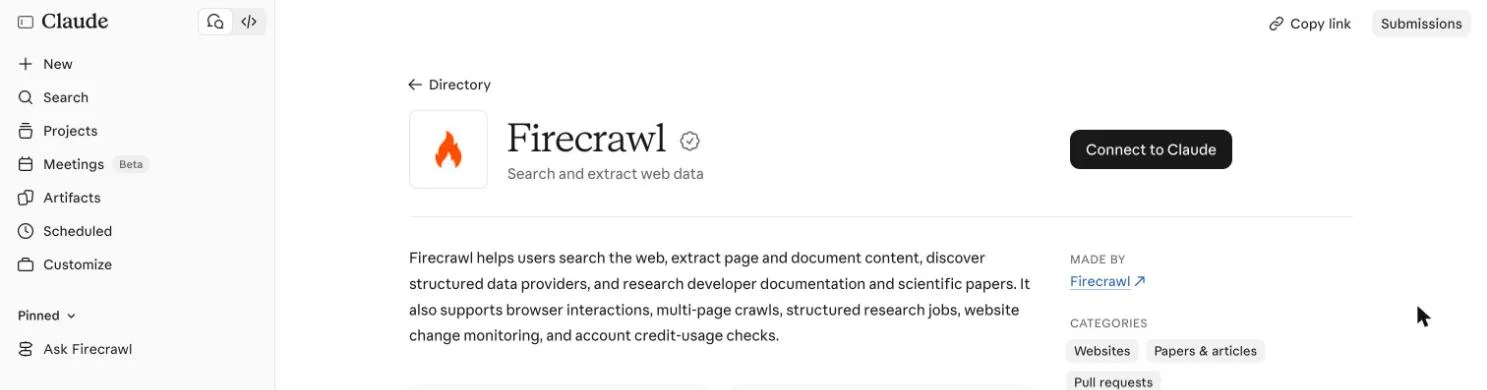
Connect your Firecrawl account
Claude opens Firecrawl in your browser. Sign in, choose a team with Alexandria enabled, and approve access. No account yet? You can create one for free in the same flow.
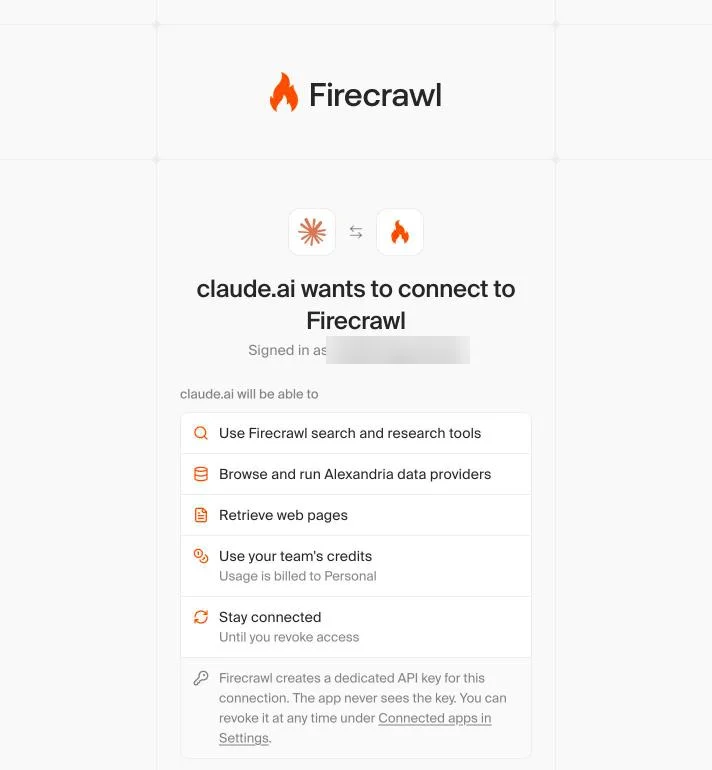
Turn on Firecrawl in a chat
In a new conversation, open the + menu, go to Connectors and switch on Firecrawl.
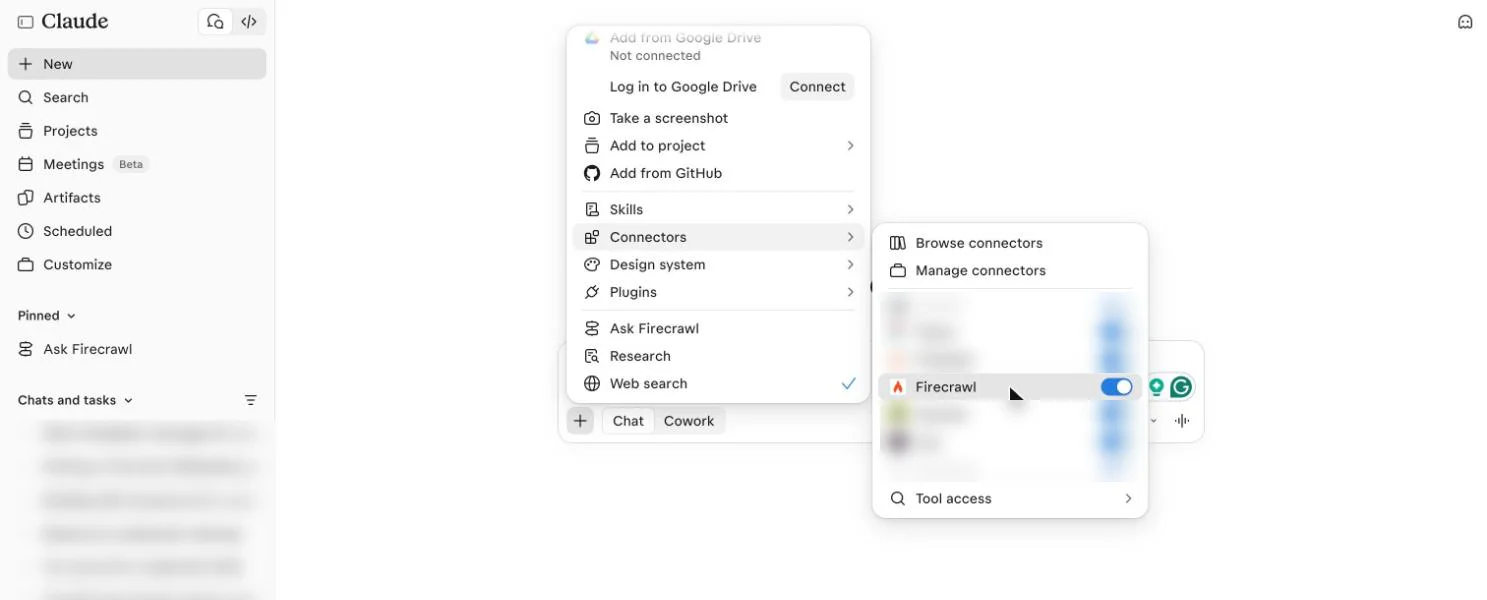
Ask Claude for the data
Ask in plain language and mention Notion Docs, Help Center, Pricing, Blog and Templates or Firecrawl Alexandria. Claude finds the Notion Docs, Help Center, Pricing, Blog and Templates capability that fits, checks its inputs and runs it. For example:
Use Firecrawl to run Notion Docs, Help Center, Pricing, Blog and Templates' Api changelog capability. Inspect the Alexandria inputs, ask for any missing required details, and return a small sample with sources.
What can Claude do with Notion Docs, Help Center, Pricing, Blog and Templates?
Notion's public site as agent-ready data: developer docs search through Notion's public docs MCP server, any developers.notion.com page (API reference, guides, MCP, CLI) as Markdown with outline and section reads, the developer page index and the API changelog; help center articles and guides in all 22 help locales with last-updated times, the help index, category tree and per-category article lists; product release notes; plan pricing with monthly and annual prices and the feature grid; blog posts with bylines and dates; and the template gallery. Public sources only (llms.txt, .md twins, docs MCP, sitemaps, RSS, server-rendered pages); no login or key.
Claude can run any of Notion Docs, Help Center, Pricing, Blog and Templates's 15 capabilities through Alexandria. Each call is billed in Firecrawl credits on your Firecrawl team.
- Api changelog: The Notion API changelog (developers.notion.com/page/changelog.md) as entries, newest first: date, the date heading as published, change title, a link to the dated section and the change's Markdown. One record per change heading; older roll-up headings such as "Changes for April 2024" have a null `date`. Filter by `since`/`until` (inclusive dates) and `q`; paginated with `limit`/`offset`. Costs 5 Firecrawl credits per call.
- Get blog post: One Notion blog post (www.notion.com/blog/{slug}) as Markdown converted from the rendered page, with title, description, published and modified times (from the page's Article JSON-LD), the byline (author names and, when shown, job titles), an outline and the content. `section` (heading text or anchor) returns one part. Accepts a slug or a blog URL. Unknown posts are `not_found`. Costs 5 Firecrawl credits per call.
- Get page: One Notion developer docs page as clean Markdown (GET developers.notion.com/{path}.md, the docs' agent-facing twin) with title, description, an outline of headings with anchors, and the content. `section` (heading text or anchor, case-insensitive) returns only that heading and its subsections. Accepts a page path or a developers.notion.com URL; an anchor in the URL selects that section. Unknown pages and sections are `not_found`. Costs 5 Firecrawl credits per call.
- Get pricing: Notion's plans and prices from www.notion.com/pricing in one call: each plan card (Free, Plus, Business, Enterprise) with its description, the price as displayed, and both the monthly-billing and annual-billing list prices from the page's embedded price table (annual as the yearly total and per month), so no billing toggle is needed. Also other priced products on the page (Notion AI add-on, AI credit packs, Sites custom domains, the student plan) and the feature comparison grid (section, feature, tooltip and each plan's value or check mark). Prices are in the currency the page serves (USD for US visitors). Costs 5 Firecrawl credits per call.
- Get release: One Notion release notes page (www.notion.com/releases/{date}) as Markdown converted from the rendered page, with date, title, version badge, description, an outline of the announced features and the content. `section` (heading text or anchor) returns one feature. Accepts the release date or a release URL. Unknown dates and sections are `not_found`. Costs 5 Firecrawl credits per call.
- Get template: One Notion template page (www.notion.com/{locale}/templates/{slug}): name, description, the listing text as plain text, creator, categories, rating (average and count), install count, created and updated times, preview image and public notion.site preview URL, in any gallery locale. Accepts a slug (with `locale`) or a template URL; a localized URL such as /he/templates/{slug} reads that locale's page, whose record (`locale`, name, preview, installs) differs from the English one; a template without a translation serves the English record (`locale` `en-US`) with localized category names. Unknown templates are `not_found`. Paid template prices are not in the page data and are not returned. Costs 5 Firecrawl credits per call.
- Help article: One Notion help center article or guide (www.notion.com/{locale}/help/{slug} or /help/guides/{slug}) in any of the 22 help center locales, as Markdown converted from the rendered page, with title, description, category, last-updated time, an outline of headings with anchors and the content. Screenshots and videos are omitted; callouts become blockquotes. `section` (heading text or anchor) returns only that heading and its subsections. Accepts a slug (plus optional `locale`) or a help center URL in any locale. `updated_at` is the page's lastmod in the same-locale help sitemap (a second request), the field change monitors should watch. Unknown articles and sections are `not_found`, as are help slugs that redirect off www.notion.com (for example `security-and-privacy`, which now points to a notion.site page; its category is readable with help_category). Costs 5 Firecrawl credits per call.
- Help category: Every article and guide in one Notion help center category (www.notion.com/{locale}/help/category/{slug}/all) with localized titles, slugs, kind and URLs, in any help locale. Accepts a category slug (plus optional `locale`) or a category URL. Unknown categories are `not_found`. Costs 5 Firecrawl credits per call.
- List blog posts: Notion blog posts, newest first. Default mode reads a listing page (www.notion.com/blog, or /blog/topic/{topic}) with title, subtitle, topic and authors with job title and company, 10 per page. `q` mode searches the blog sitemap instead: every post whose slug holds all the words, with its last-modified time, 50 per page (no titles). Paginated with `page`. Unknown topics are `not_found`. Costs 5 Firecrawl credits per call.
- List help articles: The Notion help center index from its sitemap (www.notion.com/{locale}/help/sitemap.xml), in any help locale: every article and guide with slug, kind, URL and last-modified time, most recently changed first. Filter by `q` (every word must appear in the slug), `kind` and `since`; paginated with `limit`/`offset`. The sitemap carries no titles; help_category lists titles per category, and help_article reads a page. Costs 5 Firecrawl credits per call.
See all 15 capabilities and their inputs on the Notion Docs, Help Center, Pricing, Blog and Templates API page.
What should I ask Claude?
Name Notion Docs, Help Center, Pricing, Blog and Templates or Firecrawl Alexandria in the prompt so Claude reaches for it. Each example opens in Claude with the prompt filled in.
- Use Firecrawl to run Notion Docs, Help Center, Pricing, Blog and Templates' Api changelog capability. Inspect the Alexandria inputs, ask for any missing required details, and return a small sample with sources.
- Use Firecrawl to run Notion Docs, Help Center, Pricing, Blog and Templates' Get blog post capability. Inspect the Alexandria inputs, ask for any missing required details, and return a small sample with sources.
- Use Firecrawl to run Notion Docs, Help Center, Pricing, Blog and Templates' Get page capability. Inspect the Alexandria inputs, ask for any missing required details, and return a small sample with sources.
- Use Firecrawl to run Notion Docs, Help Center, Pricing, Blog and Templates' Get pricing capability. Inspect the Alexandria inputs, ask for any missing required details, and return a small sample with sources.
Troubleshooting
Why doesn't Claude use Notion Docs, Help Center, Pricing, Blog and Templates?
The connector has to be on in each conversation. Open the + menu, go to Connectors and check that Firecrawl is switched on, then ask again and name Notion Docs, Help Center, Pricing, Blog and Templates or Firecrawl Alexandria in the prompt.
Claude says it can't reach the Firecrawl server. What should I do?
Open Customize, then Connectors, disconnect Firecrawl and connect it again. On a Team or Enterprise plan, an owner has to allow the connector before members can add it.
Why does Claude say Notion Docs, Help Center, Pricing, Blog and Templates isn't available?
Alexandria needs a Firecrawl team with Alexandria enabled. Reconnect Firecrawl and pick that team on the consent screen.
Use Notion Docs, Help Center, Pricing, Blog and Templates in other AI apps
The same Firecrawl account reaches Notion Docs, Help Center, Pricing, Blog and Templates from other AI apps. Pick one for its setup steps:
- Notion Docs, Help Center, Pricing, Blog and Templates in ChatGPT
- Notion Docs, Help Center, Pricing, Blog and Templates in Cursor
- Notion Docs, Help Center, Pricing, Blog and Templates in Grok Bot
 Notion Docs, Help Center, Pricing, Blog and Templates in Muse
Other data providers you can connect to Claude
Frequently Asked Questions
What is Firecrawl?
Firecrawl is the web data API to search, scrape and interact with the web at scale. It turns websites into clean, LLM-ready data for AI agents and apps. The Firecrawl connector brings those tools into Claude, along with every data provider in Firecrawl Alexandria.
What is Firecrawl Alexandria?
Firecrawl Alexandria is Firecrawl's library of 550+ data providers for AI agents, Notion Docs, Help Center, Pricing, Blog and Templates among them. Each provider returns structured data through documented capabilities. Claude finds the capability that fits your question and calls it through the Firecrawl connector, so you don't write any integration code. Alexandria needs a Firecrawl account signed in on a team with Alexandria enabled, or an API key from such a team; keyless connections don't include it.
Is there a Notion Docs, Help Center, Pricing, Blog and Templates MCP server for Claude?
Claude reaches Notion Docs, Help Center, Pricing, Blog and Templates through Firecrawl's hosted MCP server, which serves Notion Docs, Help Center, Pricing, Blog and Templates and every other Alexandria provider as tools. Add the Firecrawl connector once and you don't install or host a separate MCP server for Notion Docs, Help Center, Pricing, Blog and Templates.
What does connecting Notion Docs, Help Center, Pricing, Blog and Templates to Claude unlock?
Claude can run all 15 of Notion Docs, Help Center, Pricing, Blog and Templates's capabilities, including Api changelog, Get blog post and Get page, from any chat, with structured results it can sort, compare and summarize. In the same conversation, Claude can combine Notion Docs, Help Center, Pricing, Blog and Templates with Firecrawl's web search and scraping and the other providers in Firecrawl Alexandria.
Do I need my own Notion Docs, Help Center, Pricing, Blog and Templates account or API key to use it in Claude?
No. Claude calls Notion Docs, Help Center, Pricing, Blog and Templates through Firecrawl Alexandria and each call is billed in Firecrawl credits, so you don't need a separate Notion Docs, Help Center, Pricing, Blog and Templates account or API key.
How much does it cost to use Notion Docs, Help Center, Pricing, Blog and Templates in Claude?
Each Notion Docs, Help Center, Pricing, Blog and Templates call costs 5 Firecrawl credits. The capability list on this page shows each price and its unit. The credits come from the Firecrawl team you connect to Claude, and finding the right capability is free.
Can Claude use other providers besides Notion Docs, Help Center, Pricing, Blog and Templates?
Yes. The same Firecrawl connector reaches every provider in Firecrawl Alexandria, along with Firecrawl's web search and scraping, so you connect once.
Can I use Notion Docs, Help Center, Pricing, Blog and Templates in other AI apps?
Yes. Connect Firecrawl to ChatGPT, Cursor, Grok Bot, Muse signed in on a Firecrawl team with Alexandria enabled, or use the Firecrawl MCP server, CLI or API with an API key from that team, and the same Notion Docs, Help Center, Pricing, Blog and Templates capabilities are available there. Keyless connections don't include Alexandria.