How to connect OregonBuys to Claude
Add the Firecrawl connector to Claude once and it can call the OregonBuys API and every other provider in Firecrawl Alexandria, with no OregonBuys integration code.
To connect OregonBuys to Claude, add the Firecrawl connector to Claude, sign in on a Firecrawl team with Alexandria enabled, and ask for OregonBuys data in plain language. The connection works in Claude on the web, Claude Desktop and Cowork, and you set it up once.
Claude uses OregonBuys as an MCP tool through Firecrawl's hosted MCP server, so you don't install or host a separate MCP server for OregonBuys.
Claude is Anthropic's AI assistant. Connectors give it tools from other services, and the Firecrawl connector adds web search, scraping and every data provider in Firecrawl Alexandria.
How do I connect OregonBuys to Claude?
Add the Firecrawl connector
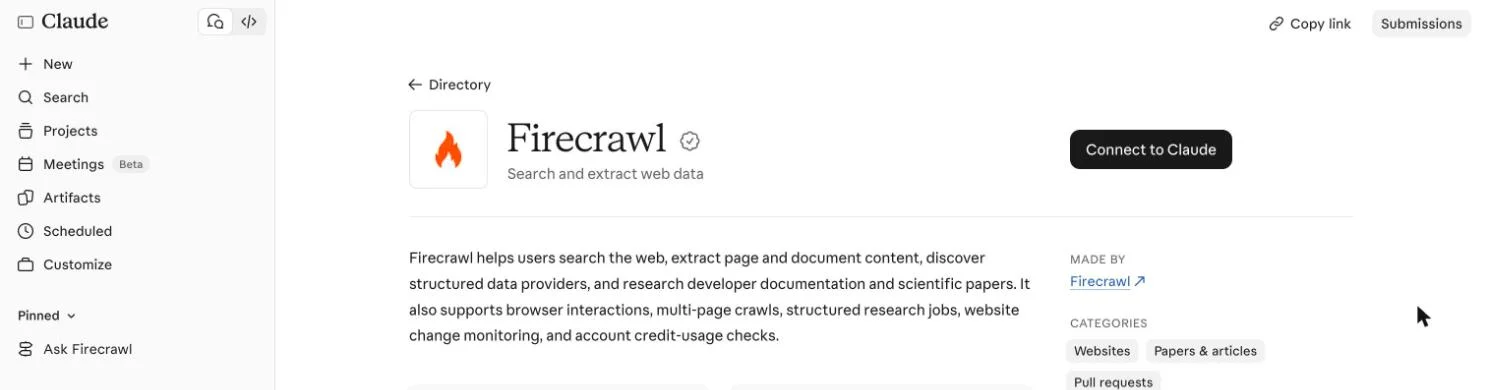
Open the Firecrawl connector in Claude's connector directory and select Connect to Claude. In Claude Desktop you can also go to Customize, then Connectors, and search for Firecrawl.
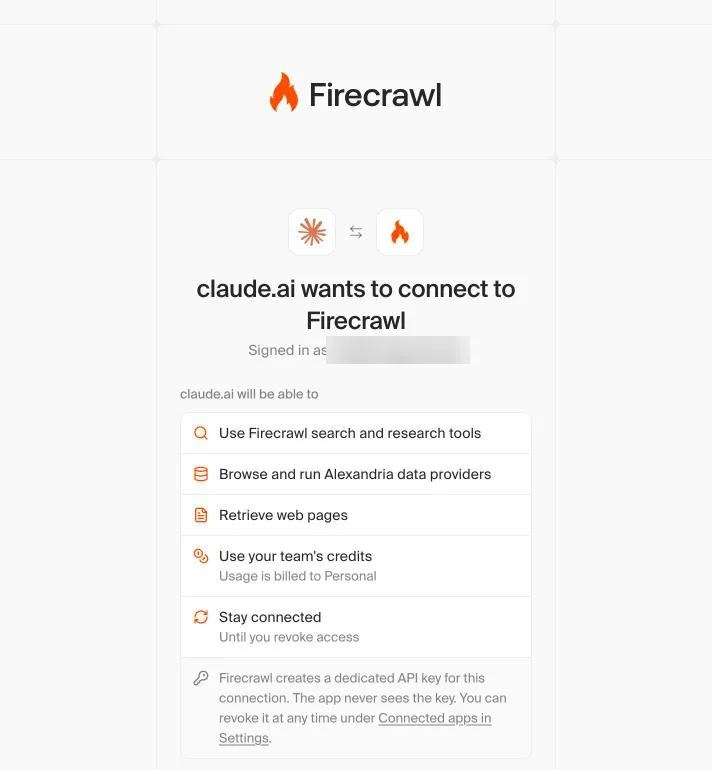
Connect your Firecrawl account
Claude opens Firecrawl in your browser. Sign in, choose a team with Alexandria enabled, and approve access. No account yet? You can create one for free in the same flow.
Turn on Firecrawl in a chat
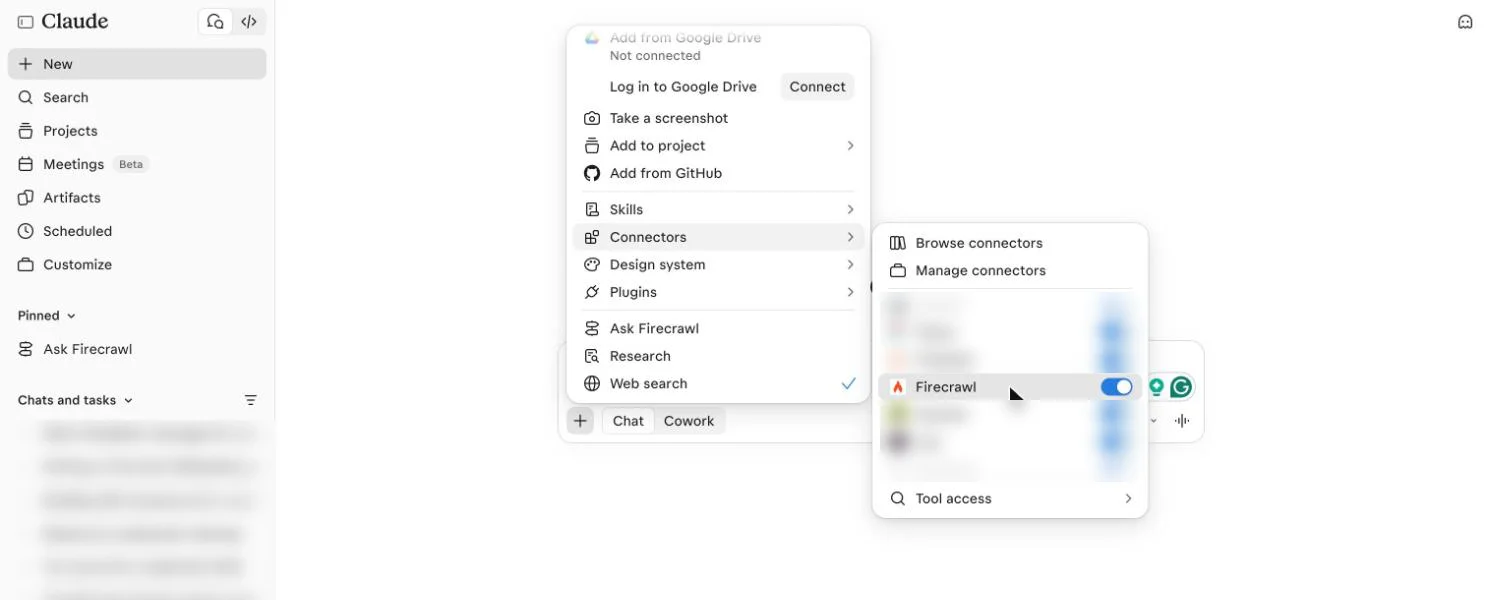
In a new conversation, open the + menu, go to Connectors and switch on Firecrawl.
Ask Claude for the data
Ask in plain language and mention OregonBuys or Firecrawl Alexandria. Claude finds the OregonBuys capability that fits, checks its inputs and runs it. For example:
Use Firecrawl to show the first 25 current OregonBuys open bids with solicitation numbers, organizations and opening dates.
What can Claude do with OregonBuys?
OregonBuys (oregonbuys.gov), the State of Oregon's public procurement portal on Periscope BuySpeed Online: keyword and filtered bid solicitation search with the site's fixed 25-row pagination, the current Open Bids list, and full bid solicitation detail pages with header fields, addresses, public attachment download URLs and line items. Anonymous public access only; bid holder lists, quotes and amendment acknowledgements need a supplier login and are not covered.
Claude can run any of OregonBuys's 3 capabilities through Alexandria. Each call is billed in Firecrawl credits on your Firecrawl team.
- Get bid: Fetch one OregonBuys bid solicitation detail page (bidDetail.sda) by bid number or pasted URL: header fields (description, opening date, purchaser, organization, department, location, fiscal year, bid type, purchase method, bulletin text), ship-to and bill-to addresses, public file attachments with stateless download URLs, form attachments, discipline, procurement method, notice type and the line items with NIGP codes, quantities, unit costs and units of measure. Values are the displayed strings; blanks are null, never zero. Costs 5 Firecrawl credits per call.
- List open bids: List the solicitations OregonBuys currently shows under Open Bids (the public `openBids=true` view, server-rendered for the first 25 rows and paginated through the site's datatable for later pages). Rows have the same shape as search_bids. Costs 5 Firecrawl credits per call.
- Search bids: Search OregonBuys bid solicitations through the public Advanced Search form (a JSF session is opened, the search POSTed and, for offsets past the first page, the results datatable paginated), 25 rows a page. Each row carries the bid solicitation number, organization, blanket number, buyer, description, bid opening date as displayed (Pacific time, no zone shown) with an ISO wall-clock conversion, awarded vendors, status, alternate id and the detail URL. Costs 5 Firecrawl credits per call.
What should I ask Claude?
Name OregonBuys or Firecrawl Alexandria in the prompt so Claude reaches for it. Each example opens in Claude with the prompt filled in.
- Use Firecrawl to show the first 25 current OregonBuys open bids with solicitation numbers, organizations and opening dates.
- Use Firecrawl to find the first page of OregonBuys solicitations mentioning road maintenance, with status, buyer and detail links.
- Use Firecrawl to read OregonBuys solicitation S-44000-00017920 and show its description, purchaser and public attachment download links.
- Use Firecrawl to show the line items, quantities and NIGP codes for OregonBuys solicitation S-44000-00017920.
Troubleshooting
Why doesn't Claude use OregonBuys?
The connector has to be on in each conversation. Open the + menu, go to Connectors and check that Firecrawl is switched on, then ask again and name OregonBuys or Firecrawl Alexandria in the prompt.
Claude says it can't reach the Firecrawl server. What should I do?
Open Customize, then Connectors, disconnect Firecrawl and connect it again. On a Team or Enterprise plan, an owner has to allow the connector before members can add it.
Why does Claude say OregonBuys isn't available?
Alexandria needs a Firecrawl team with Alexandria enabled. Reconnect Firecrawl and pick that team on the consent screen.
Use OregonBuys in other AI apps
The same Firecrawl account reaches OregonBuys from other AI apps. Pick one for its setup steps:

Other data providers you can connect to Claude
Frequently Asked Questions
What is Firecrawl?
Firecrawl is the web data API to search, scrape and interact with the web at scale. It turns websites into clean, LLM-ready data for AI agents and apps. The Firecrawl connector brings those tools into Claude, along with every data provider in Firecrawl Alexandria.
What is Firecrawl Alexandria?
Firecrawl Alexandria is Firecrawl's library of 550+ data providers for AI agents, OregonBuys among them. Each provider returns structured data through documented capabilities. Claude finds the capability that fits your question and calls it through the Firecrawl connector, so you don't write any integration code. Alexandria needs a Firecrawl account signed in on a team with Alexandria enabled, or an API key from such a team; keyless connections don't include it.
Is there a OregonBuys MCP server for Claude?
Claude reaches OregonBuys through Firecrawl's hosted MCP server, which serves OregonBuys and every other Alexandria provider as tools. Add the Firecrawl connector once and you don't install or host a separate MCP server for OregonBuys.
What does connecting OregonBuys to Claude unlock?
Claude can run OregonBuys's Get bid, List open bids and Search bids, from any chat, with structured results it can sort, compare and summarize. For example, ask: "Use Firecrawl to show the first 25 current OregonBuys open bids with solicitation numbers, organizations and opening dates." In the same conversation, Claude can combine OregonBuys with Firecrawl's web search and scraping and the other providers in Firecrawl Alexandria.
Do I need my own OregonBuys account or API key to use it in Claude?
No. Claude calls OregonBuys through Firecrawl Alexandria and each call is billed in Firecrawl credits, so you don't need a separate OregonBuys account or API key.
How much does it cost to use OregonBuys in Claude?
Each OregonBuys call costs 5 Firecrawl credits. The capability list on this page shows each price and its unit. The credits come from the Firecrawl team you connect to Claude, and finding the right capability is free.
Can Claude use other providers besides OregonBuys?
Yes. The same Firecrawl connector reaches every provider in Firecrawl Alexandria, along with Firecrawl's web search and scraping, so you connect once.
Can I use OregonBuys in other AI apps?
Yes. Connect Firecrawl to ChatGPT, Cursor, Grok Bot, Muse signed in on a Firecrawl team with Alexandria enabled, or use the Firecrawl MCP server, CLI or API with an API key from that team, and the same OregonBuys capabilities are available there. Keyless connections don't include Alexandria.