How to connect Particle to Cursor
Add the Firecrawl MCP server to Cursor once and it can call the Particle API and every other provider in Firecrawl Alexandria, with no Particle integration code.
To connect Particle to Cursor, add the Firecrawl MCP server to Cursor, sign in on a Firecrawl team with Alexandria enabled, and ask for Particle data in plain language. The connection works in Cursor's agent and chat, and you set it up once.
Cursor uses Particle as an MCP tool through Firecrawl's hosted MCP server, so you don't install or host a separate MCP server for Particle.
Cursor is an AI code editor. Its agent uses MCP servers for outside tools, and the Firecrawl MCP server adds web search, scraping and every data provider in Firecrawl Alexandria.
How do I connect Particle to Cursor?
Install the Firecrawl MCP server
Open the install dialog in Cursor, check that the URL is Firecrawl's hosted server, then select Install.
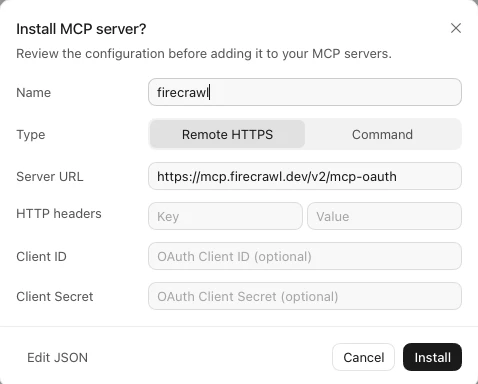
Connect your Firecrawl account
Use the server's sign-in option in Cursor's MCP settings. Firecrawl opens in your browser: sign in, choose a team with Alexandria enabled, and approve access. A green dot next to Firecrawl means it's connected.
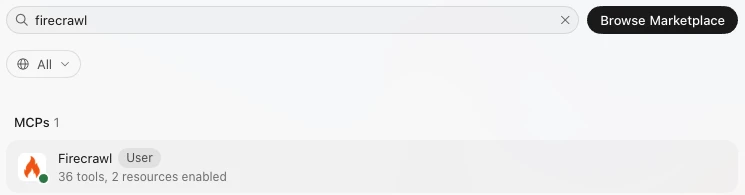
Ask Cursor's agent for the data
In the agent chat, ask in plain language and mention Particle or Firecrawl Alexandria. The agent finds the Particle capability that fits and runs it. For example:
Use Firecrawl to find five podcast discussions about AI agents and quote the matching speaker-labeled passages.
What can Cursor do with Particle?
Podcast intelligence: speaker-labelled transcripts, episode and show search, the people who appear, the sponsors and companies advertising, chart rankings, and bias and brand-suitability analysis.
Cursor can run any of Particle's 105 capabilities through Alexandria. Each call is billed in Firecrawl credits on your Firecrawl team.
- Episode search: Matching transcript segments with compact episode records under data. Beside data the body carries the resolved entity or company block when one was passed, and a diagnostics block when nothing matched. Read episode.id and fetch podcasts/episode for the optional episode web URL or audio stream; search does not return those links. Costs 15 Firecrawl credits per call.
- Show search: Matching shows, each with a match_quality from exact down to speculative, and the same filters podcasts/list takes. Costs 5 Firecrawl credits per call.
- Show directory: Shows matching the filters, most popular first when no query is given. Costs 5 Firecrawl credits per call.
- Show lookup by platform id: One result per identifier passed, echoing it beside the matched podcast. An unresolved identifier has no podcast field. Costs 5 Firecrawl credits per call.
- Podcast episode: One episode, returned directly: its show, publication date, duration, speakers, topics, and optional web and audio links. Costs 5 Firecrawl credits per call.
- Episode transcript: In the dialogue format: the full transcript as ordered, numbered, speaker-labelled lines under lines, with episode_id, language and duration_seconds beside them. The text and srt formats answer with that format's body instead. Costs 15 Firecrawl credits per call.
- Show profile: One show, returned directly: title, slug, publisher, language, episode count, popularity, topics, format profile, and its bias and suitability tiers when analysed. Costs 5 Firecrawl credits per call.
- Episodes of a show: The show's episodes, newest first, as full episode records. Costs 15 Firecrawl credits per call.
- Entity mentions in a show: Episodes of this show where the entity appears, newest first, each with salience, occurrence count and the roles it held. Costs 15 Firecrawl credits per call.
- Related shows: Shows most related to this one, best first, each with a calibrated score and a band (strong, moderate, weak). An empty page carries a coverage note saying why. Costs 15 Firecrawl credits per call.
See all 105 capabilities and their inputs on the Particle API page.
What should I ask Cursor?
Name Particle or Firecrawl Alexandria in the prompt so Cursor reaches for it. Each example opens in Cursor with the prompt filled in.
- Use Firecrawl to find five podcast discussions about AI agents and quote the matching speaker-labeled passages.
- Use Firecrawl to find the latest five episodes of Pivot and list their publication dates and speakers.
- Use Firecrawl to find Sam Altman in the podcast guest directory and list five recent guest appearances with show names and episode dates.
- Use Firecrawl to find five podcast passages discussing vector databases and show the speaker-labeled transcript of the first matching segment.
Troubleshooting
Why can't Cursor find Particle?
If Firecrawl's tools in Cursor stop at search, scrape and parse, the connection is keyless and doesn't include Alexandria. Finish the sign-in from Cursor's MCP settings, or add an API key from a team with Alexandria enabled.
Firecrawl shows a red dot in Cursor. What should I do?
Open Cursor's MCP settings, sign in to Firecrawl again, and restart the agent chat so it loads the tools.
Use Particle in other AI apps
The same Firecrawl account reaches Particle from other AI apps. Pick one for its setup steps:

Frequently Asked Questions
What is Firecrawl?
Firecrawl is the web data API to search, scrape and interact with the web at scale. It turns websites into clean, LLM-ready data for AI agents and apps. The Firecrawl MCP server brings those tools into Cursor, along with every data provider in Firecrawl Alexandria.
What is Firecrawl Alexandria?
Firecrawl Alexandria is Firecrawl's library of 550+ data providers for AI agents, Particle among them. Each provider returns structured data through documented capabilities. Cursor finds the capability that fits your question and calls it through the Firecrawl MCP server, so you don't write any integration code. Alexandria needs a Firecrawl account signed in on a team with Alexandria enabled, or an API key from such a team; keyless connections don't include it.
Is there a Particle MCP server for Cursor?
Cursor reaches Particle through Firecrawl's hosted MCP server, which serves Particle and every other Alexandria provider as tools. Add the Firecrawl MCP server once and you don't install or host a separate MCP server for Particle.
What does connecting Particle to Cursor unlock?
Cursor can run all 105 of Particle's capabilities, including Episode search, Show search and Show directory, from any chat, with structured results it can sort, compare and summarize. For example, ask: "Use Firecrawl to find five podcast discussions about AI agents and quote the matching speaker-labeled passages." In the same conversation, Cursor can combine Particle with Firecrawl's web search and scraping and the other providers in Firecrawl Alexandria.
Do I need my own Particle account or API key to use it in Cursor?
No. Cursor calls Particle through Firecrawl Alexandria and each call is billed in Firecrawl credits, so you don't need a separate Particle account or API key.
How much does it cost to use Particle in Cursor?
Particle calls cost from 5 to 50 Firecrawl credits, depending on the capability. The capability list on this page shows each price and its unit. The credits come from the Firecrawl team you connect to Cursor, and finding the right capability is free.
Can Cursor use other providers besides Particle?
Yes. The same Firecrawl MCP server reaches every provider in Firecrawl Alexandria, along with Firecrawl's web search and scraping, so you connect once.
Can I use Particle in other AI apps?
Yes. Connect Firecrawl to ChatGPT, Claude, Grok Bot, Muse signed in on a Firecrawl team with Alexandria enabled, or use the Firecrawl MCP server, CLI or API with an API key from that team, and the same Particle capabilities are available there. Keyless connections don't include Alexandria.