How to connect Promocodes.com coupons and promo codes to Grok Bot
Add the Firecrawl plugin to Grok Bot once and it can call the Promocodes.com coupons and promo codes API and every other provider in Firecrawl Alexandria, with no Promocodes.com coupons and promo codes integration code.
To connect Promocodes.com coupons and promo codes to Grok Bot, add the Firecrawl plugin to Grok Bot, sign in on a Firecrawl team with Alexandria enabled, and ask for Promocodes.com coupons and promo codes data in plain language. The connection works in every Bot in your Grok Bot account, and you set it up once.
Grok Bot uses Promocodes.com coupons and promo codes as an MCP tool through Firecrawl's hosted MCP server, so you don't install or host a separate MCP server for Promocodes.com coupons and promo codes.
Grok Bot is xAI's agent app. Plugins give your Bots outside tools, and the Firecrawl plugin adds web search, scraping and every data provider in Firecrawl Alexandria.
How do I connect Promocodes.com coupons and promo codes to Grok Bot?
Add the Firecrawl plugin
In Grok Bot, open Connect apps from the sidebar, find Firecrawl and select Connect. You can also open Firecrawl's plugin listing and select Add to Grok Bot, which opens the desktop app to finish the install.
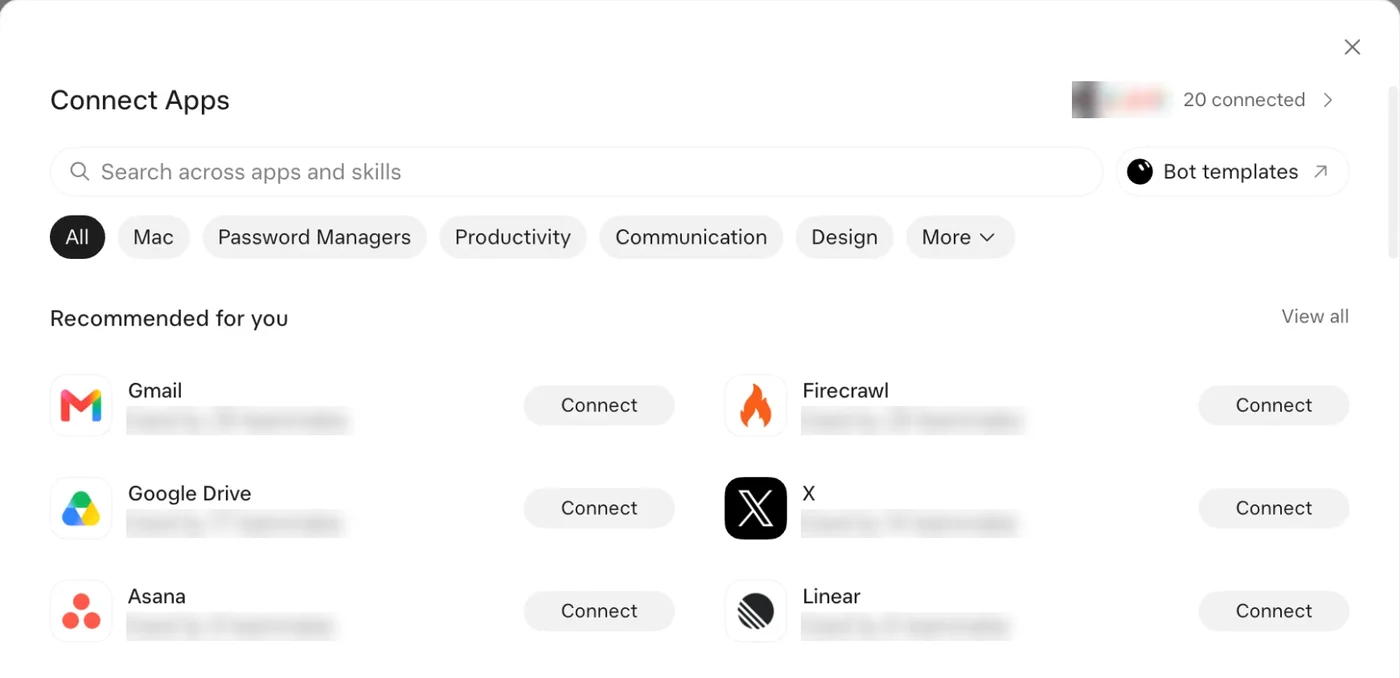
Connect your Firecrawl account
Grok Bot opens Firecrawl in your browser. Sign in, choose a team with Alexandria enabled, and select Authorize. The screen names Cursor, because the plugin is published on the Cursor Marketplace. No account yet? You can create one for free in the same flow.
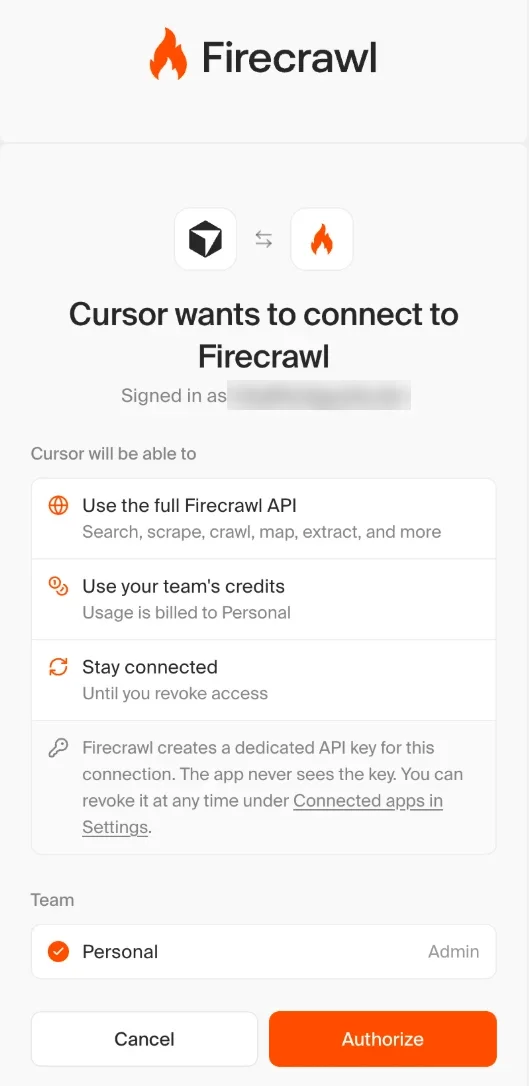
Ask your Bot for the data
In a chat, ask in plain language and mention Promocodes.com coupons and promo codes or Firecrawl Alexandria. To make sure the Bot uses Firecrawl, type @ and choose Firecrawl first. For example:
Use Firecrawl to answer this: Any Kohl's promo codes that work today?
What can Grok Bot do with Promocodes.com coupons and promo codes?
Promocodes.com (www.promocodes.com) coupon data from the site's embedded page data: a store's active promo codes and deals with the code, savings, verified/exclusive flags, expiry and copies today, plus expired codes and similar stores; store search by name through the API the site's search box calls; the home page's featured and weekly top coupons; and category pages with their coupons, sub-categories and featured stores.
Grok Bot can run any of Promocodes.com coupons and promo codes's 4 capabilities through Alexandria. Each call is billed in Firecrawl credits on your Firecrawl team.
- Get store coupons: One store's promocodes.com page (/{slug}-coupons): featured and active promo codes and deals with the code (null for deals), headline, description, savings amount, verified/exclusive/free-shipping flags, start and expiry dates and copies today; recently expired offers; the store's category, rating and average savings; similar stores. Costs 5 Firecrawl credits per call.
- List category coupons: A promocodes.com category page (/coupons/{category}, e.g. clothing, travel, black-friday): its coupons and deals across stores, sub-categories with offer counts and featured stores. Costs 5 Firecrawl credits per call.
- List top coupons: The promocodes.com home page's coupon rails: featured codes, this week's top coupons and explore picks across stores, each with its store slug, code, savings and flags, tagged by section. Costs 5 Firecrawl credits per call.
- Search stores: Search promocodes.com stores by name through the store search API the site's search box calls. Returns matching stores with slug, promocodes.com URL, website, coupon count and rank. Costs 5 Firecrawl credits per call.
What should I ask Grok Bot?
Name Promocodes.com coupons and promo codes or Firecrawl Alexandria in the prompt so Grok Bot reaches for it.
- Use Firecrawl to answer this: Any Kohl's promo codes that work today?
- Use Firecrawl to find the promocodes.com page for Nike.
- Use Firecrawl to answer this: What are this week's top coupon codes?
- Use Firecrawl to help with this: Clothing coupons and promo codes right now.
Troubleshooting
Why doesn't my Bot use Promocodes.com coupons and promo codes?
Attach Firecrawl to the chat with @ before you ask, and name Promocodes.com coupons and promo codes or Firecrawl Alexandria in the prompt.
Add to Grok Bot doesn't open the app. What should I do?
Install the Grok Bot desktop app first, or open Connect apps in Grok Bot and search for Firecrawl.
Use Promocodes.com coupons and promo codes in other AI apps
The same Firecrawl account reaches Promocodes.com coupons and promo codes from other AI apps. Pick one for its setup steps:
- Promocodes.com coupons and promo codes in ChatGPT
- Promocodes.com coupons and promo codes in Claude
- Promocodes.com coupons and promo codes in Cursor
 Promocodes.com coupons and promo codes in Muse
Other data providers you can connect to Grok Bot
Frequently Asked Questions
What is Firecrawl?
Firecrawl is the web data API to search, scrape and interact with the web at scale. It turns websites into clean, LLM-ready data for AI agents and apps. The Firecrawl plugin brings those tools into Grok Bot, along with every data provider in Firecrawl Alexandria.
What is Firecrawl Alexandria?
Firecrawl Alexandria is Firecrawl's library of 550+ data providers for AI agents, Promocodes.com coupons and promo codes among them. Each provider returns structured data through documented capabilities. Grok Bot finds the capability that fits your question and calls it through the Firecrawl plugin, so you don't write any integration code. Alexandria needs a Firecrawl account signed in on a team with Alexandria enabled, or an API key from such a team; keyless connections don't include it.
Is there a Promocodes.com coupons and promo codes MCP server for Grok Bot?
Grok Bot reaches Promocodes.com coupons and promo codes through Firecrawl's hosted MCP server, which serves Promocodes.com coupons and promo codes and every other Alexandria provider as tools. Add the Firecrawl plugin once and you don't install or host a separate MCP server for Promocodes.com coupons and promo codes.
What does connecting Promocodes.com coupons and promo codes to Grok Bot unlock?
Grok Bot can run all 4 of Promocodes.com coupons and promo codes's capabilities, including Get store coupons, List category coupons and List top coupons, from any chat, with structured results it can sort, compare and summarize. For example, ask: "Use Firecrawl to answer this: Any Kohl's promo codes that work today?" In the same conversation, Grok Bot can combine Promocodes.com coupons and promo codes with Firecrawl's web search and scraping and the other providers in Firecrawl Alexandria.
Do I need my own Promocodes.com coupons and promo codes account or API key to use it in Grok Bot?
No. Grok Bot calls Promocodes.com coupons and promo codes through Firecrawl Alexandria and each call is billed in Firecrawl credits, so you don't need a separate Promocodes.com coupons and promo codes account or API key.
How much does it cost to use Promocodes.com coupons and promo codes in Grok Bot?
Each Promocodes.com coupons and promo codes call costs 5 Firecrawl credits. The capability list on this page shows each price and its unit. The credits come from the Firecrawl team you connect to Grok Bot, and finding the right capability is free.
Can Grok Bot use other providers besides Promocodes.com coupons and promo codes?
Yes. The same Firecrawl plugin reaches every provider in Firecrawl Alexandria, along with Firecrawl's web search and scraping, so you connect once.
Can I use Promocodes.com coupons and promo codes in other AI apps?
Yes. Connect Firecrawl to ChatGPT, Claude, Cursor, Muse signed in on a Firecrawl team with Alexandria enabled, or use the Firecrawl MCP server, CLI or API with an API key from that team, and the same Promocodes.com coupons and promo codes capabilities are available there. Keyless connections don't include Alexandria.