How to connect Alberta Purchasing Connection to Claude
Add the Firecrawl connector to Claude once and it can call the Alberta Purchasing Connection API and every other provider in Firecrawl Alexandria, with no Alberta Purchasing Connection integration code.
To connect Alberta Purchasing Connection to Claude, add the Firecrawl connector to Claude, sign in on a Firecrawl team with Alexandria enabled, and ask for Alberta Purchasing Connection data in plain language. The connection works in Claude on the web, Claude Desktop and Cowork, and you set it up once.
Claude uses Alberta Purchasing Connection as an MCP tool through Firecrawl's hosted MCP server, so you don't install or host a separate MCP server for Alberta Purchasing Connection.
Claude is Anthropic's AI assistant. Connectors give it tools from other services, and the Firecrawl connector adds web search, scraping and every data provider in Firecrawl Alexandria.
How do I connect Alberta Purchasing Connection to Claude?
Add the Firecrawl connector
Open the Firecrawl connector in Claude's connector directory and select Connect to Claude. In Claude Desktop you can also go to Customize, then Connectors, and search for Firecrawl.
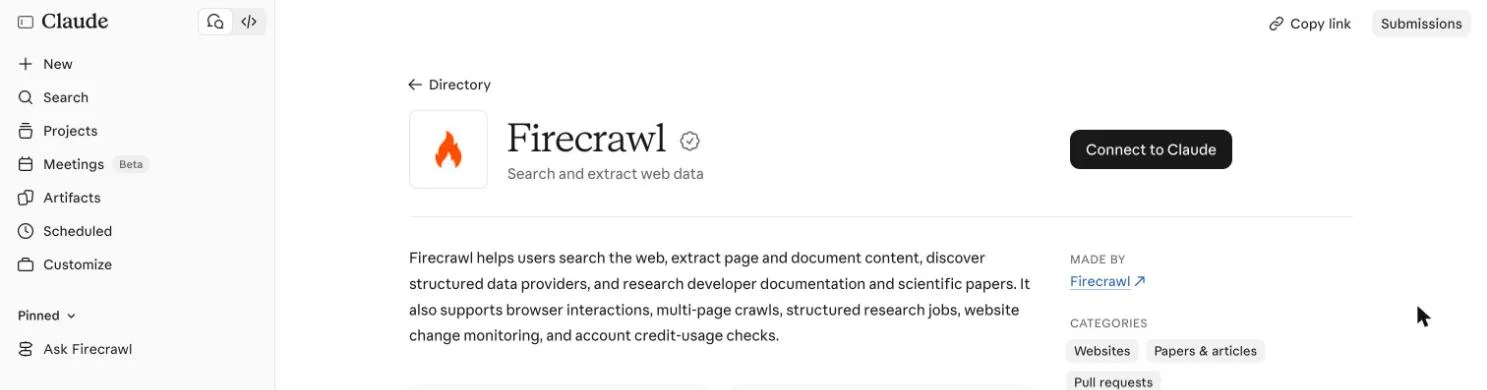
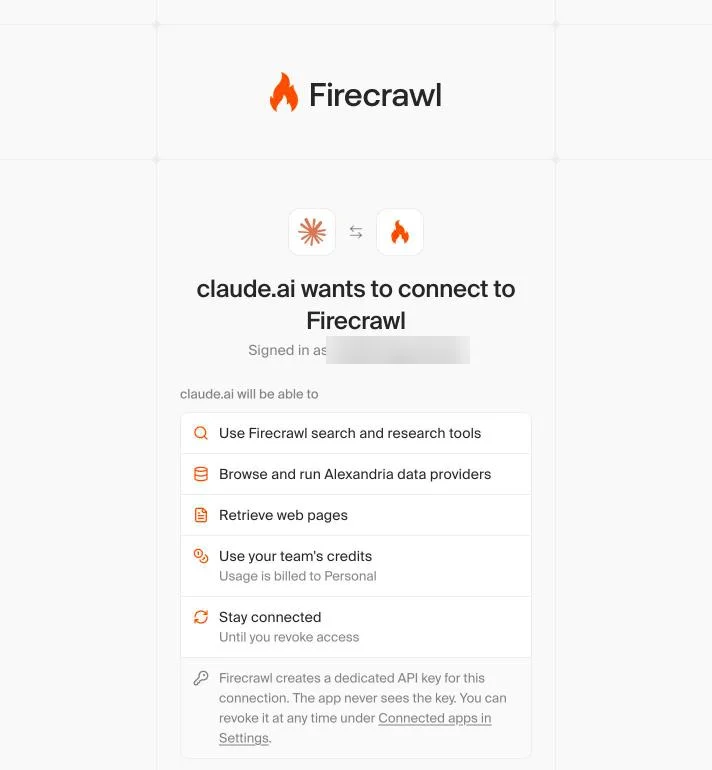
Connect your Firecrawl account
Claude opens Firecrawl in your browser. Sign in, choose a team with Alexandria enabled, and approve access. No account yet? You can create one for free in the same flow.
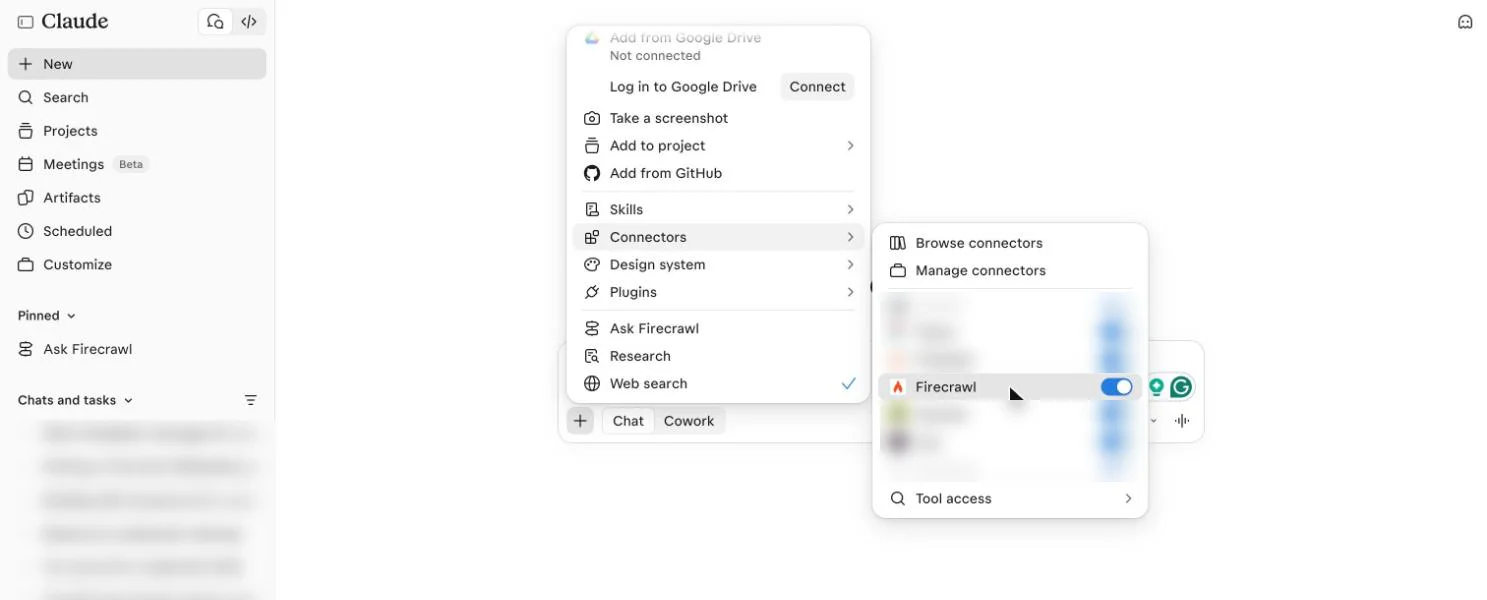
Turn on Firecrawl in a chat
In a new conversation, open the + menu, go to Connectors and switch on Firecrawl.
Ask Claude for the data
Ask in plain language and mention Alberta Purchasing Connection or Firecrawl Alexandria. Claude finds the Alberta Purchasing Connection capability that fits, checks its inputs and runs it. For example:
Use Firecrawl to find the first 10 open Alberta Purchasing Connection postings matching wildfire, ordered by earliest closing date, with buyers and reference numbers.
What can Claude do with Alberta Purchasing Connection?
Alberta Purchasing Connection (purchasing.alberta.ca), the Government of Alberta's public procurement portal: search tender postings by text, status, organization, region, category, solicitation and opportunity type, UNSPSC code and post/close dates; one posting's full public record (dates, submission details, contact, documents metadata, plan holders, bidders, awards); the contracting-organization directory, the code tables used as filter values and the UNSPSC commodity-code lookup. Anonymous JSON API; document bytes are not retrievable (Cloudflare Turnstile plus login).
Claude can run any of Alberta Purchasing Connection's 5 capabilities through Alexandria. Each call is billed in Firecrawl credits on your Firecrawl team.
- Get posting: One posting's full public record by reference number (GET /api/opportunity/public/{year}/{number}): titles, description, status, codes, estimated/actual value (CAD), trade agreements, post/close/delivery/question dates and posting periods, submission methods, the buyer's published procurement contact, document metadata (names, types, sizes; the bytes themselves need a Cloudflare Turnstile check plus login and are never returned), resolved UNSPSC hierarchy, plan holders (interested suppliers) and bidders as businesses, and awards with amounts. Unknown reference numbers are not_found. Costs 5 Firecrawl credits per call.
- List codes: One of the site's code tables (GET /api/lookup): the codes and display values behind search filters and posting fields. Categories include opportunity-status, opportunity-category, opportunity-solicitation-type, opportunity-posting-type, trade-agreement, trade-agreement-exception, region-of-delivery (about 800 Alberta places), opportunity-document-type, organization-type, country, contact-method, opportunity-award-selection-criteria and others; 'root' lists every category. An unknown category is not_found. Costs 5 Firecrawl credits per call.
- List organizations: The directory of contracting organizations (GET /api/organizational-unit): every ministry, agency/board/commission, Crown corporation, Indigenous organization and MASH-sector body (municipalities, academic, school boards, health) that posts on APC, with id, type and active flag. Optional type and name filters are applied locally to the one full list the site serves (about 530 rows). Names are the values search_postings accepts in `organizations`. Costs 5 Firecrawl credits per call.
- Search postings: Search Alberta Purchasing Connection postings (POST /api/opportunity/search). Free text plus any combination of status, category, solicitation type, opportunity type, trade agreement, contracting organization, delivery region, UNSPSC code and post/close date range filters; sorted by post or close date; one page per call (page_size rows, default 20, max 100). Each posting carries its reference number (AB-YYYY-NNNNN), titles, organization, codes, regions, UNSPSC codes with titles, post and close date-times (Alberta local time, America/Edmonton, no offset) and its source URL. Facet counts for the filtered result set are returned when include_facets is true. Zero matches is a legitimate empty result. Costs 5 Firecrawl credits per call.
- Search unspsc codes: UNSPSC commodity codes whose 8-digit code starts with a numeric prefix (GET /api/lookup/unspsc-codes/prefix-search), with title, level (Segment, Family, Class, Commodity) and the Canadian GSIN code. These are the codes search_postings accepts in `unspsc_codes` and that postings carry. A prefix nothing starts with is a legitimate empty result. Costs 5 Firecrawl credits per call.
What should I ask Claude?
Name Alberta Purchasing Connection or Firecrawl Alexandria in the prompt so Claude reaches for it. Each example opens in Claude with the prompt filled in.
- Use Firecrawl to find the first 10 open Alberta Purchasing Connection postings matching wildfire, ordered by earliest closing date, with buyers and reference numbers.
- Use Firecrawl to read Alberta tender AB-2026-06670 and show its description, deadlines, submission methods and document metadata.
- Use Firecrawl to list active contracting organizations with Calgary in their name and show their organization types.
- Use Firecrawl to run Alberta Purchasing Connection's Get posting capability. Inspect the Alexandria inputs, ask for any missing required details, and return a small sample with sources.
Troubleshooting
Why doesn't Claude use Alberta Purchasing Connection?
The connector has to be on in each conversation. Open the + menu, go to Connectors and check that Firecrawl is switched on, then ask again and name Alberta Purchasing Connection or Firecrawl Alexandria in the prompt.
Claude says it can't reach the Firecrawl server. What should I do?
Open Customize, then Connectors, disconnect Firecrawl and connect it again. On a Team or Enterprise plan, an owner has to allow the connector before members can add it.
Why does Claude say Alberta Purchasing Connection isn't available?
Alexandria needs a Firecrawl team with Alexandria enabled. Reconnect Firecrawl and pick that team on the consent screen.
Use Alberta Purchasing Connection in other AI apps
The same Firecrawl account reaches Alberta Purchasing Connection from other AI apps. Pick one for its setup steps:
- Alberta Purchasing Connection in ChatGPT
- Alberta Purchasing Connection in Cursor
- Alberta Purchasing Connection in Grok Bot
 Alberta Purchasing Connection in Muse
Other data providers you can connect to Claude
Frequently Asked Questions
What is Firecrawl?
Firecrawl is the web data API to search, scrape and interact with the web at scale. It turns websites into clean, LLM-ready data for AI agents and apps. The Firecrawl connector brings those tools into Claude, along with every data provider in Firecrawl Alexandria.
What is Firecrawl Alexandria?
Firecrawl Alexandria is Firecrawl's library of 550+ data providers for AI agents, Alberta Purchasing Connection among them. Each provider returns structured data through documented capabilities. Claude finds the capability that fits your question and calls it through the Firecrawl connector, so you don't write any integration code. Alexandria needs a Firecrawl account signed in on a team with Alexandria enabled, or an API key from such a team; keyless connections don't include it.
Is there a Alberta Purchasing Connection MCP server for Claude?
Claude reaches Alberta Purchasing Connection through Firecrawl's hosted MCP server, which serves Alberta Purchasing Connection and every other Alexandria provider as tools. Add the Firecrawl connector once and you don't install or host a separate MCP server for Alberta Purchasing Connection.
What does connecting Alberta Purchasing Connection to Claude unlock?
Claude can run all 5 of Alberta Purchasing Connection's capabilities, including Get posting, List codes and List organizations, from any chat, with structured results it can sort, compare and summarize. For example, ask: "Use Firecrawl to find the first 10 open Alberta Purchasing Connection postings matching wildfire, ordered by earliest closing date, with buyers and reference numbers." In the same conversation, Claude can combine Alberta Purchasing Connection with Firecrawl's web search and scraping and the other providers in Firecrawl Alexandria.
Do I need my own Alberta Purchasing Connection account or API key to use it in Claude?
No. Claude calls Alberta Purchasing Connection through Firecrawl Alexandria and each call is billed in Firecrawl credits, so you don't need a separate Alberta Purchasing Connection account or API key.
How much does it cost to use Alberta Purchasing Connection in Claude?
Each Alberta Purchasing Connection call costs 5 Firecrawl credits. The capability list on this page shows each price and its unit. The credits come from the Firecrawl team you connect to Claude, and finding the right capability is free.
Can Claude use other providers besides Alberta Purchasing Connection?
Yes. The same Firecrawl connector reaches every provider in Firecrawl Alexandria, along with Firecrawl's web search and scraping, so you connect once.
Can I use Alberta Purchasing Connection in other AI apps?
Yes. Connect Firecrawl to ChatGPT, Cursor, Grok Bot, Muse signed in on a Firecrawl team with Alexandria enabled, or use the Firecrawl MCP server, CLI or API with an API key from that team, and the same Alberta Purchasing Connection capabilities are available there. Keyless connections don't include Alexandria.