How to connect Rotten Tomatoes to Cursor
Add the Firecrawl MCP server to Cursor once and it can call the Rotten Tomatoes API and every other provider in Firecrawl Alexandria, with no Rotten Tomatoes integration code.
To connect Rotten Tomatoes to Cursor, add the Firecrawl MCP server to Cursor, sign in on a Firecrawl team with Alexandria enabled, and ask for Rotten Tomatoes data in plain language. The connection works in Cursor's agent and chat, and you set it up once.
Cursor uses Rotten Tomatoes as an MCP tool through Firecrawl's hosted MCP server, so you don't install or host a separate MCP server for Rotten Tomatoes.
Cursor is an AI code editor. Its agent uses MCP servers for outside tools, and the Firecrawl MCP server adds web search, scraping and every data provider in Firecrawl Alexandria.
How do I connect Rotten Tomatoes to Cursor?
Install the Firecrawl MCP server
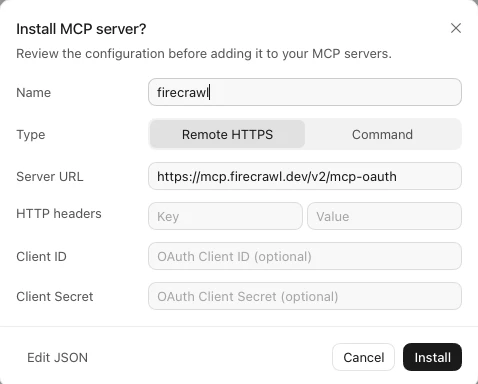
Open the install dialog in Cursor, check that the URL is Firecrawl's hosted server, then select Install.
Connect your Firecrawl account
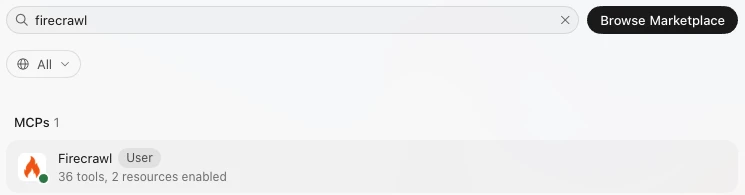
Use the server's sign-in option in Cursor's MCP settings. Firecrawl opens in your browser: sign in, choose a team with Alexandria enabled, and approve access. A green dot next to Firecrawl means it's connected.
Ask Cursor's agent for the data
In the agent chat, ask in plain language and mention Rotten Tomatoes or Firecrawl Alexandria. The agent finds the Rotten Tomatoes capability that fits and runs it. For example:
Use Firecrawl to answer this: What are the Tomatometer and Popcornmeter for The Shawshank Redemption, and what is the critics consensus?
What can Cursor do with Rotten Tomatoes?
Rotten Tomatoes (rottentomatoes.com) movie and TV data from the public site: title search over the site's own search index; one movie, TV series or TV season's Tomatometer (all critics and Top Critics, with average rating, fresh and rotten counts and Certified Fresh), Popcornmeter (all and verified audience, with average stars, banded rating count and Verified Hot), Critics Consensus, synopsis, genres, rating, runtime, release dates, US box office, distributor or network, every Movie Info row, the leading cast and crew, seasons and where-to-watch links; the 40 most recent critic quotes (critic and publication) and 40 most recent audience reviews (stars and text) with the consensus; Tomatometer and Popcornmeter for up to 20 titles in one call; and the discovery lists (in theaters, at home, coming soon, TV series) with genre, Tomatometer, Popcornmeter, rating and streaming-service filters, sorts and cursor pagination. US site. Full review pagination and review dates are not available: Rotten Tomatoes serves them only to its own browser client.
Cursor can run any of Rotten Tomatoes's 5 capabilities through Alexandria. Each call is billed in Firecrawl credits on your Firecrawl team.
- Browse: The Rotten Tomatoes discovery lists: movies in theaters, movies at home (streaming and rental), movies coming soon and TV series, 30 titles per page with Tomatometer and Popcornmeter percents, Certified Fresh and Verified Hot flags, release line and poster, filtered by genre, Tomatometer (certified_fresh, fresh, rotten), Popcornmeter (verified_hot, upright, spilled), content rating and streaming service, sorted by popularity, newest, box office, title or score, with cursor pagination. A filter set with no titles returns an empty list with a no_results warning. Costs 5 Firecrawl credits per call.
- Reviews: Recent reviews for one movie or TV season: up to the 40 most recent critic reviews (critic, publication and the quote Rotten Tomatoes shows) and the 40 most recent audience reviews (stars out of 5 and text), with the Critics Consensus and Audience Says text, from the review summary the site publishes for AI agents. A title with no reviews yet returns empty lists with a no_reviews warning. Coverage is partial: older reviews, review dates, fresh or rotten per review and full pagination are served only to the site's own browser client. Costs 5 Firecrawl credits per call.
- Scores bulk: Tomatometer (all critics and Top Critics, with average rating and review, fresh and rotten counts), Popcornmeter and Critics Consensus for up to 20 movies, TV series or seasons in one call, from each title page. Every input item gets a row in input order; an unknown title or failed fetch sets that row's error (not_found, invalid_input or upstream_*) without hiding the rest. Fails only when every item fails the same way. Costs 5 Firecrawl credits per call.
- Search: Search Rotten Tomatoes movies and TV series by title through the site's own search index (the header search box). Each result carries the path and URL to pass to title or reviews, type, year, Tomatometer and Popcornmeter percents, Certified Fresh and Verified Hot flags, rating, genres, runtime, synopsis, poster, directors and leading cast. Pages of 1 to 50, up to the index's first 1000 matches; no match returns an empty list with a no_results warning. Costs 5 Firecrawl credits per call.
- Title: One movie, TV series or TV season page: Tomatometer from all critics and from Top Critics (score, average rating out of 10 for all critics, review, fresh and rotten counts, Certified Fresh), Popcornmeter from all and verified audiences (score, average stars, banded rating count, Verified Hot), Critics Consensus and Audience Says text, synopsis, genres, rating, runtime, year and release date, theatrical and streaming release dates, US box office, distributor or network, original language, every Movie Info row, the leading cast and crew, a series' seasons and Where to Watch links. A series' scores average its seasons. Scores are null when the site shows none (unreleased titles). Costs 5 Firecrawl credits per call.
What should I ask Cursor?
Name Rotten Tomatoes or Firecrawl Alexandria in the prompt so Cursor reaches for it. Each example opens in Cursor with the prompt filled in.
- Use Firecrawl to answer this: What are the Tomatometer and Popcornmeter for The Shawshank Redemption, and what is the critics consensus?
- Use Firecrawl to answer this: What did critics say about Breaking Bad season 1?
- Use Firecrawl to answer this: Which Certified Fresh movies were added to Netflix most recently?
- Use Firecrawl to give me the critic average rating and review count for these ten movies.
Troubleshooting
Why can't Cursor find Rotten Tomatoes?
If Firecrawl's tools in Cursor stop at search, scrape and parse, the connection is keyless and doesn't include Alexandria. Finish the sign-in from Cursor's MCP settings, or add an API key from a team with Alexandria enabled.
Firecrawl shows a red dot in Cursor. What should I do?
Open Cursor's MCP settings, sign in to Firecrawl again, and restart the agent chat so it loads the tools.
Use Rotten Tomatoes in other AI apps
The same Firecrawl account reaches Rotten Tomatoes from other AI apps. Pick one for its setup steps:
- Rotten Tomatoes in ChatGPT
- Rotten Tomatoes in Claude
- Rotten Tomatoes in Grok Bot
 Rotten Tomatoes in Muse
Other data providers you can connect to Cursor
Frequently Asked Questions
What is Firecrawl?
Firecrawl is the web data API to search, scrape and interact with the web at scale. It turns websites into clean, LLM-ready data for AI agents and apps. The Firecrawl MCP server brings those tools into Cursor, along with every data provider in Firecrawl Alexandria.
What is Firecrawl Alexandria?
Firecrawl Alexandria is Firecrawl's library of 550+ data providers for AI agents, Rotten Tomatoes among them. Each provider returns structured data through documented capabilities. Cursor finds the capability that fits your question and calls it through the Firecrawl MCP server, so you don't write any integration code. Alexandria needs a Firecrawl account signed in on a team with Alexandria enabled, or an API key from such a team; keyless connections don't include it.
Is there a Rotten Tomatoes MCP server for Cursor?
Cursor reaches Rotten Tomatoes through Firecrawl's hosted MCP server, which serves Rotten Tomatoes and every other Alexandria provider as tools. Add the Firecrawl MCP server once and you don't install or host a separate MCP server for Rotten Tomatoes.
What does connecting Rotten Tomatoes to Cursor unlock?
Cursor can run all 5 of Rotten Tomatoes's capabilities, including Browse, Reviews and Scores bulk, from any chat, with structured results it can sort, compare and summarize. For example, ask: "Use Firecrawl to answer this: What are the Tomatometer and Popcornmeter for The Shawshank Redemption, and what is the critics consensus?" In the same conversation, Cursor can combine Rotten Tomatoes with Firecrawl's web search and scraping and the other providers in Firecrawl Alexandria.
Do I need my own Rotten Tomatoes account or API key to use it in Cursor?
No. Cursor calls Rotten Tomatoes through Firecrawl Alexandria and each call is billed in Firecrawl credits, so you don't need a separate Rotten Tomatoes account or API key.
How much does it cost to use Rotten Tomatoes in Cursor?
Each Rotten Tomatoes call costs 5 Firecrawl credits. The capability list on this page shows each price and its unit. The credits come from the Firecrawl team you connect to Cursor, and finding the right capability is free.
Can Cursor use other providers besides Rotten Tomatoes?
Yes. The same Firecrawl MCP server reaches every provider in Firecrawl Alexandria, along with Firecrawl's web search and scraping, so you connect once.
Can I use Rotten Tomatoes in other AI apps?
Yes. Connect Firecrawl to ChatGPT, Claude, Grok Bot, Muse signed in on a Firecrawl team with Alexandria enabled, or use the Firecrawl MCP server, CLI or API with an API key from that team, and the same Rotten Tomatoes capabilities are available there. Keyless connections don't include Alexandria.