How to connect SAM.gov to Grok Bot
Add the Firecrawl plugin to Grok Bot once and it can call the SAM.gov API and every other provider in Firecrawl Alexandria, with no SAM.gov integration code.
To connect SAM.gov to Grok Bot, add the Firecrawl plugin to Grok Bot, sign in on a Firecrawl team with Alexandria enabled, and ask for SAM.gov data in plain language. The connection works in every Bot in your Grok Bot account, and you set it up once.
Grok Bot uses SAM.gov as an MCP tool through Firecrawl's hosted MCP server, so you don't install or host a separate MCP server for SAM.gov.
Grok Bot is xAI's agent app. Plugins give your Bots outside tools, and the Firecrawl plugin adds web search, scraping and every data provider in Firecrawl Alexandria.
How do I connect SAM.gov to Grok Bot?
Add the Firecrawl plugin
In Grok Bot, open Connect apps from the sidebar, find Firecrawl and select Connect. You can also open Firecrawl's plugin listing and select Add to Grok Bot, which opens the desktop app to finish the install.
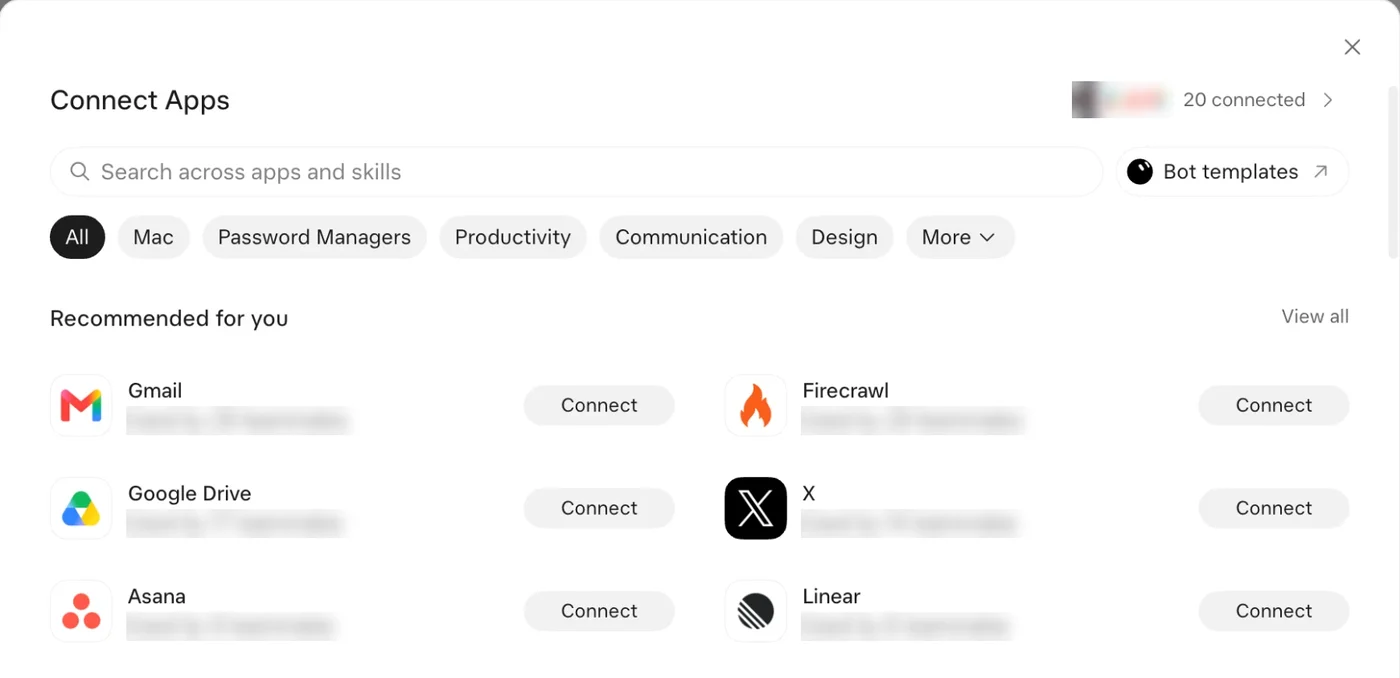
Connect your Firecrawl account
Grok Bot opens Firecrawl in your browser. Sign in, choose a team with Alexandria enabled, and select Authorize. The screen names Cursor, because the plugin is published on the Cursor Marketplace. No account yet? You can create one for free in the same flow.
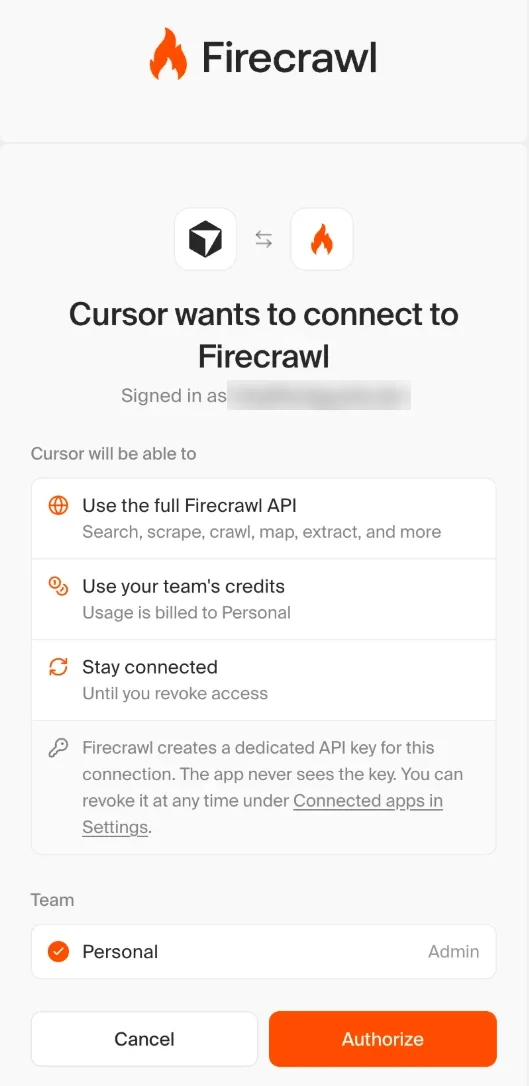
Ask your Bot for the data
In a chat, ask in plain language and mention SAM.gov or Firecrawl Alexandria. To make sure the Bot uses Firecrawl, type @ and choose Firecrawl first. For example:
Use Firecrawl to find up to 20 active small-business set-aside solicitations for cybersecurity services and show their response deadlines.
What can Grok Bot do with SAM.gov?
US federal procurement notices (search and detail), entity registrations (search, get, changes, monthly extract status) and exclusions (daily extract list, get, status) from SAM.gov's public APIs and data-services extracts.
Grok Bot can run any of SAM.gov's 9 capabilities through Alexandria. Each call is billed in Firecrawl credits on your Firecrawl team.
- Detail: Fetch one SAM.gov contract opportunity by its 32-character notice id (the id in https://sam.gov/opp/{id}/view): full description, deadlines, NAICS, set-aside, place of performance, points of contact, award data, attachments (titles and download URLs only) and optionally the amendment history. Costs 5 Firecrawl credits per call.
- Entities changes: Entity registrations whose SAM.gov record changed in a date window (the Entity Management API's updateDate filter, the publisher's own modified-since feed), same record shape as entities_search, pages of at most 10. A one-day window holds about 9,700 updates against the 10,000-record query window; split larger windows by registration_status or state. Costs 5 Firecrawl credits per call.
- Entities get: One to ten SAM.gov entity registrations by UEI or by CAGE code (the public Entity Management API, sections entityRegistration, coreData, assertions and pointsOfContact). Identifiers with no public registration are listed in not_found; when none is found the call fails with not_found. Costs 5 Firecrawl credits per call.
- Entities search: Search SAM.gov entity registrations (the public Entity Management API served keyless from sam.gov) by legal business name, primary or any NAICS code, physical-address state or city, CAGE or UEI, for active (default) or expired registrations. Each record carries UEI, CAGE, legal and DBA name, registration status and dates, exclusion flag, physical and mailing address, entity structure, state of incorporation, business types, primary NAICS and NAICS list, and the government and electronic business points of contact (name, title, address; the public tier has no email or phone). Pages of at most 10; SAM.gov serves at most 10,000 records per query. Costs 5 Firecrawl credits per call.
- Entities status: Version check and hand-off for the public monthly entity registration extract (SAM_PUBLIC_MONTHLY_V2_YYYYMMDD.ZIP in SAM.gov Data Services, about 149 MB): file name as publication_id, S3 Last-Modified, size and ETag from a 64 KB range read through the download route's 303 (the presigned URL is resolved per call and never stored), and the record count from the pipe file's BOF line decoded from the nested zip heads. hand_off is true because the file exceeds the runner's 32 MiB cap; file_url is the sam.gov download route. No daily public entity file exists. Costs 5 Firecrawl credits per call.
- Exclusions get: One exclusion by SAM Number (the UUID in the extract's `SAM Number` column, served by SAM.gov's view-exclusion-details service), or every exclusion of a UEI or CAGE code (the v4 exclusions API, with the SAM Number resolved through the UI exclusion index). Same record shape as exclusions_list; the `source` field says which service answered. Costs 5 Firecrawl credits per call.
- Exclusions list: The full current list of SAM.gov exclusions from the daily public extract (SAM_Exclusions_Public_Extract_V2_YYDDD.ZIP: about 169,000 rows, individuals, firms, special entity designations and vessels), paged with a cursor pinned to the file name and its S3 ETag. Every page re-resolves the newest file through listfiles, downloads the 12 MB zip through the download route's 303, inflates and parses the quoted multi-line CSV in one pass and returns the rows of the requested window; when the publication moved on since the cursor was issued the call fails with invalid_input at /continuation (issue code publication_changed). source_record_id is the extract's SAM Number. Optional classification filter. Each daily file is a full snapshot: there is no exclusions changes feed, diff consecutive snapshots. Costs 5 Firecrawl credits per call.
- Exclusions status: Version check of the daily public exclusions extract (SAM_Exclusions_Public_Extract_V2_YYDDD.ZIP, Julian-dated, about 12 MB zip holding a 79 MB CSV): file name as publication_id, S3 Last-Modified, size and ETag from a 1 KB range read through the download route's 303, and the inner CSV's name and sizes from the zip local header. The zip fits the runner cap, so hand_off is false; exclusions_list reads it. record_count is null until a full read. Costs 5 Firecrawl credits per call.
- Search: Search SAM.gov contract opportunities by keyword, agency, notice status, publication date, NAICS, set-aside, notice type and response deadline. Returns one page (default 20, max 100) with an opaque cursor for the next page. By default each hit is enriched with its full notice detail (NAICS, set-aside, place of performance, full description). Costs 5 Firecrawl credits per call.
What should I ask Grok Bot?
Name SAM.gov or Firecrawl Alexandria in the prompt so Grok Bot reaches for it.
- Use Firecrawl to find up to 20 active small-business set-aside solicitations for cybersecurity services and show their response deadlines.
- Use Firecrawl to find up to 10 Department of Veterans Affairs medical-equipment opportunities published in September 2026.
- Use Firecrawl to find the active cybersecurity solicitation with the earliest upcoming response deadline, then show its full notice, attachment links and amendment history.
- Use Firecrawl to run SAM.gov's Detail capability. Inspect the Alexandria inputs, ask for any missing required details, and return a small sample with sources.
Troubleshooting
Why doesn't my Bot use SAM.gov?
Attach Firecrawl to the chat with @ before you ask, and name SAM.gov or Firecrawl Alexandria in the prompt.
Add to Grok Bot doesn't open the app. What should I do?
Install the Grok Bot desktop app first, or open Connect apps in Grok Bot and search for Firecrawl.
Use SAM.gov in other AI apps
The same Firecrawl account reaches SAM.gov from other AI apps. Pick one for its setup steps:

Other data providers you can connect to Grok Bot
Frequently Asked Questions
What is Firecrawl?
Firecrawl is the web data API to search, scrape and interact with the web at scale. It turns websites into clean, LLM-ready data for AI agents and apps. The Firecrawl plugin brings those tools into Grok Bot, along with every data provider in Firecrawl Alexandria.
What is Firecrawl Alexandria?
Firecrawl Alexandria is Firecrawl's library of 550+ data providers for AI agents, SAM.gov among them. Each provider returns structured data through documented capabilities. Grok Bot finds the capability that fits your question and calls it through the Firecrawl plugin, so you don't write any integration code. Alexandria needs a Firecrawl account signed in on a team with Alexandria enabled, or an API key from such a team; keyless connections don't include it.
Is there a SAM.gov MCP server for Grok Bot?
Grok Bot reaches SAM.gov through Firecrawl's hosted MCP server, which serves SAM.gov and every other Alexandria provider as tools. Add the Firecrawl plugin once and you don't install or host a separate MCP server for SAM.gov.
What does connecting SAM.gov to Grok Bot unlock?
Grok Bot can run all 9 of SAM.gov's capabilities, including Detail, Entities changes and Entities get, from any chat, with structured results it can sort, compare and summarize. For example, ask: "Use Firecrawl to find up to 20 active small-business set-aside solicitations for cybersecurity services and show their response deadlines." In the same conversation, Grok Bot can combine SAM.gov with Firecrawl's web search and scraping and the other providers in Firecrawl Alexandria.
Do I need my own SAM.gov account or API key to use it in Grok Bot?
No. Grok Bot calls SAM.gov through Firecrawl Alexandria and each call is billed in Firecrawl credits, so you don't need a separate SAM.gov account or API key.
How much does it cost to use SAM.gov in Grok Bot?
Each SAM.gov call costs 5 Firecrawl credits. The capability list on this page shows each price and its unit. The credits come from the Firecrawl team you connect to Grok Bot, and finding the right capability is free.
Can Grok Bot use other providers besides SAM.gov?
Yes. The same Firecrawl plugin reaches every provider in Firecrawl Alexandria, along with Firecrawl's web search and scraping, so you connect once.
Can I use SAM.gov in other AI apps?
Yes. Connect Firecrawl to ChatGPT, Claude, Cursor, Muse signed in on a Firecrawl team with Alexandria enabled, or use the Firecrawl MCP server, CLI or API with an API key from that team, and the same SAM.gov capabilities are available there. Keyless connections don't include Alexandria.