How to connect OFAC Sanctions List Search to Grok Bot
Add the Firecrawl plugin to Grok Bot once and it can call the OFAC Sanctions List Search API and every other provider in Firecrawl Alexandria, with no OFAC Sanctions List Search integration code.
To connect OFAC Sanctions List Search to Grok Bot, add the Firecrawl plugin to Grok Bot, sign in on a Firecrawl team with Alexandria enabled, and ask for OFAC Sanctions List Search data in plain language. The connection works in every Bot in your Grok Bot account, and you set it up once.
Grok Bot uses OFAC Sanctions List Search as an MCP tool through Firecrawl's hosted MCP server, so you don't install or host a separate MCP server for OFAC Sanctions List Search.
Grok Bot is xAI's agent app. Plugins give your Bots outside tools, and the Firecrawl plugin adds web search, scraping and every data provider in Firecrawl Alexandria.
How do I connect OFAC Sanctions List Search to Grok Bot?
Add the Firecrawl plugin
In Grok Bot, open Connect apps from the sidebar, find Firecrawl and select Connect. You can also open Firecrawl's plugin listing and select Add to Grok Bot, which opens the desktop app to finish the install.
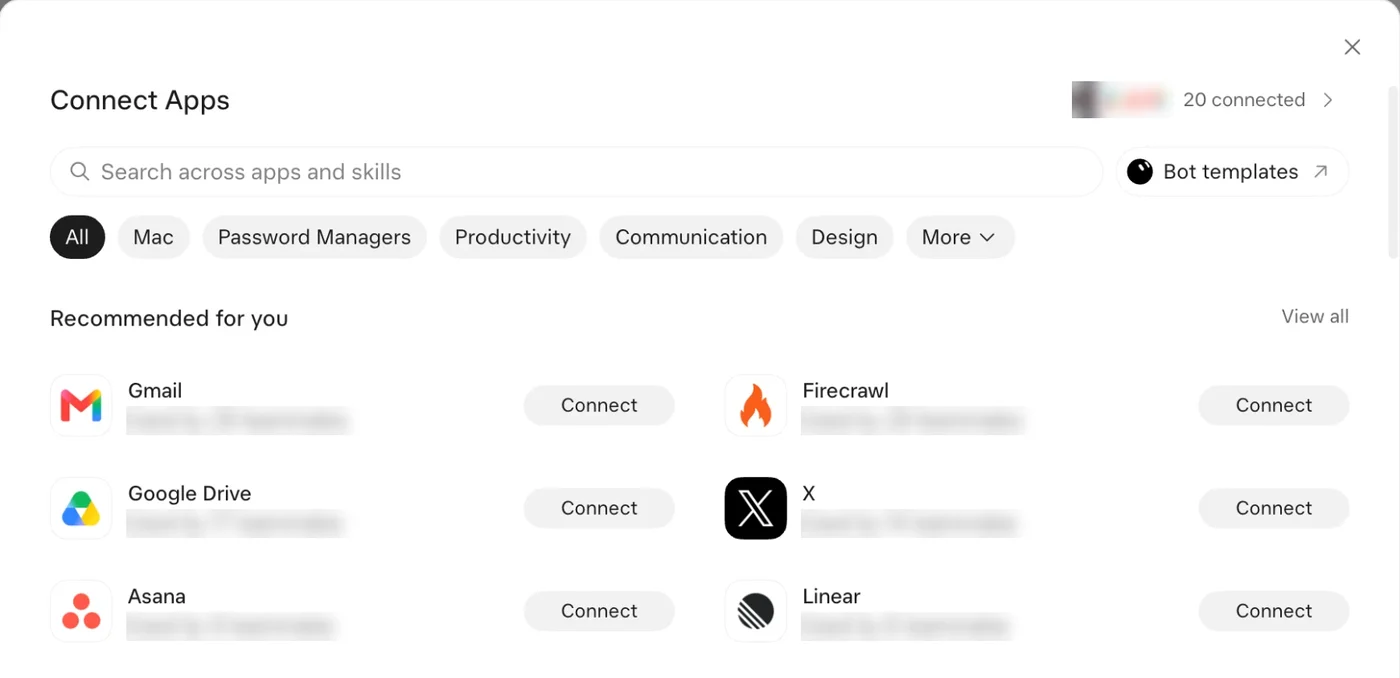
Connect your Firecrawl account
Grok Bot opens Firecrawl in your browser. Sign in, choose a team with Alexandria enabled, and select Authorize. The screen names Cursor, because the plugin is published on the Cursor Marketplace. No account yet? You can create one for free in the same flow.
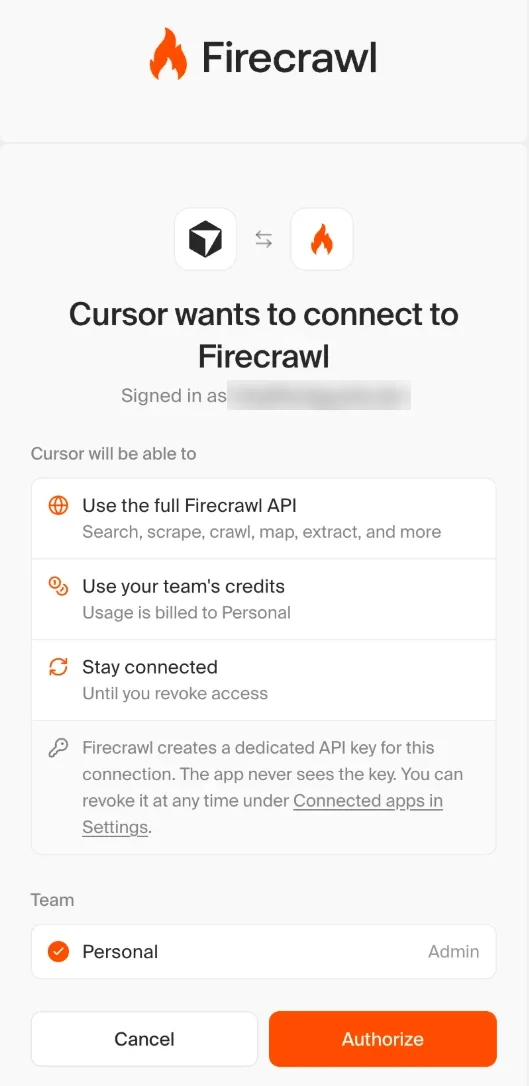
Ask your Bot for the data
In a chat, ask in plain language and mention OFAC Sanctions List Search or Firecrawl Alexandria. To make sure the Bot uses Firecrawl, type @ and choose Firecrawl first. For example:
Use Firecrawl to search OFAC sanctions lists for the exact identification number 7736050003 and show matching names, list names and entity IDs.
What can Grok Bot do with OFAC Sanctions List Search?
U.S. Treasury OFAC Sanctions List Search (sanctionssearch.ofac.treas.gov) and the Sanctions List Service REST API (sanctionslistservice.ofac.treas.gov): fuzzy name / ID-number / address search across the SDN and Non-SDN lists with program, country, type and list filters and a minimum match score; the Details page of one record (identifications, aliases, addresses); the structured Enhanced XML entity record of the Sanctions List Service; the reference lists of program codes and list names; the publication history of list changes for a year; and, for collectors, the full SDN and Consolidated lists paginated from the official Enhanced XML exports with a publication-pinned cursor, the parsed per-publication delta files (add / update / remove), a cheap per-list status with OFAC's posted hashes, and single records in the batch's common shape. Anonymous, read-only, US-hosted.
Grok Bot can run any of OFAC Sanctions List Search's 9 capabilities through Alexandria. Each call is billed in Firecrawl credits on your Firecrawl team.
- Entity: Sanctions List Service Enhanced XML record of one entity (GET /entities/{id}, anonymous): identity id, entity type, remarks, sanctions lists with their publication dates, programs, sanctions types, legal authorities, every name with its alias type and script translations and name parts, addresses (country and typed parts), features (typed values, with date ranges where the feature is a date) and identity documents (type, number, validity, issuing country, dates). Dates are ISO as the service returns them. The service's data may include historically removed records and is for research, not transaction screening (its own warning). Fails with not_found when the service returns no entity for the id. Costs 5 Firecrawl credits per call.
- Publications: Sanctions List Service publication history for one year (GET /changes/history/{year}): every list publication's id and timestamp, newest first as the service orders them, plus the URL of the service's delta file for that publication (/changes/{publicationID}, a 302 to a presigned S3 object that expires after one hour, so it is a URL to follow at call time, not to store). `date_published` is the service's naive timestamp (US Eastern, no zone). A year with no publications is a successful empty result. Costs 5 Firecrawl credits per call.
- Record: The Sanctions List Search Details page of one OFAC record (Details.aspx?id=): type, list, name (entity name, or last and first name for individuals), title, nationality, citizenship, date and place of birth, programs, remarks, any further labelled field the page shows (vessel and aircraft layouts), the identifications table (type, ID number, country, issue and expire dates; also features such as secondary sanctions risk and directive determinations), the aliases table and the addresses table. Dates are kept as printed ('19 Jan 1960'). Fails with not_found when the site redirects an unknown id to its error page. Costs 5 Firecrawl credits per call.
- Records changes: The publisher's delta for one publication (GET /changes/{publicationID}, a 302 to the DeltaFile 1.0 XML on S3; publication ids come from `publications` or `source_status`), parsed into records: entity@action `add` (a full record), `remove` (the record as it was, `delisted: true`) and, for an entity without an action attribute, `update` with the changed children listed in `changes` (element, id, action add / update / remove, value) and a partial record built from those children; fetch `records_get` for the full current record of an update. `counts` gives entity-level and element-level action totals (the element-level counts are the ones OFAC's delta statistics quote). Fails with not_found when the service has no delta for the id (it answers 400 'Could not retrieve delta'). Costs 5 Firecrawl credits per call.
- Records get: One record by OFAC entity id (or a pasted SLS /entities/{id} or sanctionssearch Details.aspx?id= URL), from GET /entities/{id} (live Enhanced XML, the service's current data), shaped into the batch's common record; `publication_id` is the newest publicationID from /changes/history at retrieval time because the live endpoint serves no publication id of its own. Fails with not_found when the service returns no entity for the id. The service's own warning applies: its live data may include historic records and is not the official list file. Costs 5 Firecrawl credits per call.
- Records list: The full current list, one page of records at a time, read from the official Enhanced XML export (GET /api/PublicationPreview/exports/SDN_ENHANCED.XML or CONS_ENHANCED.XML, 302 to the presigned S3 object) with HTTP Range windows so every fetch stays under the 32 MiB cap: a page fetches one byte window (page_size x 16 KiB, 256 KiB to 8 MiB, grown up to 24 MiB when a single entity is larger), shapes the complete <entity> elements in it (at most page_size; a page may be shorter than page_size, never empty before the end) and returns a cursor holding the byte offset after the last record. The cursor is pinned to the S3 object (x-amz-meta-publication-id, ETag, byte size): when OFAC publishes a new file between pages the next call fails with invalid_input, issue code `publication_changed` at /cursor, instead of mixing publications; start again without a cursor. The Consolidated list (481 records, 3.8 MB) takes five pages of 100; the SDN list (about 19,500 records, 110 MB) about 200. Records are in file order and carry source_record_id, source_url, publication_id and retrieved_at. Costs 5 Firecrawl credits per call.
- Reference lists: The Sanctions List Service reference vocabularies: every sanctions program code (GET /sanctions-programs) and every sanctions list name (GET /sanctions-lists), as the service returns them. Program codes are the values `search.programs` accepts (the search form offers a subset) and the codes printed in results and records. Costs 5 Firecrawl credits per call.
- Search: Sanctions List Search: one WebForms postback (GET the form for its __VIEWSTATE, POST the criteria) returning every matching row of the SDN and Non-SDN lists at once (the site has no pager). Only `name` is fuzzy; `min_score` (default 100) is the minimum match score for name matches; `id_number` matches ID numbers and digital currency addresses exactly and rows then carry no score. `programs`, `country`, `type` and `list` must be values the form offers (the function validates them against the live option lists and fails with invalid_input otherwise). Each row carries the OFAC entity id shared with `record` and `entity`. A search that matches nothing is a successful empty result (total 0). Costs 5 Firecrawl credits per call.
- Source status: Cheap version check of one OFAC list for collectors: the latest publication (GET /changes/history/{year}: publicationID and datePublished), the export catalogue (POST /api/PublicationPreview/SdnList or /ConsolidatedList: every file with size, lastUpdated and OFAC's posted SHA-256 / SHA-384 / SHA-512, the hashes shown under 'File Signatures' on sanctionslist.ofac.treas.gov), the legacy XML header read with a 2 KB Range request (publshInformation Publish_Date and Record_Count) and the Enhanced XML object's S3 metadata read with a 4 KB Range request (x-amz-meta-publication-id, ETag, byte size, dataAsOf). `bulk_file` is the hand-off for the SDN list (110 MB, above the 32 MiB fetch cap): URL, size, posted SHA-256, publication id; `fits_single_fetch` says whether one fetch can read it. Four requests, no file download. Costs 5 Firecrawl credits per call.
What should I ask Grok Bot?
Name OFAC Sanctions List Search or Firecrawl Alexandria in the prompt so Grok Bot reaches for it.
- Use Firecrawl to search OFAC sanctions lists for the exact identification number 7736050003 and show matching names, list names and entity IDs.
- Use Firecrawl to read OFAC record 30042 and show its list, programs, aliases, identification numbers and addresses.
- Use Firecrawl to list OFAC Sanctions List Service publications for 2026 with publication IDs and source timestamps.
- Use Firecrawl to run OFAC Sanctions List Search's Entity capability. Inspect the Alexandria inputs, ask for any missing required details, and return a small sample with sources.
Troubleshooting
Why doesn't my Bot use OFAC Sanctions List Search?
Attach Firecrawl to the chat with @ before you ask, and name OFAC Sanctions List Search or Firecrawl Alexandria in the prompt.
Add to Grok Bot doesn't open the app. What should I do?
Install the Grok Bot desktop app first, or open Connect apps in Grok Bot and search for Firecrawl.
Use OFAC Sanctions List Search in other AI apps
The same Firecrawl account reaches OFAC Sanctions List Search from other AI apps. Pick one for its setup steps:
- OFAC Sanctions List Search in ChatGPT
- OFAC Sanctions List Search in Claude
- OFAC Sanctions List Search in Cursor
 OFAC Sanctions List Search in Muse
Other data providers you can connect to Grok Bot
Frequently Asked Questions
What is Firecrawl?
Firecrawl is the web data API to search, scrape and interact with the web at scale. It turns websites into clean, LLM-ready data for AI agents and apps. The Firecrawl plugin brings those tools into Grok Bot, along with every data provider in Firecrawl Alexandria.
What is Firecrawl Alexandria?
Firecrawl Alexandria is Firecrawl's library of 550+ data providers for AI agents, OFAC Sanctions List Search among them. Each provider returns structured data through documented capabilities. Grok Bot finds the capability that fits your question and calls it through the Firecrawl plugin, so you don't write any integration code. Alexandria needs a Firecrawl account signed in on a team with Alexandria enabled, or an API key from such a team; keyless connections don't include it.
Is there a OFAC Sanctions List Search MCP server for Grok Bot?
Grok Bot reaches OFAC Sanctions List Search through Firecrawl's hosted MCP server, which serves OFAC Sanctions List Search and every other Alexandria provider as tools. Add the Firecrawl plugin once and you don't install or host a separate MCP server for OFAC Sanctions List Search.
What does connecting OFAC Sanctions List Search to Grok Bot unlock?
Grok Bot can run all 9 of OFAC Sanctions List Search's capabilities, including Entity, Publications and Record, from any chat, with structured results it can sort, compare and summarize. For example, ask: "Use Firecrawl to search OFAC sanctions lists for the exact identification number 7736050003 and show matching names, list names and entity IDs." In the same conversation, Grok Bot can combine OFAC Sanctions List Search with Firecrawl's web search and scraping and the other providers in Firecrawl Alexandria.
Do I need my own OFAC Sanctions List Search account or API key to use it in Grok Bot?
No. Grok Bot calls OFAC Sanctions List Search through Firecrawl Alexandria and each call is billed in Firecrawl credits, so you don't need a separate OFAC Sanctions List Search account or API key.
How much does it cost to use OFAC Sanctions List Search in Grok Bot?
Each OFAC Sanctions List Search call costs 5 Firecrawl credits. The capability list on this page shows each price and its unit. The credits come from the Firecrawl team you connect to Grok Bot, and finding the right capability is free.
Can Grok Bot use other providers besides OFAC Sanctions List Search?
Yes. The same Firecrawl plugin reaches every provider in Firecrawl Alexandria, along with Firecrawl's web search and scraping, so you connect once.
Can I use OFAC Sanctions List Search in other AI apps?
Yes. Connect Firecrawl to ChatGPT, Claude, Cursor, Muse signed in on a Firecrawl team with Alexandria enabled, or use the Firecrawl MCP server, CLI or API with an API key from that team, and the same OFAC Sanctions List Search capabilities are available there. Keyless connections don't include Alexandria.