How to connect City of Seattle to Cursor
Add the Firecrawl MCP server to Cursor once and it can call the City of Seattle API and every other provider in Firecrawl Alexandria, with no City of Seattle integration code.
To connect City of Seattle to Cursor, add the Firecrawl MCP server to Cursor, sign in on a Firecrawl team with Alexandria enabled, and ask for City of Seattle data in plain language. The connection works in Cursor's agent and chat, and you set it up once.
Cursor uses City of Seattle as an MCP tool through Firecrawl's hosted MCP server, so you don't install or host a separate MCP server for City of Seattle.
Cursor is an AI code editor. Its agent uses MCP servers for outside tools, and the Firecrawl MCP server adds web search, scraping and every data provider in Firecrawl Alexandria.
How do I connect City of Seattle to Cursor?
Install the Firecrawl MCP server
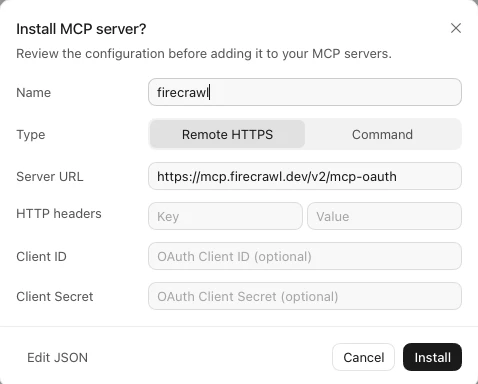
Open the install dialog in Cursor, check that the URL is Firecrawl's hosted server, then select Install.
Connect your Firecrawl account
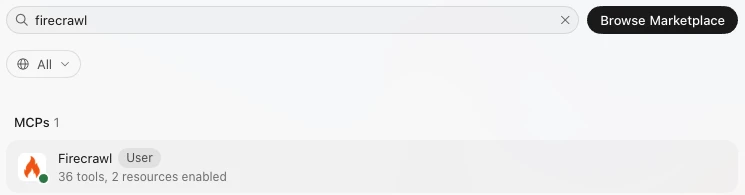
Use the server's sign-in option in Cursor's MCP settings. Firecrawl opens in your browser: sign in, choose a team with Alexandria enabled, and approve access. A green dot next to Firecrawl means it's connected.
Ask Cursor's agent for the data
In the agent chat, ask in plain language and mention City of Seattle or Firecrawl Alexandria. The agent finds the City of Seattle capability that fits and runs it. For example:
Use Firecrawl to show the current Seattle City Council roster with each seat, published office contact details and term expiration.
What can Cursor do with City of Seattle?
City of Seattle (seattle.gov): the City Council roster with office phone, email, page ids and term dates, one councilmember's typed contact card with CMS provenance, the City Clerk's terms of office for every elected official, council district lookup by coordinates (ArcGIS), site search, generic CMS page content and Council Connection news. Anonymous throughout: the Ingeniux content API, the public ArcGIS feature services and the WordPress REST API need no cookies, tokens or keys.
Cursor can run any of City of Seattle's 7 capabilities through Alexandria. Each call is billed in Firecrawl credits on your Firecrawl team.
- Council news: Posts from Council Connection (council.seattle.gov), the City Council's news blog, through its WordPress REST API: id, dates, slug, link, title, excerpt, author id, category and tag ids plus category slugs (e.g. `councilmember-lin`, `news-releases`). Full-text `search`, `categories` filter, `per_page`/`page` pagination with the total from the API headers. Costs 5 Firecrawl credits per call.
- Council roster: Current Seattle City Council roster by seat (Districts 1-7, Positions 8-9): name, role (Councilmember / Council President), district description, published office phone and email, councilmember page URL and CMS ids, headshot, and (by default) the City Clerk's term record (elected or appointed date, term length, term expiry, footnote). Sources: the roster page's BoardMemberComponent records, the Elected Officials page cards and the Terms of Office page. Costs 5 Firecrawl credits per call.
- Councilmember: One Seattle councilmember's page: name, seat, banner image, the typed ContactComponent (main/alt phone, TTY, fax, main/alt email, mailing and street address, coordinates, hours) and CMS provenance (page changed, contact card created/changed/published timestamps from the component XML). Identify the member by page slug (`eddie-lin`), Ingeniux page id (`x182337`, from `council_roster`) or a seattle.gov/council/members/... URL. Costs 5 Firecrawl credits per call.
- Find district: Which Seattle City Council district contains a WGS84 point (longitude, latitude), with that district's councilmember contact record and the two at-large positions, from the Seattle City GIS feature services behind maps.seattle.gov/find-your-district. A point outside the seven districts is `not_found`. Costs 5 Firecrawl credits per call.
- Page content: Any seattle.gov CMS record (page or component) by Ingeniux id through the site's own content API: attributes (id, name, view, friendly URL, render time) and the element tree (name, value, attributes, children). Optionally restrict to named elements (the API silently omits names that do not exist). Unknown ids are `not_found`. Costs 5 Firecrawl credits per call.
- Search pages: seattle.gov site search (server-rendered /searchresults): hits with title, URL, excerpt, relevance score, last-changed timestamp and Ingeniux page id, the total, page window and the taxonomy facets offered for narrowing (`cats`). Page ids feed `page_content`. `page` + `pagesize` (10 or 25) paginate; `next_page` is null on the last page. Costs 5 Firecrawl credits per call.
- Terms of office: The City Clerk's Terms of Office for Elected Officials page: for the Mayor, every City Council position, the City Attorney and each Municipal Court judge, the name, elected or appointed date, term length, term expiry and any footnote explaining a partial or appointed term. Costs 5 Firecrawl credits per call.
What should I ask Cursor?
Name City of Seattle or Firecrawl Alexandria in the prompt so Cursor reaches for it. Each example opens in Cursor with the prompt filled in.
- Use Firecrawl to show the current Seattle City Council roster with each seat, published office contact details and term expiration.
- Use Firecrawl to find the Seattle council district for longitude -122.3321, latitude 47.6062 and show the district councilmember and both at-large contacts.
- Use Firecrawl to find the first 10 seattle.gov pages mentioning tenant rights and show their excerpts and official links.
- Use Firecrawl to run City of Seattle's Council news capability. Inspect the Alexandria inputs, ask for any missing required details, and return a small sample with sources.
Troubleshooting
Why can't Cursor find City of Seattle?
If Firecrawl's tools in Cursor stop at search, scrape and parse, the connection is keyless and doesn't include Alexandria. Finish the sign-in from Cursor's MCP settings, or add an API key from a team with Alexandria enabled.
Firecrawl shows a red dot in Cursor. What should I do?
Open Cursor's MCP settings, sign in to Firecrawl again, and restart the agent chat so it loads the tools.
Use City of Seattle in other AI apps
The same Firecrawl account reaches City of Seattle from other AI apps. Pick one for its setup steps:
- City of Seattle in ChatGPT
- City of Seattle in Claude
- City of Seattle in Grok Bot
 City of Seattle in Muse
Other data providers you can connect to Cursor
Frequently Asked Questions
What is Firecrawl?
Firecrawl is the web data API to search, scrape and interact with the web at scale. It turns websites into clean, LLM-ready data for AI agents and apps. The Firecrawl MCP server brings those tools into Cursor, along with every data provider in Firecrawl Alexandria.
What is Firecrawl Alexandria?
Firecrawl Alexandria is Firecrawl's library of 550+ data providers for AI agents, City of Seattle among them. Each provider returns structured data through documented capabilities. Cursor finds the capability that fits your question and calls it through the Firecrawl MCP server, so you don't write any integration code. Alexandria needs a Firecrawl account signed in on a team with Alexandria enabled, or an API key from such a team; keyless connections don't include it.
Is there a City of Seattle MCP server for Cursor?
Cursor reaches City of Seattle through Firecrawl's hosted MCP server, which serves City of Seattle and every other Alexandria provider as tools. Add the Firecrawl MCP server once and you don't install or host a separate MCP server for City of Seattle.
What does connecting City of Seattle to Cursor unlock?
Cursor can run all 7 of City of Seattle's capabilities, including Council news, Council roster and Councilmember, from any chat, with structured results it can sort, compare and summarize. For example, ask: "Use Firecrawl to show the current Seattle City Council roster with each seat, published office contact details and term expiration." In the same conversation, Cursor can combine City of Seattle with Firecrawl's web search and scraping and the other providers in Firecrawl Alexandria.
Do I need my own City of Seattle account or API key to use it in Cursor?
No. Cursor calls City of Seattle through Firecrawl Alexandria and each call is billed in Firecrawl credits, so you don't need a separate City of Seattle account or API key.
How much does it cost to use City of Seattle in Cursor?
Each City of Seattle call costs 5 Firecrawl credits. The capability list on this page shows each price and its unit. The credits come from the Firecrawl team you connect to Cursor, and finding the right capability is free.
Can Cursor use other providers besides City of Seattle?
Yes. The same Firecrawl MCP server reaches every provider in Firecrawl Alexandria, along with Firecrawl's web search and scraping, so you connect once.
Can I use City of Seattle in other AI apps?
Yes. Connect Firecrawl to ChatGPT, Claude, Grok Bot, Muse signed in on a Firecrawl team with Alexandria enabled, or use the Firecrawl MCP server, CLI or API with an API key from that team, and the same City of Seattle capabilities are available there. Keyless connections don't include Alexandria.