How to connect SEC EDGAR to Cursor
Add the Firecrawl MCP server to Cursor once and it can call the SEC EDGAR API and every other provider in Firecrawl Alexandria, with no SEC EDGAR integration code.
To connect SEC EDGAR to Cursor, add the Firecrawl MCP server to Cursor, sign in on a Firecrawl team with Alexandria enabled, and ask for SEC EDGAR data in plain language. The connection works in Cursor's agent and chat, and you set it up once.
Cursor uses SEC EDGAR as an MCP tool through Firecrawl's hosted MCP server, so you don't install or host a separate MCP server for SEC EDGAR.
Cursor is an AI code editor. Its agent uses MCP servers for outside tools, and the Firecrawl MCP server adds web search, scraping and every data provider in Firecrawl Alexandria.
How do I connect SEC EDGAR to Cursor?
Install the Firecrawl MCP server
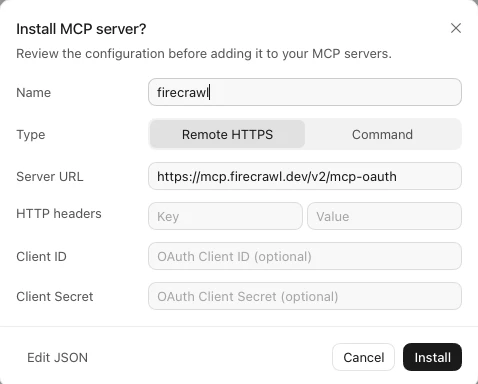
Open the install dialog in Cursor, check that the URL is Firecrawl's hosted server, then select Install.
Connect your Firecrawl account
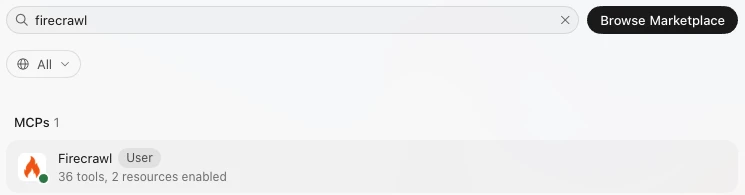
Use the server's sign-in option in Cursor's MCP settings. Firecrawl opens in your browser: sign in, choose a team with Alexandria enabled, and approve access. A green dot next to Firecrawl means it's connected.
Ask Cursor's agent for the data
In the agent chat, ask in plain language and mention SEC EDGAR or Firecrawl Alexandria. The agent finds the SEC EDGAR capability that fits and runs it. For example:
Use Firecrawl to show the Risk Factors and MD&A sections of Apple's latest 10-K.
What can Cursor do with SEC EDGAR?
Official SEC company profiles, filings, filing sections, 13F holdings, XBRL concept facts and revenue by product from each filing's XBRL, plus bulk collection of companies, XBRL facts, the daily filings index, insider transactions (Forms 3/4/5) and Schedules 13D/13G.
Cursor can run any of SEC EDGAR's 24 capabilities through Alexandria. Each call is billed in Firecrawl credits on your Firecrawl team.
- Companies get: One company identity record by CIK from its submissions JSON (publication_id = SHA-256 of that document), optionally with one page of its filings: filings_page 0 is filings.recent (up to 1,000 rows), n is the n-th older overflow page filings.files[n-1]; the continuation walks the pages. Costs 5 Firecrawl credits per call.
- Companies list: The full current list of EDGAR filers in the ticker index, paginated by CIK: each page re-fetches company_tickers_exchange.json, pins its SHA-256 as publication_id, then reads one submissions JSON per CIK (sequential, paced) and emits the company identity record (cik, name, tickers, exchanges, SIC, entity type, category, EIN, LEI, state of incorporation, fiscal year end, addresses, former names, filing counts and the overflow page list). A stale cursor fails with publication_changed. Costs 5 Firecrawl credits per call.
- Companies status: Version check of the companies source: fetches company_tickers_exchange.json (about 10,400 ticker rows, 8,000 CIKs), returns its Last-Modified, size, SHA-256 (the publisher posts no hash or ETag; this hash is the publication_id companies_list pins) and record counts, plus the headers of the bulk submissions.zip as a hand-off (never downloaded). Costs 5 Firecrawl credits per call.
- Company: Resolve a ticker, CIK or company name to its EDGAR filer profile: CIK, name, tickers, exchanges, SIC, filer category, state of incorporation, fiscal year end, addresses, former names and filing counts. Start here to get the CIK the other functions accept. Costs 5 Firecrawl credits per call.
- Concept: Every reported value of one XBRL concept for a filer (Revenues, NetIncomeLoss, Assets, EarningsPerShareDiluted ...) straight from the SEC's companyconcept API (or the same concept in companyfacts when companyconcept serves an empty placeholder; `source_url` names which): value, period, unit, fiscal year and period, the form and accession it came from. Newest period first. Costs 5 Firecrawl credits per call.
- Daily index changes: Additions to the EDGAR filings index between two dates, one published day per page (the daily files are the publisher's own change feed): the same records as daily_index_list with change_type=added and change_date, walking the quarter listings for the days that exist. Removals and corrections never appear in daily files; they surface only in the weekly full-index rebuild (see daily_index_status.full_index), which the downstream must diff. Costs 5 Firecrawl credits per call.
- Daily index get: One filing by accession number: located in the filer's submissions JSON (recent, then the older overflow pages), with items, primary document, acceptance time and the documents of its archive folder. The filer CIK defaults to the accession's first ten digits, which is right for self-filed filings; pass cik when a filing agent submitted it. Costs 5 Firecrawl credits per call.
- Daily index list: One day's filings from master.YYYYMMDD.idx, one record per accession (co-filer rows merged), filtered by form types and 8-K item codes, paged with a cursor pinned to the file's ETag. 8-K and 8-K/A rows (or all rows with join=all) are joined with the filer's submissions JSON for items[], the primary document URL and acceptance time; the index itself carries no items. M&A event types: 2.01 completion, 1.01 agreement (noisy), 1.02 termination, 5.01 change in control. Costs 5 Firecrawl credits per call.
- Daily index status: Version check of one day's EDGAR daily filings index (master.YYYYMMDD.idx, about 300 KB): publication_id is the file's S3 ETag, with Last-Modified, size, SHA-256, row and distinct-filing counts, the days available in the quarter, and the headers of the quarter's weekly full-index rebuild as a hand-off (the only place removals appear). Without a date, the newest published day. Costs 5 Firecrawl credits per call.
- Facts list: Every XBRL fact of one filer from companyfacts, paged by fact in a deterministic order (taxonomy, tag, unit, then array index): concept, unit, value, start, end, accn, form, filed, fy, fp, frame and is_frame_fact. Restatements are not resolved (the same period and unit can carry several values); fy and fp describe the filing, not the period. Each page re-downloads the document and pins its SHA-256. Costs 5 Firecrawl credits per call.
See all 24 capabilities and their inputs on the SEC EDGAR API page.
What should I ask Cursor?
Name SEC EDGAR or Firecrawl Alexandria in the prompt so Cursor reaches for it. Each example opens in Cursor with the prompt filled in.
- Use Firecrawl to show the Risk Factors and MD&A sections of Apple's latest 10-K.
- Use Firecrawl to answer this: Which 8-K items has Tesla filed since July 1, 2026? Show filing dates, item captions and document links.
- Use Firecrawl to answer this: What were Bristol Myers Squibb's Opdivo sales last quarter and year to date?
- Use Firecrawl to give me Microsoft's 20 most recent reported NetIncomeLoss values from XBRL, with periods, units and source filing accessions.
Troubleshooting
Why can't Cursor find SEC EDGAR?
If Firecrawl's tools in Cursor stop at search, scrape and parse, the connection is keyless and doesn't include Alexandria. Finish the sign-in from Cursor's MCP settings, or add an API key from a team with Alexandria enabled.
Firecrawl shows a red dot in Cursor. What should I do?
Open Cursor's MCP settings, sign in to Firecrawl again, and restart the agent chat so it loads the tools.
Use SEC EDGAR in other AI apps
The same Firecrawl account reaches SEC EDGAR from other AI apps. Pick one for its setup steps:

Other data providers you can connect to Cursor
Frequently Asked Questions
What is Firecrawl?
Firecrawl is the web data API to search, scrape and interact with the web at scale. It turns websites into clean, LLM-ready data for AI agents and apps. The Firecrawl MCP server brings those tools into Cursor, along with every data provider in Firecrawl Alexandria.
What is Firecrawl Alexandria?
Firecrawl Alexandria is Firecrawl's library of 550+ data providers for AI agents, SEC EDGAR among them. Each provider returns structured data through documented capabilities. Cursor finds the capability that fits your question and calls it through the Firecrawl MCP server, so you don't write any integration code. Alexandria needs a Firecrawl account signed in on a team with Alexandria enabled, or an API key from such a team; keyless connections don't include it.
Is there a SEC EDGAR MCP server for Cursor?
Cursor reaches SEC EDGAR through Firecrawl's hosted MCP server, which serves SEC EDGAR and every other Alexandria provider as tools. Add the Firecrawl MCP server once and you don't install or host a separate MCP server for SEC EDGAR.
What does connecting SEC EDGAR to Cursor unlock?
Cursor can run all 24 of SEC EDGAR's capabilities, including Companies get, Companies list and Companies status, from any chat, with structured results it can sort, compare and summarize. For example, ask: "Use Firecrawl to show the Risk Factors and MD&A sections of Apple's latest 10-K." In the same conversation, Cursor can combine SEC EDGAR with Firecrawl's web search and scraping and the other providers in Firecrawl Alexandria.
Do I need my own SEC EDGAR account or API key to use it in Cursor?
No. Cursor calls SEC EDGAR through Firecrawl Alexandria and each call is billed in Firecrawl credits, so you don't need a separate SEC EDGAR account or API key.
How much does it cost to use SEC EDGAR in Cursor?
Each SEC EDGAR call costs 5 Firecrawl credits. The capability list on this page shows each price and its unit. The credits come from the Firecrawl team you connect to Cursor, and finding the right capability is free.
Can Cursor use other providers besides SEC EDGAR?
Yes. The same Firecrawl MCP server reaches every provider in Firecrawl Alexandria, along with Firecrawl's web search and scraping, so you connect once.
Can I use SEC EDGAR in other AI apps?
Yes. Connect Firecrawl to ChatGPT, Claude, Grok Bot, Muse signed in on a Firecrawl team with Alexandria enabled, or use the Firecrawl MCP server, CLI or API with an API key from that team, and the same SEC EDGAR capabilities are available there. Keyless connections don't include Alexandria.