How to connect Sleeper to Claude
Add the Firecrawl connector to Claude once and it can call the Sleeper API and every other provider in Firecrawl Alexandria, with no Sleeper integration code.
To connect Sleeper to Claude, add the Firecrawl connector to Claude, sign in on a Firecrawl team with Alexandria enabled, and ask for Sleeper data in plain language. The connection works in Claude on the web, Claude Desktop and Cowork, and you set it up once.
Claude uses Sleeper as an MCP tool through Firecrawl's hosted MCP server, so you don't install or host a separate MCP server for Sleeper.
Claude is Anthropic's AI assistant. Connectors give it tools from other services, and the Firecrawl connector adds web search, scraping and every data provider in Firecrawl Alexandria.
How do I connect Sleeper to Claude?
Add the Firecrawl connector
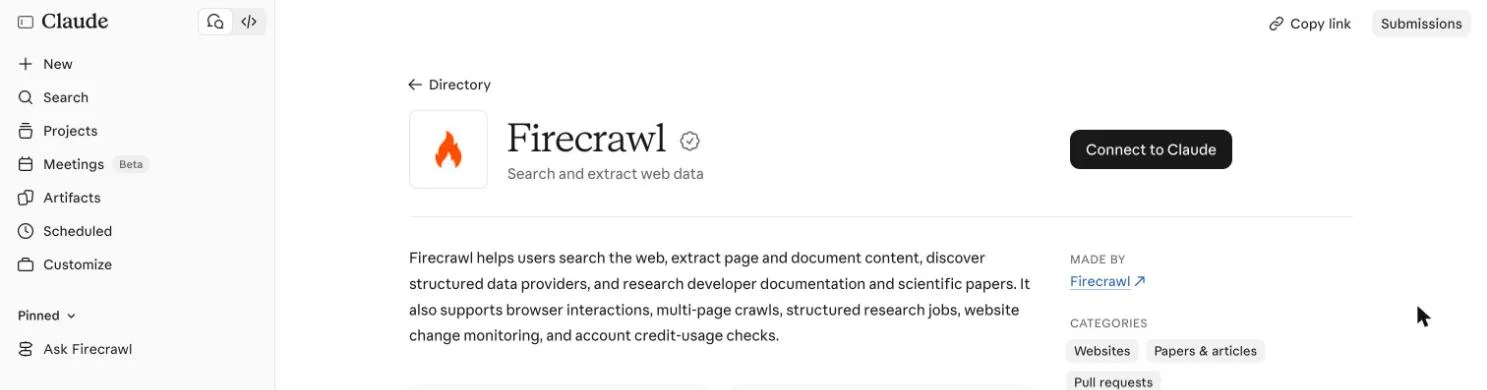
Open the Firecrawl connector in Claude's connector directory and select Connect to Claude. In Claude Desktop you can also go to Customize, then Connectors, and search for Firecrawl.
Connect your Firecrawl account
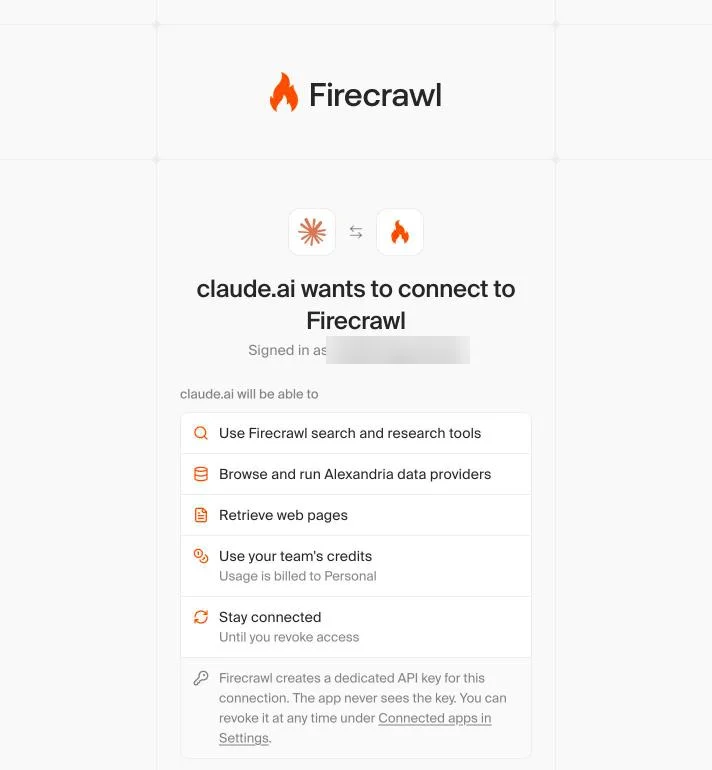
Claude opens Firecrawl in your browser. Sign in, choose a team with Alexandria enabled, and approve access. No account yet? You can create one for free in the same flow.
Turn on Firecrawl in a chat
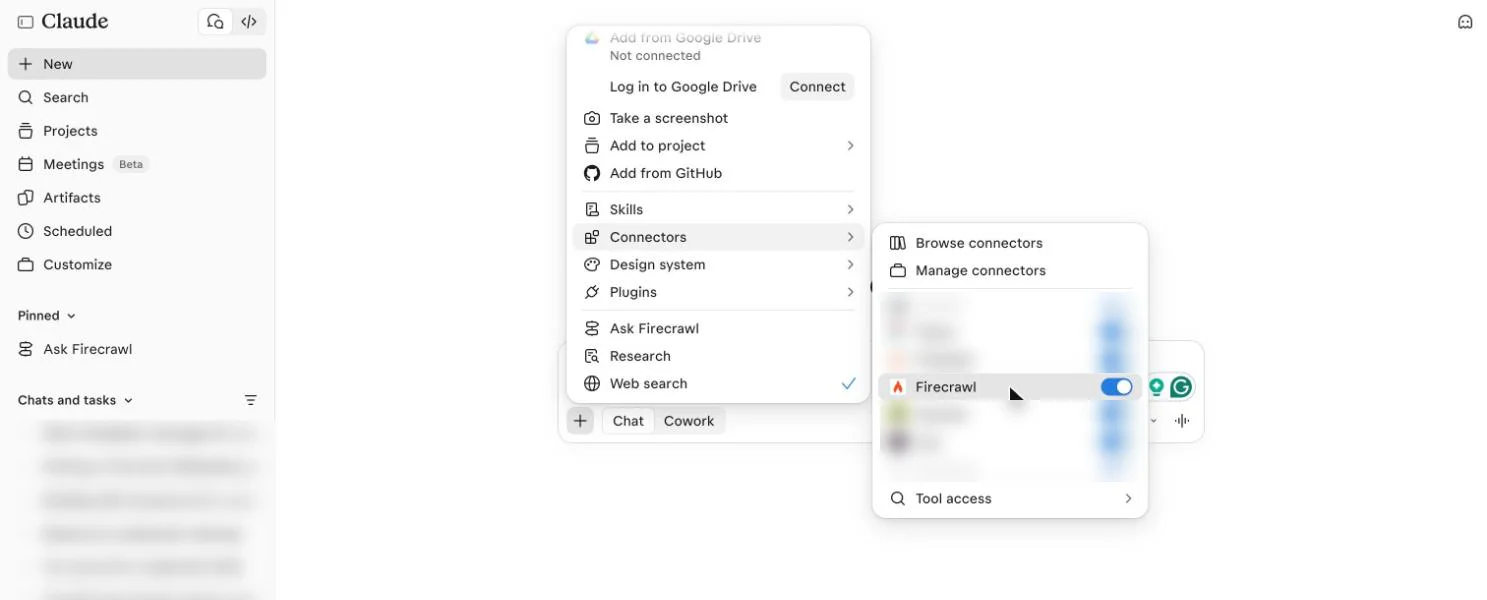
In a new conversation, open the + menu, go to Connectors and switch on Firecrawl.
Ask Claude for the data
Ask in plain language and mention Sleeper or Firecrawl Alexandria. Claude finds the Sleeper capability that fits, checks its inputs and runs it. For example:
Use Firecrawl to answer this: Which players are the most added on Sleeper in the last 24 hours, and are any of them injured?
What can Claude do with Sleeper?
Sleeper fantasy football data: public leagues, rosters, weekly matchups and transactions, NFL players with injury status and bye weeks, trending adds and drops, and the NFL schedule.
Claude can run any of Sleeper's 9 capabilities through Alexandria. Each call is billed in Firecrawl credits on your Firecrawl team.
- League: One public Sleeper NFL league: name, season, status, team count, starting lineup slots (roster_positions), league settings (waivers, trade deadline, playoffs, reserve rules) and scoring settings. An unknown league is not_found. Costs 5 Firecrawl credits per call.
- League rosters: Every roster in a Sleeper league (or one roster_id) with owner, record and every player: lineup slot (starter in slot order, bench, reserve, taxi), position, NFL team, injury_status and body part, bye week, this week's game and whether it has kicked off (locked), and flags summarising all of it. Before recommending a start, sit, add or drop, read flags: never start a player flagged out or bye, warn on injured, and never suggest adding, dropping, starting or benching a locked player (his game has started or finished). Weekly lineups come from Sleeper; starters reflect what the manager last set. An unknown league or roster_id is not_found. Costs 5 Firecrawl credits per call.
- League users: Managers in a Sleeper league: user id, display name, team name and whether they are a commissioner. Join to league_rosters by owner_id. An unknown league is not_found. Costs 5 Firecrawl credits per call.
- Matchups: Head-to-head matchups for one week of a Sleeper league: each roster's matchup_id (rosters sharing it play each other), points, every player's points, and starters in lineup order with points and the same injury status, bye week, game, lock and flags as players for that week. Before recommending a start, sit, add or drop, read flags: never start a player flagged out or bye, warn on injured, and never suggest adding, dropping, starting or benching a locked player (his game has started or finished). Weeks with no games return an empty list. An unknown league is not_found. Costs 5 Firecrawl credits per call.
- Nfl schedule: Sleeper's NFL schedule for one week: games with date and status (pre_game, in_game, complete, canceled) and kicked_off, the teams on bye that week, and every team's regular-season bye week. Sleeper gives game dates but no kickoff times. A season Sleeper has no schedule for is not_found. Costs 5 Firecrawl credits per call.
- Nfl state: Sleeper's current NFL season, week and season_type (pre, regular, post, off). Every week-aware function defaults to this week. Costs 5 Firecrawl credits per call.
- Players: NFL players by Sleeper id, trimmed from Sleeper's player map to what lineup decisions need: position, fantasy positions, team, status, injury_status and body part, depth chart, plus the week's bye, game, lock and flags. Before recommending a start, sit, add or drop, read flags: never start a player flagged out or bye, warn on injured, and never suggest adding, dropping, starting or benching a locked player (his game has started or finished). Ids Sleeper does not know are listed in missing_ids; if none are known the call is not_found. The full 15 MB player map is never returned. Costs 5 Firecrawl credits per call.
- Transactions: Adds, drops, waiver claims and trades in one week of a Sleeper league, with status (complete or failed), the rosters involved, players added and dropped by roster and the FAAB bid. Weeks with none return an empty list. An unknown league is not_found. Costs 5 Firecrawl credits per call.
- Trending players: Players most added or dropped across all Sleeper leagues in the last lookback_hours, with counts and each player's injury, bye, lock and flags for the current week. Before recommending a start, sit, add or drop, read flags: never start a player flagged out or bye, warn on injured, and never suggest adding, dropping, starting or benching a locked player (his game has started or finished). Costs 5 Firecrawl credits per call.
What should I ask Claude?
Name Sleeper or Firecrawl Alexandria in the prompt so Claude reaches for it. Each example opens in Claude with the prompt filled in.
- Use Firecrawl to answer this: Which players are the most added on Sleeper in the last 24 hours, and are any of them injured?
- Use Firecrawl to show this week's matchups in my Sleeper league, with each team's starters and points.
- Use Firecrawl to answer this: Which NFL teams are on bye this week, according to Sleeper's schedule?
- Use Firecrawl to run Sleeper's League capability. Inspect the Alexandria inputs, ask for any missing required details, and return a small sample with sources.
Troubleshooting
Why doesn't Claude use Sleeper?
The connector has to be on in each conversation. Open the + menu, go to Connectors and check that Firecrawl is switched on, then ask again and name Sleeper or Firecrawl Alexandria in the prompt.
Claude says it can't reach the Firecrawl server. What should I do?
Open Customize, then Connectors, disconnect Firecrawl and connect it again. On a Team or Enterprise plan, an owner has to allow the connector before members can add it.
Why does Claude say Sleeper isn't available?
Alexandria needs a Firecrawl team with Alexandria enabled. Reconnect Firecrawl and pick that team on the consent screen.
Use Sleeper in other AI apps
The same Firecrawl account reaches Sleeper from other AI apps. Pick one for its setup steps:

Other data providers you can connect to Claude
Frequently Asked Questions
What is Firecrawl?
Firecrawl is the web data API to search, scrape and interact with the web at scale. It turns websites into clean, LLM-ready data for AI agents and apps. The Firecrawl connector brings those tools into Claude, along with every data provider in Firecrawl Alexandria.
What is Firecrawl Alexandria?
Firecrawl Alexandria is Firecrawl's library of 550+ data providers for AI agents, Sleeper among them. Each provider returns structured data through documented capabilities. Claude finds the capability that fits your question and calls it through the Firecrawl connector, so you don't write any integration code. Alexandria needs a Firecrawl account signed in on a team with Alexandria enabled, or an API key from such a team; keyless connections don't include it.
Is there a Sleeper MCP server for Claude?
Claude reaches Sleeper through Firecrawl's hosted MCP server, which serves Sleeper and every other Alexandria provider as tools. Add the Firecrawl connector once and you don't install or host a separate MCP server for Sleeper.
What does connecting Sleeper to Claude unlock?
Claude can run all 9 of Sleeper's capabilities, including League, League rosters and League users, from any chat, with structured results it can sort, compare and summarize. For example, ask: "Use Firecrawl to answer this: Which players are the most added on Sleeper in the last 24 hours, and are any of them injured?" In the same conversation, Claude can combine Sleeper with Firecrawl's web search and scraping and the other providers in Firecrawl Alexandria.
Do I need my own Sleeper account or API key to use it in Claude?
No. Claude calls Sleeper through Firecrawl Alexandria and each call is billed in Firecrawl credits, so you don't need a separate Sleeper account or API key.
How much does it cost to use Sleeper in Claude?
Each Sleeper call costs 5 Firecrawl credits. The capability list on this page shows each price and its unit. The credits come from the Firecrawl team you connect to Claude, and finding the right capability is free.
Can Claude use other providers besides Sleeper?
Yes. The same Firecrawl connector reaches every provider in Firecrawl Alexandria, along with Firecrawl's web search and scraping, so you connect once.
Can I use Sleeper in other AI apps?
Yes. Connect Firecrawl to ChatGPT, Cursor, Grok Bot, Muse signed in on a Firecrawl team with Alexandria enabled, or use the Firecrawl MCP server, CLI or API with an API key from that team, and the same Sleeper capabilities are available there. Keyless connections don't include Alexandria.