How to connect JPL Small-Body and CNEOS Data to Cursor
Add the Firecrawl MCP server to Cursor once and it can call the JPL Small-Body and CNEOS Data API and every other provider in Firecrawl Alexandria, with no JPL Small-Body and CNEOS Data integration code.
To connect JPL Small-Body and CNEOS Data to Cursor, add the Firecrawl MCP server to Cursor, sign in on a Firecrawl team with Alexandria enabled, and ask for JPL Small-Body and CNEOS Data data in plain language. The connection works in Cursor's agent and chat, and you set it up once.
Cursor uses JPL Small-Body and CNEOS Data as an MCP tool through Firecrawl's hosted MCP server, so you don't install or host a separate MCP server for JPL Small-Body and CNEOS Data.
Cursor is an AI code editor. Its agent uses MCP servers for outside tools, and the Firecrawl MCP server adds web search, scraping and every data provider in Firecrawl Alexandria.
How do I connect JPL Small-Body and CNEOS Data to Cursor?
Install the Firecrawl MCP server
Open the install dialog in Cursor, check that the URL is Firecrawl's hosted server, then select Install.
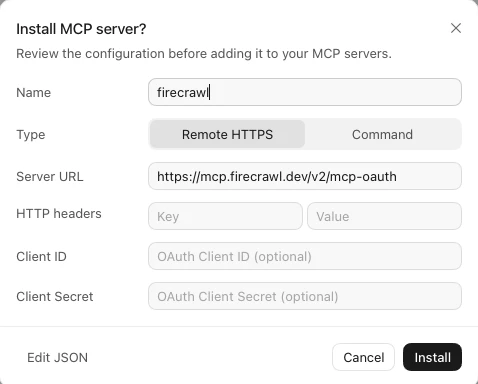
Connect your Firecrawl account
Use the server's sign-in option in Cursor's MCP settings. Firecrawl opens in your browser: sign in, choose a team with Alexandria enabled, and approve access. A green dot next to Firecrawl means it's connected.
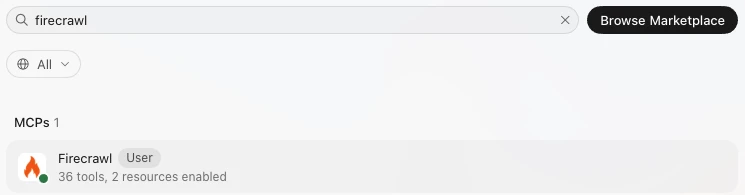
Ask Cursor's agent for the data
In the agent chat, ask in plain language and mention JPL Small-Body and CNEOS Data or Firecrawl Alexandria. The agent finds the JPL Small-Body and CNEOS Data capability that fits and runs it. For example:
Use Firecrawl to answer this: Which asteroids pass closer than 10 lunar distances to Earth in the next two weeks?
What can Cursor do with JPL Small-Body and CNEOS Data?
NASA/JPL Solar System Dynamics and CNEOS data from the keyless ssd-api.jpl.nasa.gov API: asteroid and comet close approaches to Earth and other bodies, the Sentry impact-risk list and per-object impact details (Palermo and Torino scales, impact dates and probabilities), small-body lookup with orbit, physical parameters and discovery, filtered small-body lists from the SBDB query API, and fireball (bolide) events with location and energy.
Cursor can run any of JPL Small-Body and CNEOS Data's 6 capabilities through Alexandria. Each call is billed in Firecrawl credits on your Firecrawl team.
- Close approaches: Asteroid and comet close approaches from JPL's CNEOS close-approach data (cad.api): by date window (default now to 60 days ahead), maximum distance in au or lunar distances (default 0.05 au, 0.2 au for one object), body (Earth by default, Moon, planets or all), one object's designation, PHA-only and H range. Each approach: designation and full name, time (TDB), distance in au, LD and km with 3-sigma bounds, relative and infinity velocity, H, known diameter and an SBDB link. One API request per call. Costs 5 Firecrawl credits per call.
- Fireballs: Fireball (bolide) events reported by US Government sensors from JPL CNEOS (fireball.api), newest first by default: peak-brightness time, latitude and longitude, altitude, entry velocity, total radiated energy and estimated impact energy in kilotons, optionally entry velocity components. Filter by date range, minimum impact or radiated energy, and require a location or altitude; sort by date, energy, impact energy, velocity or altitude. One API request per call. Costs 5 Firecrawl credits per call.
- Impact risk list: Objects on JPL's Sentry impact-risk list (sentry.api summary table): each with cumulative impact probability, cumulative and maximum Palermo scale, maximum Torino scale, number of potential impacts and their year range, estimated diameter, H, entry velocity and last observation date. Filter by minimum Palermo scale, minimum impact probability, maximum H and recent observation; sorted by Palermo scale (default), probability, diameter, first year or last observation. One API request per call. Costs 5 Firecrawl credits per call.
- Impact risk object: One object's Sentry impact assessment (sentry.api object table): status listed or removed (with the removal time, such as Apophis removed 2021-02-21), the probability-weighted summary (cumulative probability, Palermo and Torino scales, impact energy in Mt, diameter, mass, velocities, observation arc and computation time), and its potential impacts (date, probability, Palermo, Torino, energy) ordered by probability. One API request per call. Costs 5 Firecrawl credits per call.
- Small body: One asteroid or comet from JPL's Small-Body Database (sbdb.api) by name, designation or SPK-ID: identity (designation, SPK-ID, full name, kind, NEO and PHA flags, orbit class, alternate designations), the current orbit (epoch, elements e, a, q, i, node, peri, M, tp, period, n, Q with 1-sigma uncertainties, Earth and Jupiter MOID, Tisserand parameter, condition code, data arc, observations), physical parameters (H, G, diameter, albedo, rotation period, spectral type, density ... with references) and discovery circumstances with the IAU citation. A name matching several objects fails with the candidates to choose from. One API request per call. Costs 5 Firecrawl credits per call.
- Small body query: Lists of asteroids and comets matching constraints from JPL's SBDB query API (sbdb_query.api): kind, NEO/PHA group, numbered status, orbit classes, has satellites, excluding comet fragments, and field constraints written field|OP|value (EQ, NE, LT, GT, LE, GE, RG range, RE regex, DF defined, ND undefined), such as diameter|GT|100 or H|RG|15|18, combined with AND (or OR). Choose output fields by SBDB name (default spkid, full_name, pdes, name, kind, class, neo, pha, H, diameter, e, a, q, i, moid), sort by up to three fields, page with continuation. One API request per call. Costs 5 Firecrawl credits per call.
What should I ask Cursor?
Name JPL Small-Body and CNEOS Data or Firecrawl Alexandria in the prompt so Cursor reaches for it. Each example opens in Cursor with the prompt filled in.
- Use Firecrawl to answer this: Which asteroids pass closer than 10 lunar distances to Earth in the next two weeks?
- Use Firecrawl to answer this: What is Apophis's impact risk and how close does it come in 2029?
- Use Firecrawl to answer this: What are the orbital elements, diameter and rotation period of 433 Eros?
- Use Firecrawl to answer this: Which objects on the Sentry list have the highest Palermo scale?
Troubleshooting
Why can't Cursor find JPL Small-Body and CNEOS Data?
If Firecrawl's tools in Cursor stop at search, scrape and parse, the connection is keyless and doesn't include Alexandria. Finish the sign-in from Cursor's MCP settings, or add an API key from a team with Alexandria enabled.
Firecrawl shows a red dot in Cursor. What should I do?
Open Cursor's MCP settings, sign in to Firecrawl again, and restart the agent chat so it loads the tools.
Use JPL Small-Body and CNEOS Data in other AI apps
The same Firecrawl account reaches JPL Small-Body and CNEOS Data from other AI apps. Pick one for its setup steps:
- JPL Small-Body and CNEOS Data in ChatGPT
- JPL Small-Body and CNEOS Data in Claude
- JPL Small-Body and CNEOS Data in Grok Bot
 JPL Small-Body and CNEOS Data in Muse
Other data providers you can connect to Cursor
Frequently Asked Questions
What is Firecrawl?
Firecrawl is the web data API to search, scrape and interact with the web at scale. It turns websites into clean, LLM-ready data for AI agents and apps. The Firecrawl MCP server brings those tools into Cursor, along with every data provider in Firecrawl Alexandria.
What is Firecrawl Alexandria?
Firecrawl Alexandria is Firecrawl's library of 550+ data providers for AI agents, JPL Small-Body and CNEOS Data among them. Each provider returns structured data through documented capabilities. Cursor finds the capability that fits your question and calls it through the Firecrawl MCP server, so you don't write any integration code. Alexandria needs a Firecrawl account signed in on a team with Alexandria enabled, or an API key from such a team; keyless connections don't include it.
Is there a JPL Small-Body and CNEOS Data MCP server for Cursor?
Cursor reaches JPL Small-Body and CNEOS Data through Firecrawl's hosted MCP server, which serves JPL Small-Body and CNEOS Data and every other Alexandria provider as tools. Add the Firecrawl MCP server once and you don't install or host a separate MCP server for JPL Small-Body and CNEOS Data.
What does connecting JPL Small-Body and CNEOS Data to Cursor unlock?
Cursor can run all 6 of JPL Small-Body and CNEOS Data's capabilities, including Close approaches, Fireballs and Impact risk list, from any chat, with structured results it can sort, compare and summarize. For example, ask: "Use Firecrawl to answer this: Which asteroids pass closer than 10 lunar distances to Earth in the next two weeks?" In the same conversation, Cursor can combine JPL Small-Body and CNEOS Data with Firecrawl's web search and scraping and the other providers in Firecrawl Alexandria.
Do I need my own JPL Small-Body and CNEOS Data account or API key to use it in Cursor?
No. Cursor calls JPL Small-Body and CNEOS Data through Firecrawl Alexandria and each call is billed in Firecrawl credits, so you don't need a separate JPL Small-Body and CNEOS Data account or API key.
How much does it cost to use JPL Small-Body and CNEOS Data in Cursor?
Each JPL Small-Body and CNEOS Data call costs 5 Firecrawl credits. The capability list on this page shows each price and its unit. The credits come from the Firecrawl team you connect to Cursor, and finding the right capability is free.
Can Cursor use other providers besides JPL Small-Body and CNEOS Data?
Yes. The same Firecrawl MCP server reaches every provider in Firecrawl Alexandria, along with Firecrawl's web search and scraping, so you connect once.
Can I use JPL Small-Body and CNEOS Data in other AI apps?
Yes. Connect Firecrawl to ChatGPT, Claude, Grok Bot, Muse signed in on a Firecrawl team with Alexandria enabled, or use the Firecrawl MCP server, CLI or API with an API key from that team, and the same JPL Small-Body and CNEOS Data capabilities are available there. Keyless connections don't include Alexandria.