How to connect Statistics Canada (www150.statcan.gc.ca) to ChatGPT
Add the Firecrawl plugin to ChatGPT once and it can call the Statistics Canada (www150.statcan.gc.ca) API and every other provider in Firecrawl Alexandria, with no Statistics Canada (www150.statcan.gc.ca) integration code.
To connect Statistics Canada (www150.statcan.gc.ca) to ChatGPT, add the Firecrawl plugin to ChatGPT, sign in on a Firecrawl team with Alexandria enabled, and ask for Statistics Canada (www150.statcan.gc.ca) data in plain language. The connection works in ChatGPT and Codex, and you set it up once.
ChatGPT uses Statistics Canada (www150.statcan.gc.ca) as an MCP tool through Firecrawl's hosted MCP server, so you don't install or host a separate MCP server for Statistics Canada (www150.statcan.gc.ca).
ChatGPT is OpenAI's AI assistant. Plugins add tools from other services, and the Firecrawl plugin adds web search, scraping and every data provider in Firecrawl Alexandria.
How do I connect Statistics Canada (www150.statcan.gc.ca) to ChatGPT?
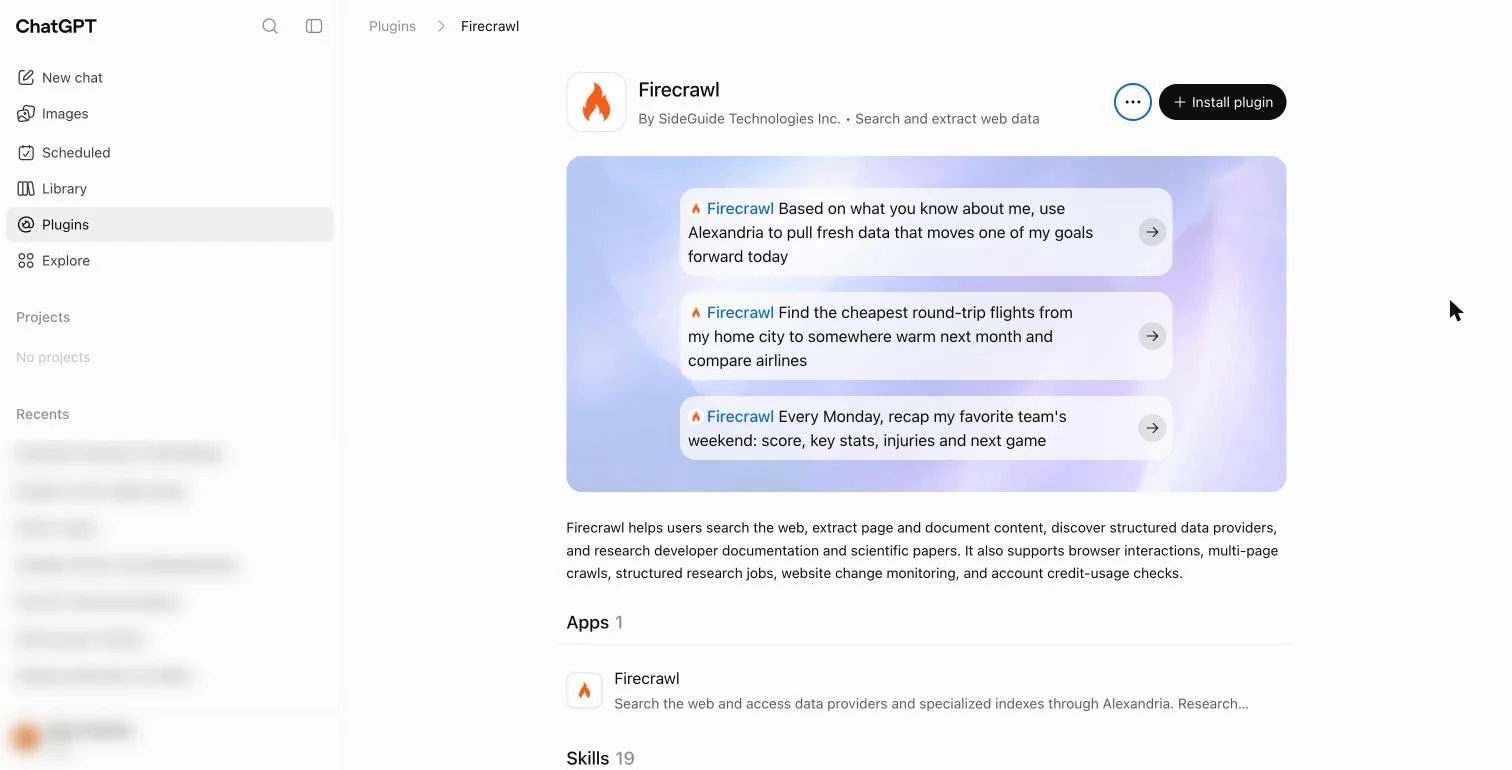
Install the Firecrawl plugin
Open the Firecrawl listing in ChatGPT's plugin directory and select Install plugin. You can also open Plugins in ChatGPT or Codex and search for Firecrawl.
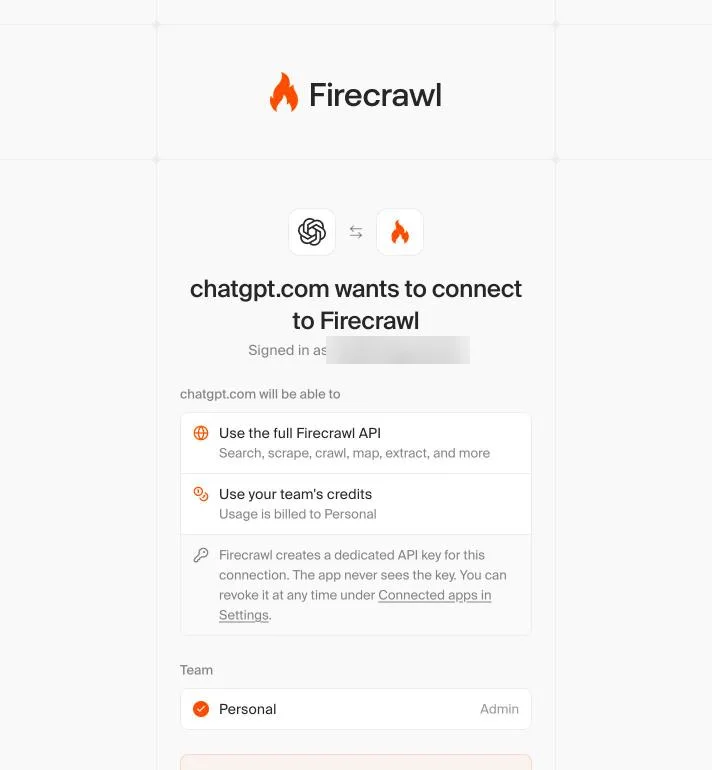
Connect your Firecrawl account
ChatGPT opens Firecrawl in your browser. Sign in, choose a team with Alexandria enabled, and approve access. No account yet? You can create one for free in the same flow.
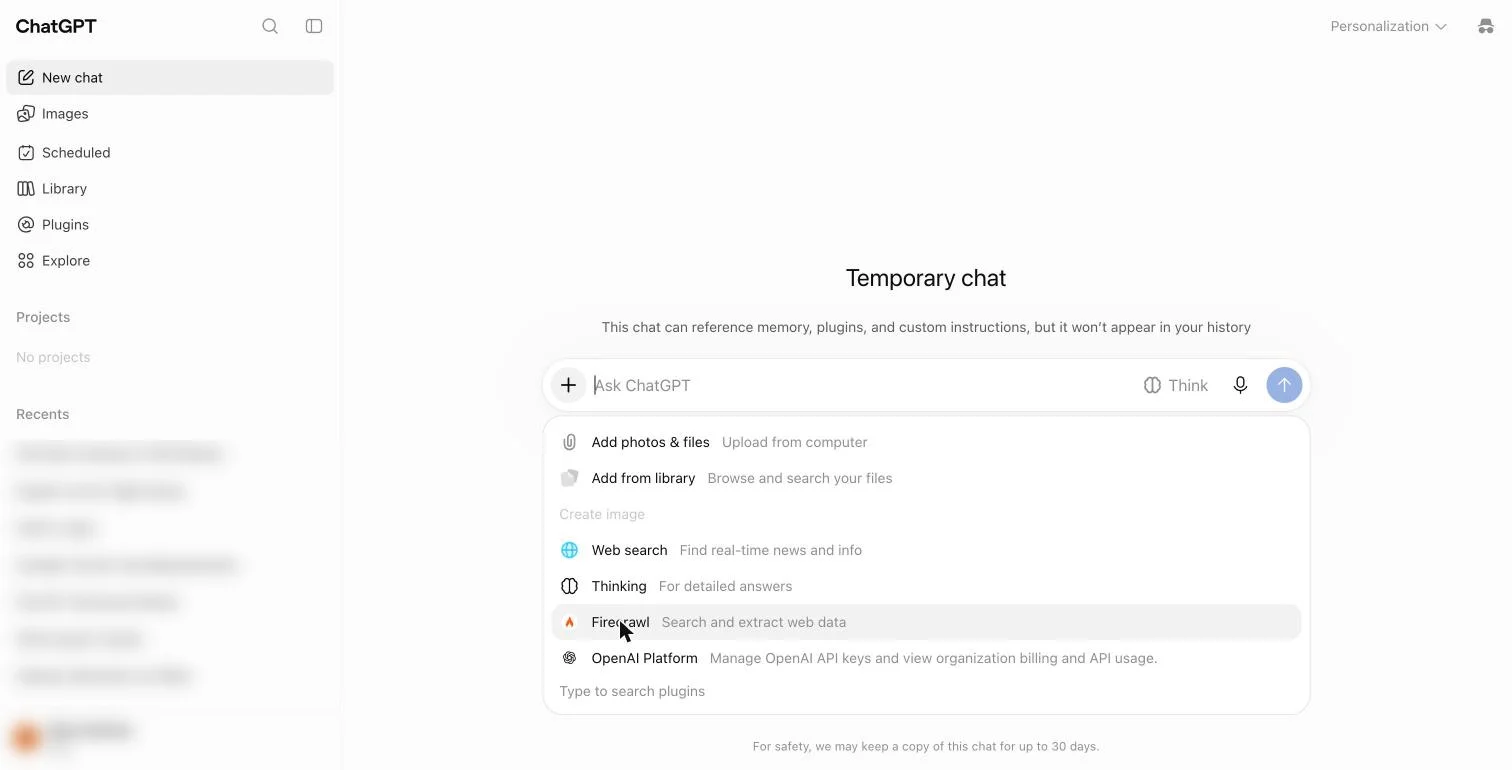
Attach Firecrawl to a chat
Start a new chat so it loads the plugin, open the + menu and choose Firecrawl. You can also ask ChatGPT to use Firecrawl by name.
Ask ChatGPT for the data
Ask in plain language and mention Statistics Canada (www150.statcan.gc.ca) or Firecrawl Alexandria. ChatGPT finds the Statistics Canada (www150.statcan.gc.ca) capability that fits and runs it. For example:
Use Firecrawl to run Statistics Canada (www150.statcan.gc.ca)'s Changed tables capability. Inspect the Alexandria inputs, ask for any missing required details, and return a small sample with sources.
What can ChatGPT do with Statistics Canada (www150.statcan.gc.ca)?
Statistics Canada, the national statistical agency: its ~8,300 data tables (CPI, population estimates, Labour Force Survey, GDP, farm and agriculture, trade, housing, health) with geographic breakdowns for Canada, provinces, territories and census metropolitan areas, through the keyless Web Data Service (WDS) REST API, plus The Daily, the agency's official release bulletin. Table search by words or id, table metadata with dimensions and member names, series values chosen by member name or by vector id (latest N periods or a reference-period range), the tables changed on a day, and Daily articles with their indicators and cited tables. Every value carries its reference period, preliminary/revised and quality flags and release time. Full-table CSV downloads are never fetched; reads are per series. Data: Statistics Canada, Statistics Canada Open Licence.
ChatGPT can run any of Statistics Canada (www150.statcan.gc.ca)'s 7 capabilities through Alexandria. Each call is billed in Firecrawl credits on your Firecrawl team.
- Changed tables: Tables Statistics Canada released or updated on one day (WDS getChangedCubeList), titled from the table list: product id, table number, English and French title, frequency, release time and viewer URL. A day without releases (weekends, holidays) is a valid empty list with a note; a future date is invalid input. Costs 5 Firecrawl credits per call.
- Daily release: One article of The Daily, Statistics Canada's official release bulletin, by URL or by release date and letter (a, b, c... in publication order that day): title, release date, the headline indicator boxes (label, value, reference period, change and its basis, source tables), the article text (headings marked ##, chart and navigation panels left out, notes to readers kept), every table it cites with its viewer URL, and the links to its tables page, PDF and previous release. An article that does not exist is not_found. Costs 5 Firecrawl credits per call.
- Daily releases: The Daily's 'In the news' page: the latest release day and each release published that day, with its theme, one-paragraph summary and article URL for daily_release. Costs 5 Firecrawl credits per call.
- Search tables: Find Statistics Canada data tables by words or id. Downloads the WDS table list (getAllCubesListLite, every one of ~8,300 tables, ~5 MB) and filters it client-side: every word of the query must appear in the English or French title (case and accents ignored), or the query is a table id in any spelling (18100004, 1810000401, 18-10-0004-01) or a CANSIM id (326-0020). Exact-phrase hits rank first, then current tables, then shorter titles. Archived tables are excluded unless include_archived; frequency narrows to one cadence. Each row carries the product_id that table_metadata and table_data take, the printed table number, dates, last release time and the table-viewer URL. Paged with limit/offset; no match is a valid empty result. Costs 5 Firecrawl credits per call.
- Table data: Values of one or more series of a Statistics Canada table, chosen by member names instead of raw coordinates. members is an object mapping a dimension (its English or French name, or its position) to one member or a list of members, or an array or string of member names (`Canada`, `Geography=Edmonton, Alberta`); `member` is an alias. Unknown options are rejected by name. Every combination is fetched, up to 50 series. Dimensions left out use their first member (usually Canada or the total). A table-viewer URL's pickMembers selection is honoured when members is omitted; coordinates (e.g. 2.2.0.0.0.0.0.0.0.0) are accepted instead. Returns the latest_n periods (default 12) or a start_period/end_period range per series, each with its vector id, title, unit, scale, decimals, member names and data points (reference period, value, preliminary/revised symbol, status and confidentiality flags, release time). Series the table does not hold are listed in missing; when none exist the call is not_found. Requests over 20,000 data points are refused; narrow the range. WDS getCubeMetadata, getSeriesInfoFromCubePidCoord and getDataFromVectorsAndLatestNPeriods / getDataFromVectorByReferencePeriodRange; full-table CSV downloads are never fetched. Costs 5 Firecrawl credits per call.
- Table metadata: Describe one Statistics Canada table: title, frequency, coverage dates, last release, archive status, series and data-point counts, and every dimension with its members (member_id, parent, English and French names, geographic classification code, unit). This is how to find the member names or ids table_data takes (e.g. Geography = Edmonton, Alberta; Products and product groups = All-items). member_query keeps only members whose name contains the text (case and accents ignored), and max_members caps each dimension's list (members_truncated says when). Footnotes are counted and returned with include_footnotes. WDS getCubeMetadata plus getCodeSets for unit names. An unknown table id is not_found. Costs 5 Firecrawl credits per call.
- Vector data: Values of Statistics Canada series by vector id (v41690973 or 41690973; up to 50 per call): each series' table, coordinate, title, unit, scale and decimals with its latest_n periods (default 12) or a start_period/end_period range of data points. Unknown vectors are listed in missing; when none exist the call is not_found. WDS getSeriesInfoFromVector and getDataFromVectorsAndLatestNPeriods / getDataFromVectorByReferencePeriodRange. Costs 5 Firecrawl credits per call.
What should I ask ChatGPT?
Name Statistics Canada (www150.statcan.gc.ca) or Firecrawl Alexandria in the prompt so ChatGPT reaches for it. Each example opens in ChatGPT with the prompt filled in.
- Use Firecrawl to run Statistics Canada (www150.statcan.gc.ca)'s Changed tables capability. Inspect the Alexandria inputs, ask for any missing required details, and return a small sample with sources.
- Use Firecrawl to run Statistics Canada (www150.statcan.gc.ca)'s Daily release capability. Inspect the Alexandria inputs, ask for any missing required details, and return a small sample with sources.
- Use Firecrawl to run Statistics Canada (www150.statcan.gc.ca)'s Daily releases capability. Inspect the Alexandria inputs, ask for any missing required details, and return a small sample with sources.
- Use Firecrawl to run Statistics Canada (www150.statcan.gc.ca)'s Search tables capability. Inspect the Alexandria inputs, ask for any missing required details, and return a small sample with sources.
Troubleshooting
Why doesn't ChatGPT use Statistics Canada (www150.statcan.gc.ca)?
Start a new chat after installing so ChatGPT loads the plugin, then attach Firecrawl from the + menu and name Statistics Canada (www150.statcan.gc.ca) or Firecrawl Alexandria in the prompt.
How do I switch the Firecrawl team ChatGPT uses?
Open the Firecrawl plugin page in ChatGPT, uninstall it from the menu next to Settings, then install it again and choose the other team on Firecrawl's consent screen.
Why does ChatGPT say Statistics Canada (www150.statcan.gc.ca) isn't available?
Alexandria needs a Firecrawl team with Alexandria enabled. Reinstall the plugin and pick that team when you approve access.
Use Statistics Canada (www150.statcan.gc.ca) in other AI apps
The same Firecrawl account reaches Statistics Canada (www150.statcan.gc.ca) from other AI apps. Pick one for its setup steps:
- Statistics Canada (www150.statcan.gc.ca) in Claude
- Statistics Canada (www150.statcan.gc.ca) in Cursor
- Statistics Canada (www150.statcan.gc.ca) in Grok Bot
 Statistics Canada (www150.statcan.gc.ca) in Muse
Other data providers you can connect to ChatGPT
Frequently Asked Questions
What is Firecrawl?
Firecrawl is the web data API to search, scrape and interact with the web at scale. It turns websites into clean, LLM-ready data for AI agents and apps. The Firecrawl plugin brings those tools into ChatGPT, along with every data provider in Firecrawl Alexandria.
What is Firecrawl Alexandria?
Firecrawl Alexandria is Firecrawl's library of 550+ data providers for AI agents, Statistics Canada (www150.statcan.gc.ca) among them. Each provider returns structured data through documented capabilities. ChatGPT finds the capability that fits your question and calls it through the Firecrawl plugin, so you don't write any integration code. Alexandria needs a Firecrawl account signed in on a team with Alexandria enabled, or an API key from such a team; keyless connections don't include it.
Is there a Statistics Canada (www150.statcan.gc.ca) MCP server for ChatGPT?
ChatGPT reaches Statistics Canada (www150.statcan.gc.ca) through Firecrawl's hosted MCP server, which serves Statistics Canada (www150.statcan.gc.ca) and every other Alexandria provider as tools. Add the Firecrawl plugin once and you don't install or host a separate MCP server for Statistics Canada (www150.statcan.gc.ca).
What does connecting Statistics Canada (www150.statcan.gc.ca) to ChatGPT unlock?
ChatGPT can run all 7 of Statistics Canada (www150.statcan.gc.ca)'s capabilities, including Changed tables, Daily release and Daily releases, from any chat, with structured results it can sort, compare and summarize. In the same conversation, ChatGPT can combine Statistics Canada (www150.statcan.gc.ca) with Firecrawl's web search and scraping and the other providers in Firecrawl Alexandria.
Do I need my own Statistics Canada (www150.statcan.gc.ca) account or API key to use it in ChatGPT?
No. ChatGPT calls Statistics Canada (www150.statcan.gc.ca) through Firecrawl Alexandria and each call is billed in Firecrawl credits, so you don't need a separate Statistics Canada (www150.statcan.gc.ca) account or API key.
How much does it cost to use Statistics Canada (www150.statcan.gc.ca) in ChatGPT?
Each Statistics Canada (www150.statcan.gc.ca) call costs 5 Firecrawl credits. The capability list on this page shows each price and its unit. The credits come from the Firecrawl team you connect to ChatGPT, and finding the right capability is free.
Can ChatGPT use other providers besides Statistics Canada (www150.statcan.gc.ca)?
Yes. The same Firecrawl plugin reaches every provider in Firecrawl Alexandria, along with Firecrawl's web search and scraping, so you connect once.
Can I use Statistics Canada (www150.statcan.gc.ca) in other AI apps?
Yes. Connect Firecrawl to Claude, Cursor, Grok Bot, Muse signed in on a Firecrawl team with Alexandria enabled, or use the Firecrawl MCP server, CLI or API with an API key from that team, and the same Statistics Canada (www150.statcan.gc.ca) capabilities are available there. Keyless connections don't include Alexandria.