How to connect Stock Analysis to Grok Bot
Add the Firecrawl plugin to Grok Bot once and it can call the Stock Analysis API and every other provider in Firecrawl Alexandria, with no Stock Analysis integration code.
To connect Stock Analysis to Grok Bot, add the Firecrawl plugin to Grok Bot, sign in on a Firecrawl team with Alexandria enabled, and ask for Stock Analysis data in plain language. The connection works in every Bot in your Grok Bot account, and you set it up once.
Grok Bot uses Stock Analysis as an MCP tool through Firecrawl's hosted MCP server, so you don't install or host a separate MCP server for Stock Analysis.
Grok Bot is xAI's agent app. Plugins give your Bots outside tools, and the Firecrawl plugin adds web search, scraping and every data provider in Firecrawl Alexandria.
How do I connect Stock Analysis to Grok Bot?
Add the Firecrawl plugin
In Grok Bot, open Connect apps from the sidebar, find Firecrawl and select Connect. You can also open Firecrawl's plugin listing and select Add to Grok Bot, which opens the desktop app to finish the install.
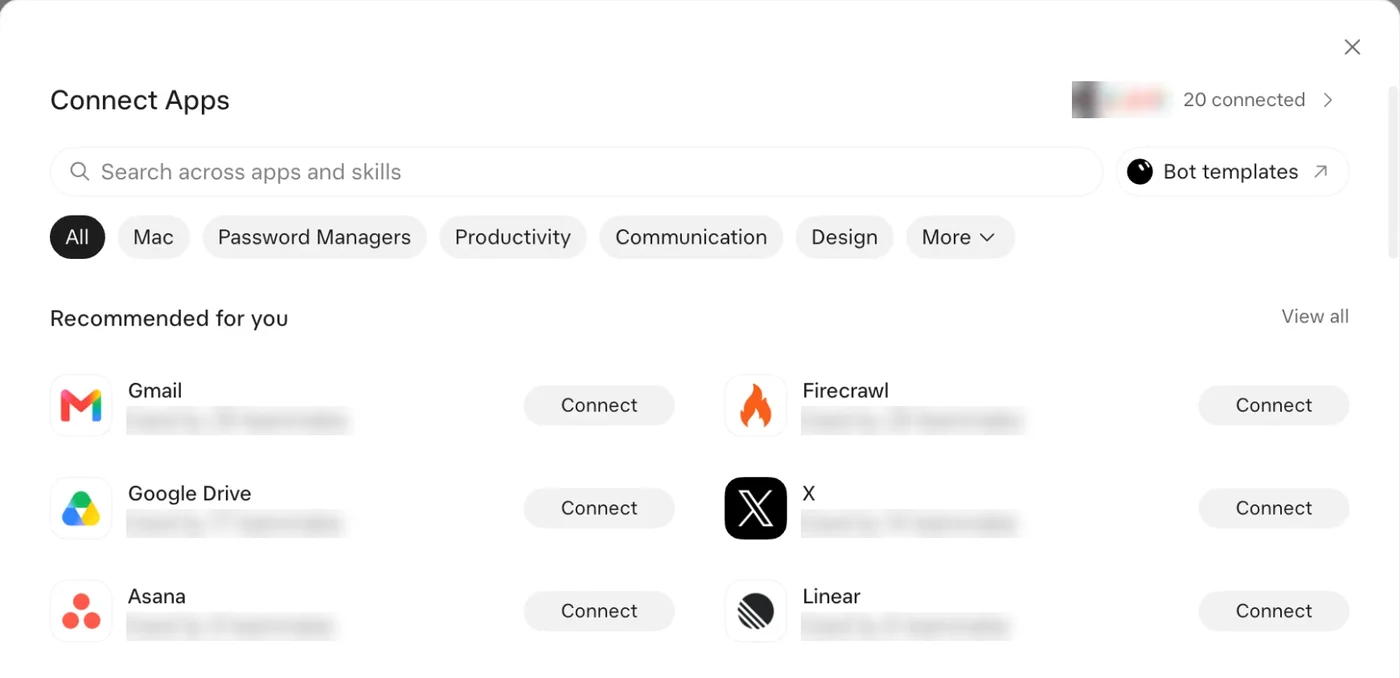
Connect your Firecrawl account
Grok Bot opens Firecrawl in your browser. Sign in, choose a team with Alexandria enabled, and select Authorize. The screen names Cursor, because the plugin is published on the Cursor Marketplace. No account yet? You can create one for free in the same flow.
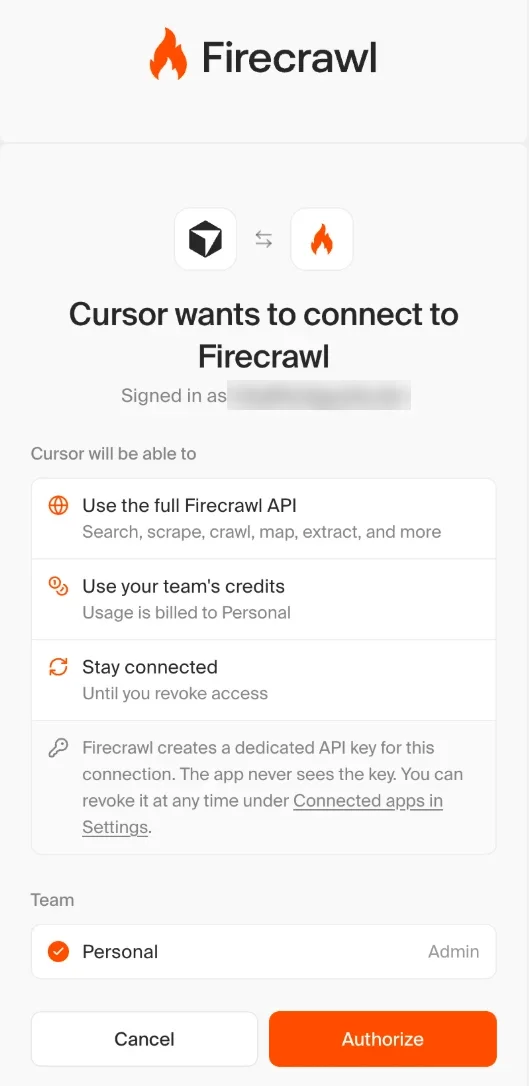
Ask your Bot for the data
In a chat, ask in plain language and mention Stock Analysis or Firecrawl Alexandria. To make sure the Bot uses Firecrawl, type @ and choose Firecrawl first. For example:
Use Firecrawl to list all Vanguard ETFs with their expense ratios, AUM and holdings count.
What can Grok Bot do with Stock Analysis?
Stock Analysis (stockanalysis.com) ETF and stock data: ETF and stock screeners with bulk columns, ETF profiles and holdings, issuer lineups, quotes, price history, dividends, earnings, company overviews, statistics and market movers from the site's own JSON endpoints.
Grok Bot can run any of Stock Analysis's 15 capabilities through Alexandria. Each call is billed in Firecrawl credits on your Firecrawl team.
- Dividends: Dividend history (ex-date, amount per share, pay date) for a stock or ETF from api.stockanalysis.com, newest first. Costs 5 Firecrawl credits per call.
- Earnings: Quarterly earnings history for a US-listed stock from api.stockanalysis.com: report date, fiscal period, revenue and EPS actual vs. estimate, and the prior-year values. Costs 5 Firecrawl credits per call.
- Etf holdings: Current holdings of an ETF from the stockanalysis.com holdings page: as-of date, holdings count, top-10 weight, asset allocation, sector and country weights, and the top holdings (rank, symbol, name, weight, shares, price, daily change). The site shows the top 25 holdings to anonymous visitors; the rest is behind its Pro paywall and is reported as partial coverage. Costs 5 Firecrawl credits per call.
- Etf profile: ETF profile from the stockanalysis.com ETF page: name, exchange, provider, inception, mandate description, asset class, category, region, index tracked, AUM, expense ratio, P/E, shares outstanding, dividend metrics, beta, holdings count, top holdings, performance (total returns / CAGR), recent dividends and the live quote. Costs 5 Firecrawl credits per call.
- Etf provider: Every ETF of one issuer from the stockanalysis.com provider page (for example vanguard, blackrock, state-street) with AUM, dividend yield, expense ratio and 1-year change, plus the issuer's totals. Costs 5 Firecrawl credits per call.
- Etf providers: Every ETF issuer listed on stockanalysis.com with its slug (the `provider` input of etf_provider), fund count, total AUM, average expense ratio, average dividend yield and average 1-year change. Costs 5 Firecrawl credits per call.
- Etf screener: The full ETF universe from the stockanalysis.com ETF screener (5,800+ US ETFs by default), with symbol, name, asset class, AUM, price, change, volume and holdings count, plus any extra screener columns (expense ratio, issuer, category, index, inception date, dividend yield, ...) attached in one bulk request. Paged locally; optionally restricted to a list of tickers. Costs 5 Firecrawl credits per call.
- Market movers: Today's US market movers from stockanalysis.com: top gainers, losers, most active, pre-market or after-hours (first page of 20 rows with price, percent change, volume and market cap). Costs 5 Firecrawl credits per call.
- Price history: Historical prices (open, high, low, close, adjusted close, volume, percent change) for a stock or ETF from api.stockanalysis.com, newest first. Costs 5 Firecrawl credits per call.
- Quote: Latest quote for one US-listed stock or ETF from api.stockanalysis.com: price, change, OHLC, volume, 52-week range, market state and extended-hours quote. Costs 5 Firecrawl credits per call.
See all 15 capabilities and their inputs on the Stock Analysis API page.
What should I ask Grok Bot?
Name Stock Analysis or Firecrawl Alexandria in the prompt so Grok Bot reaches for it.
- Use Firecrawl to list all Vanguard ETFs with their expense ratios, AUM and holdings count.
- Use Firecrawl to answer this: What does SPY hold, and what are its sector weights?
- Use Firecrawl to compare the expense ratio, dividend yield and inception date of VOO, IVV and SPY in one call.
- Use Firecrawl to show Apple's quarterly earnings history and its current valuation ratios.
Troubleshooting
Why doesn't my Bot use Stock Analysis?
Attach Firecrawl to the chat with @ before you ask, and name Stock Analysis or Firecrawl Alexandria in the prompt.
Add to Grok Bot doesn't open the app. What should I do?
Install the Grok Bot desktop app first, or open Connect apps in Grok Bot and search for Firecrawl.
Use Stock Analysis in other AI apps
The same Firecrawl account reaches Stock Analysis from other AI apps. Pick one for its setup steps:

Other data providers you can connect to Grok Bot
Frequently Asked Questions
What is Firecrawl?
Firecrawl is the web data API to search, scrape and interact with the web at scale. It turns websites into clean, LLM-ready data for AI agents and apps. The Firecrawl plugin brings those tools into Grok Bot, along with every data provider in Firecrawl Alexandria.
What is Firecrawl Alexandria?
Firecrawl Alexandria is Firecrawl's library of 550+ data providers for AI agents, Stock Analysis among them. Each provider returns structured data through documented capabilities. Grok Bot finds the capability that fits your question and calls it through the Firecrawl plugin, so you don't write any integration code. Alexandria needs a Firecrawl account signed in on a team with Alexandria enabled, or an API key from such a team; keyless connections don't include it.
Is there a Stock Analysis MCP server for Grok Bot?
Grok Bot reaches Stock Analysis through Firecrawl's hosted MCP server, which serves Stock Analysis and every other Alexandria provider as tools. Add the Firecrawl plugin once and you don't install or host a separate MCP server for Stock Analysis.
What does connecting Stock Analysis to Grok Bot unlock?
Grok Bot can run all 15 of Stock Analysis's capabilities, including Dividends, Earnings and Etf holdings, from any chat, with structured results it can sort, compare and summarize. For example, ask: "Use Firecrawl to list all Vanguard ETFs with their expense ratios, AUM and holdings count." In the same conversation, Grok Bot can combine Stock Analysis with Firecrawl's web search and scraping and the other providers in Firecrawl Alexandria.
Do I need my own Stock Analysis account or API key to use it in Grok Bot?
No. Grok Bot calls Stock Analysis through Firecrawl Alexandria and each call is billed in Firecrawl credits, so you don't need a separate Stock Analysis account or API key.
How much does it cost to use Stock Analysis in Grok Bot?
Each Stock Analysis call costs 5 Firecrawl credits. The capability list on this page shows each price and its unit. The credits come from the Firecrawl team you connect to Grok Bot, and finding the right capability is free.
Can Grok Bot use other providers besides Stock Analysis?
Yes. The same Firecrawl plugin reaches every provider in Firecrawl Alexandria, along with Firecrawl's web search and scraping, so you connect once.
Can I use Stock Analysis in other AI apps?
Yes. Connect Firecrawl to ChatGPT, Claude, Cursor, Muse signed in on a Firecrawl team with Alexandria enabled, or use the Firecrawl MCP server, CLI or API with an API key from that team, and the same Stock Analysis capabilities are available there. Keyless connections don't include Alexandria.