How to connect AusTender to Cursor
Add the Firecrawl MCP server to Cursor once and it can call the AusTender API and every other provider in Firecrawl Alexandria, with no AusTender integration code.
To connect AusTender to Cursor, add the Firecrawl MCP server to Cursor, sign in on a Firecrawl team with Alexandria enabled, and ask for AusTender data in plain language. The connection works in Cursor's agent and chat, and you set it up once.
Cursor uses AusTender as an MCP tool through Firecrawl's hosted MCP server, so you don't install or host a separate MCP server for AusTender.
Cursor is an AI code editor. Its agent uses MCP servers for outside tools, and the Firecrawl MCP server adds web search, scraping and every data provider in Firecrawl Alexandria.
How do I connect AusTender to Cursor?
Install the Firecrawl MCP server
Open the install dialog in Cursor, check that the URL is Firecrawl's hosted server, then select Install.
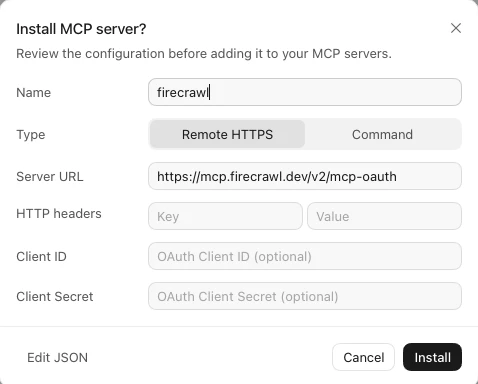
Connect your Firecrawl account
Use the server's sign-in option in Cursor's MCP settings. Firecrawl opens in your browser: sign in, choose a team with Alexandria enabled, and approve access. A green dot next to Firecrawl means it's connected.
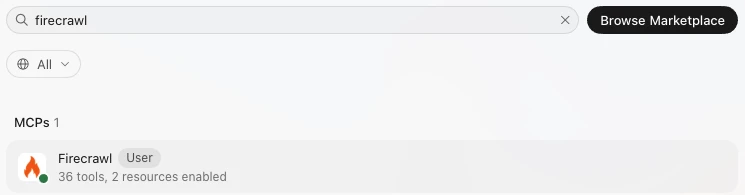
Ask Cursor's agent for the data
In the agent chat, ask in plain language and mention AusTender or Firecrawl Alexandria. The agent finds the AusTender capability that fits and runs it. For example:
Use Firecrawl to find the first page of current AusTender opportunities for cleaning, ordered by soonest closing date, with agency and closing time.
What can Cursor do with AusTender?
AusTender, the Australian Government procurement portal: current and closed approaches to market (ATMs) with closing times in ACT local time and UTC, full ATM notices including the free-text instructions where mandatory briefings are announced, and Commonwealth contract notices from the public OCDS API by publication, modification, start or end date, or by CN id.
Cursor can run any of AusTender's 4 capabilities through Alexandria. Each call is billed in Firecrawl credits on your Firecrawl team.
- Atm detail: One ATM notice in full from its /Atm/Show or /Advert/Show page: ids, agency, UNSPSC category code and name, closing and publish dates (ACT local and UTC), locations, ATM type, multi-agency/panel/multi-stage flags, description, other instructions, conditions for participation, timeframe for delivery, address for lodgement, contact officer, the login-only documents URL, and a derived `briefing_mentioned` flag with the sentences that mention a briefing. Costs 5 Firecrawl credits per call.
- Atm search: List approaches to market (ATMs) on AusTender's Current ATM List, optionally filtered by keyword, 15 per page. Each row carries the ATM id, title, agency, UNSPSC category name, closing time as shown (ACT local time) and converted to UTC, a description snippet, last-updated time, the notice GUID and its detail URL. Costs 5 Firecrawl credits per call.
- Contract detail: One Commonwealth contract notice by CN id from AusTender's OCDS API: the contract record (title, description, value, dates, UNSPSC, procurement method, limited-tender details) with the full buyer and supplier parties (ABN, address, contact point) and the OCDS ids. Costs 5 Firecrawl credits per call.
- Contracts by date: Commonwealth contract notices (CNs) from AusTender's public OCDS API for a UTC date window, selected by publication, last-modification, contract start or contract end date. One record per contract: CN id, title, description, agency (buyer) with ABN, supplier with ABN and address, UNSPSC codes, AUD value, signing and period dates, procurement method and limited-tender details, plus the OCDS ids. Costs 5 Firecrawl credits per call.
What should I ask Cursor?
Name AusTender or Firecrawl Alexandria in the prompt so Cursor reaches for it. Each example opens in Cursor with the prompt filled in.
- Use Firecrawl to find the first page of current AusTender opportunities for cleaning, ordered by soonest closing date, with agency and closing time.
- Use Firecrawl to find the first current AusTender opportunity for cleaning and read its participation conditions, delivery timeframe and briefing instructions.
- Use Firecrawl to show up to 10 Commonwealth contract notices published from 1 to 7 September 2026, with supplier, buyer and AUD contract value.
- Use Firecrawl to find the first Commonwealth contract notice published from 1 to 7 September 2026 and read its full buyer and supplier records and procurement method.
Troubleshooting
Why can't Cursor find AusTender?
If Firecrawl's tools in Cursor stop at search, scrape and parse, the connection is keyless and doesn't include Alexandria. Finish the sign-in from Cursor's MCP settings, or add an API key from a team with Alexandria enabled.
Firecrawl shows a red dot in Cursor. What should I do?
Open Cursor's MCP settings, sign in to Firecrawl again, and restart the agent chat so it loads the tools.
Use AusTender in other AI apps
The same Firecrawl account reaches AusTender from other AI apps. Pick one for its setup steps:

Other data providers you can connect to Cursor
Frequently Asked Questions
What is Firecrawl?
Firecrawl is the web data API to search, scrape and interact with the web at scale. It turns websites into clean, LLM-ready data for AI agents and apps. The Firecrawl MCP server brings those tools into Cursor, along with every data provider in Firecrawl Alexandria.
What is Firecrawl Alexandria?
Firecrawl Alexandria is Firecrawl's library of 550+ data providers for AI agents, AusTender among them. Each provider returns structured data through documented capabilities. Cursor finds the capability that fits your question and calls it through the Firecrawl MCP server, so you don't write any integration code. Alexandria needs a Firecrawl account signed in on a team with Alexandria enabled, or an API key from such a team; keyless connections don't include it.
Is there a AusTender MCP server for Cursor?
Cursor reaches AusTender through Firecrawl's hosted MCP server, which serves AusTender and every other Alexandria provider as tools. Add the Firecrawl MCP server once and you don't install or host a separate MCP server for AusTender.
What does connecting AusTender to Cursor unlock?
Cursor can run all 4 of AusTender's capabilities, including Atm detail, Atm search and Contract detail, from any chat, with structured results it can sort, compare and summarize. For example, ask: "Use Firecrawl to find the first page of current AusTender opportunities for cleaning, ordered by soonest closing date, with agency and closing time." In the same conversation, Cursor can combine AusTender with Firecrawl's web search and scraping and the other providers in Firecrawl Alexandria.
Do I need my own AusTender account or API key to use it in Cursor?
No. Cursor calls AusTender through Firecrawl Alexandria and each call is billed in Firecrawl credits, so you don't need a separate AusTender account or API key.
How much does it cost to use AusTender in Cursor?
Each AusTender call costs 5 Firecrawl credits. The capability list on this page shows each price and its unit. The credits come from the Firecrawl team you connect to Cursor, and finding the right capability is free.
Can Cursor use other providers besides AusTender?
Yes. The same Firecrawl MCP server reaches every provider in Firecrawl Alexandria, along with Firecrawl's web search and scraping, so you connect once.
Can I use AusTender in other AI apps?
Yes. Connect Firecrawl to ChatGPT, Claude, Grok Bot, Muse signed in on a Firecrawl team with Alexandria enabled, or use the Firecrawl MCP server, CLI or API with an API key from that team, and the same AusTender capabilities are available there. Keyless connections don't include Alexandria.