How to connect Tenders WA (tenders.wa.gov.au) to Grok Bot
Add the Firecrawl plugin to Grok Bot once and it can call the Tenders WA (tenders.wa.gov.au) API and every other provider in Firecrawl Alexandria, with no Tenders WA (tenders.wa.gov.au) integration code.
To connect Tenders WA (tenders.wa.gov.au) to Grok Bot, add the Firecrawl plugin to Grok Bot, sign in on a Firecrawl team with Alexandria enabled, and ask for Tenders WA (tenders.wa.gov.au) data in plain language. The connection works in every Bot in your Grok Bot account, and you set it up once.
Grok Bot uses Tenders WA (tenders.wa.gov.au) as an MCP tool through Firecrawl's hosted MCP server, so you don't install or host a separate MCP server for Tenders WA (tenders.wa.gov.au).
Grok Bot is xAI's agent app. Plugins give your Bots outside tools, and the Firecrawl plugin adds web search, scraping and every data provider in Firecrawl Alexandria.
How do I connect Tenders WA (tenders.wa.gov.au) to Grok Bot?
Add the Firecrawl plugin
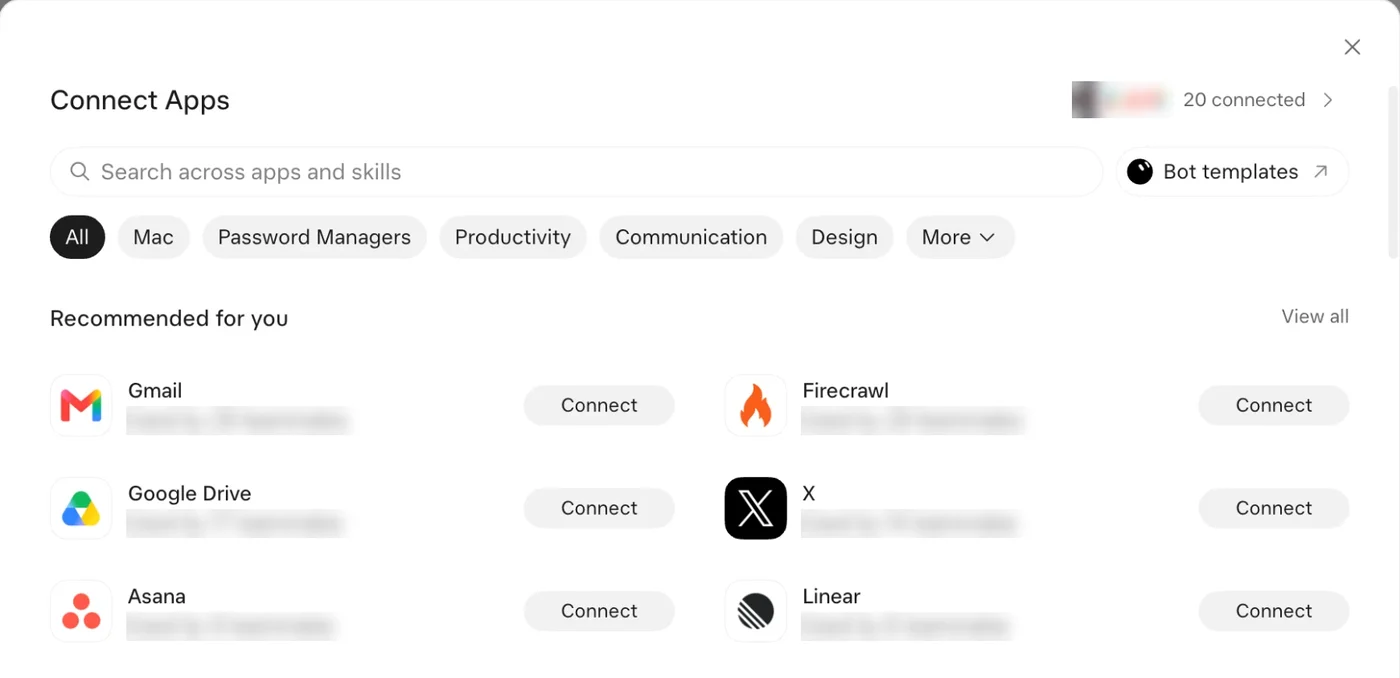
In Grok Bot, open Connect apps from the sidebar, find Firecrawl and select Connect. You can also open Firecrawl's plugin listing and select Add to Grok Bot, which opens the desktop app to finish the install.
Connect your Firecrawl account
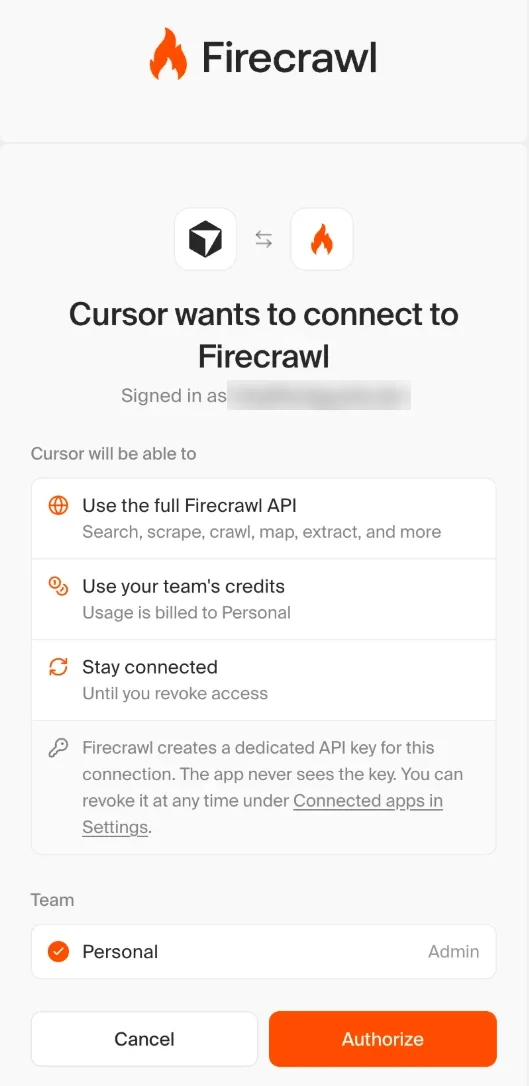
Grok Bot opens Firecrawl in your browser. Sign in, choose a team with Alexandria enabled, and select Authorize. The screen names Cursor, because the plugin is published on the Cursor Marketplace. No account yet? You can create one for free in the same flow.
Ask your Bot for the data
In a chat, ask in plain language and mention Tenders WA (tenders.wa.gov.au) or Firecrawl Alexandria. To make sure the Bot uses Firecrawl, type @ and choose Firecrawl first. For example:
Use Firecrawl to list up to 10 newly advertised Western Australian tenders from this week, with request number, agency and closing time.
What can Grok Bot do with Tenders WA (tenders.wa.gov.au)?
Western Australian Government procurement portal Tenders WA: open, new, closed, awarded, early-advice and DCSP tender notice listings, advanced tender search with keyword, state, type, agency, region and date filters, tender detail (status, UNSPSC, regions, closing time, specification document list, briefing/site visit and awarded contract link), recently awarded contracts, contract search, contract detail (value, dates, contractors, associated tender) and the agency/region lookup lists behind the search form. Read anonymously from the server-rendered Struts pages and JSON lookups; no login.
Grok Bot can run any of Tenders WA (tenders.wa.gov.au)'s 7 capabilities through Alexandria. Each call is billed in Firecrawl credits on your Firecrawl team.
- Get contract: Full public record of one awarded contract by its numeric contract_id (from list_contracts / search_contracts rows, get_tender's awarded_contract_id, or a pasted contract/view.action URL): public authority and address, title, reference, description text, type of work, procurement method, associated tender (id and title), UNSPSC, regions, number of submissions, panel contract, contract term, closing / award / commencement / initial and final expiry dates, original contract value with its basis, the contractors with their addresses, and any other labelled field. Contract developer / manager names, phones and emails are not relayed. An unknown id is not_found (HTTP 200 'Contract does not exist'). Costs 5 Firecrawl credits per call.
- Get tender: Full public notice of one tender by its numeric tender_id (from list_tenders / search_tenders rows or a pasted tender-details.action URL): request number, title, issuing agency, status, request type, date awarded, UNSPSC categories, regions, description text, closing time (Perth), the specification document list (name, version, date, availability; the files themselves need a supplier login), briefing / site visit details with the mandatory flag, the awarded contract id when the tender was awarded, and any other labelled field the page prints. Agency contact officers' names, phones and emails are not relayed (only the contact roles). An unknown id is not_found (the site answers HTTP 200 'Tender does not exist'). Costs 5 Firecrawl credits per call.
- List contracts: The site's 'Recently awarded contracts' table (contract/list.action?action=contract-view) as one page: contract_id for get_contract, reference, title, agency, award date, final expiry date and contract value. No server-side pagination; the page holds every row the site publishes in this view (about 250). Costs 5 Firecrawl credits per call.
- List tenders: One of the site's standing tender lists as one page: open (Advertised Requests, currently open for responses), new_this_week, closed (closed and under evaluation), awarded (Results: awarded, no offers received, all offers declined), early_advice (Early Tender Advice, future requests with an estimated advertising date) or open_dcsp (open requests under the Delivering Community Services in Partnership policy). Every row carries the tender_id for get_tender, the request number, state, type, issuing agency, UNSPSC categories, the date column (closing / closed / estimated advertising date) as printed and normalised to Perth time, and whether a briefing or site visit is mandatory. The site renders the whole list in one page; there is no server-side pagination. Costs 5 Firecrawl credits per call.
- Lookups: The id/name lists behind the search forms, from the site's JSON lookups (tender-search.action?action=set_*): public_authorities (publicAuthorityId), issuing_agencies (issuingBusinessId), regions (regionId: 1 Gascoyne ... 7 Perth Metropolitan ... 12 International) and pre_qualification_levels (preQualificationLevelId). The site's first entry is the 'Any' sentinel with id -1; it is kept as returned. Costs 5 Firecrawl credits per call.
- Search contracts: Awarded contract search (contract/list.action contract-search-submit form): keyword, reference, title, goods/works, public authority and issuing agency ids, region id, up to three UNSPSC codes, minimum value, closing / award / starting date ranges (dd/MM/yyyy), Aboriginal participation, DCSP and VET Act filters. The server caps the answer at 50 rows and prints a notice when it did; that is returned as `truncated` (narrow the filters), there is no next page. Costs 5 Firecrawl credits per call.
- Search tenders: Advanced tender search (the site's do-advanced-tender-search form): keyword (exact phrase or any word) over title, number and description, request state (Open, Closed, Awarded, Early Advice, Withdrawn, Shortlisted, Expired, No Offers Received, All Offers Declined), request type, goods/works, request number, title, public authority and issuing agency ids, region id, up to three UNSPSC codes, opening / closing / awarded date ranges (dd/MM/yyyy), Aboriginal participation, DCSP and pre-qualification level. Rows have the same shape as list_tenders. The server returns everything matching in one page and prints a notice when it cut the list; that notice is returned as `truncated` (narrow the filters), there is no next page. An empty result is the site's own 'No results found.' notice. Costs 5 Firecrawl credits per call.
What should I ask Grok Bot?
Name Tenders WA (tenders.wa.gov.au) or Firecrawl Alexandria in the prompt so Grok Bot reaches for it.
- Use Firecrawl to list up to 10 newly advertised Western Australian tenders from this week, with request number, agency and closing time.
- Use Firecrawl to search Western Australian open tenders for cleaning and read the first result’s description, briefing and document list.
- Use Firecrawl to search Western Australian awarded contracts for cleaning with a minimum value of AUD 100,000 and show reference, agency and award date.
- Use Firecrawl to help with this: Take the first recently awarded Western Australian contract and read its contractor, original value, procurement method and expiry dates.
Troubleshooting
Why doesn't my Bot use Tenders WA (tenders.wa.gov.au)?
Attach Firecrawl to the chat with @ before you ask, and name Tenders WA (tenders.wa.gov.au) or Firecrawl Alexandria in the prompt.
Add to Grok Bot doesn't open the app. What should I do?
Install the Grok Bot desktop app first, or open Connect apps in Grok Bot and search for Firecrawl.
Use Tenders WA (tenders.wa.gov.au) in other AI apps
The same Firecrawl account reaches Tenders WA (tenders.wa.gov.au) from other AI apps. Pick one for its setup steps:
- Tenders WA (tenders.wa.gov.au) in ChatGPT
- Tenders WA (tenders.wa.gov.au) in Claude
- Tenders WA (tenders.wa.gov.au) in Cursor
 Tenders WA (tenders.wa.gov.au) in Muse
Other data providers you can connect to Grok Bot
Frequently Asked Questions
What is Firecrawl?
Firecrawl is the web data API to search, scrape and interact with the web at scale. It turns websites into clean, LLM-ready data for AI agents and apps. The Firecrawl plugin brings those tools into Grok Bot, along with every data provider in Firecrawl Alexandria.
What is Firecrawl Alexandria?
Firecrawl Alexandria is Firecrawl's library of 550+ data providers for AI agents, Tenders WA (tenders.wa.gov.au) among them. Each provider returns structured data through documented capabilities. Grok Bot finds the capability that fits your question and calls it through the Firecrawl plugin, so you don't write any integration code. Alexandria needs a Firecrawl account signed in on a team with Alexandria enabled, or an API key from such a team; keyless connections don't include it.
Is there a Tenders WA (tenders.wa.gov.au) MCP server for Grok Bot?
Grok Bot reaches Tenders WA (tenders.wa.gov.au) through Firecrawl's hosted MCP server, which serves Tenders WA (tenders.wa.gov.au) and every other Alexandria provider as tools. Add the Firecrawl plugin once and you don't install or host a separate MCP server for Tenders WA (tenders.wa.gov.au).
What does connecting Tenders WA (tenders.wa.gov.au) to Grok Bot unlock?
Grok Bot can run all 7 of Tenders WA (tenders.wa.gov.au)'s capabilities, including Get contract, Get tender and List contracts, from any chat, with structured results it can sort, compare and summarize. For example, ask: "Use Firecrawl to list up to 10 newly advertised Western Australian tenders from this week, with request number, agency and closing time." In the same conversation, Grok Bot can combine Tenders WA (tenders.wa.gov.au) with Firecrawl's web search and scraping and the other providers in Firecrawl Alexandria.
Do I need my own Tenders WA (tenders.wa.gov.au) account or API key to use it in Grok Bot?
No. Grok Bot calls Tenders WA (tenders.wa.gov.au) through Firecrawl Alexandria and each call is billed in Firecrawl credits, so you don't need a separate Tenders WA (tenders.wa.gov.au) account or API key.
How much does it cost to use Tenders WA (tenders.wa.gov.au) in Grok Bot?
Each Tenders WA (tenders.wa.gov.au) call costs 5 Firecrawl credits. The capability list on this page shows each price and its unit. The credits come from the Firecrawl team you connect to Grok Bot, and finding the right capability is free.
Can Grok Bot use other providers besides Tenders WA (tenders.wa.gov.au)?
Yes. The same Firecrawl plugin reaches every provider in Firecrawl Alexandria, along with Firecrawl's web search and scraping, so you connect once.
Can I use Tenders WA (tenders.wa.gov.au) in other AI apps?
Yes. Connect Firecrawl to ChatGPT, Claude, Cursor, Muse signed in on a Firecrawl team with Alexandria enabled, or use the Firecrawl MCP server, CLI or API with an API key from that team, and the same Tenders WA (tenders.wa.gov.au) capabilities are available there. Keyless connections don't include Alexandria.