How to connect UniProt to Grok Bot
Add the Firecrawl plugin to Grok Bot once and it can call the UniProt API and every other provider in Firecrawl Alexandria, with no UniProt integration code.
To connect UniProt to Grok Bot, add the Firecrawl plugin to Grok Bot, sign in on a Firecrawl team with Alexandria enabled, and ask for UniProt data in plain language. The connection works in every Bot in your Grok Bot account, and you set it up once.
Grok Bot uses UniProt as an MCP tool through Firecrawl's hosted MCP server, so you don't install or host a separate MCP server for UniProt.
Grok Bot is xAI's agent app. Plugins give your Bots outside tools, and the Firecrawl plugin adds web search, scraping and every data provider in Firecrawl Alexandria.
How do I connect UniProt to Grok Bot?
Add the Firecrawl plugin
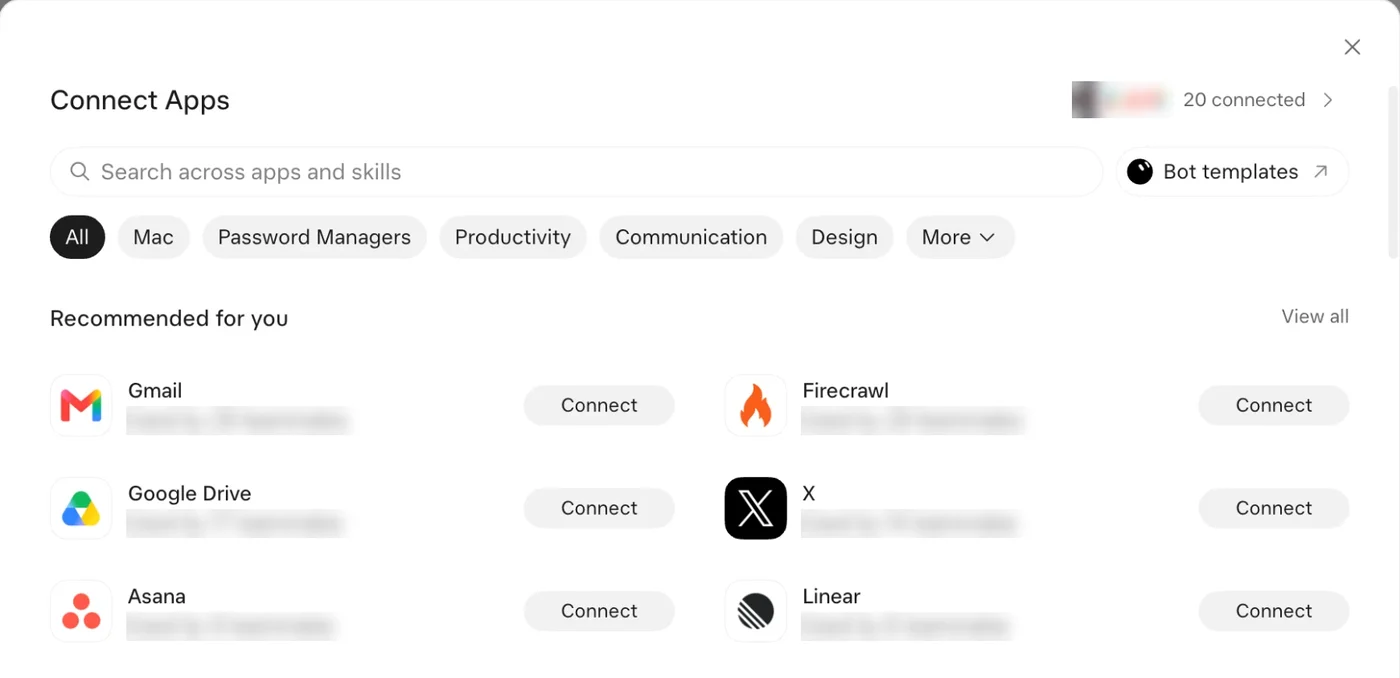
In Grok Bot, open Connect apps from the sidebar, find Firecrawl and select Connect. You can also open Firecrawl's plugin listing and select Add to Grok Bot, which opens the desktop app to finish the install.
Connect your Firecrawl account
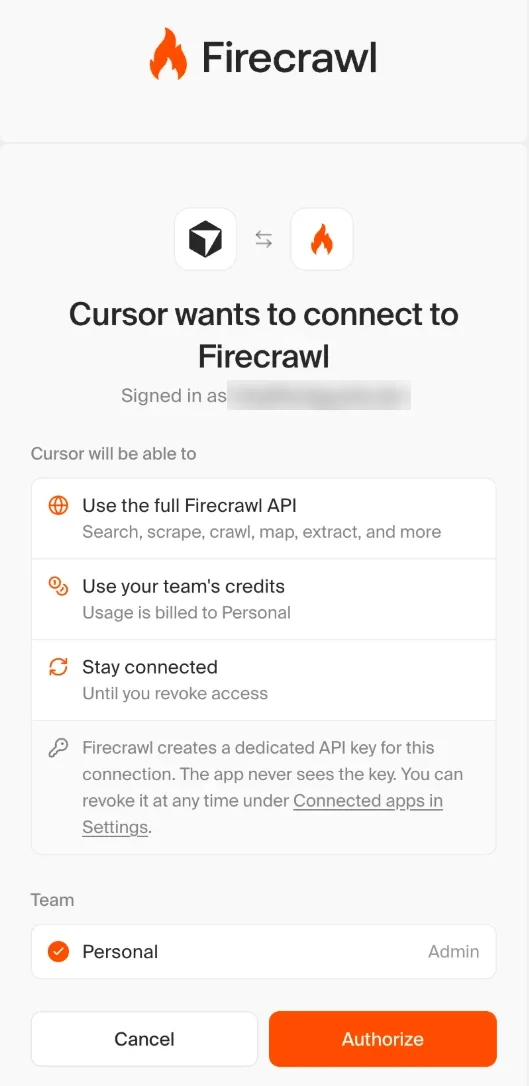
Grok Bot opens Firecrawl in your browser. Sign in, choose a team with Alexandria enabled, and select Authorize. The screen names Cursor, because the plugin is published on the Cursor Marketplace. No account yet? You can create one for free in the same flow.
Ask your Bot for the data
In a chat, ask in plain language and mention UniProt or Firecrawl Alexandria. To make sure the Bot uses Firecrawl, type @ and choose Firecrawl first. For example:
Use Firecrawl to answer this: Where in the cell is human CD52 located, and on what evidence?
What can Grok Bot do with UniProt?
UniProtKB, the UniProt Consortium's protein knowledgebase (EMBL-EBI, SIB and PIR), through its public REST API at rest.uniprot.org: search entries by text, gene, organism and Swiss-Prot review status; read one entry's protein and gene names with synonyms, organism, curated function, catalytic activity with Rhea IDs and kinetic parameters (KM, Vmax) with evidence, subcellular location with evidence codes, GO terms, disease associations, sequence length and PDB, AlphaFold, ChEMBL, Ensembl, NCBI Gene and HGNC cross-references, optionally with the sequence and the full cited references; and map gene symbols or Ensembl, NCBI Gene, PDB and ChEMBL IDs to accessions. Data is CC BY 4.0: every result carries its license, attribution and entry URL.
Grok Bot can run any of UniProt's 3 capabilities through Alexandria. Each call is billed in Firecrawl credits on your Firecrawl team.
- Get: One UniProtKB entry by accession (`P04637`), isoform accession (`P04637-2`), entry name (`P53_HUMAN`) or uniprot.org entry URL: recommended protein name with every synonym, gene names with synonyms, organism and lineage, curated function, catalytic activity (each reaction with Rhea and ChEBI IDs, EC number, physiological direction and evidence), kinetics (KM, Vmax, kcat note, pH and temperature dependence with evidence), subcellular location (per isoform, with topology and ECO evidence codes marking experimental, by-similarity or automatic assertions), GO terms with evidence, disease associations with OMIM numbers, sequence length and mass (the sequence itself with `include_sequence`), and PDB, AlphaFold, ChEMBL, Ensembl, NCBI Gene and HGNC cross-references. With `include_references`, the full cited references (title, authors, journal, PubMed ID, DOI, scopes) so that every `PubMed` or `Ref.N` evidence can be traced to its paper. Secondary (merged) accessions and entry names resolve to the current entry. Unknown and deleted accessions are `not_found`. Costs 5 Firecrawl credits per call.
- Map ids: Map up to 50 gene symbols, or Ensembl, NCBI Gene, PDB or ChEMBL identifiers, to UniProtKB accessions in one call. Gene symbols match primary gene names, gene synonyms (`P53` finds TP53), ordered locus and ORF names, and `matched_on` says which; identifier sources match the entry's cross-references (Ensembl gene, transcript or protein IDs, with or without version). Reviewed Swiss-Prot entries only by default and listed first. Inputs without a match are listed in `unmatched`; when nothing matches the result is `not_found`. Costs 5 Firecrawl credits per call.
- Search: Search UniProtKB, the UniProt protein knowledgebase, by free text (gene, protein or disease names) or UniProt query syntax, optionally restricted to an organism (NCBI taxonomy ID or name, including descendant strains) and to reviewed Swiss-Prot or unreviewed TrEMBL entries. Each result has the accession, entry name, review status, recommended protein name with its synonyms, gene name with synonyms, organism, length, annotation score, protein existence level and the curated subcellular location terms. Results come in UniProt's relevance order, `total_count` is the full hit count, and `next_cursor` pages onward. An empty result is a valid empty page. Costs 5 Firecrawl credits per call.
What should I ask Grok Bot?
Name UniProt or Firecrawl Alexandria in the prompt so Grok Bot reaches for it.
- Use Firecrawl to answer this: Where in the cell is human CD52 located, and on what evidence?
- Use Firecrawl to map the gene symbols TP53, P53 and HLA-A to human UniProt accessions.
- Use Firecrawl to answer this: Which diseases are associated with UniProt entry P04637, with their OMIM numbers?
- Use Firecrawl to list the PDB structures and ChEMBL target for the human insulin receptor.
Troubleshooting
Why doesn't my Bot use UniProt?
Attach Firecrawl to the chat with @ before you ask, and name UniProt or Firecrawl Alexandria in the prompt.
Add to Grok Bot doesn't open the app. What should I do?
Install the Grok Bot desktop app first, or open Connect apps in Grok Bot and search for Firecrawl.
Use UniProt in other AI apps
The same Firecrawl account reaches UniProt from other AI apps. Pick one for its setup steps:

Other data providers you can connect to Grok Bot
Frequently Asked Questions
What is Firecrawl?
Firecrawl is the web data API to search, scrape and interact with the web at scale. It turns websites into clean, LLM-ready data for AI agents and apps. The Firecrawl plugin brings those tools into Grok Bot, along with every data provider in Firecrawl Alexandria.
What is Firecrawl Alexandria?
Firecrawl Alexandria is Firecrawl's library of 550+ data providers for AI agents, UniProt among them. Each provider returns structured data through documented capabilities. Grok Bot finds the capability that fits your question and calls it through the Firecrawl plugin, so you don't write any integration code. Alexandria needs a Firecrawl account signed in on a team with Alexandria enabled, or an API key from such a team; keyless connections don't include it.
Is there a UniProt MCP server for Grok Bot?
Grok Bot reaches UniProt through Firecrawl's hosted MCP server, which serves UniProt and every other Alexandria provider as tools. Add the Firecrawl plugin once and you don't install or host a separate MCP server for UniProt.
What does connecting UniProt to Grok Bot unlock?
Grok Bot can run UniProt's Get, Map ids and Search, from any chat, with structured results it can sort, compare and summarize. For example, ask: "Use Firecrawl to answer this: Where in the cell is human CD52 located, and on what evidence?" In the same conversation, Grok Bot can combine UniProt with Firecrawl's web search and scraping and the other providers in Firecrawl Alexandria.
Do I need my own UniProt account or API key to use it in Grok Bot?
No. Grok Bot calls UniProt through Firecrawl Alexandria and each call is billed in Firecrawl credits, so you don't need a separate UniProt account or API key.
How much does it cost to use UniProt in Grok Bot?
Each UniProt call costs 5 Firecrawl credits. The capability list on this page shows each price and its unit. The credits come from the Firecrawl team you connect to Grok Bot, and finding the right capability is free.
Can Grok Bot use other providers besides UniProt?
Yes. The same Firecrawl plugin reaches every provider in Firecrawl Alexandria, along with Firecrawl's web search and scraping, so you connect once.
Can I use UniProt in other AI apps?
Yes. Connect Firecrawl to ChatGPT, Claude, Cursor, Muse signed in on a Firecrawl team with Alexandria enabled, or use the Firecrawl MCP server, CLI or API with an API key from that team, and the same UniProt capabilities are available there. Keyless connections don't include Alexandria.