How to connect Vimeo to Grok Bot
Add the Firecrawl plugin to Grok Bot once and it can call the Vimeo API and every other provider in Firecrawl Alexandria, with no Vimeo integration code.
To connect Vimeo to Grok Bot, add the Firecrawl plugin to Grok Bot, sign in on a Firecrawl team with Alexandria enabled, and ask for Vimeo data in plain language. The connection works in every Bot in your Grok Bot account, and you set it up once.
Grok Bot uses Vimeo as an MCP tool through Firecrawl's hosted MCP server, so you don't install or host a separate MCP server for Vimeo.
Grok Bot is xAI's agent app. Plugins give your Bots outside tools, and the Firecrawl plugin adds web search, scraping and every data provider in Firecrawl Alexandria.
How do I connect Vimeo to Grok Bot?
Add the Firecrawl plugin
In Grok Bot, open Connect apps from the sidebar, find Firecrawl and select Connect. You can also open Firecrawl's plugin listing and select Add to Grok Bot, which opens the desktop app to finish the install.
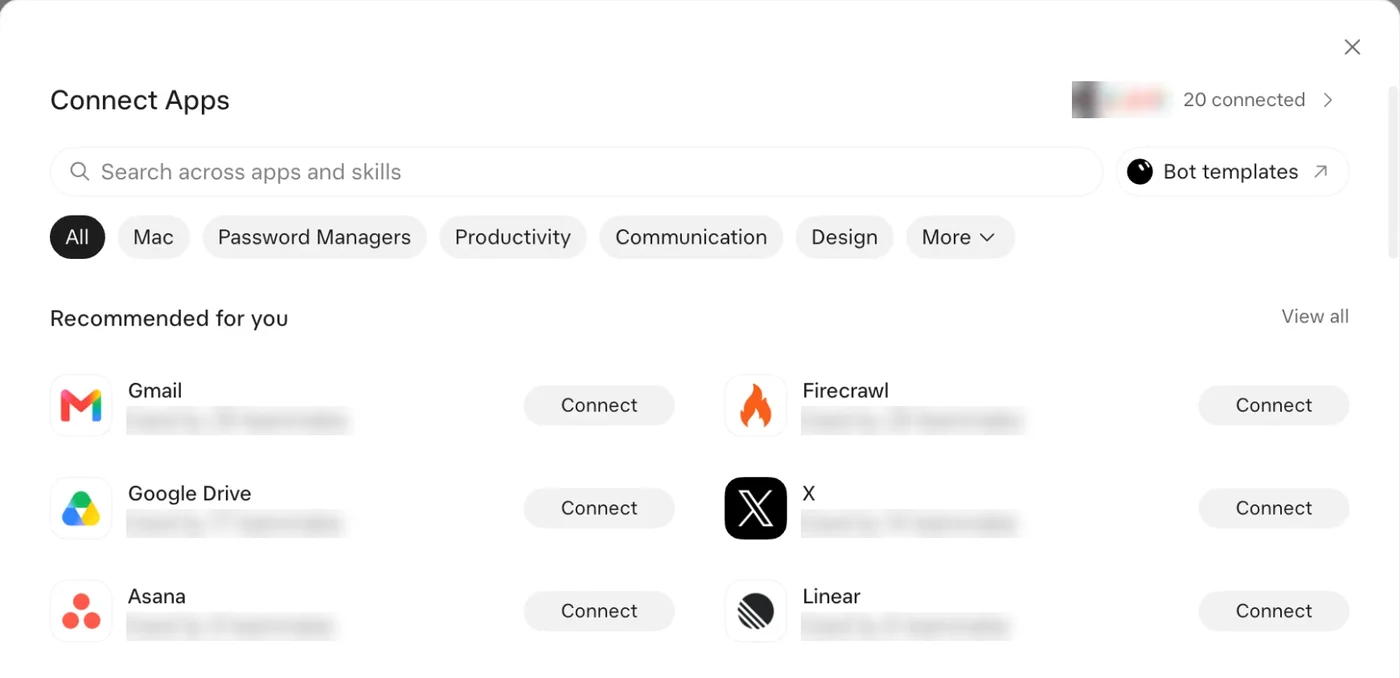
Connect your Firecrawl account
Grok Bot opens Firecrawl in your browser. Sign in, choose a team with Alexandria enabled, and select Authorize. The screen names Cursor, because the plugin is published on the Cursor Marketplace. No account yet? You can create one for free in the same flow.
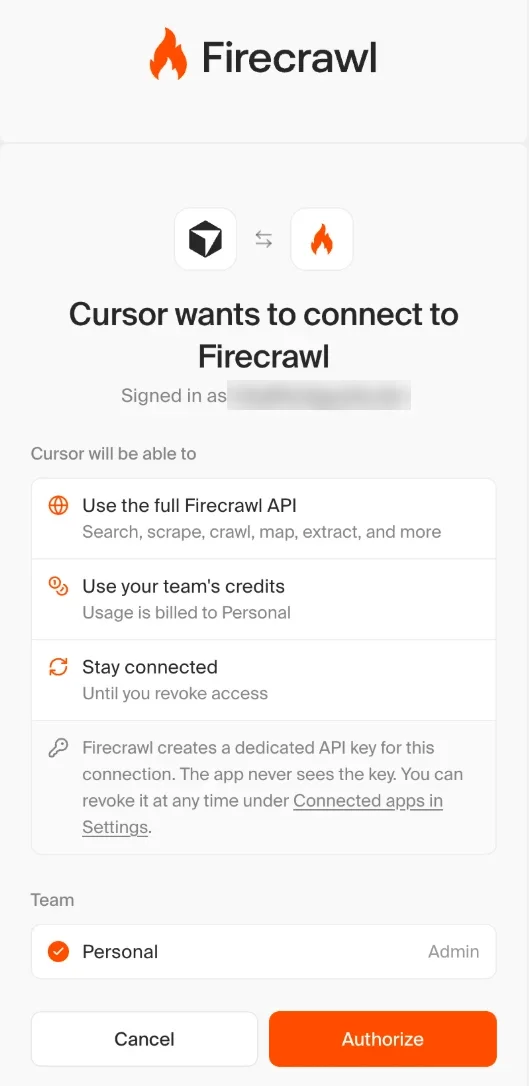
Ask your Bot for the data
In a chat, ask in plain language and mention Vimeo or Firecrawl Alexandria. To make sure the Bot uses Firecrawl, type @ and choose Firecrawl first. For example:
Use Firecrawl to give me the full transcript of https://vimeo.com/76979871 in English.
What can Grok Bot do with Vimeo?
Public Vimeo video data: the full spoken transcript or caption track of a video as WebVTT cues (human-uploaded and Vimeo's auto-generated tracks, with provenance), the list of text tracks a video carries, video detail (title, description, duration, dates, plays, likes, comments, tags, categories, content rating, privacy), keyword search over public videos, and the videos of a channel or a user. Transcripts come from the player embed's inline playerConfig and the signed WebVTT files it points to; everything else uses Vimeo's own API 3.4 with the anonymous public-scope token vimeo.com issues to every visitor. No login, no cookies.
Grok Bot can run any of Vimeo's 6 capabilities through Alexandria. Each call is billed in Firecrawl credits on your Firecrawl team.
- Get video: Detail of one public Vimeo video from Vimeo API 3.4 (api.vimeo.com/videos/{id}) with the anonymous public token: title, description, canonical link, duration, dimensions, spoken language, created/release/modified times, content rating, license, privacy (view/embed/download), thumbnails, tags, categories, play count (null when the owner hides it), like and comment totals, text track count and the owner. An unknown video id is not_found; private videos are not visible to the anonymous token and also answer not_found. Costs 5 Firecrawl credits per call.
- Get video transcript: The complete transcript of one public Vimeo video as timed WebVTT cues plus the joined plain text. Loads the player embed page (player.vimeo.com/video/{id}), reads the inline playerConfig, picks the text track for the requested language (or the track the player marks default, else the first track), downloads its signed WebVTT file and parses the cues (formatting tags stripped). Reports the chosen track's id, language, label, kind (subtitles/captions) and provenance (user_uploaded or ai_generated) and lists every other track. A video with no text tracks succeeds with an empty cue list and a warning; an unknown or removed video id is not_found. When player.vimeo.com gates a clip behind its Cloudflare Turnstile challenge, the identity and text-track count come from Vimeo's API instead (warning player_challenged): zero tracks is the same empty success, otherwise upstream_blocked. Costs 5 Firecrawl credits per call.
- List channel videos: Videos of one public Vimeo channel (Vimeo API 3.4 api.vimeo.com/channels/{channel}/videos, anonymous public token), by channel name (staffpicks) or numeric id (927), newest additions first by default. Same video summary rows as search_videos, with `total`, `next_page` and `continuation`. An unknown channel is not_found. Costs 5 Firecrawl credits per call.
- List user videos: Public videos uploaded by one Vimeo user (Vimeo API 3.4 api.vimeo.com/users/{user}/videos, anonymous public token), by vanity name (staff) or numeric user id (152184), newest first by default. Same video summary rows as search_videos, with `total`, `next_page` and `continuation`. An unknown user is not_found. Costs 5 Firecrawl credits per call.
- List video text tracks: Every caption or subtitle track of one public Vimeo video, from the player embed's inline playerConfig: track id, language code, label, kind and provenance (user_uploaded or ai_generated), plus the video's title, duration and owner. The signed download URLs themselves are not returned because they expire within the hour; call get_video_transcript for the content. A video with no tracks returns an empty list; an unknown video id is not_found. When player.vimeo.com gates a clip behind its Cloudflare Turnstile challenge, the identity and text-track count come from Vimeo's API instead (warning player_challenged): zero tracks is the same empty list, otherwise upstream_blocked. Costs 5 Firecrawl credits per call.
- Search videos: Keyword search over public Vimeo videos through Vimeo API 3.4 (api.vimeo.com/videos?query=) with the anonymous public token. Sort by relevance, date, alphabetical, plays, likes, comments or duration; optionally restrict to videos with closed captions. Each hit carries id, URL, title, description, duration, created and release times, plays (null when hidden), likes, comments, the largest thumbnail and the owner. Pages of up to 50; `continuation` reports whether another page exists and `next_page` is its number. A query that matches nothing succeeds with an empty list. Vimeo caps search at 15 requests per anonymous token; a fresh token is minted per call. Costs 5 Firecrawl credits per call.
What should I ask Grok Bot?
Name Vimeo or Firecrawl Alexandria in the prompt so Grok Bot reaches for it.
- Use Firecrawl to give me the full transcript of https://vimeo.com/76979871 in English.
- Use Firecrawl to answer this: Which caption languages does Vimeo video 76979871 have, and are they human-made or auto-generated?
- Use Firecrawl to find recent Vimeo videos about climate change that have closed captions, then pull the transcript of the first one.
- Use Firecrawl to list the latest Vimeo Staff Picks and show how many plays each has.
Troubleshooting
Why doesn't my Bot use Vimeo?
Attach Firecrawl to the chat with @ before you ask, and name Vimeo or Firecrawl Alexandria in the prompt.
Add to Grok Bot doesn't open the app. What should I do?
Install the Grok Bot desktop app first, or open Connect apps in Grok Bot and search for Firecrawl.
Use Vimeo in other AI apps
The same Firecrawl account reaches Vimeo from other AI apps. Pick one for its setup steps:

Other data providers you can connect to Grok Bot
Frequently Asked Questions
What is Firecrawl?
Firecrawl is the web data API to search, scrape and interact with the web at scale. It turns websites into clean, LLM-ready data for AI agents and apps. The Firecrawl plugin brings those tools into Grok Bot, along with every data provider in Firecrawl Alexandria.
What is Firecrawl Alexandria?
Firecrawl Alexandria is Firecrawl's library of 550+ data providers for AI agents, Vimeo among them. Each provider returns structured data through documented capabilities. Grok Bot finds the capability that fits your question and calls it through the Firecrawl plugin, so you don't write any integration code. Alexandria needs a Firecrawl account signed in on a team with Alexandria enabled, or an API key from such a team; keyless connections don't include it.
Is there a Vimeo MCP server for Grok Bot?
Grok Bot reaches Vimeo through Firecrawl's hosted MCP server, which serves Vimeo and every other Alexandria provider as tools. Add the Firecrawl plugin once and you don't install or host a separate MCP server for Vimeo.
What does connecting Vimeo to Grok Bot unlock?
Grok Bot can run all 6 of Vimeo's capabilities, including Get video, Get video transcript and List channel videos, from any chat, with structured results it can sort, compare and summarize. For example, ask: "Use Firecrawl to give me the full transcript of https://vimeo.com/76979871 in English." In the same conversation, Grok Bot can combine Vimeo with Firecrawl's web search and scraping and the other providers in Firecrawl Alexandria.
Do I need my own Vimeo account or API key to use it in Grok Bot?
No. Grok Bot calls Vimeo through Firecrawl Alexandria and each call is billed in Firecrawl credits, so you don't need a separate Vimeo account or API key.
How much does it cost to use Vimeo in Grok Bot?
Each Vimeo call costs 5 Firecrawl credits. The capability list on this page shows each price and its unit. The credits come from the Firecrawl team you connect to Grok Bot, and finding the right capability is free.
Can Grok Bot use other providers besides Vimeo?
Yes. The same Firecrawl plugin reaches every provider in Firecrawl Alexandria, along with Firecrawl's web search and scraping, so you connect once.
Can I use Vimeo in other AI apps?
Yes. Connect Firecrawl to ChatGPT, Claude, Cursor, Muse signed in on a Firecrawl team with Alexandria enabled, or use the Firecrawl MCP server, CLI or API with an API key from that team, and the same Vimeo capabilities are available there. Keyless connections don't include Alexandria.